








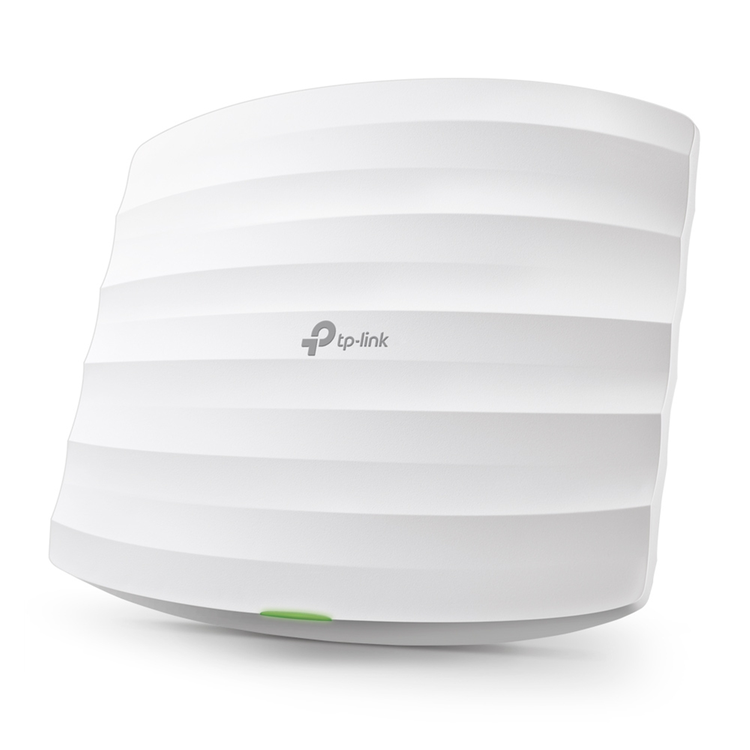
TP-Link Omada EAP245 (AC1750) Dual-Band 6-Stream Wi-Fi 5 Access Point
- Simultaneous 450Mbps on 2.4GHz and 1300Mbps on 5GHz totals 1750Mbps Wi-Fi speeds
- Supports Seamless Roaming so even video streams and voice calls are unaffected as users move between locations
- Cloud centralized management and Omada app for ultra convenience and easy management
- Support Power over Ethernet(802.3at/802.3af) for convenient and affordable installation
- Secure guest network along with multiple authentication options (SMS/Facebook Wi-Fi/ Voucher, etc.) and abundant wireless security technologies.
- Band Steering Automatically moves dual band devices onto the wider 5GHz band for faster connections
- Load balance ensures large numbers of users have smooth network experiences in high-density business networks
- Supports management VLAN for an enhanced network management
Superior Wi-Fi Speeds and Performance
QCA enterprise-class chipsets, dedicated high-power amplifier, and professional antenna along with the latest generation 802.11ac Wave 2 MU-MIMO technology ensure superior 1750 Mbps Wi-Fi speeds and long-range coverage over 2.4GHz and 5GHz wireless bands.
Seamless Roaming
802.11k/802.11v seamless roaming switches clients automatically to the access point with the optimal signal with a seamless transition when moving. This allows sensitive applications like VoIP and video conferences to go uninterrupted.
Secure Guest Network with Facebook Wi-Fi and SMS Login
Guest Network provides secure access to guests sharing your Wi-Fi network, with captive portal helping maintain only authorized guests to use the network. The addition of SMS and Facebook authentication simplifies the captive portal even further to simplify connectivity and boost your business.
Multiple PoE Options for Easy Installation
EAP245 supports both 802.3af PoE and Passive PoE power supply, which can be either powered by a PoE switch or the provided PoE adapter. The addition of elegant appearance and simple mounting design for easy attachment to a wall or ceiling further makes deployment effortless and flexible.
Cloud Centralized Management
- Anytime, Anywhere
Omada Hardware Controller OC200 and Omada Software Controller make it easy to manage and monitor the whole Omada network in real-time, while cloud service enables remote and secure access no matter where you find yourself.
Easy Management with the Omada App
Follow configuration instructions on the free Omada app to get set up in minutes. Omada lets you configure settings, monitor the network status and manage clients, all from the convenience of a smartphone or tablet.
HARDWARE FEATURES
Interface
2 × Gigabit Ethernet (RJ-45) Port (One port supports IEEE802.3af PoE and Passive PoE)
Physical Security Lock
Yes
Button
Reset
Power Supply
802.3af/at PoE
48V Passive PoE (+4,5pins; -7,8pins. PoE Adapter Included)
Power Consumption
12.3 W
Dimensions ( W x D x H )
8.1 × 7.1 × 1.5 in. (205.5 × 181.5 × 37.1 mm)
Antenna Type
Internal Omni
2.4GHz: 3* 3.5dBi
5GHz: 3*4dBi
Mounting
Ceiling /Wall Mounting (Kits included)
WIRELESS FEATURES
Wireless Standards
IEEE 802.11ac/n/g/b/a
Frequency
2.4GHz and 5GHz
Signal Rate
5GHz:Up to 1300Mbps
2.4GHz:Up to 450Mbps
Wireless Functions
Multiple SSIDs (Up to 16 SSIDs, 8 for each band)
Enable/Disable Wireless Radio
Automatic Channel Assignment
Transmit Power Control (Adjust Transmit Power on dBm)
QoS(WMM)
MU-MIMO
Seamless Roaming
Band Steering
Load Balance
Airtime Fairness
Beamforming
Rate Limit
Reboot Schedule
Wireless Schedule
Wireless Statistics based on SSID/AP/Client
Wireless Security
Captive Portal Authentication
Access Control
Wireless Mac Address Filtering
Wireless Isolation Between Clients
SSID to VLAN Mapping
Rogue AP Detection
802.1X Support
64/128/152-bit WEP / WPA / WPA2-Enterprise,
WPA-PSK / WPA2-PSK
Transmission Power
CE:
=20dBm(2.4GHz)
=23dBm(5GHz)
FCC:
=24dBm(2.4GHz)
=24dBm(5GHz)
MANAGEMENT
Omada App
Yes
Centralized Management
Omada Software Controller
OC200
Cloud Access
Yes (Through Omada Software Controller or OC200)
Email Alerts
Yes
LED ON/OFF Control
Yes
Management MAC Access Control
Yes
SNMP
v1, v2c
System Logging Local/Remote Syslog
Local/Remote Syslog
SSH
Yes
Web-based Management
HTTP/HTTPS
L3 Management
Yes
Multi-site Management
Yes
Management VLAN
Yes
OTHERS
Certification
CE, FCC, RoHS
Package Contents
AC1750 Wireless MU-MIMO Gigabit Ceiling Mount Access Point EAP245
Gigabit Passive PoE Adapter
Power Cord
Mounting Kits
Installation Guide
System Requirements
Microsoft Windows XP, Vista, Windows 7, Windows 8, Windows10, Linux
Environment
Operating Temperature
0?~40? (32?~104?)
Storage Temperature
-40?~70? (-40?~158?)
Operating Humidity
10%~90% non-condensing
Storage Humidity
5%~90% non-condensing
As an international traveller you are entitled to bring a certain amount/value of goods that are free of Customs duty and exempt Goods and Services tax (GST) into New Zealand. This is called your duty free allowance and personal goods concession. It is important to review these for any purchases you make on The Mall.
Your duty free allowance entitles you to bring into New Zealand the following quantities of alcohol products free of customs duty and GST provided you are over 17 years of age. You do need to be 18 years or over to purchase.
- Up to six bottles (4.5 litres) of wine, champagne, port or sherry or
- Up to twelve cans (4.5 litres) of beer
- And three bottles (or other containers) each containing not more than 1125ml of spirits, liqueur, or other spirituous beverages
Goods other than alcohol and tobacco, whether purchased overseas or purchased duty free in New Zealand, that have a combined total value not exceeding NZ$700 may also be brought as part of your personal goods concession.
When travelling overseas there are legal limits on the amount of duty free alcohol and other goods you can take with you. These amounts will vary depending on the country you are flying into. We always recommend you check the latest limits and exemptions.
Your order can be picked up at an Auckland Airport Collection Point. There is one in departures and one at arrivals in the international terminal. Alternatively, if you are arriving between 11pm and 6am you will be able to collect your order from our lockers. See map
Please bring your order confirmation email and your passport. If you are collecting from lockers you will have been sent an email with your access code, be sure to have this on you in order to collect your order.
If you’re departing Auckland Airport, we recommend that you come to the Auckland Airport Collection Point at least 60 minutes before your flight. If you miss your pickup time or your flight details have changed please let us know as soon as possible.
When you collect your order you will have the opportunity to inspect the items and sign for them.
If you need to return an item, our Collection Point team are there to help you. If you are collecting after hours please return the item to your locker and our team will be in touch as soon as possible. You may also like to view our Returns & refunds which provides information on how this works and outlines the individual retailer's returns and refunds policies.
After Hours Collections
If your order needs to be collected after the Auckland Airport Collection Point desk is closed, your order will be placed in the lockers next to the desk. All the details you will need to collect your order will be provided in your Order Confirmation and Ready to Collect Email.