










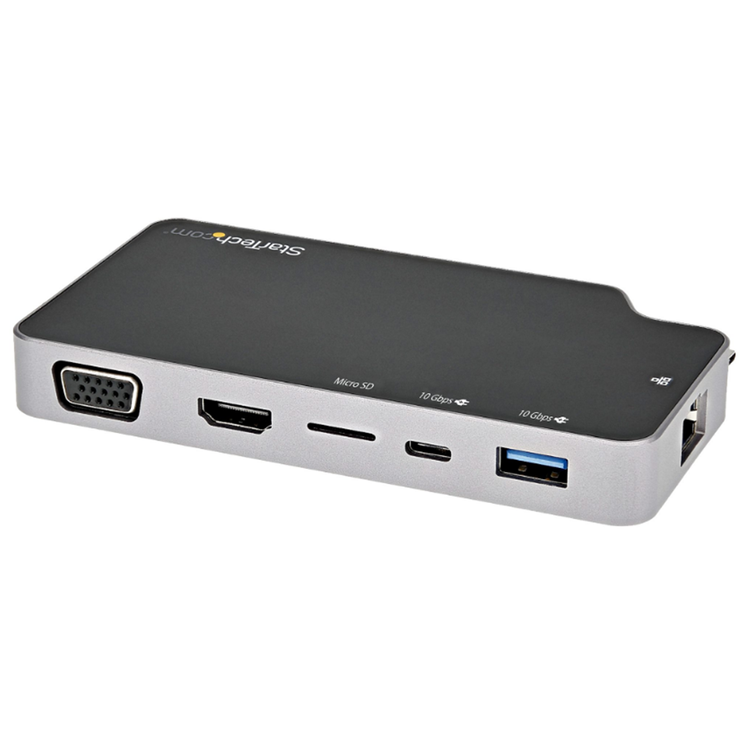
This USB-C™ multiport adapter with HDMI/VGA lets you add vital connections to your MacBook or Windows laptop, through a single USB-C port. The adapter features a presentation mode switch, that when activated ensures the computer will not go into sleep standby or hibernation. Connect a 4K HDMI or 1080p VGA Monitor For maximum productivity, connect your USB-C or Thunderbolt 3 laptop to a 4K 30Hz monitor, using this USB-C to 4K HDMI / 1080p VGA multiport adapter. You can also connect to an HDMI projector or TV in a boardroom or other meeting space, to deliver presentations on a shared screen. Presentation Mode Switch When you turn on this switch, the USB-C to HDMI adapter prevents your computer from launching its screen saver, going to sleep, or entering power save mode while presenting. Plus, the built-in MicroSD card reader can be used as external storage - ideal for storing &; delivering presentations at boardroom/conference room meetings. - Left Switch Position: Enables Presentation Mode- Right Switch Position: Disables Presentation Mode 100W Power Delivery 3.0 Passthrough The USB-C adapter lets you power and charge your USB-C laptop during a presentation or while you're working, with a USB-C Power Delivery port. Even if your laptop has only a single USB-C port available, you can keep your laptop powered. Device reserves 15 watts, avoiding video flicker, device dropouts and power overdraw which is commonly seen in other hubs with less reliable power distribution. Add Downstream USB-A &; USB-C Ports This USB-C multiport adapter offers a USB 3.1 Gen 2 Type-A port (10Gbps), and a USB-C 3.1 Gen 2 port that can be used for power delivery charging, or if power delivery is not required, can be used as a 10Gbps data port for connecting USB-C peripherals. MicroSD 4.0 Card Reader This USB-C multiport adapter features a memory card slot, providing fast read and write access for microSD™ memory cards through USB 3.0. It's ideal for transferring photos, videos or presentations from your SD cards to your USB-C enabled laptop or tablet. Portable &; Compact The compact all-in-one adapter is a vital accessory for your USB-C laptop. With its small-footprint design, you can take it with you anywhere you would use your laptop.
- External Ports
- 1 - VGA (14 pin, High Density D-Sub)
- 1 - HDMI
- 1 - USB 3.2 Type-A (9 pin, Gen 2, 10Gbps)
- 1 - USB 3.2 USB Type C (10 pin, Gen 2, 10 Gbps)
- 1 - MicroSD
- 1 - Ethernet Gigabit
- Host Connectors
- 1 - USB 3.2 USB Type C (10 pin, Gen 2, 10 Gbps)
- Operating Temperature
- 0? to+70?
- Storage Temperature
- -10? to +55?
- Humidity
- 5% to 90% RH (no condensation)
- Displays Supported
- 1
- 4K Support
- Yes
- Fast-Charge Port(s)
- Yes
- Interface
- USB 3.2 Gen 2 - 10 Gbit/s
- Bus Type
- USB-C
- USB-A
- USB Pass-Through
- Yes
- Industry Standards
- 1 Gigabit connectivity to any 1000BASE-T device (IEEE802.3ab compliant)
- 100 Megabit connectivity to any 100BASE-TX device (IEEE802.3u compliant)
- 10 Megabit connectivity to any 10BASE-T device (IEEE802.3i compliant)
- Chipset ID
- Realtek - RTD2141DS
- Realtek - RTS5423
- Realtek - RTL8153B
- Realtek - RTS5306
- LED Indicators
- 2 - Network Indicators (RJ-45 Port): Link (Green), Activity (Amber)
- Package Height
- 1.2 in [3.0 cm]
- Package Length
- 6.7 in [17.0 cm]
- Shipping (Package) Weight
- 6.8 oz [194.0 g]
- Package Width
- 5.6 in [14.2 cm]
- Maximum Analog Resolutions
- 1920 x 1080p @ 60Hz
- Maximum Digital Resolutions
- 3840 x 2160P @ 30Hz
- PXE
- Yes
- General Specifications
- Wake-On-LAN (WoL): Yes
- Presentation Mode Switch: Left Position Enables Stay Awake
- Right Position Disables Stay Awake
- MTBF
- 307, 402
- Color
- Black & Gray
- Product Height
- 0.6 in [1.6 cm]
- Product Length
- 2.7 in [6.8 cm]
- Weight of Product
- 4.4 oz [126.0 g]
- Product Width
- 4.9 in [12.5 cm]
- Material
- Aluminum and Plastic
- Cable Length
- 5.1 in [13 cm]
- Power Source
- Bus Powered and Host USB-C Power Adapter
- Power Delivery
- 100W
- Laptop Charging via Power Delivery
- 85W
- Power Consumption (In Watts)
- 15W
As an international traveller you are entitled to bring a certain amount/value of goods that are free of Customs duty and exempt Goods and Services tax (GST) into New Zealand. This is called your duty free allowance and personal goods concession. It is important to review these for any purchases you make on The Mall.
Your duty free allowance entitles you to bring into New Zealand the following quantities of alcohol products free of customs duty and GST provided you are over 17 years of age. You do need to be 18 years or over to purchase.
- Up to six bottles (4.5 litres) of wine, champagne, port or sherry or
- Up to twelve cans (4.5 litres) of beer
- And three bottles (or other containers) each containing not more than 1125ml of spirits, liqueur, or other spirituous beverages
Goods other than alcohol and tobacco, whether purchased overseas or purchased duty free in New Zealand, that have a combined total value not exceeding NZ$700 may also be brought as part of your personal goods concession.
When travelling overseas there are legal limits on the amount of duty free alcohol and other goods you can take with you. These amounts will vary depending on the country you are flying into. We always recommend you check the latest limits and exemptions.
Your order can be picked up at an Auckland Airport Collection Point. There is one in departures and one at arrivals in the international terminal. Alternatively, if you are arriving between 11pm and 6am you will be able to collect your order from our lockers. See map
Please bring your order confirmation email and your passport. If you are collecting from lockers you will have been sent an email with your access code, be sure to have this on you in order to collect your order.
If you’re departing Auckland Airport, we recommend that you come to the Auckland Airport Collection Point at least 60 minutes before your flight. If you miss your pickup time or your flight details have changed please let us know as soon as possible.
When you collect your order you will have the opportunity to inspect the items and sign for them.
If you need to return an item, our Collection Point team are there to help you. If you are collecting after hours please return the item to your locker and our team will be in touch as soon as possible. You may also like to view our Returns & refunds which provides information on how this works and outlines the individual retailer's returns and refunds policies.
After Hours Collections
If your order needs to be collected after the Auckland Airport Collection Point desk is closed, your order will be placed in the lockers next to the desk. All the details you will need to collect your order will be provided in your Order Confirmation and Ready to Collect Email.