










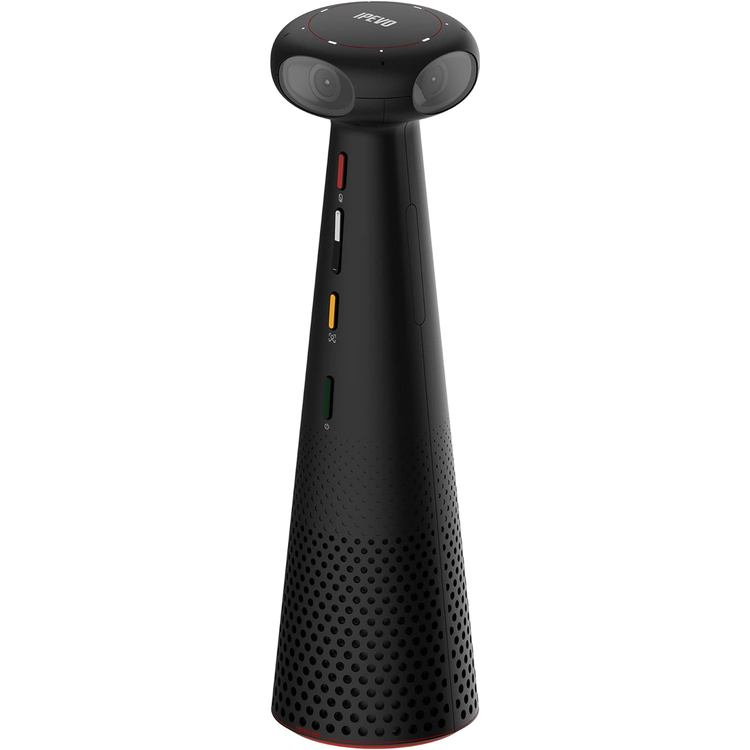
The IPEVO TOTEM 360 delivers true 360° 5K panoramic video with its four built-in cameras and 4996 x 928 panoramic-style video resolution, all in a portable form factor. Its integrated stand, included USB-C and power cables, and four built-in microphones create a plug-and-play camera capable of high-quality video and audio capture. Onboard button controls and Windows, macOS, and Chrome OS compatibility make adding the TOTEM 360 to your preexisting conference room a breeze.
360° Video and Sound Four integrated cameras capture 360° images of your entire meeting space. Video stitching technology ensure the image is free of spatial distortion. Four beamforming microphones with omnidirectional pickup patterns can determine the direction sound is coming from. This can track active speakers during a hybrid meeting from up to 16.4' away. The built-in speaker spans 360° around the TOTEM 360's base to deliver sound evenly in all directions.
AI-Enabled Functions Onboard AI can track the presenter or meeting participants and keep them as the main focus of the shot, ensuring they remain in frame. AI noise reduction filters out background noise to highlight participants' vocals for undisturbed communication.
Conferencing Mode The bottom of the screen displays a panoramic 360° view of the meeting room table. Up to four speakers are highlighted above in individual close-ups.
Surround Mode The 360° view is split into two horizontal screens to provide a clear view of everyone at the table.
Hybrid Learning Mode The bottom of the screen displays a 360° view of the classroom and its participants. The lecturer is in view at the top and can be tracked via AI.
Presentation Mode AI can be used to track up to two presenters in this directional video mode.
Plug-and-Play Interface, Onboard Controls Included with the camera is a 5.9' long USB-C cable that can be plugged into a Windows, macOS, or Chrome OS computer with a corresponding USB-C port and a 4.92' DC power cable. Take the TOTEM 360 anywhere thanks to its integrated stand and 1/4"-20 thread. Platforms like Zoom, Google Meet, Skype, and Microsoft Teams are supported. Control your microphone muting, volume, toggle between video modes, and turn the camera on and off using the onboard button controls. LED indicators on the top of the TOTEM 360 show you which image mode you are currently using.
- Resolution and Frame Rate
- "Panoramic 5K" (4992 x 928) at up to 30 fps
- 1080p at up to 30 fps
- 720p at up to 30 fps
- Number of Lenses
- 4
- Image Sensor
- CMOS
- Field of View
- Horizontal: 360°
- Vertical: 60°
- Zoom
- 2.5x (Digital)
- Tilt
- No
- System Connection
- USB-C 2.0
- Focus Type
- Fixed
- Bluetooth
- No
- Wi-Fi
- No
- Power Source
- AC Adapter
- Low-Light Correction
- No
- DC Input Power
- 12 VDC at 2 A
- OS Compatibility
- macOS 10.9 or Later
- Windows 7 or Later
- Chrome OS
- *As of June, 2023: Check with manufacturer for the most up-to-date compatibility
- Microphone
- 4
- Pickup Range
- 16.4' / 5 m
- Polar Pattern
- Omnidirectional
- Signal-to-Noise Ratio (SNR)
- 64 dBA
- Microphone Features
- Beam Forming, Noise Cancellation
- Cancellation Technology
- Noise
- Built-In Speakers
- 1 x 6 W
- Operating Temperature
- 41 to 95°F / 5 to 35°C
- Operating Humidity
- 10 to 95%
- Storage Temperature
- 14 to 122°F / -10 to 50°C
- Storage Humidity
- 10 to 95%
- Privacy Shutter
- No
- Security
- Kensington Lock Slot
- Attachment Method
- 1/4"-20 Tripod
- Built-In Light
- No
- Certifications
- WEEE, RoHS
- Cable Length
- 5.9' / 1.8 m
- Dimensions (W x H x D)
- 2.8 x 10.0 x 2.8" / 7.1 x 25.4 x 7.1 cm
- Weight
- 1.27 lb / 0.58 kg
- Package Weight
- 2.7 lb
- Box Dimensions (LxWxH)
- 15.1 x 4.4 x 1.7"
As an international traveller you are entitled to bring a certain amount/value of goods that are free of Customs duty and exempt Goods and Services tax (GST) into New Zealand. This is called your duty free allowance and personal goods concession. It is important to review these for any purchases you make on The Mall.
Your duty free allowance entitles you to bring into New Zealand the following quantities of alcohol products free of customs duty and GST provided you are over 17 years of age. You do need to be 18 years or over to purchase.
- Up to six bottles (4.5 litres) of wine, champagne, port or sherry or
- Up to twelve cans (4.5 litres) of beer
- And three bottles (or other containers) each containing not more than 1125ml of spirits, liqueur, or other spirituous beverages
Goods other than alcohol and tobacco, whether purchased overseas or purchased duty free in New Zealand, that have a combined total value not exceeding NZ$700 may also be brought as part of your personal goods concession.
When travelling overseas there are legal limits on the amount of duty free alcohol and other goods you can take with you. These amounts will vary depending on the country you are flying into. We always recommend you check the latest limits and exemptions.
Your order can be picked up at an Auckland Airport Collection Point. There is one in departures and one at arrivals in the international terminal. Alternatively, if you are arriving between 11pm and 6am you will be able to collect your order from our lockers. See map
Please bring your order confirmation email and your passport. If you are collecting from lockers you will have been sent an email with your access code, be sure to have this on you in order to collect your order.
If you’re departing Auckland Airport, we recommend that you come to the Auckland Airport Collection Point at least 60 minutes before your flight. If you miss your pickup time or your flight details have changed please let us know as soon as possible.
When you collect your order you will have the opportunity to inspect the items and sign for them.
If you need to return an item, our Collection Point team are there to help you. If you are collecting after hours please return the item to your locker and our team will be in touch as soon as possible. You may also like to view our Returns & refunds which provides information on how this works and outlines the individual retailer's returns and refunds policies.
After Hours Collections
If your order needs to be collected after the Auckland Airport Collection Point desk is closed, your order will be placed in the lockers next to the desk. All the details you will need to collect your order will be provided in your Order Confirmation and Ready to Collect Email.