










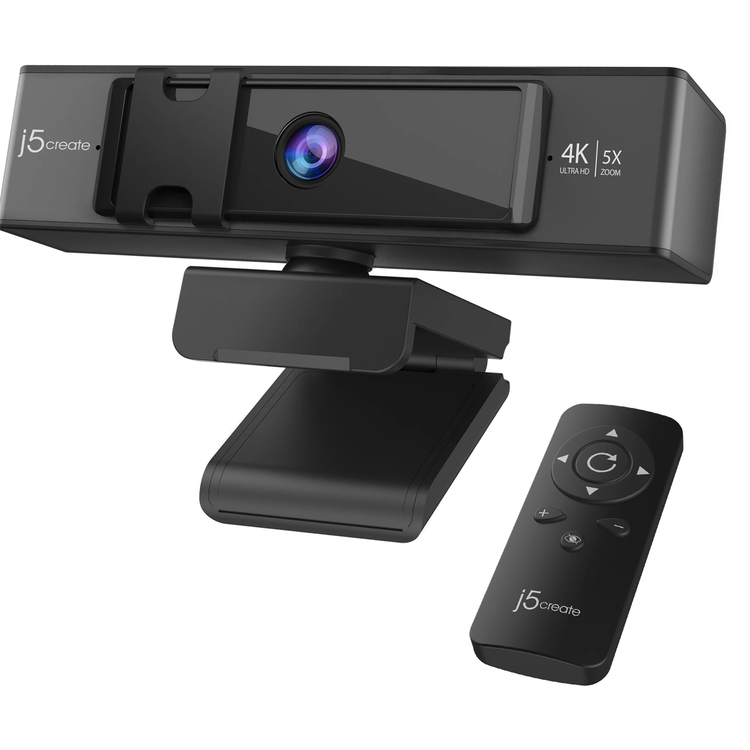
The USB™ 4K ULTRA HD Webcam with 5x Digital Zoom Remote Control offers ePTZ (electronic pan, tilt and zoom) functionality via remote control. It supports 4K resolution @ 30 Hz and optimizes video calls with 5X digital zoom in and zoom out, making it perfect for meetings in large conference rooms and also for single person use. In addition, the webcam has built-in low light enhancement, built-in dual high-fidelity microphones, and two ways to disable the lens for privacy. It is equipped with a USB-C® cable and a USB™ Type-A connector to work with both your older and newer devices. - Built-in low light enhancement (ultra-low illumination 0.05 lux, F/1.6 aperture lens)- Includes remote control for 5x digital zoom &; ePTZ functionality- Built-in high-fidelity dual microphones- Privacy cover- Supports H.264 and MJPEG image formats- Maximum support 4K/30 FPS &; 1080P/30 FPS image resolution- High definition 4K image sensor with up to 8 MP capture- Compliant with standard UVC 1.0/1.1/1.5 &; UAC protocol, driver-free- USB™ plug-and-play (Compliant with USB™ 2.0 / USB™ 3.0, 500 mA)- Wide Compatibility: Zoom™, Facebook™ Messenger, Skype™, Microsoft Teams™, etc.
4K Ultra HD ePTZ Webcam with IR Remote Control
Astonishing 4K Ultra HD Video Experience the premium quality 4K video resolution at 30 FPS with all the subtle details of movements and expressions.
Electronic Pan/Tilt/Zoom Options Easily control the camera pan, tilt, and 5x zoom for a close up view using the included IR remote control.
Built-in Low Light Enhancement F/1.6 aperture lens and security camera image sensor with enhanced light sensitivity gives you the ability to capture more light and clearer images, making it ideal for better low light capture and blurless movement.
Brighter and More Vivid Images The low light enhancement feature automatically adjusts the brightness and color scales to accommodate low-light environments.
Customize Your Webcam Settings The Webcam Companion App is a free utility tool available for download. It gives you the ability to adjust various image settings and to control pan, tilt, and zoom on the webcam.
H.264 | MPEG-4 AVC (Advanced Video Coding) H.264 video compression provides Blu-Ray™-quality video at considerably lower bit rates, and minimize its dependence on computer and network resources.
Built-in Dual High-Fidelity Microphones Two high-fidelity microphones delivers an exceptional audio performance, allowing everyone to hear and be heard.
Protect Your Digital Privacy Two ways to disable the lens for ensured privacy. You can slide the privacy cover over the lens while not using the camera or quickly disable the camera audio and video with the remote control.
Flexible Mounting Options With the tripod-ready clip, you can mount the camera however it works the best.
Works with Your Favorite Video Conferencing Software Zoom™, Facebook™ Messenger, Skype™, Microsoft Teams™, etc
USB™ Plug-and-Play No driver required for Windows®, macOS®, or Chrome OS™ ! Simply connect the computer/laptop with the USB™ cable, and you're good to go. Equipped with a USB-C® cable and a USB™ Type-A connector, the webcam works with both your older and newer devices.
Standard UVC/UAC Protocol
360° Rotation
- Host Connector
- USB-C® / USB™ 2.0 Type-A
- Image Sensor
- 1/2.8" CMOS sensor
- Led Indicators
- Green: In Use
- Mounting Style
- Monitor clamp mount and tripod mount
- Operating Voltage and Current
- DC5V/500 mA ±15 mA
- Privacy Cover
- Yes
- Protocol
- UVC 1.0/1.1& UAC
- Shutter Style
- Auto Electronic Shutter (AES)
- Display Fov
- 70°
- Effective Pixels
- 3840(H) x 2160(V)
- Frame Rate
- 30 FPS
- Max Display Refresh Rate
- 30 Hz
- Megapixels
- 8 million pixels (8MP)
- Microphone
- Dual High-fidelity Stereo Mic
- Output Format
- H.264, MJPEG, YUV2
- Supported Resolution - Output
- H.264:
- 3840 x 2160
- 2560 x 1440
- 1920 x 1080
- 1280 x 720
- 640 x 480 / 360
- MJPEG:
- 3840 x 2160
- 2560 x 1440
- 1920 x 1080
- 1280 x 720
- 640 x 480 / 360
- YUV2:
- 640 x 480 / 360
- System Requirements
- Available USB-C® or USB™ Type-A port
- UVC 1.1/1.5 & UAC 1.0 support
- Windows® 10 / 8.1
- macOS® 10.4.11 with UVC support
- Chrome OS™ with UVC support
- Linux® (special configuration required)
- Cable Length
- 5.9 ft. (180 cm)
- Color
- Black and Silver
- Enclosure Type
- ABS (Housing)/PC (Panel)/optical plastic
- Lens Kit
- PC+30% GF (Housing)/Glass + COC (Lens)
- Operating Humidity
- < 90% non-condensing
- Operating Temperature
- -4°F to 104°F (-20°C to 60°C)
- Product Depth
- 1.92 in. (4.87 cm)
- Product Height
- 2.16 in. (5.48 cm)
- Product Width
- 5.31 in. (13.5 cm)
- Product Weight
- Approx. 220g
- Storage Humidity
- < 90% non-condensing
- Storage Temperature
- -4°F to 140°F (-20°C to 60°C)
- Package Contents
- 1 x USB™ 4K ULTRA HD Webcam (Model: JVCU435)
- 1 x Remote Control (Battery not included)
- 1 - Quick Installation Guide
As an international traveller you are entitled to bring a certain amount/value of goods that are free of Customs duty and exempt Goods and Services tax (GST) into New Zealand. This is called your duty free allowance and personal goods concession. It is important to review these for any purchases you make on The Mall.
Your duty free allowance entitles you to bring into New Zealand the following quantities of alcohol products free of customs duty and GST provided you are over 17 years of age. You do need to be 18 years or over to purchase.
- Up to six bottles (4.5 litres) of wine, champagne, port or sherry or
- Up to twelve cans (4.5 litres) of beer
- And three bottles (or other containers) each containing not more than 1125ml of spirits, liqueur, or other spirituous beverages
Goods other than alcohol and tobacco, whether purchased overseas or purchased duty free in New Zealand, that have a combined total value not exceeding NZ$700 may also be brought as part of your personal goods concession.
When travelling overseas there are legal limits on the amount of duty free alcohol and other goods you can take with you. These amounts will vary depending on the country you are flying into. We always recommend you check the latest limits and exemptions.
Your order can be picked up at an Auckland Airport Collection Point. There is one in departures and one at arrivals in the international terminal. Alternatively, if you are arriving between 11pm and 6am you will be able to collect your order from our lockers. See map
Please bring your order confirmation email and your passport. If you are collecting from lockers you will have been sent an email with your access code, be sure to have this on you in order to collect your order.
If you’re departing Auckland Airport, we recommend that you come to the Auckland Airport Collection Point at least 60 minutes before your flight. If you miss your pickup time or your flight details have changed please let us know as soon as possible.
When you collect your order you will have the opportunity to inspect the items and sign for them.
If you need to return an item, our Collection Point team are there to help you. If you are collecting after hours please return the item to your locker and our team will be in touch as soon as possible. You may also like to view our Returns & refunds which provides information on how this works and outlines the individual retailer's returns and refunds policies.
After Hours Collections
If your order needs to be collected after the Auckland Airport Collection Point desk is closed, your order will be placed in the lockers next to the desk. All the details you will need to collect your order will be provided in your Order Confirmation and Ready to Collect Email.