










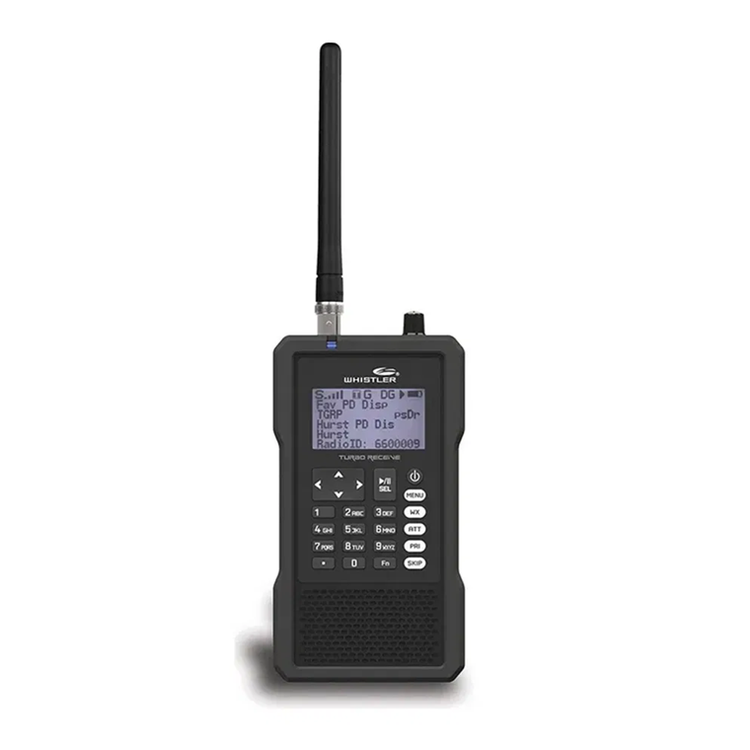
The Whistler TRX-1 is multi-system adaptive digital trunking scanners with Motorola P25 Phase I&;II, X2-TDMA, and DMR making it capable of monitoring the following unencrypted channels/systems: Conventional DMR (Entered as a DMR trunked system)Hytera XPTMotoTRBO™ Capacity PlusMotoTRBO™ Connect PlusMotoTRBO™ Linked Cap Plus systems and NXDN -The TRX-1 allows the user the ability to group their stored objects using up to 200 Scan lists plus a special Skywarn scan list. Objects can be mapped to as many Scan lists as desired, giving you complete flexibility for grouping objects and selecting groups in any combination for scanning. -Programmable audible alarms can be configured to sound when certain Scannable Objects are active. Can be used in conjunction with, or separately from, the Alert LED described above. -Record received audio from selected objects and searches to the Micro SD card. Replay recorded audio using a powerful built-in playback system or transfer to PC for playback and archiving. Record up to 50 hours of audio on the 2 GB microSDr -Date and time stamp recorded audio files, and "alarm clock" function allows you to program the scanner to wake up and start scanning at a specific time each day. -A built-in Discriminator Output provides raw discriminator signal to third party signal decoding software without risky hardware modifications. -Predefined service search ranges make it easy to find activity in your area. -A simplified keypad and display with familiar Scan, Pause, Skip and Navigation controls make it easy for you to use your TRX-1. Behind the scenes, Whistler's exclusive Object Oriented database runs the show, with support for millions of stored objects, limited only by MicroSD card capacity. -With the expanded V-Scanner II (VS-II) storage system, you can use the TRX-1 PC Application to save up to 200 V-Scanner configurations on the MicroSD Card, which can be recalled at any time in the field using the radio's keypad. -Industry-standard Composite Device USB interface with USB Mass Storage Device (MSD) and Serial Data (CDC) support. Access the MicroSD card without removing it from the radio, stream decoded Control Channel data and upgrade your radio's firmware over USB. Mini USB cable included. -The TRX-1 detects and masks digital voice audio, and decodes RadioID/TalkgroupID data embedded in voice packets. -Uses an industry-standard MicroSD card to store the RadioReference data library and all of your programming - capacity for millions of stored objects! Supports cards up to 32 GB -Scans most common trunked radio system signaling formats, including Motorola, EDACS, LTR, and P25 trunked radio networks. Both talkgroup and individual call monitoring are supported. -Quickly sweeps the TRX-1's frequency ranges for transmissions from nearby sources. When a nearby transmission is found, the TRX-1 automatically tunes to that frequency and receives the traffic. Lockout found frequencies and continue searching the same band. -Customize existing programming or add new objects to scan, and keep your TRX-1 firmware and Library data up to date. -The backlight can be programmed to flash with custom flash patterns when certain objects are active, providing another way of alerting the operator when important radio traffic is present.displays the weather event and sounds an alert for a specific county or counties of your choice. -Scan Sets expand the functionality of Scanlists by allowing you to define different combinations of enabled Scanlists as Scan Sets, then you can select one or more Scan Sets for scanning using a simple menu system. With Scanlists and Scan Sets, you have unlimited possibilities for grouping, enabling and disabling objects for scanning. -Shows relative strength of received signals. Slim, compact case design with a textured exterior finish and large speaker - Designed for durability, one-handed operation and ease of use.provides instant access to frequencies used by storm spotter networks. Monitor storm conditions as they occur, and become aware of dangerous conditions before the media or emergency management officials are able to announce them to the general public. -Programmable tri-color LED displays thousands of colors that can be used to indicate different types of activity or activity on special channels. Program color sequences with multiple colors for special alerts, even emulate the red/blue strobe of police vehicles. Product Manual
- Whats in the box:
- Digital Handheld Scanner
- Antenna
- MicroSD Card
- Swivel Belt Clip
- USB Cable
- Protective Case
- 2 Inserts
- User Guide
- Quick Start Guide
- Frequency Coverage (MHz.):
- 25-54
- 108-174
- 216-512
- 764-960 (minus cellular phone ranges)
- 1240-1300
- Unit Dimensions:
- 5.31 in. H x 2.12 in. W x 1.06 in. L
- Unit Weight:
- 0.46 lbs.
As an international traveller you are entitled to bring a certain amount/value of goods that are free of Customs duty and exempt Goods and Services tax (GST) into New Zealand. This is called your duty free allowance and personal goods concession. It is important to review these for any purchases you make on The Mall.
Your duty free allowance entitles you to bring into New Zealand the following quantities of alcohol products free of customs duty and GST provided you are over 17 years of age. You do need to be 18 years or over to purchase.
- Up to six bottles (4.5 litres) of wine, champagne, port or sherry or
- Up to twelve cans (4.5 litres) of beer
- And three bottles (or other containers) each containing not more than 1125ml of spirits, liqueur, or other spirituous beverages
Goods other than alcohol and tobacco, whether purchased overseas or purchased duty free in New Zealand, that have a combined total value not exceeding NZ$700 may also be brought as part of your personal goods concession.
When travelling overseas there are legal limits on the amount of duty free alcohol and other goods you can take with you. These amounts will vary depending on the country you are flying into. We always recommend you check the latest limits and exemptions.
Your order can be picked up at an Auckland Airport Collection Point. There is one in departures and one at arrivals in the international terminal. Alternatively, if you are arriving between 11pm and 6am you will be able to collect your order from our lockers. See map
Please bring your order confirmation email and your passport. If you are collecting from lockers you will have been sent an email with your access code, be sure to have this on you in order to collect your order.
If you’re departing Auckland Airport, we recommend that you come to the Auckland Airport Collection Point at least 60 minutes before your flight. If you miss your pickup time or your flight details have changed please let us know as soon as possible.
When you collect your order you will have the opportunity to inspect the items and sign for them.
If you need to return an item, our Collection Point team are there to help you. If you are collecting after hours please return the item to your locker and our team will be in touch as soon as possible. You may also like to view our Returns & refunds which provides information on how this works and outlines the individual retailer's returns and refunds policies.
After Hours Collections
If your order needs to be collected after the Auckland Airport Collection Point desk is closed, your order will be placed in the lockers next to the desk. All the details you will need to collect your order will be provided in your Order Confirmation and Ready to Collect Email.