










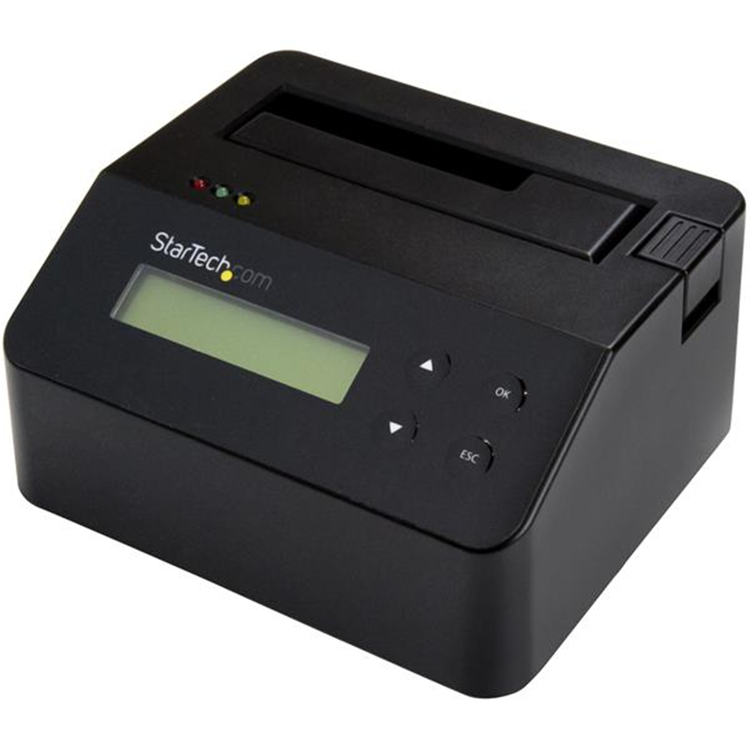
StarTech.com SDOCK1EU3P2 Hard Drive Eraser & Dock for 2.5" / 3.5" SATA SSD/HDD
This hard drive eraser lets you wipe a SATA solid-state drive (SSD) or hard drive (HDD) without connecting to a host computer. It's compatible with 2.5" and 3.5" drives and supports SATA I, II, and III, and large capacity drives, including 4Kn drives.Sanitize Your Drives with ConfidenceYou can rest easy when using this eraser to retire, re-use or re-purpose a drive. No data will remain on the drive and nothing will be accessible with data recovery software.The SSD and HDD eraser supports nine erase modes to support a variety of security requirements, including:- Quick Erase- Single and Multi-pass Overwrites- Custom Erase- Secure Erase- Enhanced Secure EraseThe eraser meets global requirements, including the new NIST (SP 800-88 Rev1) standards, ensuring that all drives are properly wiped.Monitor Erase Status and Keep LogsThe hard drive eraser can connect to an RS232 serial printer to print a record of the erase procedure. The receipt shows the time and date of the erasure, and the erase mode used.The LCD also lets you monitor erase performance and completion. Back Up Your Data before Wiping Your DriveThe eraser can be used as a SATA dock when connected to a USB 3.0 computer. It supports data transfer speeds of up to 5Gbps.When used as a dock you can:Back up a driveTest a driveTransfer data to a drive
- Bus Type
- USB 3.0
- Chipset ID
- Xilinx - Spartan-6
- Compatible Drive Types
- SATA
- Drive Installation
- Removable
- Drive Size
- 2.5in & 3.5in
- Interface
- USB 3.0
- Number of Drives
- 1
- 4Kn Support
- Yes
- Erase Modes
- Quick Erase
- 1-Pass Overwrite (NIST SP 800-88 Rev 1 - Clear)
- 3-Pass Overwrite
- 7-Pass Overwrite
- Custom Erase
- Secure Erase (NIST SP 800-88 Rev 1 - Purge)
- Enhanced Secure Erase (NIST SP 800-88 Rev 1 - Purge)
- Hot Swap Capability
- Yes
- Max Drive Capacity
- Currently tested with up to 10TB 7200 RPM
- Maximum Data Transfer Rate
- 3Gbps
- MTBF
- 8640 Hours
- Port Multiplier
- No
- S.M.A.R.T. Support
- Yes
- Type and Rate
- USB 3.0 - 5 Gbit/s
- SATA III (6 Gbps)
As an international traveller you are entitled to bring a certain amount/value of goods that are free of Customs duty and exempt Goods and Services tax (GST) into New Zealand. This is called your duty free allowance and personal goods concession. It is important to review these for any purchases you make on The Mall.
Your duty free allowance entitles you to bring into New Zealand the following quantities of alcohol products free of customs duty and GST provided you are over 17 years of age. You do need to be 18 years or over to purchase.
- Up to six bottles (4.5 litres) of wine, champagne, port or sherry or
- Up to twelve cans (4.5 litres) of beer
- And three bottles (or other containers) each containing not more than 1125ml of spirits, liqueur, or other spirituous beverages
Goods other than alcohol and tobacco, whether purchased overseas or purchased duty free in New Zealand, that have a combined total value not exceeding NZ$700 may also be brought as part of your personal goods concession.
When travelling overseas there are legal limits on the amount of duty free alcohol and other goods you can take with you. These amounts will vary depending on the country you are flying into. We always recommend you check the latest limits and exemptions.
Your order can be picked up at an Auckland Airport Collection Point. There is one in departures and one at arrivals in the international terminal. Alternatively, if you are arriving between 11pm and 6am you will be able to collect your order from our lockers. See map
Please bring your order confirmation email and your passport. If you are collecting from lockers you will have been sent an email with your access code, be sure to have this on you in order to collect your order.
If you’re departing Auckland Airport, we recommend that you come to the Auckland Airport Collection Point at least 60 minutes before your flight. If you miss your pickup time or your flight details have changed please let us know as soon as possible.
When you collect your order you will have the opportunity to inspect the items and sign for them.
If you need to return an item, our Collection Point team are there to help you. If you are collecting after hours please return the item to your locker and our team will be in touch as soon as possible. You may also like to view our Returns & refunds which provides information on how this works and outlines the individual retailer's returns and refunds policies.
After Hours Collections
If your order needs to be collected after the Auckland Airport Collection Point desk is closed, your order will be placed in the lockers next to the desk. All the details you will need to collect your order will be provided in your Order Confirmation and Ready to Collect Email.