










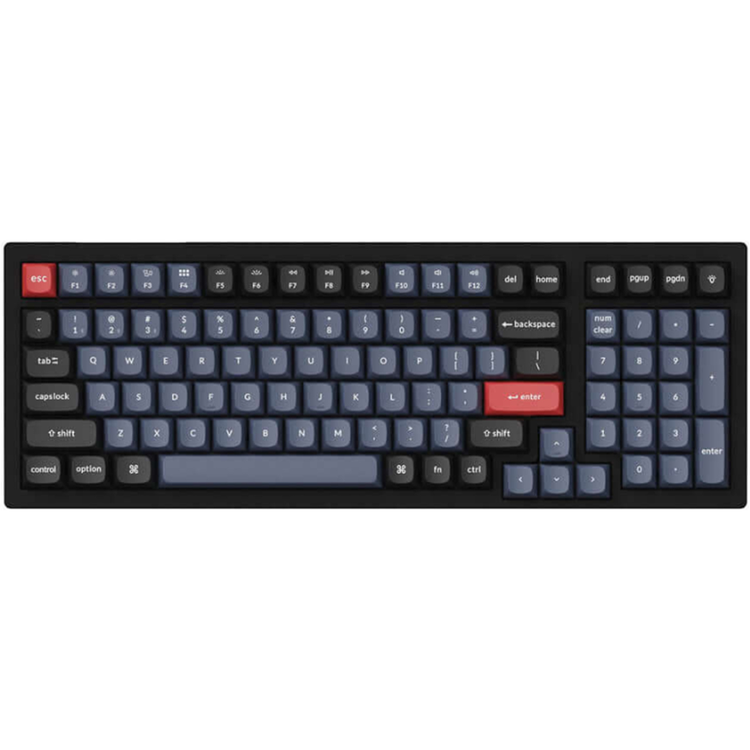
Keychron K4 Pro 96% Mechanical Wireless Keyboard - RGB Backlight
Keychron K4P-H3 96% Brown Switch RGB Wireless Mechanical Keyboard
_x000D_ Keychron K4 Pro QMK/VIA Wireless Mechanical Keyboard allows anyone to master any keyboard keys or macro commands through VIA, it has included keycaps for both Windows and macOS, and users can hot-swap with any MX mechanical switch in a breeze.
_x000D_ Wireless and Wired
_x000D_ An excellent solution for multitasking. You can connect the K4 Pro with up to 3 devices wirelessly via its stable Broadcom Bluetooth 5.1 for seamless multitasking across your laptop, phone, and tablet. Switch among them swiftly, and it’s fully compatible with both Mac and Windows. A reliable USB Type-C wired connection is also available when you need it.
_x000D_ Program With QMK & VIA:
_x000D_ QMK/VIA means endless possibilities for a fluid workflow.
_x000D_ Simply connect the K4 Pro to your device with a cable, drag and drop your favorite keys or macro commands to remap any key you want on any system (macOS, Windows, or Linux).
_x000D_ Suitable For All Devices
_x000D_ Offers a Mac layout while still being compatible with Windows, the K4 Pro is one of the few on the market that has the same multimedia and function key functions as Apple keyboards for Mac users, but with more tactile feedback. You can even configure different keymaps for both Mac and Windows devices. While VIA software is compatible with macOS, Windows, and Linux. Includes keycaps for both macOS and Windows (3 keycaps for each) to allow you to switch between operating systems with ease.
_x000D_ Hot-Swappable
_x000D_ Every detail matters, so we make the K4 Pro hot-swappable for your personalized typing experience. The hot-swappable sockets are mounted on the PCB, so you can hot-swap every switch on the K4 Pro with almost all of the 3pin and 5pin MX style mechanical switches on the market (including Cherry, Gateron, Kailh, Panda, etc.) without soldering. You can customize your own typing experience in seconds.
_x000D_ Screw-In PCB Stabilizers
_x000D_ Even small part matters for your fingertip feel. We’ve integrated the PCB-mounted screw-in stabilizers for a smoother typing experience with less wobbliness on the big keys such as space bar, shift, enter, and backspace. The Keychron K4 Pro also supports third-party screw-in PCB stabilizers.
_x000D_ Pre-Lubed Keychron K Pro Switch
_x000D_ By optimizing the switch mold, the K Pro switch wobbles less than a standard mechanical switch and feels smoother on each hit. Plus, the factory pre-lubed process on all the K Pro switches (exclude the clicky ones), no doubt this will ensure the best smoothness at your fingertips when typing.
_x000D_ OSA Profile Double-Shot PBT Keycaps
_x000D_ To further fine-tune your typing experience, the K4 Pro comes with our unique OSA profile (OEM profile with spherical-angle) and double-shot PBT keycaps that aim to provide a more comfortable fingertip feel with excellent oil resistance for long-term use on the 96% layout.
_x000D_
_x000D_ General Specifications
_x000D_ Number of Keys
_x000D_ 100 (96%)
_x000D_ Switches
_x000D_ Keychron K Pro Mechanical
_x000D_ Switch Face
_x000D_ South facing
_x000D_ Stabilizers
_x000D_ PCB-mounted screw-in stabilizers
_x000D_ Number of Multimedia Keys
_x000D_ 12
_x000D_ Frame Material
_x000D_ ABS
_x000D_ Plate Material
_x000D_ Steel
_x000D_ Keycap Material
_x000D_ Double shot PBT
_x000D_ Keycap Profile
_x000D_ OSA (OEM profile with spherical angle)
_x000D_ Layout
_x000D_ ANSI
_x000D_ Polling Rate (Wired Mode)
_x000D_ 1000Hz
_x000D_ Polling Rate (Wireless Mode)
_x000D_ 90Hz
_x000D_ N-Key Rollover (NKRO)
_x000D_ Yes for both wireless and wired modes
_x000D_ Connectivity And Power
_x000D_ Backlit
_x000D_ 22 types of RGB backlight options plus endless possibilities
_x000D_ Battery
_x000D_ 4000 mAh rechargeable li-polymer battery
_x000D_ BT Working Time (Backlit off)
_x000D_ Up to 300 hours (Lab test result may vary by actual use)
_x000D_ BT Working Time (RGB)
_x000D_ Up to 100 hours (Lowest brightness)
_x000D_ Connection
_x000D_ Bluetooth and Type-C cable
_x000D_ Bluetooth version
_x000D_ 5.1
_x000D_ Bluetooth Device Name
_x000D_ Keychron K4 Pro
_x000D_ Compatible System
_x000D_ macOS/Windows/Linux
_x000D_ Physical Specifications
_x000D_ Dimension
_x000D_ 390.6 x 139.2 mm (15.38 x 5.48")
_x000D_ Weight
_x000D_ About 1280 g / 2.82 lbs
_x000D_ Height without keycap (front)
_x000D_ 24 mm (0.94")
_x000D_ Height without keycap (rear)
_x000D_ 31 mm (1.22")
_x000D_ Height incl. keycap (front)
_x000D_ 33 mm (1.30")
_x000D_ Height incl. keycap (rear)
_x000D_ 40 mm (1.57")
_x000D_ Typing Angle
_x000D_ 3º, 7º and 10º
_x000D_ MCU
_x000D_ Ultra-low-power ARM Cortex-M4 32-bit STM32L432 (128KB Flash)
_x000D_ Operating Environment
_x000D_ -10 to 50?
As an international traveller you are entitled to bring a certain amount/value of goods that are free of Customs duty and exempt Goods and Services tax (GST) into New Zealand. This is called your duty free allowance and personal goods concession. It is important to review these for any purchases you make on The Mall.
Your duty free allowance entitles you to bring into New Zealand the following quantities of alcohol products free of customs duty and GST provided you are over 17 years of age. You do need to be 18 years or over to purchase.
- Up to six bottles (4.5 litres) of wine, champagne, port or sherry or
- Up to twelve cans (4.5 litres) of beer
- And three bottles (or other containers) each containing not more than 1125ml of spirits, liqueur, or other spirituous beverages
Goods other than alcohol and tobacco, whether purchased overseas or purchased duty free in New Zealand, that have a combined total value not exceeding NZ$700 may also be brought as part of your personal goods concession.
When travelling overseas there are legal limits on the amount of duty free alcohol and other goods you can take with you. These amounts will vary depending on the country you are flying into. We always recommend you check the latest limits and exemptions.
Your order can be picked up at an Auckland Airport Collection Point. There is one in departures and one at arrivals in the international terminal. Alternatively, if you are arriving between 11pm and 6am you will be able to collect your order from our lockers. See map
Please bring your order confirmation email and your passport. If you are collecting from lockers you will have been sent an email with your access code, be sure to have this on you in order to collect your order.
If you’re departing Auckland Airport, we recommend that you come to the Auckland Airport Collection Point at least 60 minutes before your flight. If you miss your pickup time or your flight details have changed please let us know as soon as possible.
When you collect your order you will have the opportunity to inspect the items and sign for them.
If you need to return an item, our Collection Point team are there to help you. If you are collecting after hours please return the item to your locker and our team will be in touch as soon as possible. You may also like to view our Returns & refunds which provides information on how this works and outlines the individual retailer's returns and refunds policies.
After Hours Collections
If your order needs to be collected after the Auckland Airport Collection Point desk is closed, your order will be placed in the lockers next to the desk. All the details you will need to collect your order will be provided in your Order Confirmation and Ready to Collect Email.