










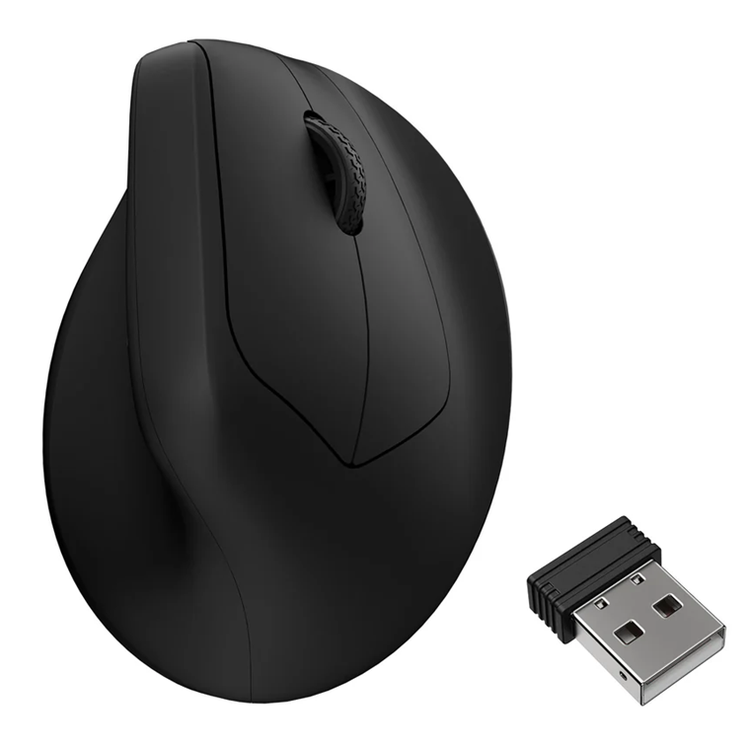
Keychron M5 Wireless Ergonomic Mouse
_x000D_ Keychron M5 packs all the best features in its super ergonomic vertical design. It supports both 2.4 GHz wireless and Bluetooth connection, ideal for any scenario, whether at work, gaming, or on the go, and offers ultimate performance to maximize productivity!
_x000D_ - Ergonomic Design
_x000D_ - Ultra-Flex Paracord Cable
_x000D_ - 8000 Hz Polling Rate
_x000D_ - DPI Up to 30000
_x000D_ - 2.4GHz & Bluetooth Wireless Connection
_x000D_ - Battery Life Up to 140h
_x000D_
_x000D_
_x000D_ The Strongest Mouse Sensor
_x000D_ The top-tier optical sensor delivers flawless sensitivity and pinpoint precision, ensuring seamless response to every hand movement for ultimate control in gaming scenarios or professional tasks.
_x000D_ - Sensor: PAW 3950
_x000D_ - DPI (CPI): Up to 30,000
_x000D_ - IPS: 750
_x000D_ - Polling Rate: 8K
_x000D_
_x000D_
_x000D_ 8000 Hz Polling Rate
_x000D_ Setting the mouse at a 8000 Hz polling rate can result in a high-speed signal transmittance between the mouse and the connected device. More responsive cursor movements captured with faster trigger response guarantees unparalleled performance, securing your triumph when it truly counts!
_x000D_
_x000D_
_x000D_ Stable & Ultra-low Latency Response - 2.4 GHz and Bluetooth
_x000D_ With cutting-edge 2.4 GHz frequency wireless connectivity, the M5 gives you extremely low latency and quick response for gaming and the office. It also offers a stable 5.3 Bluetooth connection for even more variety in your wireless connectivity.
_x000D_
_x000D_
_x000D_ Peak Performance For Every Scenario
_x000D_ Precise sensors, extremely low latency wireless connectivity, and high polling rate give you the best performance for both office, gaming or even on the go.
_x000D_
_x000D_
_x000D_ 47° Vertical Angle for Optimal Wrist Comfort
_x000D_ The ergonomic design of M5, especially its unique 47° vertical angle alleviates wrist strain, featuring a smooth curve throughout the body and a thumb rest on the side, which conforms more closely to the contour of your palm, ensuring a comfortable grip over extended periods. It promotes a natural handshake position for all-day comfort.
_x000D_
_x000D_
_x000D_ More Customization on The Keychron Launcher
_x000D_ Just click, save, and turn it off, the online Launcher web app allows for easy personalization. You can modify keys, set shortcuts, create dedicated macros, or do professional settings for LOD, polling rate, DPI, etc. Besides, it provides 5 on-board memory profiles for your access to different apps or computers.
_x000D_
_x000D_ * Please use the latest version of Chrome / Opera / Edge browser to open the Launcher and connect the mouse to your device via wired mode or 2.4G mode.
_x000D_
_x000D_ Switch Polling Rate
_x000D_ Press the Report Rate button to switch among 6 levels of polling rate from 125 Hz to 8000 Hz in the 2.4 GHz / Wired mode.
_x000D_
_x000D_
_x000D_ 8K Wireless Receiver
_x000D_ The M5 8K comes with an included 8K wireless receiver.
_x000D_
_x000D_
_x000D_ Connectivity for Different Receivers in 2.4 GHz Wireless Mode
_x000D_
_x000D_
_x000D_
_x000D_ Up To 140 Hours
_x000D_ Equipped with a large 600 mAh battery , the M5 provides a long continuous working time of up to 140 hours in Bluetooth mode and up to 120 hours in 1K Polling Rate mode.
_x000D_
_x000D_
_x000D_ Huano 80M Micro Switch
_x000D_ Huano 80M micro switch deliver clean clicks feeling, and the lifespan is up to 80 million clicks.
_x000D_
_x000D_
_x000D_ Adjust Without Software
_x000D_ Quick swap 3 Bluetooth devices through the bottom button for a seamless workflow experience. You can also adjust DPI and polling rates without software installation demand.
_x000D_
_x000D_
_x000D_ Thumb Wheel
_x000D_ The thumb scroll wheel, conveniently located on the side, also serves as a horizontal scroller, providing an effortless way to breeze through wide spreadsheets in Excel or to scrub through video clips.
_x000D_
_x000D_ Color
_x000D_ Black
_x000D_ Sensor
_x000D_ PixArt 3950
_x000D_ Motion Sync
_x000D_ Support
_x000D_ DPI (CPI) Range
_x000D_ 100 - 30000
_x000D_ Angle Snapping
_x000D_ On / Off
_x000D_ IPS
_x000D_ 750
_x000D_ Acceleration
_x000D_ 50g
_x000D_ Polling Rate
_x000D_ Max 8000 Hz (2.4GHz / Wired mode)
_x000D_ Max 125 Hz (Bluetooth mode)
_x000D_ Click Switch
_x000D_ Huano Micro Switch
_x000D_ MCU
_x000D_ Realtek 8762G
_x000D_ Weight
_x000D_ 95 ± 3 g
_x000D_ Lift Off Distance
_x000D_ 0.7 mm / 1.0 mm / 2.0 mm
_x000D_ Battery
_x000D_ 600 mAh
_x000D_ Tracks on glass (min. 4 mm thickness)
_x000D_ Yes (max 1KHz report rate)
_x000D_ Cable
_x000D_ Detachable Type-C to Type-C Cable +Type-A to Type-C adapter
_x000D_ Bluetooth Version
_x000D_ 5.3
_x000D_ Mouse Feet
_x000D_ Teflon / PTFE
_x000D_ Connectivity
_x000D_ Bluetooth / 2.4 GHz / Wired (Type-C cable)
_x000D_ Material (Body and Grip)
_x000D_ ABS
_x000D_ System Support
_x000D_ Windows & macOS
_x000D_ Click Switch Lifespan
_x000D_ 80 Million Clicks
_x000D_ Dimensions
_x000D_ 117.8mm x 87.1mm x 71.7mm
As an international traveller you are entitled to bring a certain amount/value of goods that are free of Customs duty and exempt Goods and Services tax (GST) into New Zealand. This is called your duty free allowance and personal goods concession. It is important to review these for any purchases you make on The Mall.
Your duty free allowance entitles you to bring into New Zealand the following quantities of alcohol products free of customs duty and GST provided you are over 17 years of age. You do need to be 18 years or over to purchase.
- Up to six bottles (4.5 litres) of wine, champagne, port or sherry or
- Up to twelve cans (4.5 litres) of beer
- And three bottles (or other containers) each containing not more than 1125ml of spirits, liqueur, or other spirituous beverages
Goods other than alcohol and tobacco, whether purchased overseas or purchased duty free in New Zealand, that have a combined total value not exceeding NZ$700 may also be brought as part of your personal goods concession.
When travelling overseas there are legal limits on the amount of duty free alcohol and other goods you can take with you. These amounts will vary depending on the country you are flying into. We always recommend you check the latest limits and exemptions.
Your order can be picked up at an Auckland Airport Collection Point. There is one in departures and one at arrivals in the international terminal. Alternatively, if you are arriving between 11pm and 6am you will be able to collect your order from our lockers. See map
Please bring your order confirmation email and your passport. If you are collecting from lockers you will have been sent an email with your access code, be sure to have this on you in order to collect your order.
If you’re departing Auckland Airport, we recommend that you come to the Auckland Airport Collection Point at least 60 minutes before your flight. If you miss your pickup time or your flight details have changed please let us know as soon as possible.
When you collect your order you will have the opportunity to inspect the items and sign for them.
If you need to return an item, our Collection Point team are there to help you. If you are collecting after hours please return the item to your locker and our team will be in touch as soon as possible. You may also like to view our Returns & refunds which provides information on how this works and outlines the individual retailer's returns and refunds policies.
After Hours Collections
If your order needs to be collected after the Auckland Airport Collection Point desk is closed, your order will be placed in the lockers next to the desk. All the details you will need to collect your order will be provided in your Order Confirmation and Ready to Collect Email.