










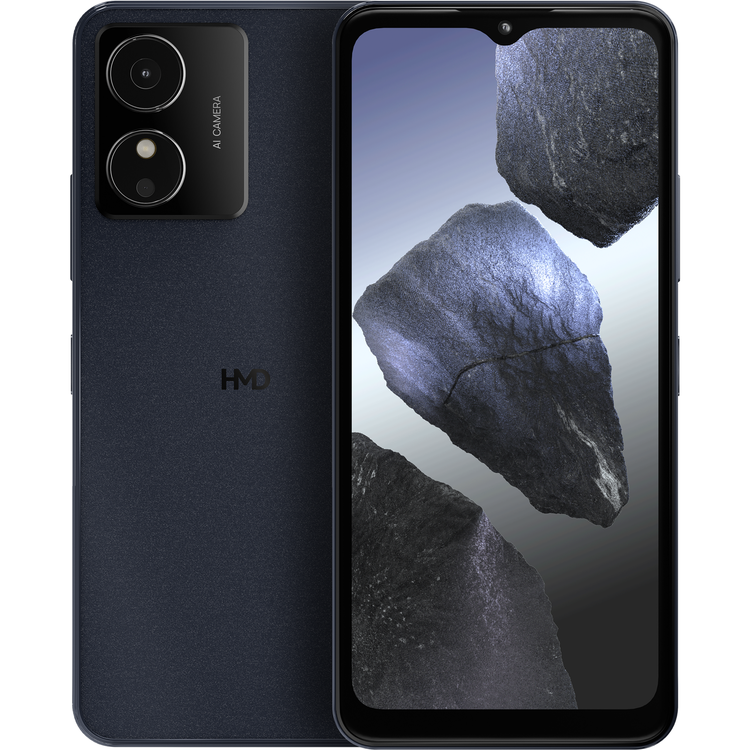
HMD Key Upgrade without overspending. It's got those essential photography modes, performance-boosting virtual memory,[1] and the smooth Android 14 (Go edition).
Affordable A tight budget won't lock you out of this upgrade.
Virtual Memory Boost performance using onboard storage.[1]
Operating System Android™ 14 (Go edition). Smooth and secure.
Camera modes Portrait mode, Night mode, and more.
Software, Lightweight and speedy Because it focusses on the essentials, Android 14 (Go edition) keeps HMD Key running nice and breezily. There's one area that this OS hasn't cut back on though, and that's security. Quarterly security updates for 2 years[2] will help keep everything safe and sound.
Virtual memory, Boost performance in a pinch There's a lot of potential tied up in cold, hard, storage space. Virtual Memory takes just 2 GB of storage and treats it as RAM[1] - that's the type of memory that helps run your phone smoothly. Pretty neat.
Battery, Get things done HMD Key goes for up to 47 hours between charges.[3] So no matter how much you want to get done in a day, you won't have to add panic-charging to your to-do list.
Camera, The right mode for the right shot You know how that one ingredient really makes your favorite dish what it is? That's what the right camera mode is for your photos - the special sauce. HMD Key is packing Portrait mode, Night mode, Pro mode, Slow motion, Time Lapse and Panorama modes. Bon appetit. *TM and © 2025 HMD Global. All rights reserved. Android is a trademark of Google LLC. Variations on offering may apply. Check local availability. All specifications, features and other product information provided are subject to change without notice. Images are for illustrative purposes only.[1]Using memory extension (virtual RAM) requires enough storage space. To protect the storage, memory extension is automatically and permanently disabled once 90% of the usage limit is reached. This can occur after 4 years of heavy usage.[2]From the global launch date of HMD Key.[3]Battery testing was conducted by HMD Global Oy using a real-life usage test. Testing included cycles combining 1-9 minutes of active usage and 30 minutes of idle time with a new battery, starting from 100% battery charge until the device powered off. Usage included e.g., gaming, video streaming, video playback, calling, browsing, and data transfer. Testing was conducted with normal device settings in a lit indoor environment.
- Height
- 166.4 mm
- Weight
- 185.4 g
- Width
- 76.9 mm
- Depth
- 8.95 mm
- Size
- 6.52 in
- Highlights
- 60Hz refresh rate, 460 nits peak brightness.
- Aspect ratio
- 20:9
- Resolution
- HD (576 x 1280)
- Highlights
- Portrait (bokeh), Night mode, Pro mode, Slow motion, QR code scanner, Time lapse, Panorama
- Front camera
- 5 MP
- Rear camera
- 8 MP auto-focus
- Flash
- Rear flash LED
- Bluetooth®
- Bluetooth 4.2
- Headphone jack
- 3.5 mm
- Location
- GPS/AGPS/Galileo
- USB connection
- USB Type-C™
- WiFi
- 802.11 b/g/n
- Battery
- 4000 mAh[1]
- Battery life
- Up to 47h[2]
- Charging
- 10W charging support.
- Wattage
- 10 W
- Virtual RAM options
- Up to 2GB[3]
- Cloud storage
- Google Drive
- Internal storage
- 32 GB[4]
- MicroSD card support up to
- 128 GB
- RAM
- 2 GB
- CPU
- Unisoc 9832E
- Operating System
- Android™ 14 Go
- Features
- FM Radio receiver.
- Microphones
- 1
- Speakers
- 1
- Max network speed
- 4G
- Networks
- 2G, 3G & 4G
- Sim size
- Nano Sim
- Security updates
- 2 years of quarterly security updates5
- Other
- Face Unlock
- IP Rating
- IP52
- Sensors
- Accelerometer (G-sensor)
- Ambient light sensor
- Proximity sensor
- Items included
- Safety Booklet
- SIM pin
- Quick Start Guide
- USB Type-C™ Cable
- User Guide
- Remarks
- *TM and © 2025 HMD Global. All rights reserved. Android and Google Drive are trademarks of Google LLC. Variations on offering may apply. Check local availability. All specifications, features and other product information provided are subject to change without notice. All images are for illustrative purposes only.
- [1]Battery has limited recharge cycles and battery capacity reduces over time. Eventually the battery may need to be replaced.
- [2]Battery testing was conducted using a real life usage test by HMD Global. The test included active usage of a device for 5 hours per day with a new battery. Usage included e.g. gaming, video streaming, calling, sending sms, browsing and using apps (such as social media, news, navigation and music). The test was conducted with normal device settings in a lit indoor environment. The device was left on standby overnight.
- [3]Using memory extension (virtual RAM) requires enough storage space. To protect the storage, memory extension is automatically and permanently disabled once 90% of the usage limit is reached. This can occur after 4 years of heavy usage.
- [4]Pre-installed system software and apps use a significant part of memory space.
- [5]From the global launch date of device.
As an international traveller you are entitled to bring a certain amount/value of goods that are free of Customs duty and exempt Goods and Services tax (GST) into New Zealand. This is called your duty free allowance and personal goods concession. It is important to review these for any purchases you make on The Mall.
Your duty free allowance entitles you to bring into New Zealand the following quantities of alcohol products free of customs duty and GST provided you are over 17 years of age. You do need to be 18 years or over to purchase.
- Up to six bottles (4.5 litres) of wine, champagne, port or sherry or
- Up to twelve cans (4.5 litres) of beer
- And three bottles (or other containers) each containing not more than 1125ml of spirits, liqueur, or other spirituous beverages
Goods other than alcohol and tobacco, whether purchased overseas or purchased duty free in New Zealand, that have a combined total value not exceeding NZ$700 may also be brought as part of your personal goods concession.
When travelling overseas there are legal limits on the amount of duty free alcohol and other goods you can take with you. These amounts will vary depending on the country you are flying into. We always recommend you check the latest limits and exemptions.
Your order can be picked up at an Auckland Airport Collection Point. There is one in departures and one at arrivals in the international terminal. Alternatively, if you are arriving between 11pm and 6am you will be able to collect your order from our lockers. See map
Please bring your order confirmation email and your passport. If you are collecting from lockers you will have been sent an email with your access code, be sure to have this on you in order to collect your order.
If you’re departing Auckland Airport, we recommend that you come to the Auckland Airport Collection Point at least 60 minutes before your flight. If you miss your pickup time or your flight details have changed please let us know as soon as possible.
When you collect your order you will have the opportunity to inspect the items and sign for them.
If you need to return an item, our Collection Point team are there to help you. If you are collecting after hours please return the item to your locker and our team will be in touch as soon as possible. You may also like to view our Returns & refunds which provides information on how this works and outlines the individual retailer's returns and refunds policies.
After Hours Collections
If your order needs to be collected after the Auckland Airport Collection Point desk is closed, your order will be placed in the lockers next to the desk. All the details you will need to collect your order will be provided in your Order Confirmation and Ready to Collect Email.