










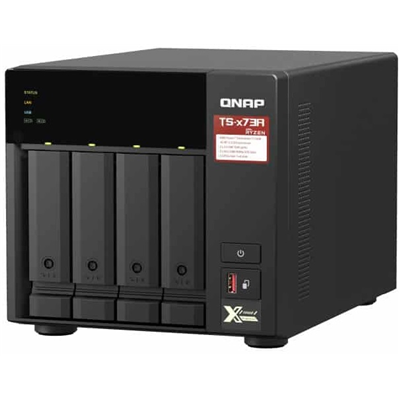
AMD Ryzen™ quad-core 2.2 GHz 2.5GbE NAS supports M.2 NVMe SSD and PCIe expansion for adding 10GbE high-speed connectivity and M.2 SSD; QTS and QuTS hero dual operating system for greater flexibility Featuring an AMD Ryzen™ V1000 series V1500B quad-core processor that delivers great system performance with up to quad-core / 8 threads and Turbo Core up to 2.2 GHz. The TS-473A features two 2.5GbE RJ45 ports and two PCIe Gen 3 slots for you to flexibly deploy 5GbE/10GbE networks. Two M.2 NVMe SSD slots for Qtier Technology and SSD Caching enable constant storage optimization. The TS-473A supports QTS and QuTS hero, allowing users to flexibly switch operating system based on their requirements. 2.5GbE connectivity
- Both 2.5GbE ports are backwards compatible with 1GbE/ 100MbE speeds. Up to 5 Gbps transfer speeds can be achieved by using port trunking. Flexible PCIe expansion
- Add extra functionality with PCIe cards, including 10GbE ports, SSD caching, extra USB 3.2 Gen 2 ports, wireless networking, or Fibre Channel. GPU applications
- Supports entry-level NVIDIA® graphics cards for video processing or GPU-passthrough to VMs. SSD cache acceleration
- Features two M.2 PCIe NVMe SSD slots for Qtier Technology and SSD Caching enable constant storage optimization. Virtualization applications
- Host containerized applications and virtual machines with various operating systems. Supports QTS/QuTS hero OS
- Features QTS operating system and supports switching to ZFS-based QuTS hero for greater reliability. High performance AMD Ryzen™ processor The TS-473A is powered by an AMD Ryzen™ V1000 series V1500 quad-core 2.2 GHz processor with up to 64GB RAM (ECC memory is supported*) and features USB 3.2 Gen 2 ports for speeds up to 10 Gb/s. The TS-473A also provides one USB Type-C port for supporting more devices to transfer large media files across devices, providing you with a more efficient workflow. * Using ECC memory requires the removal of pre-installed memory, as you cannot use non-ECC memory with ECC memory. Transform your network with a wallet-friendly 2.5GbE switch Upgrading your network shouldn't break the bank, and 2.5GbE connectivity provides immediately noticeable improvements compared to standard 1GbE. QNAP offers 2.5GbE switches that supports Multi-Gigabit NBASE-T™ and allows you to use existing CAT5e cables to connect multiple computers and NAS, assisting organizations in implementing high-speed, secure and scalable network environments without going over budget. Switch operating systems for optimal data integrity and reliability The TS-473A also supports QuTS hero - QNAP's ZFS-based NAS operating system. Providing end-to-end data integrity, data reduction (inline data deduplication, compression and compaction), and much more, QuTS hero uses additional system resources to ensure an optimal environment for protecting business data. Note:1. QTS and QuTS hero use different file systems. You must remove all the drives from the TS-473A before switching from QTS to QuTS hero.2. QuTS hero requires a NAS with at least 8 GB memory.3. Inline Data Deduplication requires a NAS with at least 16 GB memory (at least 32 GB memory is recommended for optimal performance).4. It is recommended to create an SSD RAID with at least two SSDs for the QuTS hero system drive to attain optimal system performance. Please note that M.2 SSD hot-swapping is only supported by M.2 SSD slots on PCIe cards (such as the QM2). M.2 SSD slots that are built into the NAS do not support hot-swapping. Obtain performance benefits from M.2 SSD caching The TS-473A features 2 M.2 NVMe SSD slots for you to enjoy SSD caching or Qtier auto tiering Technology Improve random data access speeds with an SSD cacheSSD caches accelerate IOPS performance and reduce latency for storage volumes. They are perfect for IOPS-demanding applications (including databases and virtualization) and can significantly improve overall workflows. Maximize the value of SSDs with Qtier TechnologyQtier™ Technology empowers the TS-473A with auto tiering that helps continuously optimize storage efficiency by automatically moving data between M.2 SSDs, 2.5-inch SSDs, and high-capacity HDDs based on the data's access frequency. Qtier™ 2.0 features IO-awareness that empowers SSD-tiered storage with a cache-like reserved space to handle burst I/O in real time, greatly maximizing the advantages of SSDs. Note: Qtier Technology is supported by QTS Upgrade to 10GbE and abundant capability with PCIe expansion The TS-473A features two PCIe Gen 3 x4 slots that allows for various expansion cards for expanding application potential. Note: TS-473A uses low-profile expansion cards Easy and Secure File Management File Station allows direct management of files stored on the TS-473A and in the cloud. Users can easily upload files from their PC, drag/drop files between folders, rename/delete files, and configure file/folder permissions to prevent unauthorized access. Microsoft Office Online can also be used to directly view/edit Microsoft Office documents stored on the TS-473A. Confidential/sensitive data can be encrypted to add extra security. Install a graphics card for GPU-accelerated computing Graphics cards are optimized for graphical calculations and transformations, but require significantly more power than other hardware. The TS-473A features PCIe slots to support low-profile graphics cards that do not need power cables, including NVIDIA® GeForce® GTX1650 graphics cards to boost performance of applications such as video editing , 4K UHD transcoding, imaging processing in QTS and performance of virtual machines via GPU passthrough. Note:1. Supported video formats depend on the hardware and software specifications of the devices. Playback capability and quality may vary due to factors including the original file formats/quality, hardware and software limitations, and output devices.2. When Virtualization Station uses graphics cards, the NAS will temporarily stop hardware transcoding acceleration for QTS (and vice versa).3. Consult the Compatibility List for information on supported NAS and graphics cards. Build an affordable Fibre Channel SAN environment Common Fibre Channel Storage Area Networks (SAN) devices are often costly. By installing a QNAP 16Gb Fibre Channel card (QXP-16G2FC 16Gb) in the TS-473A, you can set a Fibre Channel Target using the iSCSI &; Fibre Channel app. Moreover, the LUN Masking and Port Binding features provide an additional layer of data security. High-speed 2.5GbE VM Backup Solution With Hyper Data Protector, the TS-473A becomes an agentless backup tool for unlimited VMware® vSphere and Microsoft® Hyper-V VM backup. Hyper Data Protector features incremental backup, global deduplication, backup scheduling and recovery compression. With 2.5GbE connectivity, backup and restoration times are greatly reduced, providing a cost-effective solution for disaster recovery. QNAP Backup &; Data Protection Solutions: Complete Apps &; Utilities at Your Fingertips QNAP provides comprehensive solutions for virtually all data protection requirements. Discover an array of apps/utilities to help you back up various sources, including: Boxafe - Google Workspace (G Suite) /Microsoft 365 SaaS backupHyper Data Protector - VMware vSphere/Microsoft Hyper-V VM backupHybrid Backup Sync - QNAP NAS/file server/macOS backupNetBak Replicator - Windows backupSnapshot - QNAP NAS protection/backup Flexible and economical storage expansion QNAP provides easy storage capacity expansion solutions. Here are several ways to expand your TS-473A storage as needed to accommodate data and business growth. Upgrade RAID CapacityHot-swap lower-capacity drives with larger-capacity drives to expand your NAS capacity so it can grow with your business. Attach Expansion EnclosuresConnect two TR-004 RAID expansion enclosures, or one 8-bay TL-D800S SATA 6 Gb/s JBOD, and use the QTS Storage &; Snapshots Manager to easily handle NAS capacity expansion. Migrate to a New NASInstall your NAS hard drives into a larger QNAP NAS and retain all your existing data and configurations. More productivity applications QsirchQNAP's powerful, Google-like search tool for quickly finding specific images, music, videos, documents, and emails by keywords, color, and more search conditions. BoxafeBackup/sync files, emails, calendars and contacts from Google™ Workspace and Microsoft® Office 365® into the TS-473A to safeguard enterprise cloud data. QuMagieAn AI-powered photo management app, supporting automated photo categorization with AI Albums, iOS® Live Photo display, and powerful search tool for ultimate photo management and sharing solution.
- CPU
- AMD Ryzen™ Embedded V1500B 4-core/8-thread 2.2 GHz processor
- CPU Architecture
- 64-bit x86
- Graphic Processors
- Optional via a PCIe adapter
- Floating Point Unit
- Yes
- Encryption Engine
- Yes (AES-NI)
- Hardware-accelerated Transcoding
- Optional via a PCIe adapter
- System Memory
- 8 GB SO-DIMM DDR4 (1 x 8 GB)
- Maximum Memory
- 64 GB (2 x 32 GB)
- Memory Slot
- 2 x SO-DIMM DDR4
- Support ECC memory
- (For dual-DIMM configurations, you must use a pair of identical DDR4 modules.)
- Flash Memory
- 5GB (Dual boot OS protection)
- Drive Bay
- 4 x 3.5-inch SATA 6Gb/s, 3Gb/s
- Drive Compatibility
- 3.5-inch SATA hard disk drives
- 2.5-inch SATA hard disk drives
- 2.5-inch SATA solid state drives
- Hot-swappable
- Yes (The following are not hot-swappable: M.2 SSDs, SSD cache drives, SSDs using PCIe expansion slots)
- M.2 Slot
- 2 x M.2 2280 PCIe Gen3 x1 slots
- The M.2 SSD is not included as standard.
- M.2 SSD operations can easily generate excessive heat. It is recommended to install a heatsink (from QNAP or a third-party provider) on the M.2 SSD.
- SSD Cache Acceleration Support
- Yes
- GPU pass-through
- Yes
- 2.5 Gigabit Ethernet Port (2.5G/1G/100M)
- 2
- 5 Gigabit Ethernet Port (5G/2.5G/1G/100M)
- Optional via a PCIe adapter
- 10 Gigabit Ethernet Port
- Optional via a PCIe adapter
- Wake on LAN (WOL)
- Yes
- Jumbo Frame
- Yes
- PCIe Slot
- 2
- Slot 1: PCIe Gen 3 x4
- Slot 2: PCIe Gen 3 x4
- USB 3.2 Gen 2 (10Gbps) Port
- 3 x Type-A USB 3.2 Gen 2 5V/1A 10Gbps
- 1 x Type-C USB 3.2 Gen 1 5V/1A 5Gbps
- HDMI Output
- Optional via a PCIe adapter
- Form Factor
- Tower
- LED Indicators
- Status/Power, USB, LAN, Drive 1-4, M.2 SSD 1-2
- Buttons
- Power, Reset, USB Auto Copy
- Dimensions (HxWxD)
- 188.2 × 199.3 × 280.8 mm
- Weight (Net)
- 5.03 kg
- Weight (Gross)
- 6.04 kg
- Operating temperature
- 0 - 40 °C (32°F - 104°F)
- Storage Temperature
- -20 - 70°C (-4°F - 158°F)
- Relative Humidity
- 5-95% RH non-condensing, wet bulb: 27°C (80.6°F)
- Power Supply Unit
- 250W, 100-240V AC, 50-60Hz, 3.5A
- Power Consumption: HDD Sleep Mode
- 19.576 W
- Power Consumption: Operating Mode, Typical
- 29.792 W
- Tested with drives fully populated.
- Fan
- System fan: 1 x 120mm
- CPU fan: 1 x 60mm
- System Warning
- Buzzer
- Max. Number of Concurrent Connections (CIFS) - with Max. Memory
- 2000
- Operating System
- QuTS hero h5.0.0
- Supported Client Operating Systems
- Apple Mac OS 10.10 or later
- Ubuntu 14.04, CentOS 7, RHEL 6.6, SUSE 12 or later Linux
- IBM AIX 7, Solaris 10 or later UNIX
- Microsoft Windows 7, 8, and 10
- Microsoft Windows Server 2008 R2, 2012, 2012 R2, 2016, and 2019
- Supported Browsers
- Apple Safari (latest version)
- Google Chrome (latest version)
- Microsoft Edge (latest version)
- Mozilla Firefox (latest version)
- Supported Languages
- Chinese (Traditional & Simplified), Czech, Danish, Dutch, English, Finnish, French, German, Greek, Hungarian, Italian, Japanese, Korean, Norwegian, Polish, Portuguese (Brazil), Romanian, Russian, Spanish, Swedish, Thai, and Turkish
- Storage Pool
- Yes
- SED Storage Pool
- Yes
- Maximum Pool size
- 1024 TB
- Maximum number of storage pool
- 128
- Shared Folder Type
- Thick, Thin
- Maximum shared folder size
- 1024 TB
- Maximum number of shared folder
- 256
- JBOD Expansion
- Yes
- VJBOD / VJBOD Cloud
- Yes
- iSCSI Service
- Yes
- Fibre Channel Service
- Yes
- LUN Type
- Thick, Thin
- Block-based iSCSI LUN
- Yes
- Maximum LUN size
- 1024 TB
- Maximum number of targets LUN
- 256
- RAID Type
- Single, RAID 0, 1, 5, 6, 10, 50, 60, Triple Mirror, Triple Parity
- RAID Group
- Yes
- (To ensure data security, system stability, and storage performance, the maximum number of drives for a single RAID group is now 16 (applicable to RAID 5, RAID 6, RAID TP, and subgroups of RAID 50 and RAID 60). Nevertheless, users can combine multiple RAID groups into a large storage pool that contains more than 16 drives, using RAID 50, RAID 60, or RAID 10 as the RAID configuration. This enhancement will only be applied to new RAID groups. All existing RAID groups and storage systems will not be affected)
- RAID Expansion (by replacing bigger Disks)
- Yes
- Storage Pool Expansion (by adding RAID Group)
- Yes
- RAID Hot Spare
- Global, Local
- RAID Sync/Rebuild/Scrubbing
- Yes
- End-to-End data integrity
- Yes
- Silent error detection and self-healing
- Yes
- Internal drive
- ZFS
- External drive
- EXT3, EXT4, NTFS, FAT32, HFS+, and exFAT
- Disk, Enclosure Locate
- Yes
- Disk S.M.A.R.T. Scan
- Yes
- Disk S.M.A.R.T. Data Migration
- Yes
- Ironwolf Health Management
- Yes
- Secure Erase
- Yes
- SSD Trim
- Yes
- SSD Life Estimation
- Yes
- Disk Roaming
- Yes
- Disk Standby
- Yes
- Shared Folder Snapshot
- Yes
- LUN Snapshot
- Yes
- Maximum Snapshot (Per System)
- Check maximum number of snapshots of your NAS
- Maximum Snapshot (Per Volume / LUN)
- Check maximum number of snapshots of your NAS
- Minimum Snapshot Interval
- 1 minute
- Snapshot Retention Policy
- Yes
- Self-serve Snapshot Recovery
- Yes
- Application Consisted Snapshot
- Yes
- Snapshot Full Clone
- Yes
- Snapshot Instant Clone
- Yes
- Snapshot Replica / Vault
- Yes
- SSD read-only Cache
- Yes
- SSD read & write log cache
- Yes
- SSD dedicated ZIL cache
- Yes
- SSD Cache Maximum Size
- Check your QNAP NAS cache capacity and RAM requirements
- SSD Cache RAID
- 0, 1, 10 (journal)
- External Device Management
- Yes
- Mount Smart Phone (MTP)
- Yes
- External RAID Device (QNAP so on) Management (External Device Mode)
- Yes
- External RAID Device (QNAP so on) Management (NAS Mode)
- Yes
- File Server
- File sharing across Windows, Mac, and Linux/UNIX
- Microsoft networking (CIFS/SMB)
- Apple networking (AFP)
- NFS version 3/4 services
- FTP Server
- FTP, SFTP and TFTP protocols
- FTP over SSL/TLS (explicit FTPS)
- FXP support
- Maximum FTP connection
- 1024
- Shared Folder Data Compression
- Yes
- Shared Folder Data Deduplication
- Yes
- Shared Folder WORM
- Yes
- File Station (Web)
- Yes
- Object Storage
- Yes
- Local user account
- 16,000
- Local group account
- 512
- Domain user/group account
- 200,000
- Domain Security
- Yes
- Domain Controller
- Yes
- Shared folder permission
- Yes
- Windows ACL
- Yes
- User quota
- Yes
- Group quota
- Yes
- Folder quota
- Yes
- Home folder
- Yes
- Resource Monitor
- Yes
- SNMP
- V2, V3
- Network recycle bin
- Recover files deleted using AFP, CIFS/SMB, and File Station
- Automatic cleanup and file type filter
- System Log & Notification Center
- Log recording: 3,000 event per hour
- Smart Fan
- Yes
- Schedule on/off
- Yes
- Internet protocol
- IPv4, IPv6
- Virtual Switch
- Yes
- Port trunking
- Yes, (7 modes)
- VLAN
- Yes
- DHCP Server
- Yes
- DDNS (Dynamic Domain Name Service)
- Yes
- Network access protection with auto-blocking
- SSH, Telnet, HTTP(S), FTP, CIFS/SMB, and AFP
- Security Counselor
- Yes
- Malware Remover
- Yes
- AES 256-bit Folder Encryption validated by FIPS 140-2 CAVP
- Yes
- 2-step verification
- Yes
- Allow/Deny List
- Yes
- Access Protection
- Yes
- Service binding
- Yes
- Firewall
- Yes
- vSphere Web Client Plug-in
- Yes
- VMware vSphere VAAI for iSCSI
- Yes
- VMware vSphere VAAI for NAS
- Yes
- Windows ODX
- Yes
- Windows/VMware Snapshot Agent
- Yes
- HTTP/HTTPS Connections
- TLS 1.0/1.1/1.2/1.3
- Supports WebDAV Connection
- Yes
- Supports Virtual Hosts
- 32
- Qsync
- Yes (Note: At least 1 GB RAM is required)
- [Qsync] Management Mode
- User customization, Central
- [Qsync] Qsync client supported platforms
- Windows, macOS, Ubuntu, Android, and iOS
- [Qsync] Maximum number of version control
- 64
- HybridMount
- Yes (Note: At least 1 GB RAM is required)
- [HybridMount] File Cloud Gateway
- Concurrent Connections = 80 Upload & 80 Download
- [HybridMount] Network Drive Mount
- Yes
- [HybridMount] Free cloud gateway sessions
- 2
- HBS (Hybrid Backup Sync)
- Yes (Note: At least 1 GB RAM is required)
- [HBS (Hybrid Backup Sync)] NAS to NAS backup
- Yes
- [HBS (Hybrid Backup Sync)] Cloud Backup
- Yes
- [HBS (Hybrid Backup Sync)] Cloud Sync
- Yes
- [HBS (Hybrid Backup Sync)] 2-way and Active Sync
- Yes
- [HBS (Hybrid Backup Sync)] Backup Deduplication
- Yes
- [HBS (Hybrid Backup Sync)] Apple Time Machine Backup
- Yes
- [HBS (Hybrid Backup Sync)] External drive backup
- Yes
- [HBS (Hybrid Backup Sync)] Maximum number of backup job
- 400
- Hyper Data Protector
- Yes
- Boxafe
- Yes (Note: At least 1 GB RAM is required)
- [Boxafe] Office 365 Backup
- Yes
- [Boxafe] Google Workspace Backup
- Yes
- [Boxafe] Full-text search
- Yes
- Qsirch
- Yes (Note: This feature is supported by all QNAP NAS devices with at least 2 GB of memory)
- [Qsirch] Previews
- Photos, music, videos, PDFs, Gmail, and others
- [Qsirch] Integrate Mac Finder
- Yes
- [Qsirch] Advanced picture search
- Yes
- [Qsirch] Search filters
- Yes
- QuMagie
- Yes (Note: At least 1 GB RAM is required)
- [QuMagie] Browse photos
- Yes
- [QuMagie] Virtual and smart albums
- Yes
- [QuMagie] AI-assisted photo management
- People, things, places, and others
- Antivirus (free)
- Yes
- McAfee (License)
- Yes
- QVPN Service
- Yes (Note: At least 1 GB RAM is required)
- [QVPN Service] Remote Access
- PPTP, L2TP/IPSec, OpenVPN, QBelt (QNAP proprietary)
- [QVPN Service] Supportedd utility and mobile app
- Windows, macOS, iOS, and Android
- [QVPN Service] Supported maximum clients
- 100
- HD Station
- Yes
- LDAP Server
- Yes
- RADIUS
- Yes
- SQL server
- Yes
- License Center
- Yes
- Multimedia Console
- Yes
- Photo Station
- Yes
- Music Station
- Yes
- Video Station
- Yes
- Download Station
- Yes
- Notes Station
- Yes
- Qfiling
- Yes
- Media Streaming add-on
- Yes
- QmailAgent
- Yes
- QuWAN
- Yes
- DA Driver Analyzer
- Yes
- Q'center
- Yes (Note: The application is available in the App Center and in virtual appliance marketplaces (VMware vSphere ESXi and Microsoft Hyper-V)
- Q'center Server
- Yes
- Q'center Agent
- Yes
- Connect to Q'center
- Yes
- Virtualization Station
- Yes (Note: At least 4 GB RAM is required)
- [Virtualization Station] Supports Virtual machine instances
- Windows, Linux, Unix, and Android
- [Virtualization Station] VM importing, exporting, cloning, snapshot capturing, backup, and restoration
- All function is Fine.
- [Virtualization Station] Virtual switches
- Can create a virtual switch
- [Virtualization Station] GPU pass-through
- GPU function is fine
- [Virtualization Station] Suggested number of virtual machine instances
- 8 (The actual number of virtual machine instances may vary by the memory installed on NAS (e.g. 1 VM= 1 thread for 1 vCPU and 1GB memory). Please expend memory if needed)
- Container Station
- Yes (Note: At least 1 GB RAM is required)
- [Container Station] Supported type
- LXC/LXD and Docker (Note: LXD has been supported after Container Station 2.4)
- [Container Station] Docker Hub Registry
- Yes
- [Container Station] Container importing and exporting
- Yes
- [Container Station] Console mode
- Yes
- Linux Station
- Yes (Notification: At least 4 GB RAM is required)
- [Linux Station] Supports Ubuntu versions
- 16.04, 18.04, and 20.04
- Linux Station Center
- Yes
- QVR Elite
- Yes (Note: At least 1 GB RAM is required. The maximum number of channels supported varies by NAS model, network configuration, and camera settings. For more information, visit https://www.qnap.com/go/qvr-nas-selector)
- [QVR Elite] Recording Technique
- Standard MP4 file based
- [QVR Elite] License Type
- Subscription-based
- [QVR Elite] User-defined trigger events
- Yes
- [QVR Elite] QVR Pro Client (Desktop)
- Windows, macOS, and QNAP HybridDesk Station
- [QVR Elite] QVR Pro Client (Mobile)
- Android and iOS
- [QVR Elite] Recording camera streams
- H.264
- [QVR Elite] Free built-in camera channels
- 2
- [QVR Elite] Expandable camera channels
- Developing
- [QVR Pro Client] Live 4K H.265 (6M) channel Number @ 8 x 1080P H.264 recording channls (Use HybridDesktop Platform) (Expected)
- N/A
- [QVR Pro Client] Live 1080P H.264 (5M) channel Number @ 8 x 1080P H.264 recording channls (Use HybridDesktop Platform) (Expected)
- N/A
- [QVR Pro Client] Live 720P (3M) H.264 channel Number @ 8 x 1080P H.264 recording channls (Use HybridDesktop Platform) (Expected)
- N/A
- QVR Center
- Yes (Note: At least 4 GB RAM is required)
- [QVR Center] Log management
- Yes
- [QVR Center] Central monitoring across multiple servers
- Yes
As an international traveller you are entitled to bring a certain amount/value of goods that are free of Customs duty and exempt Goods and Services tax (GST) into New Zealand. This is called your duty free allowance and personal goods concession. It is important to review these for any purchases you make on The Mall.
Your duty free allowance entitles you to bring into New Zealand the following quantities of alcohol products free of customs duty and GST provided you are over 17 years of age. You do need to be 18 years or over to purchase.
- Up to six bottles (4.5 litres) of wine, champagne, port or sherry or
- Up to twelve cans (4.5 litres) of beer
- And three bottles (or other containers) each containing not more than 1125ml of spirits, liqueur, or other spirituous beverages
Goods other than alcohol and tobacco, whether purchased overseas or purchased duty free in New Zealand, that have a combined total value not exceeding NZ$700 may also be brought as part of your personal goods concession.
When travelling overseas there are legal limits on the amount of duty free alcohol and other goods you can take with you. These amounts will vary depending on the country you are flying into. We always recommend you check the latest limits and exemptions.
Your order can be picked up at an Auckland Airport Collection Point. There is one in departures and one at arrivals in the international terminal. Alternatively, if you are arriving between 11pm and 6am you will be able to collect your order from our lockers. See map
Please bring your order confirmation email and your passport. If you are collecting from lockers you will have been sent an email with your access code, be sure to have this on you in order to collect your order.
If you’re departing Auckland Airport, we recommend that you come to the Auckland Airport Collection Point at least 60 minutes before your flight. If you miss your pickup time or your flight details have changed please let us know as soon as possible.
When you collect your order you will have the opportunity to inspect the items and sign for them.
If you need to return an item, our Collection Point team are there to help you. If you are collecting after hours please return the item to your locker and our team will be in touch as soon as possible. You may also like to view our Returns & refunds which provides information on how this works and outlines the individual retailer's returns and refunds policies.
After Hours Collections
If your order needs to be collected after the Auckland Airport Collection Point desk is closed, your order will be placed in the lockers next to the desk. All the details you will need to collect your order will be provided in your Order Confirmation and Ready to Collect Email.