










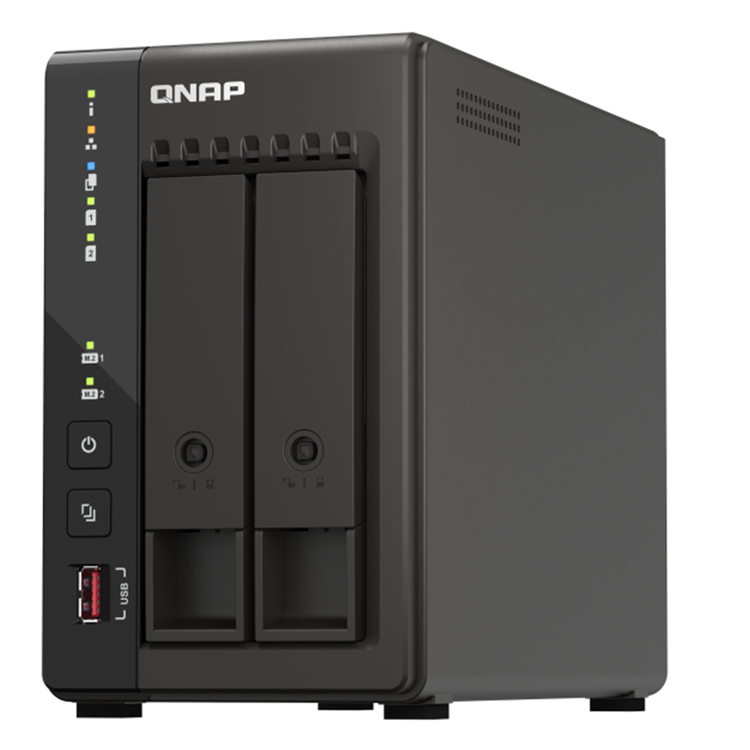
QVP-21C The QVP-21C QVR Pro appliance is a tower-based network surveillance server with an Intel® Celeron® quad-core processor that supports eight free IP camera channels and up to sixteen IP camera channels. Offering an economic and high-performance software and hardware integrated video surveillance solution, the QVP-21C fulfills requirements for secure, reliable, and centrally-managed video surveillance storage for small businesses and offices. Supports ONVIF cameras Compatible with thousands of cameras from over 190 brands and ONVIF standards. Long-term model The QVP-21C will be available and supported by QNAP for an extended period, up to 2029. Dual HDMI™ outputs Play and switch between multi-channel real-time 4K videos on two monitors with extended display. High-performance NVR Boost your surveillance data transmission efficiency with dual-port 2.5GbE, a USB 3.2 Gen2 10Gbps port, and 8GB RAM. RAID protection Unlike traditional DVR and NVR, the QVP-21C protects your data from drive failure with RAID. Lightweight AI surveillance applications QVP-21C incorporates QNAP smart surveillance applications and supports Intel® OpenVINO™ AI engine and Edge TPU expansion via M.2 SSD slots to boost facial recognition performance in QVR Face. QVP-21C vs. other NAS-based surveillance systems. What's the difference? In a conventional NAS-based surveillance system, surveillance is just one of many applications available to users. As all these applications need to share NAS system resources and storage space, surveillance performance could be impacted. The QVP-21C QVR Pro Appliance overcomes this by providing dedicated storage space and reserving full system resources for surveillance, delivering the utmost performance to fulfill professional surveillance system requirements. The QVP-21C also comes with built-in camera channel licenses and essential applications to enable local installation without requiring an internet connection. Simply install the hard drives and power up the QVP-21C to start the installation process.
High-capacity video surveillance storage solution QVP-21C is a professional network surveillance server, compatible with 6,000+ IP cameras of 190+ brands and thousands of ONVIF network cameras. Build a complete surveillance solution with affordable deployment All-in-one surveillanceSay goodbye to expensive and complicated PC NVR. QNAP network surveillance server integrates QVR Pro software and high-performance hardware.
Dual HDMI™ output for viewing multi-channel videosUse the dual HDMI™ outputs of QVP-21C for dual-screen extension to play and switch between multi-channel videos on two monitors.
Surveillance failoverInstall the high-availability QVR Guard app on another NAS to automatically takeover recording tasks if QVP-21C fails.
Live surveillance monitoring, remote management, and smart AI Live surveillance video monitoringMonitor live feeds and receive alert notifications from client applications on PCs or mobiles.
Large-scale central managementCentrally control up to 256 Surveillance NAS (licenses sold separately) in different locations via QVR Center.
AI surveillance event searchInstead of manually searching through a whole day of event videos, QVR Smart Search helps you efficiently search through hundreds of hours of video recordings from hundreds of cameras to find specific events.
MP4 surveillance videosVideos are saved using the non-proprietary MP4 video format.
Faster facial identification with integrated Intel® OpenVINO™ AI engine. With integrated Intel® OpenVINO™ AI computing resources, the QVP-21C accelerates AI facial recognition and object identification performance in QVR Face without impacting other applications or services.
Comprehensive camera support and management The QVP-21C supports thousands of camera models from over 190+ brands with a variety of image formats (including cameras that use ONVIF and RTSP/ HTTP streaming). Even USB webcams are supported, allowing home and budget-conscious users to quickly build surveillance solutions tailored to their environment while providing convenient camera management.
Motion detection using budget-friendly USB webcams Standard surveillance systems normally only support event recording and notification functions for expensive cameras with integrated motion detection. The QVP-21C provides motion detection even for entry-level cameras and USB webcams. As long as your camera can stream its footage to the QVR Pro appliance (e.g. through RTSP protocol) it supports motion detection, allowing you to build a budget-friendly, motion-detecting surveillance system.
QVR Pro Client The QVR Pro Client software can be installed on Windows® and Mac® devices, allowing you to monitor from different platforms and flexibly switch from live view or playback mode to take full control over monitored areas. Live view and playbackMonitor the live view of multiple channels and play recordings on a single interface. You can also view recordings at a specific time by clicking the timeline or by defining a time range.
Region of InterestThe Region of Interest (ROI) feature allows for viewing multiple regional images from the same camera in live view and playback mode. You can define and enlarge multiple areas to watch the area more closely.
Qdewarp TechnologyThe innovative Qdewarp enables users to view standard fisheye camera recordings in proportional ratios and sizes without affecting original recordings. The distorted parts on the edges can be turned into a clear panoramic view.
Multiple Notification MethodsThe event notification provides multiple ways of being informed of emerging events, including flashing red borders of channels, alert buzzers, and the motion icon on the e-map.
Easy remote monitoring with the QVR Pro Client mobile app The QVR Pro Client mobile app allows you to remotely monitor multiple channels simultaneously. If your network connection is slow or metered/capped, you can choose the low-bandwidth mode to view a bandwidth-optimized stream without affecting the quality of recordings. In addition, you can remotely set the camera's preset point or control the PTZ cameras within the app.
Expand your surveillance applications - Control, failover, and facial recognition QVR Center - QVR Pro control centerCentrally manage multiple QVR Pro servers installed in different areas. You can also centrally monitor live feeds, play back recordings and receive event notifications from multiple QVR Pro servers, helping you reduce response times to events. QVR Guard - High-availability failover managementProtect QVR Pro from system failure to ensure uninterruptible surveillance recordings. If your QVR Pro fails or crashes, QVR Guard automatically takes over recording tasks, providing dependable redundancy for your surveillance system. QVR Face - Smart facial recognition and analyticsObtain real-time video analytics from connected cameras and use them to set profiles, groups, and event notifications for instant facial recognition. This is ideal for smart retail, door access management, and VIP welcoming systems.
As an international traveller you are entitled to bring a certain amount/value of goods that are free of Customs duty and exempt Goods and Services tax (GST) into New Zealand. This is called your duty free allowance and personal goods concession. It is important to review these for any purchases you make on The Mall.
Your duty free allowance entitles you to bring into New Zealand the following quantities of alcohol products free of customs duty and GST provided you are over 17 years of age. You do need to be 18 years or over to purchase.
- Up to six bottles (4.5 litres) of wine, champagne, port or sherry or
- Up to twelve cans (4.5 litres) of beer
- And three bottles (or other containers) each containing not more than 1125ml of spirits, liqueur, or other spirituous beverages
Goods other than alcohol and tobacco, whether purchased overseas or purchased duty free in New Zealand, that have a combined total value not exceeding NZ$700 may also be brought as part of your personal goods concession.
When travelling overseas there are legal limits on the amount of duty free alcohol and other goods you can take with you. These amounts will vary depending on the country you are flying into. We always recommend you check the latest limits and exemptions.
Your order can be picked up at an Auckland Airport Collection Point. There is one in departures and one at arrivals in the international terminal. Alternatively, if you are arriving between 11pm and 6am you will be able to collect your order from our lockers. See map
Please bring your order confirmation email and your passport. If you are collecting from lockers you will have been sent an email with your access code, be sure to have this on you in order to collect your order.
If you’re departing Auckland Airport, we recommend that you come to the Auckland Airport Collection Point at least 60 minutes before your flight. If you miss your pickup time or your flight details have changed please let us know as soon as possible.
When you collect your order you will have the opportunity to inspect the items and sign for them.
If you need to return an item, our Collection Point team are there to help you. If you are collecting after hours please return the item to your locker and our team will be in touch as soon as possible. You may also like to view our Returns & refunds which provides information on how this works and outlines the individual retailer's returns and refunds policies.
After Hours Collections
If your order needs to be collected after the Auckland Airport Collection Point desk is closed, your order will be placed in the lockers next to the desk. All the details you will need to collect your order will be provided in your Order Confirmation and Ready to Collect Email.