










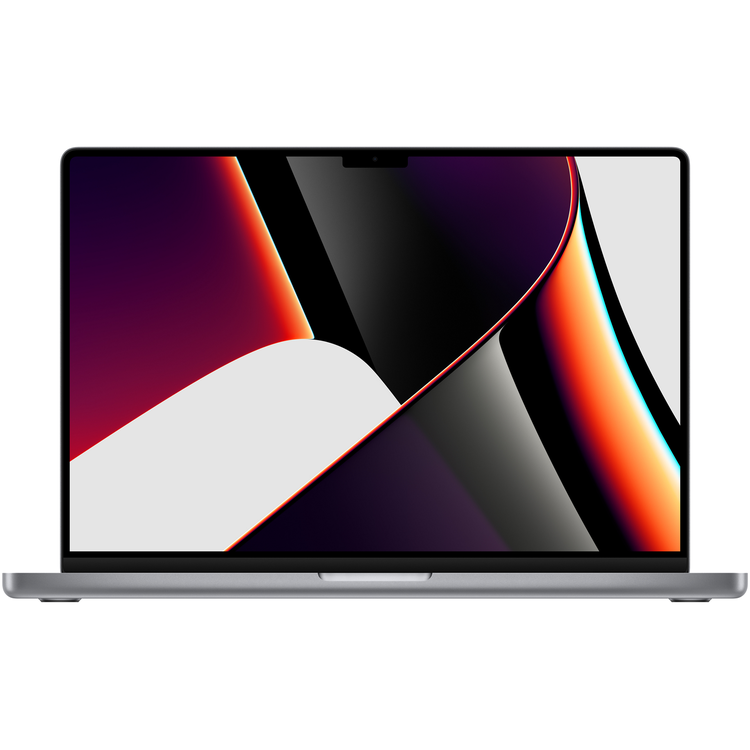
Apple Macbook Pro 16" Laptop with M1 Pro Chip - 16GB RAM - 512GB SSD - Space Grey
Apple MacBook Pro at PB Tech
- Finish
- Space Grey
- Chip
- Apple M1 Pro chip
- 10-core CPU with eight performance cores and two efficiency cores
- 16-core GPU
- 16-core Neural Engine
- 200GB/s memory bandwidth
- Media engine
- Hardware-accelerated H.264, HEVC, ProRes and ProRes RAW
- Video decode engine
- Video encode engine
- ProRes encode and decode engine
- Display
- Liquid Retina XDR display
- 16.2-inch (diagonal) Liquid Retina XDR display;[9] 3456-by-2234 native resolution at 254 pixels per inch
- XDR (Extreme Dynamic Range)
- Up to 1,000 nits sustained (full-screen) brightness, 1,600 nits peak brightness
- 1,000,000:1 contrast ratio
- Colour
- 1 billion colours
- Wide colour (P3)
- True Tone technology
- Refresh rates
- ProMotion technology for adaptive refresh rates up to 120Hz
- Fixed refresh rates: 47.95Hz, 48.00Hz, 50.00Hz, 59.94Hz, 60.00Hz
- Memory
- 16GB unified memory
- Battery and Power[2]
- Up to 21 hours Apple TV app movie playback
- Up to 14 hours wireless web
- 100-watt-hour lithium-polymer battery[2]
- 140W USB-C Power Adapter
- USB-C to MagSafe 3 Cable
- Fast-charge-capable with included 140W USB-C Power Adapter
- Storage[3]
- 512GB SSD
- Charging and Expansion
- SDXC card slot
- HDMI port
- 3.5-mm headphone jack
- MagSafe 3 port
- Three Thunderbolt 4 (USB-C) ports with support for:
- - Charging
- - DisplayPort
- - Thunderbolt 4 (up to 40 Gbps)
- - USB 4 (up to 40 Gbps)
- Video Support
- Simultaneously supports full native resolution on the built-in display in 1 billion colours and:
- Up to two external displays with up to 6K resolution at 60Hz in over a billion colours (M1 Pro), or up to three external displays with up to 6K resolution and one external display with up to 4K resolution at 60Hz in over a billion colours (M1 Max)
- Thunderbolt 4 digital video output
- Native DisplayPort output over USB-C
- VGA, HDMI, DVI and Thunderbolt 2 output supported using adapters (sold separately)
- HDMI digital video output
- Support for one display with up to 4K resolution at 60Hz
- DVI output using HDMI to DVI Adapter (sold separately)
- Keyboard and Trackpad
- Backlit Magic Keyboard with:
- 78 (US) or 79 (ISO) keys, including four arrow keys in an inverted-T arrangement and 12 full-height function keys
- Touch ID
- Ambient light sensor
- Force Touch trackpad for precise cursor control and pressure-sensing capabilities; enables Force clicks, accelerators, pressure-sensitive drawing and Multi-Touch gestures
- Wireless
- Wi-Fi
- 802.11ax Wi-Fi 6 wireless networking
- IEEE 802.11a/b/g/n/ac compatible
- Bluetooth®
- Bluetooth 5.0 wireless technology
- Camera
- 1080p FaceTime HD camera
- Advanced image signal processor with computational video
- Audio
- High-fidelity six-speaker sound system with force-cancelling woofers
- Wide stereo sound
- Support for spatial audio when playing music or video with Dolby Atmos on built-in speakers
- Spatial audio with dynamic head tracking when using AirPods (3rd generation), AirPods Pro and AirPods Max
- Studio-quality three-mic array with high signal-to-noise ratio and directional beamforming
- 3.5-mm headphone jack with advanced support for high-impedance headphones
- Operating Requirements
- Line voltage: 100V to 240V AC
- Frequency: 50Hz to 60Hz
- Operating temperature: 10° to 35° C (50° to 95° F)
- Storage temperature:-25° to 45° C (-13° to 113° F)
- Relative humidity: 0% to 90% noncondensing
- Operating altitude: Tested up to 3,000 metres (10,000 feet)
- Maximum storage altitude: 4,500 metres (15,000 feet)
- Maximum shipping altitude: 10,500 metres (35,000 feet)
- Size and Weight
- Height 1.68 cm (0.66 inch)
- Width: 35.57 cm (14.01 inches)
- Depth: 24.81 cm (9.77 inches)
- Weight (M1 Pro): 2.15 kg (4.7 pounds)[3]
- Operating System
- macOS
- macOS is the most advanced desktop operating system in the world. macOS Monterey introduces powerful new features to help you connect, share and create like never before.
- Accessibility
- Accessibility features help people with disabilities get the most out of their new MacBook Pro. With built-in support for vision, hearing, mobility and learning, you can create and do amazing things.
- Features include:
- Voice Control
- VoiceOver
- Zoom
- Increase Contrast
- Reduce Motion
- Siri and Dictation
- Switch Control
- Closed Captions
- Text to Speech
- Built-in Apps[5]
- App Store
- Books
- Calendar
- Contacts
- FaceTime
- Find My
- GarageBand
- Home
- iMovie
- Keynote
- Maps
- Messages
- Music
- Notes
- Numbers
- Pages
- Photo Booth
- Photos
- Podcasts
- Preview
- QuickTime Player
- Reminders
- Safari
- Shortcuts
- Siri
- Stocks
- Time Machine
- TV
- Voice Memos
- In the Box
- 16-inch MacBook Pro
- 140W USB-C Power Adapter
- USB-C to MagSafe 3 Cable (2 m)
- MacBook Pro and the Environment
- The 16-inch MacBook Pro is designed with the following features to reduce its environmental impact:[6]
- See the 16-inch MacBook Pro Product Environmental Report
- Made with better materials
- 100 per cent recycled aluminium in the enclosure
- 100 per cent recycled rare earth elements in all magnets, representing 98 per cent of the rare earth elements in the device
- 100 per cent recycled tin in the solder of the main logic board
- 35 per cent or more recycled plastic in multiple components
- Energy-efficient
- ENERGY STAR®-certified[7]
- Smarter chemistry[8]
- Arsenic-free display glass
- Mercury-, BFR-, PVC- and beryllium-free
- Green manufacturing
- Apple's Zero Waste Program helps suppliers eliminate waste sent to landfill
- All final assembly supplier sites are transitioning to 100 per cent renewable energy for Apple production
- Responsible packaging
- 100 per cent of virgin wood fibre comes from responsibly managed forests
- 90 per cent or more fibre-based packaging
- Recycling
- Apple takes a holistic view of materials management and waste minimisation.
- Learn more about how to recycle your Mac
- Apple and the Environment
- We're committed to making our products without taking from the earth, and to becoming carbon-neutral across our entire business, including our products, by 2030.
- See Apple's commitment
- Footnotes
- [1] The display on the 14-inch MacBook Pro has rounded corners at the top. When measured as a standard rectangular shape, the screen is 14.2 inches diagonally (actual viewable area is less).
- [2] Actual rating of 69.6 watt-hours (14-inch model) or 99.6 watt-hours (16-inch model). Testing conducted by Apple in September 2021 using preproduction 14-inch MacBook Pro systems with Apple M1 Pro, 8-core CPU, 14-core GPU, 16GB of RAM and 512GB SSD; and preproduction 16-inch MacBook Pro systems with Apple M1 Pro, 10-core CPU, 16-core GPU, 16GB of RAM and 1TB SSD. The wireless web test measures battery life by wirelessly browsing 25 popular websites with display brightness set to eight clicks from bottom. The Apple TV app movie playback test measures battery life by playing back HD 1080p content with display brightness set to eight clicks from bottom. Battery life varies by use and configuration; see apple.com/nz/batteries for more information.
- [3] 1GB = 1 billion bytes and 1TB = 1 trillion bytes; actual formatted capacity less.
- [4] Weight varies by configuration and manufacturing process.
- [5] iMovie, GarageBand, Pages, Numbers and Keynote are available on the Mac App Store. Downloading apps requires an Apple ID and a device that is compatible with the OS version required for each app.
- [6] Data accurate as of product launch.
- [7] ENERGY STAR and the ENERGY STAR mark are registered trademarks owned by the US Environmental Protection Agency.
- [8] Apple defines its restrictions on harmful substances, including definitions for what Apple considers to be 'free of', in the Apple Regulated Substances Specification. Every Apple product is free of PVC and phthalates with the exception of AC power cords in India, Thailand (for two-prong AC power cords) and South Korea, where we continue to seek government approval for our PVC and phthalates replacement.
- [9] The display on the 16-inch MacBook Pro has rounded corners at the top. When measured as a standard rectangular shape, the screen is 16.2 inches diagonally (actual viewable area is less).
As an international traveller you are entitled to bring a certain amount/value of goods that are free of Customs duty and exempt Goods and Services tax (GST) into New Zealand. This is called your duty free allowance and personal goods concession. It is important to review these for any purchases you make on The Mall.
Your duty free allowance entitles you to bring into New Zealand the following quantities of alcohol products free of customs duty and GST provided you are over 17 years of age. You do need to be 18 years or over to purchase.
- Up to six bottles (4.5 litres) of wine, champagne, port or sherry or
- Up to twelve cans (4.5 litres) of beer
- And three bottles (or other containers) each containing not more than 1125ml of spirits, liqueur, or other spirituous beverages
Goods other than alcohol and tobacco, whether purchased overseas or purchased duty free in New Zealand, that have a combined total value not exceeding NZ$700 may also be brought as part of your personal goods concession.
When travelling overseas there are legal limits on the amount of duty free alcohol and other goods you can take with you. These amounts will vary depending on the country you are flying into. We always recommend you check the latest limits and exemptions.
Your order can be picked up at an Auckland Airport Collection Point. There is one in departures and one at arrivals in the international terminal. Alternatively, if you are arriving between 11pm and 6am you will be able to collect your order from our lockers. See map
Please bring your order confirmation email and your passport. If you are collecting from lockers you will have been sent an email with your access code, be sure to have this on you in order to collect your order.
If you’re departing Auckland Airport, we recommend that you come to the Auckland Airport Collection Point at least 60 minutes before your flight. If you miss your pickup time or your flight details have changed please let us know as soon as possible.
When you collect your order you will have the opportunity to inspect the items and sign for them.
If you need to return an item, our Collection Point team are there to help you. If you are collecting after hours please return the item to your locker and our team will be in touch as soon as possible. You may also like to view our Returns & refunds which provides information on how this works and outlines the individual retailer's returns and refunds policies.
After Hours Collections
If your order needs to be collected after the Auckland Airport Collection Point desk is closed, your order will be placed in the lockers next to the desk. All the details you will need to collect your order will be provided in your Order Confirmation and Ready to Collect Email.