










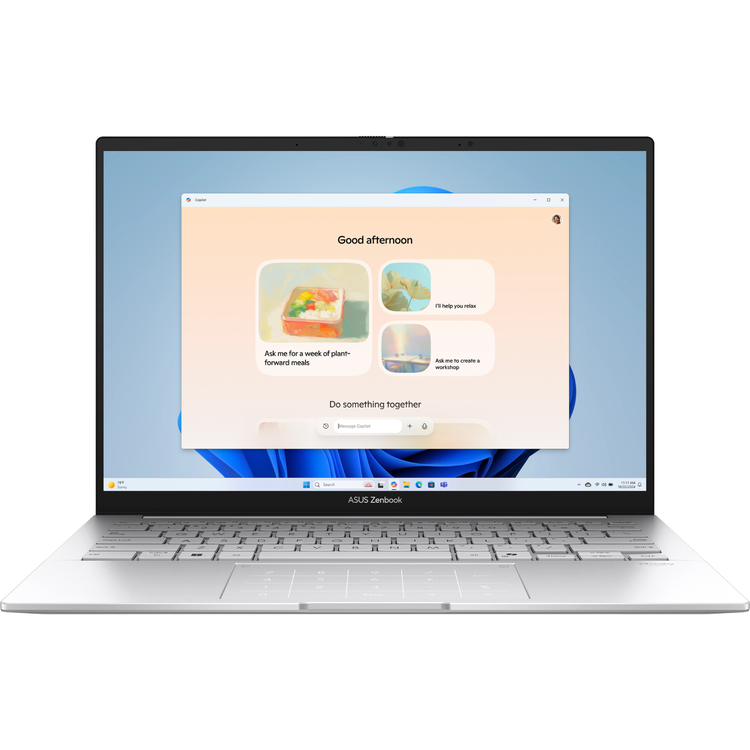
ASUS Zenbook 14 UX3405CA 14" 3K 120Hz Touch OLED Business Laptop - 32GB RAM - 1TB SSD
ASUS Zenbook 14 - New Zen with AI Go the extra mile with the remarkably sleek Zenbook 14 - the ultimate ultraportable laptop that takes sophistication to a whole new level. Seize every moment using the enhanced extended-life battery, amplify your efficiency with the top-tier Intel® Core™ Ultra processor (Series 2) and Intel Arc™ graphics, and achieve seamless connectivity via all the essential ports. Immerse your senses in the vivid ASUS Lumina OLED touchscreen and powerful new Super-linear speakers, while embracing the eco-elegance of the environmentally conscious design.
Mobility - Enjoy your freedom Enjoy uncompromising mobility with the sleek, lightweight, and sturdy all-metal design. The specially crafted seamless finish on the sides offers a smoother touch experience. Zenbook 14 is always ready for any challenge, anywhere! - 14.9 mm thin
Battery - All day, every day Untether yourself from the mains and be productive everywhere. Zenbook 14 has the day-long stamina you need, and more. And when it's time for a top-up, USB-C Easy Charge makes it ultra-quick and ultra-convenient! - 75 Wh
battery capacity- Up to 1.2x battery lifespan- 60% in 49 mins Fast Charging technology
Performance - Unleash new AI experiences Effortlessly tackle tasks with the AI-enhanced multitasking prowess of Zenbook 14. With the integrated NPU AI engine in the Intel Core Ultra processor, AI-based apps will fly, and its ultrafast 1 TB SSD storage, 32 GB RAM and Wi-Fi 7 mean you'll wait less and be able work faster, wherever you are. - Windows 11
Pro- Intel Core™ Ultra 9 (Series 2) processor- Built-in Intel Arc™ graphic- Intel® AI Boost NPU- Up to 5.4 GHz with total 16 cores- Up to 13 TOPS NPU- Up to 30 W CPU TDP
Display - View the incredible The ultra-vivid 2880 by 1800 ASUS Lumina OLED display makes every moment incredible, with its up to 600-nit brightness, web-friendly 16:10 aspect ratio, and 87% screen-to-body ratio. And adaptive sync automatically adjusts the refresh rate for always-smooth visuals.
More AccurateASUS Lumina OLED offers industry-standard colours, deep blacks, and exceptional detail.
More AdaptiveASUS Lumina OLED provides customisable visuals, power-saving solutions and sharpened playback.
More ReliableASUS Lumina OLED ensures eye protection, burn-in prevention and panel durability.
Leading 120 Hz motion clarityMore frames per second, so fast-moving visuals are smoother and clearer than ever.
Perfect brightness and colour tone!Automatically adjust screen brightness and colour tone for your eye comfort.
Corning® Gorilla® GlassA display surface that's six times more durable than ordinary laptop glass.
Audio - Everything sounds better Whatever you're listening to, the powerful, crystal-clear sound delivered by the Super-linear speakers, Smart Amplifier and ASUS Audio Booster will give your ears a treat.
Keyboard - More comfort, less distraction Our revolutionary Quiet Keyboard technology elegantly eliminates intrusive noises, benefiting both your personal space and those in your vicinity. And a touch on the emoji hotkey will infuse your conversations with vibrant expression. For easy number-crunching, the touchpad includes the ASUS NumberPad 2.0 virtual numeric keypad. - Quiet Keyboard- Emoji Hotkey- Anti-fingerprint touchpad
Wireless Connectivity - Better connectivity, and stable transmission Zenbook 14 is equipped with the latest Wi-Fi 7 for the very best wireless connections - up to 4.8x faster than the previous Wi-Fi generation. Your laptop will automatically link to the strongest Wi-Fi signal, and use all the available bandwidth efficiently. And with support for up to three simultaneous Bluetooth® headphone connections on one device, you'll also experience better communications and more enjoyable entertainment. - Up to 5.8 Gbps transfer speed- Multi-link Operation technology- Multi-RU technology- Preamble Puncturing technology
I/O Ports - Convenient connections Zenbook 14 includes all the essential full-function ports you need for fast and seamless on-the-go connections, so you don't need to carry annoying dongles and adapters. There's even a convenient audio combo jack!
Smart Conferencing - Look amazing, sound great You'll always look and sound your best with our innovative AI-enhanced camera and audio systems. Best online meeting experienceThe ASUS AI camera makes sure that you always look your best during virtual conferences.
Hear and be heard clearlyTwo-Way AI Noise Cancellation leverages a massive deep-learning database to reduce background noise for microphone and audio.
Privacy - Protect your privacy Stay secure with the camera privacy shield and fast, password-free face login. Unlock, instantlyWindows Hello Infrared (IR) camera allows you to unlock your laptop quickly and securely.
Physical webcam privacy shieldThe integrated privacy shield slides over the webcam for instant privacy protection against prying eyes and disturbances.
Software - Truly personalised workflow ASUS offers a suite of software designed to take your computing experience up a notch. MyASUS provides a collection of handy apps and tools that help you get more out of your laptop, while GlideX enables you to get more done by sharing screens across devices. Plus, ScreenXpert helps you manage app windows across all connected displays for a smoother workflow.
MyASUSMyASUS provides easy access to ASUS apps that are designed to help you maintain your system, update your software, optimise your PC's performance, and contact ASUS for after-sales support.- Device Setting- ASUS Switch- Customer Support- System Update- One-Click System Diagnosis
GlideXGlideX is a cross-device screen-sharing solution that uses wired or wireless connections to give you a bigger and better space for work and play. GlideX optimises your workflow in the blink of an eye!- Mirror- Extend (PC to Mobile)- Extend (PC to PC)- Unify Control- File Transfer- Communication
ScreenXpert for ASUS PCsScreenXpert for ASUS PCs - which you can download from Microsoft Store or find in your PC's Start menu - helps you to manage app windows across displays connected to your ASUS PC and puts you in full control of your workflow!- App Switcher- App Navigator- Control Center?- Cursor Locator- Cursor Edge Lock
- Operating System
- Windows 11 Pro
- Processor
- Intel® Core™ Ultra 9 Processor 285H 2.9 GHz (24MB Cache, up to 5.4 GHz, 16 cores, 16 Threads); Intel® AI Boost NPU up to 13TOPS
- Graphics
- Intel® Arc™ Graphics
- Neural Processor
- Intel® AI Boost NPU up to 13TOPS
- Display
- 14.0-inch, 3K (2880 x 1800) OLED 16:10 aspect ratio, 0.2ms response time, 120Hz refresh rate, 400nits, 500nits HDR peak brightness, 100% DCI-P3 color gamut, 1,000,000:1, VESA CERTIFIED Display HDR True Black 500, 1.07 billion colors, Glossy display, 70% less harmful blue light, TÜV Rheinland-certified, SGS Eye Care Display, Touch screen, (Screen-to-body ratio)87%, With stylus support
- Memory
- 32GB LPDDR5X on board
- Max Total system memory up to:32GB
- *Supports dual-channel memory.
- Storage
- 1TB M.2 NVMe™ PCIe® 4.0 SSD
- Expansion Slots (includes used)
- 1x M.2 2280 PCIe 4.0x4
- I/O Ports
- 1x USB 3.2 Gen 1 Type-A (data speed up to 5Gbps)
- 2x Thunderbolt™ 4 with support for display / power delivery (data speed up to 40Gbps)
- 1x HDMI 2.1 TMDS
- 1x 3.5mm Combo Audio Jack
- Keyboard & Touchpad
- Backlit Chiclet Keyboard, 1.4mm Key-travel, Precision touchpad, support NumberPad
- Camera
- FHD camera with IR function to support Windows Hello
- With privacy shutter
- Audio
- Smart Amp Technology
- Built-in speaker
- Built-in array microphone
- Network and Communication
- Wi-Fi 7(802.11be) (Tri-band)2*2 + Bluetooth® 5.4 Wireless Card (*Bluetooth® version may change with OS version different.)
- Battery
- 75WHrs, 2S2P, 4-cell Li-ion
- Power Supply
- TYPE-C, 65W AC Adapter, Output: 20V DC, 3.25A, 65W, Input: 100-240V AC 50/60GHz universal
- Weight
- 1.28 kg (2.82 lbs)
- Dimensions (W x D x H)
- 31.24 x 22.01 x 1.49 ~ 1.49 cm (12.30" x 8.67" x 0.59" ~ 0.59")
- Built-in Apps
- MyASUS
- ScreenXpert
- GlideX
- MyASUS Features
- System diagnosis
- Battery health charging
- Fan Profile
- Splendid
- Function key lock
- WiFi SmartConnect
- Link to MyASUS
- TaskFirst
- Live update
- ASUS OLED Care
- AI Noise Canceling
- Military Grade
- US MIL-STD 810H military-grade standard
- Ecolabels & Compliances
- EPEAT Gold
- Energy star 8.0
- RoHS
- REACH
- Security
- Trusted Platform Module (Firmware TPM)
- McAfee®
- IR webcam with Windows Hello support
- Disclaimer
- This product has only been tested for compatibility with the Windows 11 operating system, and may encounter compatibility issues if Windows 10 or older OS versions are installed.
As an international traveller you are entitled to bring a certain amount/value of goods that are free of Customs duty and exempt Goods and Services tax (GST) into New Zealand. This is called your duty free allowance and personal goods concession. It is important to review these for any purchases you make on The Mall.
Your duty free allowance entitles you to bring into New Zealand the following quantities of alcohol products free of customs duty and GST provided you are over 17 years of age. You do need to be 18 years or over to purchase.
- Up to six bottles (4.5 litres) of wine, champagne, port or sherry or
- Up to twelve cans (4.5 litres) of beer
- And three bottles (or other containers) each containing not more than 1125ml of spirits, liqueur, or other spirituous beverages
Goods other than alcohol and tobacco, whether purchased overseas or purchased duty free in New Zealand, that have a combined total value not exceeding NZ$700 may also be brought as part of your personal goods concession.
When travelling overseas there are legal limits on the amount of duty free alcohol and other goods you can take with you. These amounts will vary depending on the country you are flying into. We always recommend you check the latest limits and exemptions.
Your order can be picked up at an Auckland Airport Collection Point. There is one in departures and one at arrivals in the international terminal. Alternatively, if you are arriving between 11pm and 6am you will be able to collect your order from our lockers. See map
Please bring your order confirmation email and your passport. If you are collecting from lockers you will have been sent an email with your access code, be sure to have this on you in order to collect your order.
If you’re departing Auckland Airport, we recommend that you come to the Auckland Airport Collection Point at least 60 minutes before your flight. If you miss your pickup time or your flight details have changed please let us know as soon as possible.
When you collect your order you will have the opportunity to inspect the items and sign for them.
If you need to return an item, our Collection Point team are there to help you. If you are collecting after hours please return the item to your locker and our team will be in touch as soon as possible. You may also like to view our Returns & refunds which provides information on how this works and outlines the individual retailer's returns and refunds policies.
After Hours Collections
If your order needs to be collected after the Auckland Airport Collection Point desk is closed, your order will be placed in the lockers next to the desk. All the details you will need to collect your order will be provided in your Order Confirmation and Ready to Collect Email.