










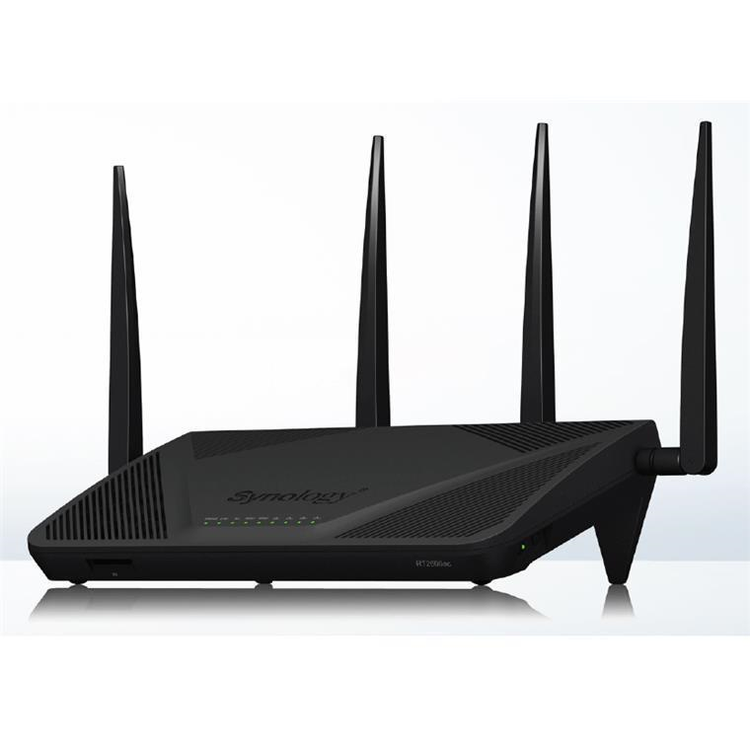
Synology RT2600ac Router 4x4 MIMO - Dual Core 1.7GHz CPU - 4x GbE LAN - 1x GbE WAN - 1x USB3.0 Port - 1x SD Card Slot - Fibre (UFB) Ready
Synology Router RT2600ac Blazing-fast Wi-Fi with up to 2.53Gbps combined wireless bandwidth to supercharge your Internet experience. RT2600ac is a powerful wireless router for homes and small offices seeking to understand, control, and secure their network. Now coming with mesh Wi-Fi technology, its coverage becomes easily expandable with additional Synology MR2200ac.
Engineered for performance Supporting MU-MIMO and the latest 802.11ac Wave 2 standard, RT2600ac enables up to 800Mbps and 1733Mbps on the 2.4GHz and 5GHz radios respectively. Reach 2Gbps combined bandwidth with Dual WAN,1 and easily optimize your network with minimal performance loss even with app-based traffic control.
Top software experience The soul of RT2600ac is the Synology Router Manager (SRM). It takes the complexity out of your network, and makes what's happening in the traffic visible and straightforward. Streamlined setup Whether you're doing it from a smartphone or computer, setting up RT2600ac is a breeze. Getting your Internet up and running takes just a couple of minutes. Powerful Connectivity Management Smart WAN allows RT2600ac to fail-over or load-balance between dual ISP connections to ensure Internet availability, whereas QuickConnect makes enabling remote access incredibly simple. Granular Traffic Control App- and device-based Quality of Service (QoS) lets you set higher bandwidth for gaming or VoIP applications while throttling BitTorrent downloads. Real-time and historical traffic data are organized into easy-to-read charts and reports, so you can identify any bottlenecks or anomalies. Wi-Fi made smarter RT2600ac's excellent Wi-Fi throughput is backed by a modern experience - automatic, scalable, and highly customizable.
Intelligent web filtering &; parental controls The Safe Access package on RT2600ac doesn't only offer a free cross-platform solution for you to create a kid-friendly online world. It also gives you a better understanding of each user and device's Internet usage, including those IoT gadgets silently working in the background. Profiles Create a user profile to manage all devices someone owns at once, while letting LAN and guest Wi-Fi profiles take care of other unspecified devices connecting to your network. Time management Set time limits and schedules. Encourage your kids to use their time wisely, and reserve some quality time for family. Internet filtering Safeguard kids from adult-only content and search results, or even set up a whitelist of approved websites for younger children. Web filters can be scheduled to ensure no social media during homework hours.
Usage insights Any device accessing the Internet in the middle of the night when they shouldn't be, or anyone being blocked by web filters? You see it here.
Business-grade security In addition to a track record of fast and continuous updates to guard itself against emerging threats, RT2600ac boasts a series of advanced features to protect the entire network from the router level. Threat Prevention Leveraging intrusion prevention technology, Threat Prevention inspects incoming and outgoing traffic on your network and automatically blocks malicious packets from passing through - all while retaining stellar Internet speeds. 2 Built-in Security Databases Integrating Google Safe Browsing and other DNS and IP threat intelligence databases, Safe Access prevents devices from accidentally accessing websites related to malware, phishing, botnets, social engineering, and more.
Best-in-class VPN server VPN Plus's Synology SSL VPN and WebVPN give you fast, intuitive, and secure access to your internal network, whereas site-to-site VPN allows you to connect multiple remote offices together. A long list of other supported protocols and management functionality is available to give IT admins better control over VPN connections. 4
More possibilities Download more add-on packages to expand the capability of RT2600ac, or manage them on the go via DS router and other mobile apps from Synology.
Shared network storage Time Machine backup, remote file sharing, media server, and much more. Turn your RT2600ac into family storage and a personal cloud. 2 5 Learn more
Be mobile Stay on top of the traffic usage, user activities, and security events wherever you are, and act on them with just one tap on the phone.
Notes: 1. Two or more connections must be established.2. External storage is required.3. Client support for WPA3 is required for compatibility.4. Access for one concurrent account is available for free and shared by WebVPN, Synology SSL VPN, and SSTP. Client VPN Access License is available to add more concurrent accounts. The Site-to-Site VPN feature also requires a license to activate. A one-time 30-day trial is available to each Synology Router. Other VPN protocols and management features are free of charge.5. USB 3.0 can reach 107 MB/s for EXT4, 103 MB/s for FAT32, and 83.8 MB/s for NTFS. Performance may vary depending on the type of device attached and on actual system usage and settings.
- CPU
- Dual core 1.7 GHz
- L4/L7 Hardware Acceleration Engine
- Yes
- Memory
- 512 MB DDR3
- Antenna type
- 4x4 MIMO Omni-directional high-gain dipole (2.4GHz / 5GHz)
- LAN port
- Gigabit (RJ-45) x 4
- Gigabit (RJ-45) x 3 (Dual WAN)
- WAN port
- Gigabit (RJ-45) x 1
- Gigabit (RJ-45) x 2 (Dual WAN)
- External Ports
- USB 3.0 x 1 (5V, 0.9A power output)
- USB 2.0 x 1 (5V, 0.5A power output)
- SD card reader x 1 (SDXC, SDHC)
- Button and switch
- WPS, USB/SD eject, Power, Reset, Wi-Fi On/Off
- Size (Height x Width x Depth)
- 77 mm x 280 mm x 169 mm
- Note
- The listed sizes of the RT1900ac and RT2600ac don't include the antennas
- Weight
- 0.7 kg
- Operating Temperature
- 5°C to 40°C (40°F to 104°F)
- Storage Temperature
- -20°C to 60°C (-5°F to 140°F)
- Relative Humidity
- 5% to 95% RH
- Certification
- FCC
- CE
- BSMI
- VCCI Class B
- CCC
- RCM
- KC
- iDA
- Wi-Fi Certification
- CE
- FCC
- NCC
- RCM
- iDA
- TELEC
- KC
- AC Input Power Voltage
- 100V to 240V AC
- Power Frequency
- 50/60 Hz, Single Phase
- Power Consumption*
- 10.80 W (Access)
- 7.94 W (Idle)
- IEEE 802.11ac
- IEEE 802.11a/b/g/n/ac
- Simultaneous dual-band Wi-Fi
- 2.4GHz: 800Mbps
- 5GHz: 1.73Gbps
- IEEE 802.11ac wave 2
- MU-MIMO
- 2x2 160 MHz (contiguous 80 + 80 MHz)
- 2x2 80 + 80 MHz (discontiguous)
- Note
- 2x2 160 MHz (contiguous 80 + 80 MHz) is not supported in Japan
- Wi-Fi Encryption
- WEP, WPA/WPA2-Personal, WPA/WPA2-Enterprise, WPA2/WPA3-Personal, WPA3-Personal/Enterprise, OWE
- Wi-Fi MAC address filter
- Yes
- Maximum MAC filters
- 64
- Seamless roaming
- 802.11k/v/r standard support
- Beamforming
- Yes
- DFS
- Yes
- WDS
- Yes
- Schedulable Wi-Fi
- Yes
- Guest Network
- Yes
- Guest Portal
- Yes
- Customized page style
- Yes
- Connection time limit
- Yes
- Password Rotation
- Yes
- WPS 2.0 (Wi-Fi Protected Setup 2.0)
- Yes
- 3G/4G Dongle & Tethering (Learn more)
- Yes
- Maximum connected devices 100
- Yes
- Note
- In real-world testing, at least 120 devices can be concurrently connected to RT2600ac
- Not all of the connected 120 devices are transmitting data, some remained idle
- RT2600ac supports at least 100 connected devices concurrently transmitting data
- The numbers above are for reference only. Actual performance and behavior may depend on network environment and settings
- Primary Wi-Fi Point
- Yes
- Internet connection
- Dynamic IP, Static IP, PPPoE, PPTP, DS-Lite (AFTR)
- 3G/4G LTE dongle
- Yes
- Android tethering
- Yes
- iPhone tethering
- Yes
- Note
- iPhone tethering only supported your Synology Router running SRM 1.2 or above
- Operating mode
- Wireless Router
- Wireless AP
- Wireless Repeater (WDS)
- Port forwarding
- Setup via manual management or UPnP
- Maximum port forwarding rules
- 64
- Maximum UPnP rules
- 64
- Port triggering
- Yes
- Maximum port triggering rules
- 32
- Minimum port triggering timeout
- 30s
- Maximum port triggering timeout
- 3600s
- DMZ
- Yes
- IPv6
- IPv6 DHCP server / client, DS-Lite, 6in4, 6to4, 6rd, Dual-Stack, DHCPv6-PD, IPv6 Relay, FLET's IPv6
- DHCP
- Server/client mode, client list, MAC address reservation
- Maximum DHCP reservations
- 500
- LAN/WLAN IGMP snooping
- Yes
- VPN
- VPN server (WebVPN, SSL VPN, SSTP, OpenVPN, L2TP/IPSec, PPTP, Site-to-Site)
- VPN client (PPTP, OpenVPN, L2TP/IPSec)
- VPN Pass-through (PPTP, IPSec, L2TP)
- Policy route, Static route, Network Address Translation (NAT), PPPoE relay
- Maximum IPv4 static routes
- 100
- Maximum IPv6 static routes
- 100
- Diagnosis tools
- Ping
- Traceroute
- User Profile
- 15
- Network Profile
- 2
- Customized Internet schedule
- Yes
- Time Quota
- Yes
- IPv4/IPv6 DNS-based web filter
- Schedule
- Database
- Request to unblock
- Customized allow/block list
- Maximum blocked URLs: 100
- Maximum allowed URLs: 100
- Pause Internet
- Yes
- Reward
- Yes
- Log
- Yes
- Report
- Yes
- Security
- Yes
- Safe Search
- Bing, Google, YouTube
- Threat Intelligence Database
- support in IPv4 & IPv6
- Google Safe Browsing
- support in IPv4 & IPv6
- Database auto update
- Threat Intelligence Database, Google Safe Browsing, DNS-based web filter
- Internet ban, device speed & priority
- Yes
- Application layer (L7) quality of service (QoS)
- Yes
- Maximum device rules
- 64
- Maximum application rules per device
- 32
- Traffic Monitor
- Yes
- Live view
- Yes
- Historical statistics
- Daily, Weekly, Monthly, Annual
- Website history
- Yes
- Application Detection
- Yes
- Traffic Report
- Yes
- Country auto update
- Yes
- Schedulable
- Yes
- Traffic analysis period
- Daily, Weekly, Monthly, Annual
- Export formats
- .CSV, .HTML
- VPN Plus Server
- Easily create and manage secure VPN access through a web browser or client. Supports various VPN services - Site-to-Site VPN, WebVPN, SSL VPN, Remote Desktop, SSTP, OpenVPN, L2TP over IPSec, and PPTP
- Maximum Client VPN Access License
- 20
- Site-to-Site VPN
- Yes
- Maximum Site-to-Site VPN Tunnels
- 10
- Remote Desktop (RDP + VNC)
- 3
- Connection List
- Yes
- Log
- Yes
- Report
- Yes
- Threat Prevention
- Greatly enhance the security of your router, designed to safeguard your network against internet threats
- Support
- Yes
- Cloud Station Server
- Sync data from multiple platforms, centralizing it on the router while easily keeping historical versions of important files
- Maximum Concurrent File Transfers
- 128
- Note
- Cloud Station ShareSync is not supported
- DNS Server
- Helps users find and translate domain names into IP addresses
- Download Station
- Supported download protocols: BT/HTTP/FTP/NZB/eMule
- Maximum concurrent download tasks
- 50
- Maximum concurrent BT download tasks
- 20
- Media Server (DLNA/UPnP®)
- Media indexing
- DLNA Compliance
- PS3/PS4/Xbox 360/Xbox One supported
- RADIUS Server
- Provides centralized authentication, authorization, and accounting for wireless network access
- DS router (Android/iOS)
- First Time Installation
- Network overview
- Wi-Fi management
- Wi-Fi system topology
- Safe Access
- Traffic Control
- Network security (firewall, port forwarding, Internet ban)
- Wake on LAN
- System Update
- VPN Plus (Android/iOS)
- Yes
- DS cloud (Android/iOS)
- Yes
- DS get (Android)
- Yes
- DS file (Android/iOS)
- Yes
- Operating system
- Synology Router Manager (SRM)
- Free OS upgrade
- Yes
- Anywhere access to SRM
- Synology QuickConnect & Dynamic DNS (DDNS)
- Security
- Firewall/SPI Firewall, DoS Protection, VPN Pass-through (PPTP, IPSec, L2TP), Auto block, SSL certificate, Security Advisor, two-factor authentication
- Wake on LAN (WOL)
- Yes
- WOL over QuickConnect
- Yes
- Maximum connected devices
- 100
- Notification
- Email, SMS, push service (via DS router)
- SSH
- Yes
- SNMP
- Yes
- Configuration backup & restore
- Yes
- User account management
- Yes
- Printer server
- Maximum printer: 1
- File System
- EXT4, FAT, NTFS, HFS+
- Access support
- File explorer (via LAN only)
- Web browsers: Chrome™, Firefox®, Internet Explorer®: 11 onwards, Safari® 11 onwards
- Mobile device: DS file
- Protocol support
- Windows file service (CIFS), Mac file service (AFP), FTP/FTPS, WebDAV
- Apple Time Machine
- Yes
- Shared Folder privileges
- Yes
- Storage hibernation
- Yes
- Environment
- RoHS Compliant
- Packaging Content
- Main Unit X 1
- Antenna X 4
- AC Power Adapter X 1
- RJ-45 LAN Cable X 1
- Quick Installation Guide X 1
As an international traveller you are entitled to bring a certain amount/value of goods that are free of Customs duty and exempt Goods and Services tax (GST) into New Zealand. This is called your duty free allowance and personal goods concession. It is important to review these for any purchases you make on The Mall.
Your duty free allowance entitles you to bring into New Zealand the following quantities of alcohol products free of customs duty and GST provided you are over 17 years of age. You do need to be 18 years or over to purchase.
- Up to six bottles (4.5 litres) of wine, champagne, port or sherry or
- Up to twelve cans (4.5 litres) of beer
- And three bottles (or other containers) each containing not more than 1125ml of spirits, liqueur, or other spirituous beverages
Goods other than alcohol and tobacco, whether purchased overseas or purchased duty free in New Zealand, that have a combined total value not exceeding NZ$700 may also be brought as part of your personal goods concession.
When travelling overseas there are legal limits on the amount of duty free alcohol and other goods you can take with you. These amounts will vary depending on the country you are flying into. We always recommend you check the latest limits and exemptions.
Your order can be picked up at an Auckland Airport Collection Point. There is one in departures and one at arrivals in the international terminal. Alternatively, if you are arriving between 11pm and 6am you will be able to collect your order from our lockers. See map
Please bring your order confirmation email and your passport. If you are collecting from lockers you will have been sent an email with your access code, be sure to have this on you in order to collect your order.
If you’re departing Auckland Airport, we recommend that you come to the Auckland Airport Collection Point at least 60 minutes before your flight. If you miss your pickup time or your flight details have changed please let us know as soon as possible.
When you collect your order you will have the opportunity to inspect the items and sign for them.
If you need to return an item, our Collection Point team are there to help you. If you are collecting after hours please return the item to your locker and our team will be in touch as soon as possible. You may also like to view our Returns & refunds which provides information on how this works and outlines the individual retailer's returns and refunds policies.
After Hours Collections
If your order needs to be collected after the Auckland Airport Collection Point desk is closed, your order will be placed in the lockers next to the desk. All the details you will need to collect your order will be provided in your Order Confirmation and Ready to Collect Email.