










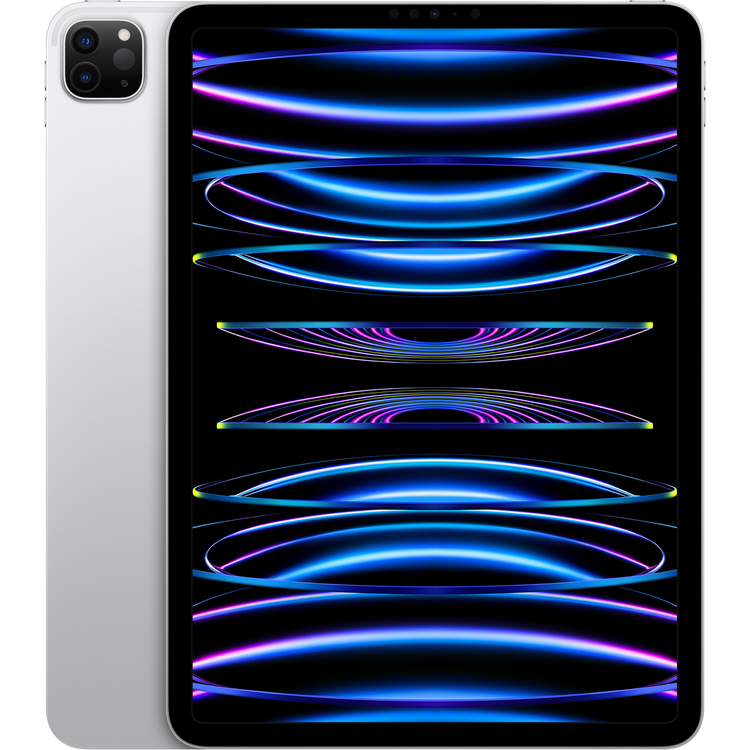


Apple iPad Pro at PB Tech
- Finish
- Silver
- Capacity
- 2TB
- Size
- 247.6 mm Length x 178.5 mm Width x 5.9 mm Thick, 466grams
- Weight
- 466 grams
- In the Box
- iPad Pro
- USB-C Charge Cable (1 metre)
- 20W USB-C Power Adapter
- Display
- Liquid Retina display
- 11-inch (diagonal) LED-backlit Multi-Touch display with IPS technology
- 2388-by-1668-pixel resolution at 264 pixels per inch (ppi)
- ProMotion technology
- Wide colour display (P3)
- True Tone display
- Fingerprint-resistant oleophobic coating
- Fully laminated display
- Antireflective coating
- 1.8% reflectivity
- SDR brightness: 600 nits max
- Supports Apple Pencil (2nd generation)
- Apple Pencil hover
- The 11-inch iPad Pro display has rounded corners that follow a beautiful curved design, and these corners are within a standard rectangle. When measured as a standard rectangular shape, the screen is 11 inches diagonally (actual viewable area is less).
- Chip
- Apple M2 chip
- 8-core CPU with four performance cores and four efficiency cores
- 10-core GPU
- 16-core Neural Engine
- 100GB/s memory bandwidth
- 8GB RAM on models with 128GB, 256GB or 512GB storage
- 16GB RAM on models with 1TB or 2TB storage
- Media engine
- Hardware-accelerated H.264, HEVC, ProRes and ProRes RAW
- Video decode engine
- Video encode engine
- ProRes encode and decode engine
- Camera
- Pro camera system: Wide and Ultra Wide cameras
- Wide: 12MP, ƒ/1.8 aperture
- Ultra Wide: 10MP, ƒ/2.4 aperture and 125° field of view
- 2x optical zoom out
- Digital zoom up to 5x
- Five-element lens (Wide and Ultra Wide)
- Brighter True Tone flash
- Panorama (up to 63MP)
- Sapphire crystal lens cover
- Autofocus with Focus Pixels (Wide)
- Smart HDR 4
- Wide colour capture for photos and Live Photos
- Lens correction (Ultra Wide)
- Advanced red-eye correction
- Photo geotagging
- Auto image stabilisation
- Burst mode
- Image formats captured: HEIF and JPEG
- Video Recording
- 4K video recording at 24 fps, 25 fps, 30 fps or 60 fps (Wide)
- 1080p HD video recording at 25 fps, 30 fps or 60 fps
- 720p HD video recording at 30 fps
- ProRes video recording up to 4K at 30 fps (1080p at 30 fps for 128GB storage)
- 2x optical zoom out
- Audio zoom
- Brighter True Tone flash
- Slow-motion video support for 1080p at 120 fps or 240 fps
- Time-lapse video with stabilisation
- Extended dynamic range for video up to 30 fps
- Cinematic video stabilisation (4K, 1080p and 720p)
- Continuous autofocus video
- Playback zoom
- Video formats recorded: HEVC and H.264
- Stereo recording
- TrueDepth Camera
- 12MP Ultra Wide camera, 122° field of view
- ƒ/2.4 aperture
- Portrait mode with advanced bokeh and Depth Control
- Portrait Lighting with six effects (Natural, Studio, Contour, Stage, Stage Mono and High-Key Mono)
- Animoji and Memoji
- Smart HDR 3
- 1080p HD video recording at 25 fps, 30 fps or 60 fps
- Time-lapse video with stabilisation
- Extended dynamic range for video up to 30 fps
- Cinematic video stabilisation (1080p and 720p)
- Wide colour capture for photos and Live Photos
- Lens correction
- Retina Flash
- Auto image stabilisation
- Burst mode
- Video Calling
- FaceTime video
- Centre Stage
- iPad to any FaceTime-enabled device over Wi-Fi or a mobile network
- Audio Calling
- FaceTime audio
- iPad to any FaceTime-enabled device over Wi-Fi or a mobile network
- Speakers
- Four Speaker Audio
- Microphones
- Five studio-quality microphones for calls, video recording and audio recording
- Location
- Digital compass
- Wi-Fi
- iBeacon microlocation
- Sensors
- Face ID
- LiDAR Scanner
- Three-axis gyro
- Accelerometer
- Barometer
- Ambient light sensor
- Face ID
- Enabled by the TrueDepth camera for facial recognition
- Unlock iPad
- Secure personal data within apps
- Make purchases from the iTunes Store, the App Store and Apple Books
- Apple Pay
- Pay with your iPad using Face ID within apps and on participating websites
- Siri
- Use your voice to send messages, set reminders and more
- Get proactive suggestions
- Use hands-free
- Charging and Expansion
- Thunderbolt/USB 4 port with support for:
- Charging
- DisplayPort
- Thunderbolt 3 (up to 40 Gbps)
- USB 4 (up to 40 Gbps)
- USB 3.1 Gen 2 (up to 10 Gbps)
- Listen to and identify songs
- Display Support
- Supports full native resolution on the built-in display in millions of colours
- Supports one external display with up to 6K resolution at 60Hz
- Thunderbolt 3 digital video output
- Native DisplayPort output over USB-C
- VGA, HDMI, DVI and Thunderbolt 2 output supported using adapters (sold separately)
- Video mirroring
- Up to 4K AirPlay for mirroring, photos and video out to Apple TV (2nd generation or later) or AirPlay 2-enabled smart TV
- Video mirroring and video out support through USB-C Digital AV Multiport Adapter and USB-C VGA Multiport Adapter (adapters sold separately)
- Power and Battery
- Built-in 28.65-watt-hour rechargeable lithium-polymer battery
- Up to 10 hours of surfing the web on Wi-Fi or watching video
- Charging via USB-C to a computer system or power adapter
- Operating System
- iPadOS 16
- iPadOS comes with powerful features and built-in apps designed to take advantage of the unique capabilities of iPad.
- Accessibility
- Built-in accessibility features supporting vision, mobility, hearing and cognitive disabilities help you get the most out of your iPad.
- Features include:
- VoiceOver
- Zoom
- Magnifier
- Spoken Content
- Voice Control
- Switch Control
- AssistiveTouch
- Siri and Dictation
- Type to Siri
- Real-Time Text
- Audio Descriptions
- Subtitles and Closed Captioning
- Built-in Apps
- App Store
- Books
- Calendar
- Camera
- Clock
- Contacts
- FaceTime
- Files
- Find My
- Home
- iTunes Store
- Magnifer
- Maps
- Measure
- Messages
- Music
- Notes
- Photo Booth
- Photos
- Podcasts
- Reminders
- Safari
- Settings
- Shortcuts
- Siri
- Stocks
- Tips
- Translate
- TV
- Voice Memos
- Weather
- Free Apps from Apple
- Pages
- Numbers
- Keynote
- iMovie
- GarageBand
- Apple Store
- Clips
- Swift Playgrounds
- Support
- System Requirements
- Apple ID (required for some features)
- Internet access11
- Syncing to a Mac or PC requires:
- macOS Catalina 10.15 or later, using the Finder
- macOS El Capitan 10.11.6 through to macOS Mojave 10.14.6, using iTunes 12.8 or later
- Windows 10 and iTunes 12.12 or later
- Video Playback
- Supported formats include HEVC, H.264 and ProRes
- HDR with Dolby Vision, HDR10 and HLG
- Audio Playback
- Supported formats include AAC, MP3, Apple Lossless, FLAC, Dolby Digital, Dolby Digital Plus and Dolby Atmos
- Spatial Audio playback
- User-configurable maximum volume limit
- Mail Attachment Support
- Viewable document types
- .jpg, .tiff, .gif (images); .doc and .docx (Microsoft Word); .htm and .html (web pages); .key (Keynote); .numbers (Numbers); .pages (Pages); .pdf (Preview and Adobe Acrobat); .ppt and .pptx (Microsoft PowerPoint); .txt (text); .rtf (rich text format); .vcf (contact information); .xls and .xlsx (Microsoft Excel); .zip; .ics; .usdz; .pkpass (Wallet)
- Environmental Requirements
- Operating ambient temperature:
- 0° to 35° C (32° to 95° F)
- Nonoperating temperature:
- -20° to 45° C (-4° to 113° F)
- Relative humidity:
- 5% to 95% noncondensing
- Operating altitude:
- Tested up to 3,000 metres (10,000 feet)
As an international traveller you are entitled to bring a certain amount/value of goods that are free of Customs duty and exempt Goods and Services tax (GST) into New Zealand. This is called your duty free allowance and personal goods concession. It is important to review these for any purchases you make on The Mall.
Your duty free allowance entitles you to bring into New Zealand the following quantities of alcohol products free of customs duty and GST provided you are over 17 years of age. You do need to be 18 years or over to purchase.
- Up to six bottles (4.5 litres) of wine, champagne, port or sherry or
- Up to twelve cans (4.5 litres) of beer
- And three bottles (or other containers) each containing not more than 1125ml of spirits, liqueur, or other spirituous beverages
Goods other than alcohol and tobacco, whether purchased overseas or purchased duty free in New Zealand, that have a combined total value not exceeding NZ$700 may also be brought as part of your personal goods concession.
When travelling overseas there are legal limits on the amount of duty free alcohol and other goods you can take with you. These amounts will vary depending on the country you are flying into. We always recommend you check the latest limits and exemptions.
Your order can be picked up at an Auckland Airport Collection Point. There is one in departures and one at arrivals in the international terminal. Alternatively, if you are arriving between 11pm and 6am you will be able to collect your order from our lockers. See map
Please bring your order confirmation email and your passport. If you are collecting from lockers you will have been sent an email with your access code, be sure to have this on you in order to collect your order.
If you’re departing Auckland Airport, we recommend that you come to the Auckland Airport Collection Point at least 60 minutes before your flight. If you miss your pickup time or your flight details have changed please let us know as soon as possible.
When you collect your order you will have the opportunity to inspect the items and sign for them.
If you need to return an item, our Collection Point team are there to help you. If you are collecting after hours please return the item to your locker and our team will be in touch as soon as possible. You may also like to view our Returns & refunds which provides information on how this works and outlines the individual retailer's returns and refunds policies.
After Hours Collections
If your order needs to be collected after the Auckland Airport Collection Point desk is closed, your order will be placed in the lockers next to the desk. All the details you will need to collect your order will be provided in your Order Confirmation and Ready to Collect Email.