










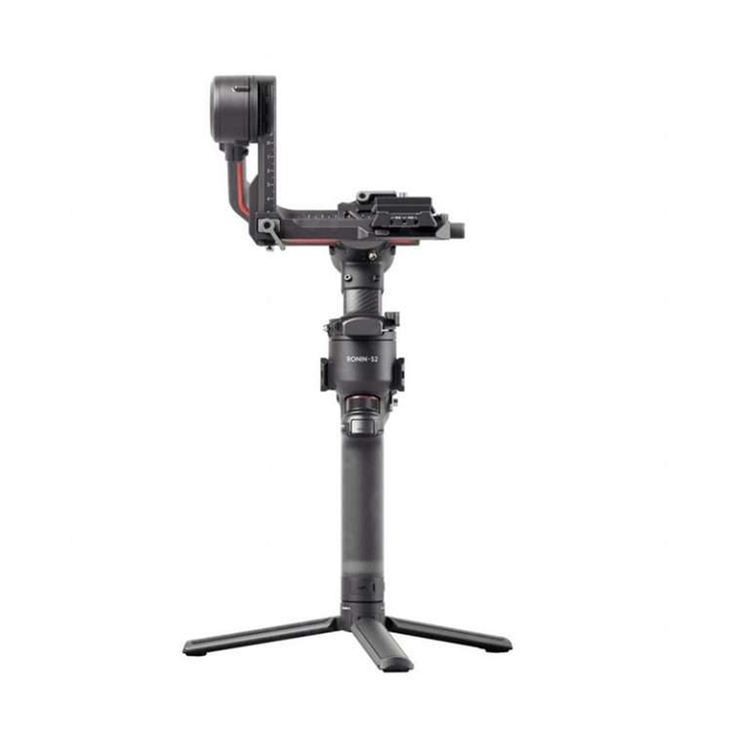


The DJI RS 2 is a redesigned follow-up to the Ronin-S gimbal with a payload of up to 10 lb. It's about 25% lighter and more compact thanks to monocoque carbon fiber axis arms and a shorter grip handle with a smaller battery cartridge. The motors are about 20% more powerful and can support larger cameras such as the Blackmagic Pocket 6K, Canon 1D X Mark III, Sony a7S III, and ALEXA Mini LF.
Upgraded Movement and Control
- The DJI Titan stabilization algorithm provides improved stabilization with increased smoothness. In applications with up to 100mm zoom lenses, a built-in feature called SuperSmooth complements the algorithm by compensating for micromovements and increasing torque to achieve fluid motion (an optional lens support is required).
- The RS 2 also has a 1.4" full-color LCD touchscreen that allows you to access gimbal settings as well as features such as time-lapse and hyperlapse, which were previously accessible only via the companion mobile app.
- The companion iOS/Android Ronin app offers many creative features in addition to standard time-lapse and panorama functions. Time Tunnel combines roll motion with hyperlapse to "twist" space and time. Track allows you to create a repeatable camera movement path for a tightly choreographed shot. Force Mobile makes the gimbal follow your smartphone's movements.
- Force Mobile can also be achieved with enhanced responsiveness when you use the optional DJI RavenEye 1080p transmission system. With the RavenEye system, you can also display a live view of your subjects on the touchscreen when using the RavenEye's ActiveTrack feature.
Expand Your Rig with Compatible Accessories
- There are two RSA ports with electrical contacts for dedicated accessories, and each port has a NATO mount for quick release attachment of these optional accessories.
- One RSA port is provided on the left and one on the right side of the gimbal. Supported accessories include a focus wheel, a twist-grip dual handle, and a universal mount for efficiently attaching the gimbal to a car, jib, or slider.
- A mini tripod is included and attaches to a 1/4"-20 thread on the bottom of the grip handle to function as a stand or an extension handle for two-handed maneuvering of the gimbal in certain scenarios.
- The RS 2 comes with a splash-proof carry case designed with dedicated compartments for the different parts of the gimbal and key accessories.
Intuitive Camera Adjustment
- The RS 2 uses a dual-layer Manfrotto plus Arca-Swiss camera mounting system with two removable quick release plates.
- For social media content, the gimbal can be adjusted at the tap of a button to position your camera into portrait mode.
- To let you efficiently balance your camera, the RS 2 has an axis lock on each axis, so you can unlock and balance one axis at a time.
- A fine-tune balancing knob allows you to further dial in the optimal balance for your camera.
Fast Charging
- The gimbal runs for up to 12 hours on a battery cartridge that secures to the included grip handle. The cartridge can easily be swapped out for another one, sold separately.
- The cartridge is rechargeable via a USB Type-C port on the grip, and the grip can be totally removed from the gimbal when you need to recharge the battery. The BG30 grip is compatible with the PD and QC 2.0 charging protocols.
- DJI highly recommends using a separately available 24W charger. The battery supports 24W fast charging and can be fully recharged in about 1.5 hours.
Gimbal
Load Capacity
10 lb / 4.5 kg
Rotation Range
Controllable Range
Yaw (Pan): 360° Unlimited
Roll: 285° (-45 to 240°)
Pitch (Tilt): 326° (-112 to 214°)
Follow Speed
Pan: 360°/s
Tilt: 360°/s
Roll: 360°/s
Connectivity
Inputs/Outputs
2x RSA
3x USB-C
Mobile App Compatible
Yes: Android & iOS
App Name: DJI Ronin
Functionality: Remote Control
Battery
Battery Chemistry
Lithium-Ion Polymer (LiPo)
Battery Capacity
1950 mAh / 30.3 Wh
Battery Runtime
12 Hours
Battery Charging Time
1.5 Hours
General
Display Type
Fixed Touchscreen LCD
Materials
Aluminum, Carbon Fiber, Plastic
Dimensions
16.1 x 10.2 x 7.7" / 410 x 260 x 195 mm
Weight
2.36 lb / 1.07 kg
2.595 lb / 1.177 kg (with Camera Plate)
2.948 lb / 1.337 kg (with Handlebar)
- Load Capacity
- 10 lb / 4.5 kg
- Rotation Range
- Controllable Range
- Yaw (Pan): 360° Unlimited
- Roll: 285° (-45 to 240°)
- Pitch (Tilt): 326° (-112 to 214°)
- Follow Speed
- Pan: 360°/s
- Tilt: 360°/s
- Roll: 360°/s
- Inputs/Outputs
- 2x RSA
- 3x USB-C
- Mobile App Compatible
- Yes: Android & iOS
- App Name: DJI Ronin
- Functionality: Remote Control
- Battery Chemistry
- Lithium-Ion Polymer (LiPo)
- Battery Capacity
- 1950 mAh / 30.3 Wh
- Battery Runtime
- 12 Hours
- Battery Charging Time
- 1.5 Hours
- Display Type
- Fixed Touchscreen LCD
- Materials
- Aluminum, Carbon Fiber, Plastic
- Dimensions
- 16.1 x 10.2 x 7.7" / 410 x 260 x 195 mm
- Weight
- 2.36 lb / 1.07 kg
- 2.595 lb / 1.177 kg (with Camera Plate)
- 2.948 lb / 1.337 kg (with Handlebar)
As an international traveller you are entitled to bring a certain amount/value of goods that are free of Customs duty and exempt Goods and Services tax (GST) into New Zealand. This is called your duty free allowance and personal goods concession. It is important to review these for any purchases you make on The Mall.
Your duty free allowance entitles you to bring into New Zealand the following quantities of alcohol products free of customs duty and GST provided you are over 17 years of age. You do need to be 18 years or over to purchase.
- Up to six bottles (4.5 litres) of wine, champagne, port or sherry or
- Up to twelve cans (4.5 litres) of beer
- And three bottles (or other containers) each containing not more than 1125ml of spirits, liqueur, or other spirituous beverages
Goods other than alcohol and tobacco, whether purchased overseas or purchased duty free in New Zealand, that have a combined total value not exceeding NZ$700 may also be brought as part of your personal goods concession.
When travelling overseas there are legal limits on the amount of duty free alcohol and other goods you can take with you. These amounts will vary depending on the country you are flying into. We always recommend you check the latest limits and exemptions.
Your order can be picked up at an Auckland Airport Collection Point. There is one in departures and one at arrivals in the international terminal. Alternatively, if you are arriving between 11pm and 6am you will be able to collect your order from our lockers. See map
Please bring your order confirmation email and your passport. If you are collecting from lockers you will have been sent an email with your access code, be sure to have this on you in order to collect your order.
If you’re departing Auckland Airport, we recommend that you come to the Auckland Airport Collection Point at least 60 minutes before your flight. If you miss your pickup time or your flight details have changed please let us know as soon as possible.
When you collect your order you will have the opportunity to inspect the items and sign for them.
If you need to return an item, our Collection Point team are there to help you. If you are collecting after hours please return the item to your locker and our team will be in touch as soon as possible. You may also like to view our Returns & refunds which provides information on how this works and outlines the individual retailer's returns and refunds policies.
After Hours Collections
If your order needs to be collected after the Auckland Airport Collection Point desk is closed, your order will be placed in the lockers next to the desk. All the details you will need to collect your order will be provided in your Order Confirmation and Ready to Collect Email.