










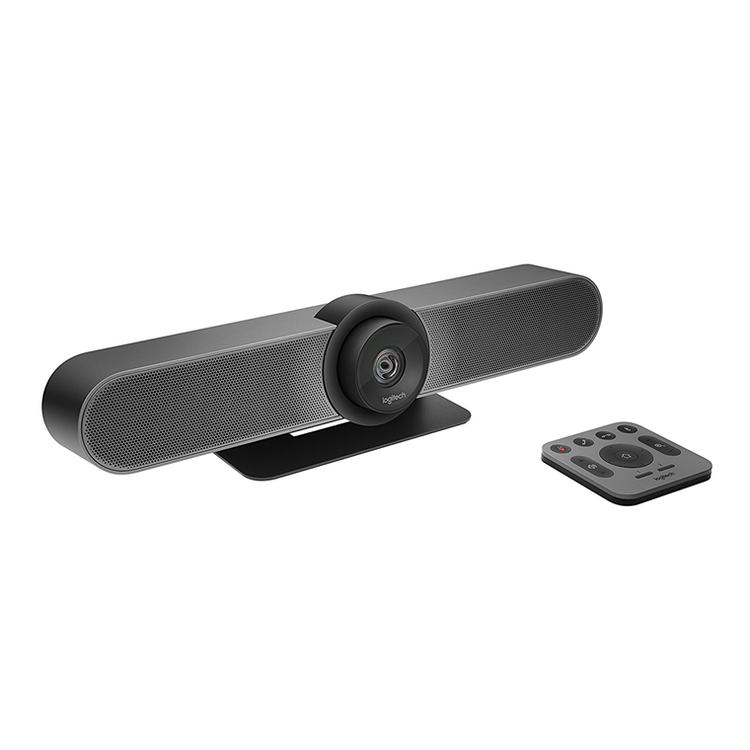
MEETUP All-in-one conferencecam with an ultra-wide lens for small rooms
MEET EASY All-In-One DesignDesigned for huddle rooms and other smaller spaces, MeetUp packs big features into a compact form factor.
Simple SetupMeetUp connects to a computer or laptop via USB for easy installation and plug-and-play video conferencing.
Convenient MountsCompact dimensions and versatile mounting options conserve space and minimize visible cabling.
SPEAK EASY Front-of-room alignment of voice and video is just the first step to natural conversations. RightSound™ technologies include a beamforming mic array that captures speech, while auto-leveling louder and softer voices and suppressing noise. RIGHTSIGHT - Computer Vision With RightSight™ computer vision, MeetUp automatically adjusts camera position and zoom to find and frame everyone in the room.
MAKE SPACE Mounted at the display like a soundbar, MeetUp takes the speakerphone off the table to reduce cross-room cabling and maximize usable space.
SIMPLE TO MANAGE with Logitech Sync Device Management Monitor and manage your meeting room devices from one single platform with Logitech Sync. Plus, get business insights into how your rooms are being used.
ENSURE BUSINESS CONTINUITY WITH SELECT SERVICE PLAN Remove barriers to collaboration and ensure conference rooms are ready for the next meeting. Select is a service plan beneficial for all room sizes and deployments. Optimize uptime with expert assistance within one hour, fast product replacements, and premium Sync functionality to proactively resolve issues before they impact your business.
With Select, we partner with you to reduce daily management, optimize performance, and help you maximize your investment.
ROOM SOLUTIONS WITH MEETUP Get everything you need to build out small rooms for video meetings, including Logitech MeetUp, a compute platform (such as a mini PC, Meet compute system, or Logitech RoomMate), room-optimized software, and the Logitech Tap touch controller.
SUSTAINABILITY AT LOGITECH Logitech is committed to creating a more sustainable world. We are actively working to minimize our environmental footprint and accelerate the pace of social change.
ADDITIONAL FEATURES 5X ZOOMPerfectly frame presenters to minimize background distractions. Zoom in on whiteboards and objects so remote participants can see what you see. Thanks to its advanced 4K image sensor, video remains sharp and clear, even when you zoom in on the details. PREMIUM CAMERA OPTICSMeetUp features exquisitely engineered, premium camera optics that capture a wide field-of-view without distorting faces and furniture with a "fisheye" effect. Faces look natural, whiteboard writing remains legible, and straight lines stay straight. EXTENDED RANGELogitech Expansion Mic for MeetUp provides greater flexibility in huddle room configurations. MeetUp's built-in beamforming mics are optimized for up to 4 meters. To extend that range up to 5 meters, add an Expansion Mic. So whether people are seated at a table, sitting against the wall, or walking around the room, Expansion Mic for MeetUp means everyone will be heard. BLUETOOTH® SPEAKERPHONEAlready connected on your smartphone? Dialing into an audio conference? Pair MeetUp with your smartphone or tablet to enjoy outstanding audio clarity, volume, and range that handheld devices can't match. TAKE CONTROLWhen you need to adjust the volume, mute the microphone, or take manual control over camera position, MeetUp' s remote control uses radio frequency (RF) signals for reliable and discreet control from anywhere in the room. You can even download the free Logi Remote app (available on iTunes) to control MeetUp with an iPhone or iPad. WALL SAVERNo drilling? No problem. By attaching to the VESA mounting points behind the display, the optional TV Mount for MeetUp lets you position MeetUp above or below the display without drilling new holes. RIGHTSENSE TECHNOLOGIESLogitech RightSense™ proactive technologies make better video meetings easy and automatic. RightSound optimizes the human voice and enhances conversational clarity, RightSight automatically moves the camera and adjusts the zoom so no one gets left out of the picture, and RightLight helps everyone look their best on camera, regardless of lighting conditions. TAA COMPLIANTMeetUp is TAA compliant.
- DIMENSIONS
- Main unit
- Height: 104 mm
- Width: 73.3 mm
- Depth: 85 mm
- Weight: 1.04 kg
- Remote Control
- Height: 83 mm
- Width: 83 mm
- Depth: 10 mm
- COMPATIBILITY
- Windows 10, Windows® 11 or later, macOS (two most recent versions)
- Chrome OS™ Version 29.0.1547.70 and higher
- USB 2.0 port (USB 3.0 Port and cable required for 4K video)
- RIGHTSENSE TECHNOLOGIES
- Advanced technologies and design innovations that make video collaboration easy and automatic.
- RightLight
- Low-light compensation
- Video noise reduction
- Low-light saturation optimization
- RightSight
- Human figure detection
- Auto-frame participants at meeting start
- Auto-frame participants on-demand
- Auto-reframe when participants enter, leave, or change positions
- RightSound
- AEC (Acoustic Echo Cancellation)
- VAD (Voice Activity Detector)
- Background noise suppression
- Auto-level loud and soft voices
- Peak-limiting algorithm eliminates even momentary speaker clipping to prevent distortion
- Anti-vibration enclosure
- COMPATIBILITY AND INTEGRATIONS
- Plug-and-play USB connectivity
- Certifications
- - Certified for Skype® for Business and Microsoft® Teams
- - Zoom™ Certified
- - Tencent Certified
- - Certified for Google Hangouts Meet Hardware
- Compatibility
- - RingCentral
- - Microsoft Cortana
- - Cisco Jabber®
- - BlueJeans
- - BroadSoft™
- - Vidyo™
- and other video conferencing, recording, and broadcasting applications that support USB cameras TAA compliant. For applicable part numbers, visit www.logitech.com/support/meetup-taa-compliance
- Camera
- Custom Logitech lens with 5x HD zoom and motorised pan (+/- 25°) and tilt (+/- 15°)
- Field of View: Diagonal: 120°, Horizontal: 113°, Vertical: 80.7°
- Total Room Coverage (field of view + pan and tilt): 163° wide x 110° tall
- 3 camera position presets
- RightSight auto-framing: Requires Windows 10 64-bit or macOS 10.14 or higher
- Video Performance
- 4K Ultra HD video calling (up to 3840 x 2160 pixels @ 30 fps with customer-supplied USB 3.0 cable)
- 1080p Full HD video calling (up to 1920 x 1080 pixels @ 30 fps)
- 720p HD video calling (up to 1280 x 720 pixels @ 30 fps)
- Microphone
- Integrated microphone with 3 beamforming elements
- Pickup Range
- - MeetUp: 4 m
- - With optional Expansion Mic: 5 m
- Sensitivity: -27 dB
- Microphone frequency response: 90Hz-16KHz for full voice reproduction and high intelligibility without noise
- Beamforming performance: Factory-paired, very low distortion broadside beamforming algorithm steers the microphones directly at the talker for the best voice pickup and noise reduction
- AEC (Acoustic Echo Cancellation)
- VAD (Voice Activity Detector)
- Microphone background noise suppression
- Microphone date rate: 32KHz sampling rate
- Recommended # of participants: 6
- Recommended # of participants with expansion mic: 8
- Speaker
- Volume adjustable to 95 dB SPL at 1/2 meter peak
- Speaker sensitivity 86.5+/-3dB SPL at 1/2 meter
- Distortion: 200-300Hz < 3%, 3000 Hz -10KHz < 1%
- Patent-pending anti-vibration enclosure improves voice clarity while limiting sound transmission to adjacent spaces
- General
- Bluetooth wireless technology
- RF remote control
- Integrated table/wall mount; optional TV mount available
- Kensington security slot
- PACKAGE CONTENTS
- MeetUp ConferenceCam
- Remote control
- USB 2.0 cable: 5 m
- Power supply
- Wall mount and hardware
- User documentation
As an international traveller you are entitled to bring a certain amount/value of goods that are free of Customs duty and exempt Goods and Services tax (GST) into New Zealand. This is called your duty free allowance and personal goods concession. It is important to review these for any purchases you make on The Mall.
Your duty free allowance entitles you to bring into New Zealand the following quantities of alcohol products free of customs duty and GST provided you are over 17 years of age. You do need to be 18 years or over to purchase.
- Up to six bottles (4.5 litres) of wine, champagne, port or sherry or
- Up to twelve cans (4.5 litres) of beer
- And three bottles (or other containers) each containing not more than 1125ml of spirits, liqueur, or other spirituous beverages
Goods other than alcohol and tobacco, whether purchased overseas or purchased duty free in New Zealand, that have a combined total value not exceeding NZ$700 may also be brought as part of your personal goods concession.
When travelling overseas there are legal limits on the amount of duty free alcohol and other goods you can take with you. These amounts will vary depending on the country you are flying into. We always recommend you check the latest limits and exemptions.
Your order can be picked up at an Auckland Airport Collection Point. There is one in departures and one at arrivals in the international terminal. Alternatively, if you are arriving between 11pm and 6am you will be able to collect your order from our lockers. See map
Please bring your order confirmation email and your passport. If you are collecting from lockers you will have been sent an email with your access code, be sure to have this on you in order to collect your order.
If you’re departing Auckland Airport, we recommend that you come to the Auckland Airport Collection Point at least 60 minutes before your flight. If you miss your pickup time or your flight details have changed please let us know as soon as possible.
When you collect your order you will have the opportunity to inspect the items and sign for them.
If you need to return an item, our Collection Point team are there to help you. If you are collecting after hours please return the item to your locker and our team will be in touch as soon as possible. You may also like to view our Returns & refunds which provides information on how this works and outlines the individual retailer's returns and refunds policies.
After Hours Collections
If your order needs to be collected after the Auckland Airport Collection Point desk is closed, your order will be placed in the lockers next to the desk. All the details you will need to collect your order will be provided in your Order Confirmation and Ready to Collect Email.