










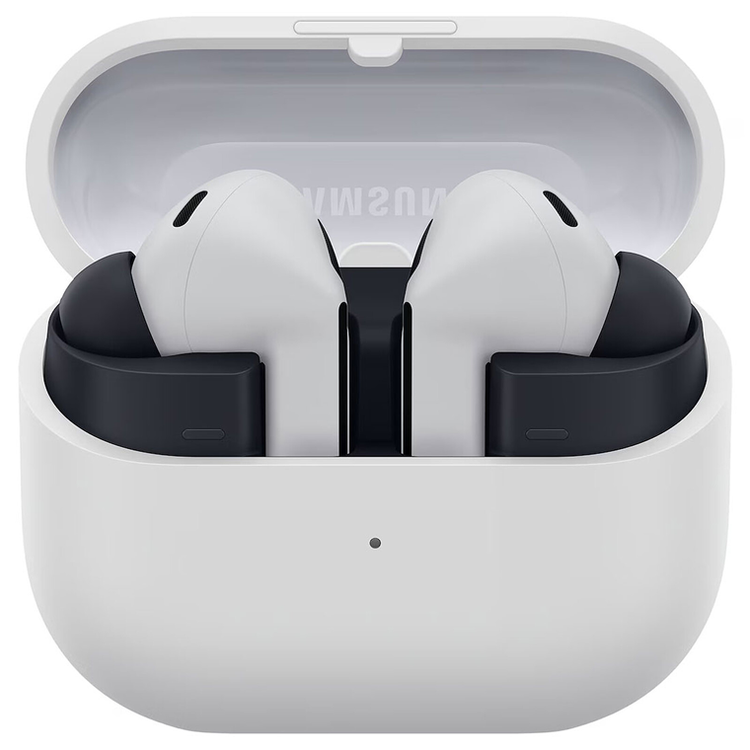
Samsung Galaxy Buds3 FE True Wireless Noise Cancelling In-Ear Headphones - Grey
Samsung Galaxy Buds3 FE True Wireless Noise Cancelling In-Ear Headphones - Grey
Established design, crafted for lasting comfort Experience comfort grounded in a proven and trusted design, shaped through advanced computational modeling and wearability testing. The ergonomic shape ensures a secure fit that reduces pressure and enhances sound, making Galaxy Buds3 FE ideal for extended wear. *Images simulated for illustrative purposes.
Refined tones and texture for timeless appeal Choose between bold Black and soft Gray. Complete with a smooth matte finish, both options bring a minimalistic look with a touch of everyday sophistication. Black
Gray
Full-bodied sound, rich in detail Level up your listening with dynamic and powerful sound. Featuring a larger speaker, experience fuller bass and balanced detail that add depth to each note.* *Compared to the previous Galaxy Buds FE.
Surround yourself with 360 Audio Fill your space with deep, multidirectional sound. 360 Audio provides an expansive, spatial audio experience, creating a simulated surround sound environment that draws out the depth of each note and layer for a truly captivating listening experience. *Images simulated for illustrative purposes.**360 Audio is only available on Samsung Galaxy smartphones and Galaxy Tab devices with Android One UI version 3.1 or later. Support for 360 Audio may vary depending on the application and content.***Direct Multi-channel is available on Samsung Galaxy smartphones and Galaxy Tab devices with Android One UI version 4.1.1 or later.****Head tracking is not supported on Galaxy Buds3 FE.
Clarity where it counts Focus on your sound, tune out the noise around Keep your world centred around your sound. Active Noise Cancellation minimises unwanted background noise, allowing you to immerse yourself in your own soundscape - whether you're taking a crowded subway, walking alongside traffic or sitting in a noisy café. Enjoy your personalised playlist without the distractions. *Images simulated for illustrative purposes.**ANC (Active Noise Cancellation) is on by default, and the Pinch and Hold gesture for ANC can be configured directly in the phone settings for devices running One UI 8.0 and later. For devices running on earlier versions of One UI, configurations can be found in the Galaxy Wearable app.
Clear conversations, less miscommunication Capture your voice the way it's meant to be heard. Equipped with an advanced pre-trained machine learning model for enhanced calls, it analyses ambient sounds and voice patterns to filter out noise - keeping your voice clear and focused, even in noisy environments. Experience rich, lifelike interactions with call quality that ensures each word is delivered with clarity and precision. *Images simulated for illustrative purposes.
Control right from your fingertip Change up your sound with smooth, intuitive gestures. From podcasts to playlists, switch tracks with Pinch Control - all while keeping your smartphone in your pocket. Swipe Control the volume by swiping up or down the Blade. *Images simulated for illustrative purposes.
Pinch Control Pinch once to play or pause, twice to skip to the next track and three times to go back to the previous track. *Images simulated for illustrative purposes.
Quick access for effortless earbud control Fine-tune your sound while streaming videos or using other apps. Access key functions and Galaxy Buds settings directly from the Quick Panel, making it easy to adjust noise control and audio preferences the way you see fit - all while staying on the same app. From customising your equaliser settings on Spotify to enabling 360 Audio for YouTube, you can set and save sound settings for each app - keeping everything in tune with you. *Availability of functions may vary by country, language, device model, apps. Some functional widgets may require a network connection and/or Samsung Account login.**Available on Samsung Galaxy devices with One UI 7.0 or above. Additional devices may be supported in the future.***Actual UI may be different.
Talk to Gemini, right on your wrist or through your Galaxy Buds Chat with Gemini right on your wrist or through your Galaxy Buds3 FE - for help during life's busy moments. Simply say, "Hey Google," to activate Gemini. Then, say what you need to get answers and ideas, complete tasks across apps, remember information and receive reminders for important events, or record your workouts - all from your Galaxy Watch or Galaxy Buds. *Images simulated for illustrative purposes.**Voice wake-up is off by default and can be configured directly in the phone settings for devices running One UI 8.0 and later. The feature uses the phone's default Digital Assistant setting.***Gemini is a trademark of Google LLC. Results for illustrative purposes. Gemini Live feature requires internet connection and Google Account login. Service availability may vary by country, language and device model. Features may differ depending on subscription and results may vary. Compatible with certain features and certain accounts.****Gemini voice wake-up is available on Galaxy Buds3 Pro, Galaxy Buds3 and Galaxy Buds3 FE with One UI 8.0 and later.
Hear interpreted responses and exchanges in real time Bridge language gaps in your conversations with Galaxy AI's Interpreter. Hear translations in real time and stay focused on your conversations without glancing at your phone screen. Now, you can enjoy hands-free interpretation wherever you go. Listening ModeTo activate listening mode, pinch and hold your earbuds and your Galaxy Buds3 FE will keep interpreting while the speaker talks.
Conversation ModeTo activate conversation mode, place the phone mic toward the speaker and briefly pinch your Galaxy Buds3 FE to hear the interpretation in real time.
Quick to pair. Ready to switch Connect in seconds. Listen for hours Connect your Galaxy Buds3 FE to your Samsung Galaxy devices with ease. Simply open the charging case to start pairing automatically, tap or click 'Connect' on your device - and you're ready to go. *Images simulated for illustrative purposes.**Devices sold separately.***Connecting Samsung Galaxy Buds as Bluetooth Audio is available regardless of the OS. For devices running One UI 8.0 and later, settings can be configured directly in the phone settings. For devices running on earlier versions of One UI, configurations can be found in the Galaxy Wearable app. Additionally, to use the Galaxy Wearable app, Samsung Galaxy Buds must be paired with a smartphone running Android 11.0 or above with at least 1.5 GB of memory.****Samsung Account login is required to activate and change the Galaxy Buds3 FE settings. For devices running on One UI 8.0 or later, settings can be configured directly in the phone settings. For devices running on earlier versions, configurations can be found in the Galaxy Wearable app.
Sound in sync with your devices Move between devices without interruption. With Auto Switch, Galaxy Buds3 FE actively detects audio activity and transfers the connection seamlessly for continuous listening across all of your Samsung Galaxy devices - including your Galaxy Book to deliver the same Auto Switch experience as Galaxy Buds3 Pro and Galaxy Buds3. *Images simulated for illustrative purposes.**Devices sold separately.***Auto Switch feature is only available on Samsung Galaxy Book series with One UI 6.0 or later, Samsung Galaxy smartphones and Galaxy Tab devices with One UI 4.1.1 or later, and on Galaxy Watch4 or later. The devices must be logged in to Samsung Account to enable Auto Switch. Availability of certain features of Auto Switch may vary.
- Number of MIC
- 6
- Speaker
- 1-way
- Ambient SoundAmbient Sound
- Yes
- Active Noise Cancellation
- Yes
- 360 Audio
- Yes
- Audio Codec
- AAC, SBC, SSC(Samsung Seamless Codec)
- Bluetooth Version
- Bluetooth v5.4
- Bluetooth Profiles
- A2DP, AVRCP, HFP
- Auto Switch
- Yes
- Sensors
- Hall Sensor, Pressure Sensor, Proximity Sensor, Touch Sensor
- Earbud Dimension (HxWxD, mm)
- 21.1 x 18.0 x 33.8
- Earbud Weight (g)
- 5
- Case Dimension (HxWxD, mm)
- 48.7 x 58.9 x 24.4
- Case Weight (g)
- 41.8
- Durability
- IP54
- Talk Time (Hours, ANC On)
- Up to 4
- Total Talk Time (Hours, ANC On)
- Up to 18
- Music Play Time (Hours, ANC On)
- Up to 6
- Total Music Play Time (Hours, ANC On)
- Up to 24
- Talk Time (Hours, ANC Off)
- Up to 4
- Total Talk Time (Hours, ANC Off)
- Up to 18
- Music Play Time (Hours, ANC Off)
- Up to 8.5
- Total Music Play Time (Hours, ANC Off)
- Up to 30
- Earbud Battery Capacity (mAh, Typical)
- 53
- Case Battery Capacity (mAh, Typical)
- 515
- Samsung Find
- Yes
- Bixby Voice Wake-up
- Yes
As an international traveller you are entitled to bring a certain amount/value of goods that are free of Customs duty and exempt Goods and Services tax (GST) into New Zealand. This is called your duty free allowance and personal goods concession. It is important to review these for any purchases you make on The Mall.
Your duty free allowance entitles you to bring into New Zealand the following quantities of alcohol products free of customs duty and GST provided you are over 17 years of age. You do need to be 18 years or over to purchase.
- Up to six bottles (4.5 litres) of wine, champagne, port or sherry or
- Up to twelve cans (4.5 litres) of beer
- And three bottles (or other containers) each containing not more than 1125ml of spirits, liqueur, or other spirituous beverages
Goods other than alcohol and tobacco, whether purchased overseas or purchased duty free in New Zealand, that have a combined total value not exceeding NZ$700 may also be brought as part of your personal goods concession.
When travelling overseas there are legal limits on the amount of duty free alcohol and other goods you can take with you. These amounts will vary depending on the country you are flying into. We always recommend you check the latest limits and exemptions.
Your order can be picked up at an Auckland Airport Collection Point. There is one in departures and one at arrivals in the international terminal. Alternatively, if you are arriving between 11pm and 6am you will be able to collect your order from our lockers. See map
Please bring your order confirmation email and your passport. If you are collecting from lockers you will have been sent an email with your access code, be sure to have this on you in order to collect your order.
If you’re departing Auckland Airport, we recommend that you come to the Auckland Airport Collection Point at least 60 minutes before your flight. If you miss your pickup time or your flight details have changed please let us know as soon as possible.
When you collect your order you will have the opportunity to inspect the items and sign for them.
If you need to return an item, our Collection Point team are there to help you. If you are collecting after hours please return the item to your locker and our team will be in touch as soon as possible. You may also like to view our Returns & refunds which provides information on how this works and outlines the individual retailer's returns and refunds policies.
After Hours Collections
If your order needs to be collected after the Auckland Airport Collection Point desk is closed, your order will be placed in the lockers next to the desk. All the details you will need to collect your order will be provided in your Order Confirmation and Ready to Collect Email.