










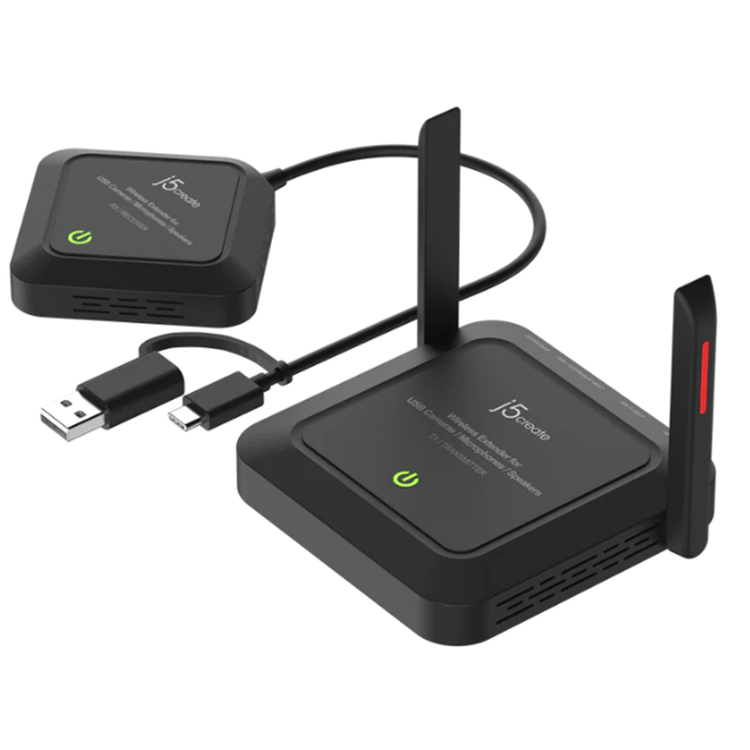
J5create JVW120 Wireless Extender for USB Cameras / Microphones / Speakers
The j5create Wireless Extender for USB™ Cameras / Microphones / Speakers turn your wired USB™ camera into a wireless one. With a wireless transmission range of up to 82 ft. (25m) users can extend the range of their wired USB™ camera without having to deal with tangled cables regardless of the room layout. In addition to transmitting both video and audio wirelessly this compact and lightweight camera extender works with Windows®, macOS®, and Chrome OS™ devices, making it a great addition to any meeting room, streaming setup, and other similar environments.
Create A Wireless Conference Easily Converts a wired USB™ camera, microphone, or speaker into a wireless one Enhanced the Field of View Place the camera farther away for wide field of view. Ensure every parcipant is seen with clarity The Perfect Mate For A High Resolution Camera Supports resolution up to
1080p @ 60 and
4K @ 30 in H.264 format or 1080p @ 30
in MJPEG format
Up to 82 ft (25m) Wireless Transmission Distance Supports 5 GHz frequency to ensures a stable connection and smooth video
Comes With A USB-C® And USB™ Type-A Connector Works with both your older and newer laptops Suitable For Conference, Personal Streaming, Online Learning, and other environments Compatible with all j5create® and other standard webcam models
- Audio ON/OFF Switch
- RX¦Receiver:
- Located on the RX device's bottom side, the"Audio
- ON/OFF switch" quickly enables or disables audio
- -Switch to ON: enables audio
- -Switch to OFF: disables
- Host Connector
- RX¦Receiver:
- USB-C® or USB® Type-A port
- Infared
- N/A
- Led Indicators
- TX¦Transmitter / RX¦Receiver:
- Red: Power on
- Orange: Waiting to connect
- *TX and RX are connected, but the USB™ camera or
- USB™ Speaker/Microphone are not connect to TX
- USB™ port
- Orange flashing light: TX / RX pairing
- Green: TX / RX connected, and TX USB™ camera is
- enabled.
- Pair Button
- Pair Button
- If TX are RX devices are close together but, the TX
- and RX device's LEDs are red and or if they
- disconnect, please try turning on "pairing mode".
- To turn on paring mode find the Pair button located
- on the bottom side of TX and RX device, push and
- hold the TX and RX device's pairing button 5
- seconds, the power LED will change orange and will
- blink for 1 minute. If TX and RX device are paired, the
- LED will turn green and will stop blinking.
- Ports
- TX¦Transmitter:
- 1 - USB-C® Power In
- 1 - USB™ Type-A Female (Camera)
- 1 - USB™ Type-A female (Speaker/Microphone)
- 1 - 3.5 mm Speaker Out
- Power Source
- TX Transmitter: 1 - DC 5V/3A Power Adapter RX¦Receiver: 1 - Bus Power through USB-C®
- Audio Channel
- 2.1 CH stereo
- Esd Protection
- N/A
- Infared Return Frequency
- N/A
- Ovp Protection
- N/A
- Rf Output Power
- +15 dBm ±1 dBm
- Security - Encryption
- 128/256-bit AES based encryption WPA2 authentication protocol
- Supported Resolution - Output
- H.264:
- 2160p / 1080p / 720p / 480p / 240p @ 30 FPS
- 1080p @ 60 FPS
- MJPEG:
- 1080p / 720p / 480p / 240p @ 30 FPS
- YUV:
- 1080p / 720p / 480p / 240p
- Cable Length
- Receiver (RX): 6.5 in. (16.5 cm)
- Color
- Black
- Enclosure Type
- Plastic
- Operating Humidity
- < 85% non-condensing
- Operating Temperature
- +32 to +104°F (0 to +40°C)
- Product Depth
- Transmitter (TX): 3.74 in. (95 mm) Receiver (RX): 2.63 in. (67 mm)
- Product Height
- Transmitter (TX): 0.9 in. (23 mm) Receiver (RX): 0.83 in. (21 mm)
- Product Weight
- Transmitter (TX): 3.95 oz (112 g) Receiver (RX): 1.95 oz (55.5 g)
- Product Width
- Transmitter (TX): 3.74 in. (95 mm) Receiver (RX): 2.63 in. (67 mm)
- Storage Humidity
- < 85% non-condensing
- Storage Temperature
- -4 to +122°F (-20 to +50°C)
- Antenna Type
- Transmitter (TX): External antenna x 2 Receiver (RX): Built-in antenna
- Channel Width
- 80 MHz
- Frequency
- 5 GHz Band I, Band IV, CE Only Band I
- Range
- Up to 82 ft. (25 m)
- Standard
- IEEE 802.11ac
- Contains
- 1 - JVW120 Wireless Extender for USB™ Cameras / Microphones / Speakers set (1 x Transmitter & 1 x
- Receiver)
- 1 - DC 5V/3A Power Adapter
- 1 - Hook and loop fastener
- 1 - Quick Installation Guide (QIG)
As an international traveller you are entitled to bring a certain amount/value of goods that are free of Customs duty and exempt Goods and Services tax (GST) into New Zealand. This is called your duty free allowance and personal goods concession. It is important to review these for any purchases you make on The Mall.
Your duty free allowance entitles you to bring into New Zealand the following quantities of alcohol products free of customs duty and GST provided you are over 17 years of age. You do need to be 18 years or over to purchase.
- Up to six bottles (4.5 litres) of wine, champagne, port or sherry or
- Up to twelve cans (4.5 litres) of beer
- And three bottles (or other containers) each containing not more than 1125ml of spirits, liqueur, or other spirituous beverages
Goods other than alcohol and tobacco, whether purchased overseas or purchased duty free in New Zealand, that have a combined total value not exceeding NZ$700 may also be brought as part of your personal goods concession.
When travelling overseas there are legal limits on the amount of duty free alcohol and other goods you can take with you. These amounts will vary depending on the country you are flying into. We always recommend you check the latest limits and exemptions.
Your order can be picked up at an Auckland Airport Collection Point. There is one in departures and one at arrivals in the international terminal. Alternatively, if you are arriving between 11pm and 6am you will be able to collect your order from our lockers. See map
Please bring your order confirmation email and your passport. If you are collecting from lockers you will have been sent an email with your access code, be sure to have this on you in order to collect your order.
If you’re departing Auckland Airport, we recommend that you come to the Auckland Airport Collection Point at least 60 minutes before your flight. If you miss your pickup time or your flight details have changed please let us know as soon as possible.
When you collect your order you will have the opportunity to inspect the items and sign for them.
If you need to return an item, our Collection Point team are there to help you. If you are collecting after hours please return the item to your locker and our team will be in touch as soon as possible. You may also like to view our Returns & refunds which provides information on how this works and outlines the individual retailer's returns and refunds policies.
After Hours Collections
If your order needs to be collected after the Auckland Airport Collection Point desk is closed, your order will be placed in the lockers next to the desk. All the details you will need to collect your order will be provided in your Order Confirmation and Ready to Collect Email.