










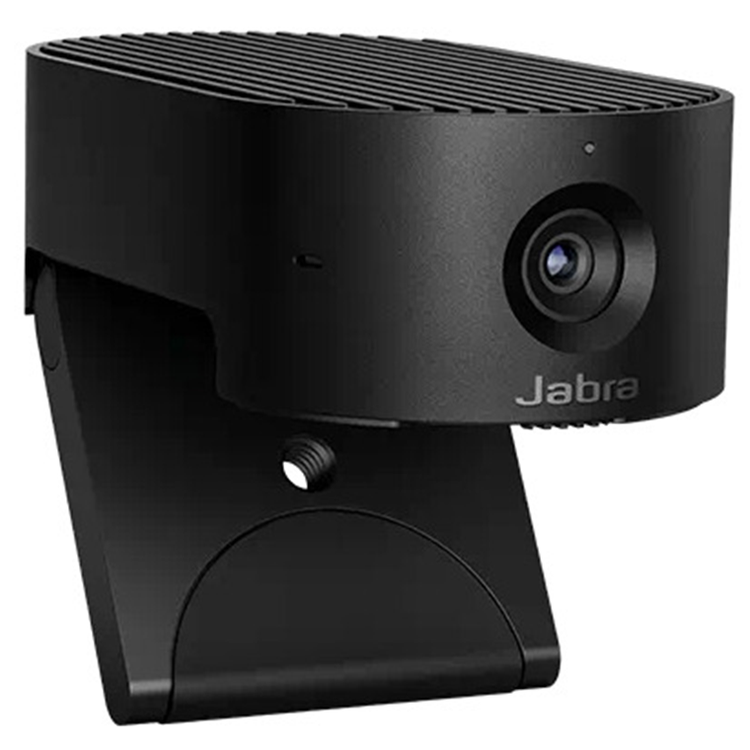
Jabra PanaCast 20 4K UHD AI-Enabled Personal Video Conference Camera - Microsoft Teams Certified
Jabra Panacast 20 Camera Jabra Panacast 20 Camera - Engineered for intelligent AI-enabled personal video conferencing. Premium Video Quality - 4K Ultra-HD Video Picture Perfect - AI-enabled image enhancement Flexible - Portable, lightweight design
NEXT-GENERATION VIDEO COLLABORATION - Personal video conferencing, but not as you know it As we all navigate the realities of trying to stay connected and productive, video conferencing is more important than ever. It's time to experience the next generation of intelligent, secure, portable video collaboration with Jabra PanaCast 20. Harnessing advanced on-board AI to deliver an intelligent feature set that takes your video experience to the next level, PanaCast 20 is a personal camera that knows exactly what you need, when you need it. Let your camera do the thinking.
4K ULTRA-HD PICTURE QUALITY - Picture perfect. Wherever you work. Video calls are now part of everyday life, but poor picture quality impacts the whole experience. PanaCast 20 uses advanced processors, powerful on-board AI and a 13-megapixel camera to deliver an impressive real-time 4K Ultra-HD image that's crystal-clear, with virtually no latency. So you can deliver that big presentation knowing you'll look your best. Give your personal video conferencing a complete makeover.
INTELLIGENT ZOOM - Are you ready for your close-up? When you're on an important video call, being seen clearly makes all the difference. Our Intelligent Zoom feature uses powerful AI to continuously scan and adjust your picture in real-time, ensuring you're always in the centre of the frame. Now you can experience more immersive, natural video collaboration without having to stay rooted to the spot. PanaCast 20 delivers a meeting experience that's not just better, it's completely reinvented. With Intelligent Zoom, you're always centre-stage.
INTELLIGENT LIGHTING OPTIMIZATION - Any light is good light Today's professionals need to take video calls from everywhere. With PanaCast 20, AI-based Intelligent Lighting Optimization analyses your environment and automatically adjusts your image in real-time to enhance the video quality. Your next meeting calls for next-generation technology.
PICTURE-IN-PICTURE - Two streams are better than one Get ready for more engaging presentations with PanaCast 20. Our unique Picture-in-Picture mode enables you to share a close-up as your main image while continuing to present in a smaller window, thanks to on-board Edge processing that combines two real-time video streams into one. What's more Picture-in-Picture mode works with any UC platform, even if they don't support dual-stream devices. Because showing is so much more powerful than telling.
ON-DEVICE BACKGROUND EFFECTS - Out of sight. Peace of mind. X-rays. Financial records. Trade agreements. Even the secret bunker VIP list. Whatever sensitive information you want to keep hidden during video calls, On-device Background Effects have - quite literally- got you covered. They blur your background or replace it with a solid color, using the powerful Edge AI on PanaCast 20 to process image alterations directly on the device, unlike similar features on UC platforms. This reduces the risk of cyber attack when you're hybrid working since the real background data isn't seen, sent, or stored on the cloud. Ensuring any data you need to conceal stays strictly "for your eyes only". How very 007. Make video calls less I-spy and more stealth mode.
ADVANCED EDGE AI CHIP - Collaborate in confidence PanaCast 20 is engineered for data security. An advanced on-board Edge AI chipset drives all of the intelligent features, as well as processing your video on the device itself to reduce the risk of data breaches. So you can get on with whatever you're doing, without worrying. Secure personal video conferencing that gives you the Edge.
INTEGRATED PRIVACY COVER - Share what's good. Hide what's not. You can't be camera-ready all the time. That's why PanaCast 20 comes with an integrated privacy cover, to give you total control. Simply slide the privacy cover across your camera lens when you need privacy and slide it back again when you're ready to turn your video on. Because video calls are great. But sometimes you just need a minute.
PREMIUM PORTABLE COLLABORATION - Here. There. Anywhere. When you work flexibly, you can be joining meetings from anywhere. This clever little camera is perfectly portable, with a compact design that easily slots over the top of any screen, an integrated, foldable mounting clip and a protective carry case. So you're only ever seconds away from seamless, intelligent, high-quality video collaboration. From the cafe to the kitchen table. Enjoy great video meetings anywhere.
PLUG-AND-PLAY …and, action. You're used to hitting the ground running, so why settle for tech that holds you back? PanaCast 20 is plug-and-play, for instant connection from the very first time you use it. Simply connect the USB-C cable to your computer and you're ready to collaborate from anywhere. Get right to it with PanaCast 20.
ENGINEERED FOR THE FUTURE - More, More, More PanaCast 20 will receive regular software updates* throughout the product's lifespan to enhance the experience and update the feature set. Get more from your UC investment. Today and tomorrow. Jabra DirectJabra Direct is desktop software that lets you personalise, update, and manage your Jabra PanaCast 20 from your computer. *Jabra Direct is available for Windows and Mac.
- Number of cameras
- 1
- Camera resolution
- 13 megapixels
- Image sensor
- 1/3.2"
- Zoom
- Up to 3x lossless digital zoom at 720p
- Field of view
- Horizontal: 90°, Vertical: 75°, Diagonal: 117°
- Resolution
- 4k Ultra-HD: 3840 x 2160 @ 30 fps
- 1080p Full HD: 1920 x 1080 @ 30 fps
- 720p HD: 1280 x 720 @ 30 fps
- Focal length
- 2.26mm
- Aperture
- 2.25
- Intelligent Zoom
- Yes
- Vivid HDR
- Yes
- Picture in Picture (PIP)
- Yes
- Microphone type
- MEMS
- Number of microphones
- 3
- Microphone sensitivity
- -37dBFS
- Microphone frequency range
- 100Hz - 8000Hz
- System requirements
- Compatible with Windows 11, Windows 10, Windows 8.1 (64-bit and 32-bit), macOS 10.15 and later, including macOS 11.x
- Compatible software and/or apps
- Jabra Direct, Jabra Xpress
- Software Development Kit (SDK)
- Yes
- Manual Pan-Tilt-Zoom (PTZ)
- Yes
- Connectivity
- USB-C
- Supported USB versions
- USB 3.0, USB 2.0 (supplying more than 500mA of current)
- UVC versions
- 1.1
- Box contents
- PanaCast 20, carry case, USB-C to USB-A cable 1.5m/4.9ft (USB 3.0)
- Packaging dimensions (WxHxD)
- 160mm x 50mm x 130mm | 6.3in x 2in x 5.2in
- Main unit dimensions (WxHxD)
- 44mm x 25mm x 80mm | 1.73in x 1in x 3.14in
- Weight
- 136g | 4.9oz
- Certifications and compliance
- Microsoft Teams, Zoom, Works with all leading UC platforms
- Operating temperature
- 5°C to 35°C | 41°F to 95°F
- Storage temperature
- -20°C to 60°C | -4°F to 140°F
As an international traveller you are entitled to bring a certain amount/value of goods that are free of Customs duty and exempt Goods and Services tax (GST) into New Zealand. This is called your duty free allowance and personal goods concession. It is important to review these for any purchases you make on The Mall.
Your duty free allowance entitles you to bring into New Zealand the following quantities of alcohol products free of customs duty and GST provided you are over 17 years of age. You do need to be 18 years or over to purchase.
- Up to six bottles (4.5 litres) of wine, champagne, port or sherry or
- Up to twelve cans (4.5 litres) of beer
- And three bottles (or other containers) each containing not more than 1125ml of spirits, liqueur, or other spirituous beverages
Goods other than alcohol and tobacco, whether purchased overseas or purchased duty free in New Zealand, that have a combined total value not exceeding NZ$700 may also be brought as part of your personal goods concession.
When travelling overseas there are legal limits on the amount of duty free alcohol and other goods you can take with you. These amounts will vary depending on the country you are flying into. We always recommend you check the latest limits and exemptions.
Your order can be picked up at an Auckland Airport Collection Point. There is one in departures and one at arrivals in the international terminal. Alternatively, if you are arriving between 11pm and 6am you will be able to collect your order from our lockers. See map
Please bring your order confirmation email and your passport. If you are collecting from lockers you will have been sent an email with your access code, be sure to have this on you in order to collect your order.
If you’re departing Auckland Airport, we recommend that you come to the Auckland Airport Collection Point at least 60 minutes before your flight. If you miss your pickup time or your flight details have changed please let us know as soon as possible.
When you collect your order you will have the opportunity to inspect the items and sign for them.
If you need to return an item, our Collection Point team are there to help you. If you are collecting after hours please return the item to your locker and our team will be in touch as soon as possible. You may also like to view our Returns & refunds which provides information on how this works and outlines the individual retailer's returns and refunds policies.
After Hours Collections
If your order needs to be collected after the Auckland Airport Collection Point desk is closed, your order will be placed in the lockers next to the desk. All the details you will need to collect your order will be provided in your Order Confirmation and Ready to Collect Email.