










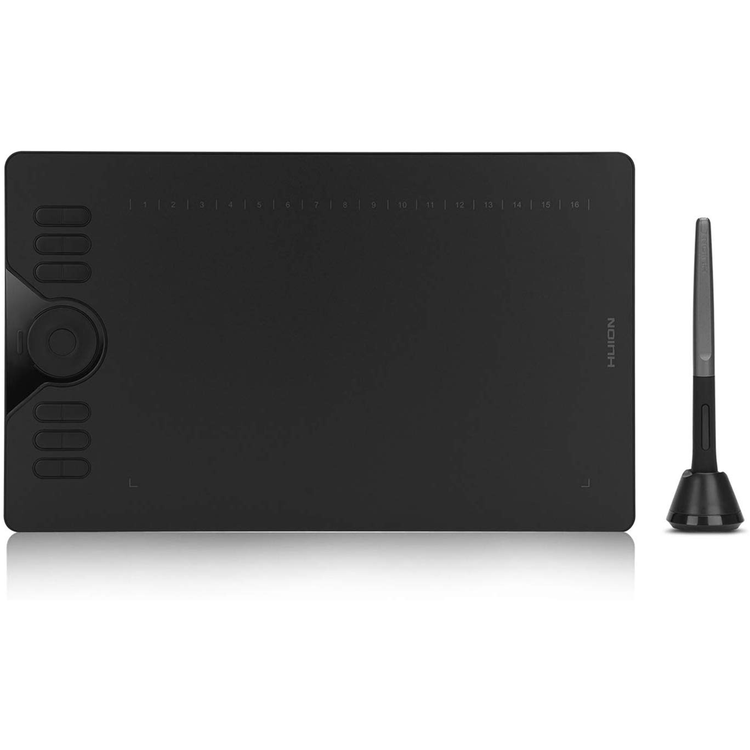
https://www.huiontablet.com/huion-hs610.html OS Android 6.0 Supported - Not Only compatible with Windows or Mac OS, it also supports Android devices; You can easily connect your phone to the tablet with the OTG connector; ONLY mobile phone and tablet powered by Android 6.0 or above are supported, while iPhone and iPad are NOT at the moment. NOTE: The cursor will not show up in SAMSUNG at present, except SAMSUNG Note Series. If you are not sure whether the product is compatible with your Phone or if you meet any problems, please contact us. Touch Ring - The newly-design Touch Ring helps you zoom in or out for your canvas, adjust your brush and page scrolling; Use the 12 Press Keys to customize the function as you like. Tilt Function - HS610 supports ±60 degrees brush tilt; Provide you better pressure detection and accurate cursor positioning with different angles, restore the true feeling of painting. Battery-free Stylus - Say goodbye to the pen charging cable; It provides a more accurate and natural drawing experience. 8192 Pen Pressure - You can enjoy smooth and accurate lines when using the drawing tablet; 266PPS Report Rate and 5080LPI Pen Resolution; Compatible with Photoshop, SAI or mainstream digital art software; One year warranty. A graphics tablet can be connected to your phone/ tablet The HS610 graphic tablet is a brand new product that can be connected not only to a PC/laptop but also to an Android phone/tablet to use. Coupled with a weight of 600g and a thickness of 8mm, this device is very lightweight and easy to carry, so you can pack this device into your bag and carry around conveniently. Excellent pen performance HS610 is equipped with the PW100 battery-free pen, which sets you free from the charging issues. Together with 8192 levels of pen pressure sensitivity and ±60° tilt support, you can enjoy more accurate and natural strokes, bringing you a more real paper-like drawing experience. Customize the express keys as you like Free to set up the 12 hard express keys and 16 soft express keys according to your habits. Together with 1 touch ring, this combination helps a lot to improve your working efficiency and save your time. Work area Because the work area of a PC/laptop is different from a phone/tablet, so the work area of the HS610 graphic tablet will be different according to the different connection way you choose. For a PC/laptop connection, the work area for the graphic tablet is 254 x 158.8mm. For an Android phone/tablet connection, the work area will be 158.8 x 99.2mm. 266PPS+5080 LPI 266PPS helps to sense the pen movement agilely, with almost no delay lines. 5080 LPI high pen resolution makes the pen stroke more delicate and natural, which can easily achieve pixel-level painting display. Thanks to these configurations, your working flow is greatly improved. OS Compatibility It is compatible with Windows 7 or later, macOS 10.12 or later, and Android 6.0 or later. And if you are connecting the tablet with Andriod device, you can try
ibis Paint
and other mainstream drawing apps. What's in the box? Pen TabletBattery-free PenMicro USB CablePen Holder PH03Pen Nibs x 8 (Inside the pen holder)OTG Adapter (Micro USB)OTG Adapter (USB-C)Quick Start Guide WARM TIPS: 1. HS610 is not a stand alone product! HS610 must be connected to a computer or Android Devices to use. 2. Connection Please make sure completely plug USB cable into the tablet. When you need to connect the tablet to mobile phone, please use the OTG adapter and operate following to the user manual. 3. Driver Download and Installation Driver Download: Our driver will be regularly updated, so please go to
Huion official web
to download the newest driver, and install it on your computer. 3.1 For Windows Users: Please make sure there is no other brands driver on computer and close all drawing program or anti-virus program before installation. (IMPORTANT) Please run as administrator when installing the driver. 3.2 For Mac Mojave (10.14), Catalina (10.15) Users: Our driver is compatible with Mac OS Mojave (10.14) and Catalina (10.15), please install the newest released driver on your computer and add the "HuionTablet" and "TabletDriverAgent" into the whitelist first after installed the driver. 4. HUION Tech Support If you have any problems with the HS610, please check the Quick Guide and search Huion online to find a way to ask us for further assistance, we are always ready to help you! Reminder: The Samsung Note series can display the cursor after setting, other series will not. The cursor will not show up in following models: Nexus 6 /Google Galaxy S6 /Samsung Galaxy S7 edge /Samsung Galaxy S7 /Samsung Galaxy Tab S2 /Samsung Galaxy S8 /Samsung Galaxy S9 /Samsung Galaxy S10, S10e /Samsung
- Response Time
- No
- Number of Colors
- No
- gamut
- No
- Contrast Ratio (Typical)
- No
- Technology
- Battery-Free Electromagnetic Resonance
- Active Area
- PC mode: 254 x 158.8mm (10 x 6.25in); Phone mode: 158.8 x 99.2mm
- Resolution
- 5080 LPI
- Report Rate
- 266PPS
- Pen Pressure
- 8192Levels
- Reading Height
- 10mm
- Supply Voltage
- No
- Power Consumption
- No
- Interface Support
- Micro USB
- OS Support
- Windows 7 or later, macOS 10.12 or later Android 6.0 or later
- Compliance
- CE/FCC/CCC
- Dimensions/piece
- 350 x 211.8 x 8mm
- Net Weight/ piece
- 600g
- Gross Weight/piece
- 1.3KG
- Out Carton Dimensions
- 410*220*40MM
- Quantity per Carton
- 10
- Net Weight/carton
- 10.29KG
- USB Cable Length
- No
- Gross Weight/carton
- 13.85KG
- Type
- Graphics tablet
- Express Keys
- 12 Customized Press Keys
- Function Keys
- 16 Customized Soft Keys
As an international traveller you are entitled to bring a certain amount/value of goods that are free of Customs duty and exempt Goods and Services tax (GST) into New Zealand. This is called your duty free allowance and personal goods concession. It is important to review these for any purchases you make on The Mall.
Your duty free allowance entitles you to bring into New Zealand the following quantities of alcohol products free of customs duty and GST provided you are over 17 years of age. You do need to be 18 years or over to purchase.
- Up to six bottles (4.5 litres) of wine, champagne, port or sherry or
- Up to twelve cans (4.5 litres) of beer
- And three bottles (or other containers) each containing not more than 1125ml of spirits, liqueur, or other spirituous beverages
Goods other than alcohol and tobacco, whether purchased overseas or purchased duty free in New Zealand, that have a combined total value not exceeding NZ$700 may also be brought as part of your personal goods concession.
When travelling overseas there are legal limits on the amount of duty free alcohol and other goods you can take with you. These amounts will vary depending on the country you are flying into. We always recommend you check the latest limits and exemptions.
Your order can be picked up at an Auckland Airport Collection Point. There is one in departures and one at arrivals in the international terminal. Alternatively, if you are arriving between 11pm and 6am you will be able to collect your order from our lockers. See map
Please bring your order confirmation email and your passport. If you are collecting from lockers you will have been sent an email with your access code, be sure to have this on you in order to collect your order.
If you’re departing Auckland Airport, we recommend that you come to the Auckland Airport Collection Point at least 60 minutes before your flight. If you miss your pickup time or your flight details have changed please let us know as soon as possible.
When you collect your order you will have the opportunity to inspect the items and sign for them.
If you need to return an item, our Collection Point team are there to help you. If you are collecting after hours please return the item to your locker and our team will be in touch as soon as possible. You may also like to view our Returns & refunds which provides information on how this works and outlines the individual retailer's returns and refunds policies.
After Hours Collections
If your order needs to be collected after the Auckland Airport Collection Point desk is closed, your order will be placed in the lockers next to the desk. All the details you will need to collect your order will be provided in your Order Confirmation and Ready to Collect Email.