










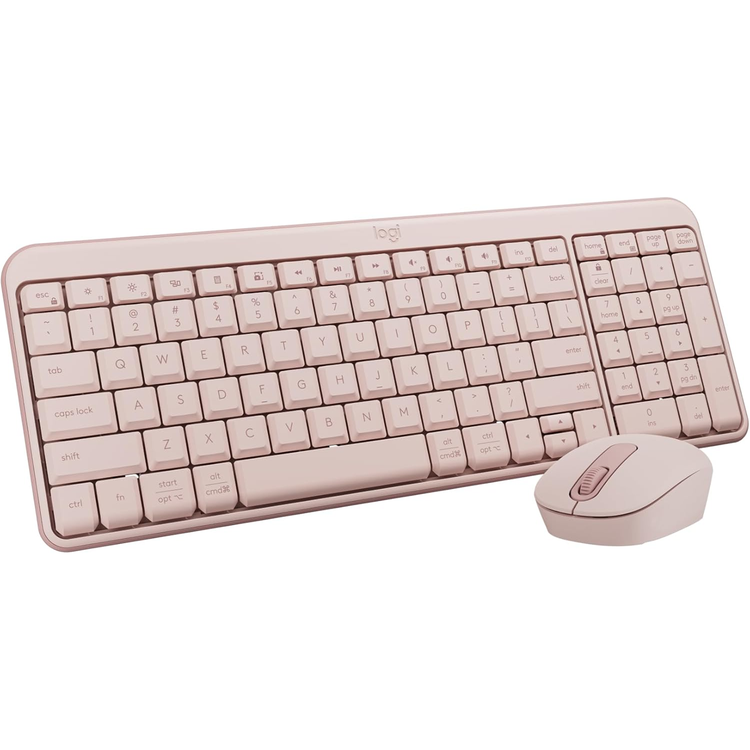
Logitech MK250 Bluetooth Desktop Keyboard & Mouse Combo - Rose
Connect easy with MK250, a combo that's simple, full-featured, wireless, and made to last with plastic parts using a minimum of 64% recycled materials. Connect easy Meet Logitech MK250 Bluetooth® combo. Easy to connect and easy to set up with a compact and comfortable design, so you can focus on the task at hand. Durable, reliable performance Spill-resistant*, robust, and with a 12-month battery life*, MK250 is designed to withstand consistent daily use. That means more focus and peace of mind for you. Made by Logitech, a brand known for quality since 1981. (*Tested under limited conditions (maximum of 60 ml liquid spillage). Do not immerse the keyboard in liquid. , ** Battery life varies with use conditions.) Compact yet complete A combo with a small mobile mouse and space-saving keyboard that still includes a numpad and all essential keys. Ideal for tight spaces, MK250 offers efficiency without sacrificing performance or convenience. Optimal comfort Enjoy a contoured, ambidextrous mouse and responsive, deep-profile keyboard keys. The MK250 provides a familiar and consistent feel, great for accuracy so you stay focused. Made to last with recycled plastic MK250 is built from plastic parts using a minimum of 66% (mouse) and 64% (keyboard) recycled plastic* in addition to uncompromising quality. At Logitech, we design for sustainability and durability. (*Mouse plastic content: minimum 66% post-consumer recycled plastic. **Keyboard plastic content: minimum 64% post-consumer recycled plastic. Excludes plastic in printed wiring assembly and packaging.)
- Keyboard
- Height: 136.9 mm
- Width: 369.9 mm
- Depth: 22.8 mm
- Weight: 380 g
- Mouse
- Height: 100 mm
- Width: 60 mm
- Depth: 38 mm
- Weight: 76 g
- Sensor technology
- Smooth optical tracking (1,000 DPI)
- Buttons
- On/Off power buttons
- Scrolling
- Line-by-line scrolling
- Scroll wheel
- 2D, mechanical
- Connect/Power
- Long press On/Off power buttons for pairing
- Battery type
- Alkaline battery
- Battery life
- 12 months
- Wireless technology
- Bluetooth® Low Energy Technology
- Wireless operating distance
- 10 m
- Number of Batteries
- 1xAA (included)
- Indicator lights
- Connectivity LED
- Number of buttons
- 3 (Left/Right-click, Scroll-wheel with middle click)
- Keyboard Connection Type
- Long press On/Off power buttons for pairing
- Keyboard Wireless Technology
- Bluetooth® Low Energy Technology
- Wireless range
- 10 m
- Keyboard battery type
- Alkaline battery
- Indicator Lights (LED)
- Connectivity LED
- Special Keys
- On/Off power buttons
- Number of Batteries
- 2xAAA (included)
- Battery life
- 12 months
- Additional Features
- Tilt legs (for 7 degree typing angle)
- Layout
- Compact layout with number pad
- Multi OS printed layout
- Yes
- Requirements
- Bluetooth® Low Energy wireless technology
- Compatibility
- Windows 10, 11 or later; macOS 12 or later; ChromeOS
As an international traveller you are entitled to bring a certain amount/value of goods that are free of Customs duty and exempt Goods and Services tax (GST) into New Zealand. This is called your duty free allowance and personal goods concession. It is important to review these for any purchases you make on The Mall.
Your duty free allowance entitles you to bring into New Zealand the following quantities of alcohol products free of customs duty and GST provided you are over 17 years of age. You do need to be 18 years or over to purchase.
- Up to six bottles (4.5 litres) of wine, champagne, port or sherry or
- Up to twelve cans (4.5 litres) of beer
- And three bottles (or other containers) each containing not more than 1125ml of spirits, liqueur, or other spirituous beverages
Goods other than alcohol and tobacco, whether purchased overseas or purchased duty free in New Zealand, that have a combined total value not exceeding NZ$700 may also be brought as part of your personal goods concession.
When travelling overseas there are legal limits on the amount of duty free alcohol and other goods you can take with you. These amounts will vary depending on the country you are flying into. We always recommend you check the latest limits and exemptions.
Your order can be picked up at an Auckland Airport Collection Point. There is one in departures and one at arrivals in the international terminal. Alternatively, if you are arriving between 11pm and 6am you will be able to collect your order from our lockers. See map
Please bring your order confirmation email and your passport. If you are collecting from lockers you will have been sent an email with your access code, be sure to have this on you in order to collect your order.
If you’re departing Auckland Airport, we recommend that you come to the Auckland Airport Collection Point at least 60 minutes before your flight. If you miss your pickup time or your flight details have changed please let us know as soon as possible.
When you collect your order you will have the opportunity to inspect the items and sign for them.
If you need to return an item, our Collection Point team are there to help you. If you are collecting after hours please return the item to your locker and our team will be in touch as soon as possible. You may also like to view our Returns & refunds which provides information on how this works and outlines the individual retailer's returns and refunds policies.
After Hours Collections
If your order needs to be collected after the Auckland Airport Collection Point desk is closed, your order will be placed in the lockers next to the desk. All the details you will need to collect your order will be provided in your Order Confirmation and Ready to Collect Email.