










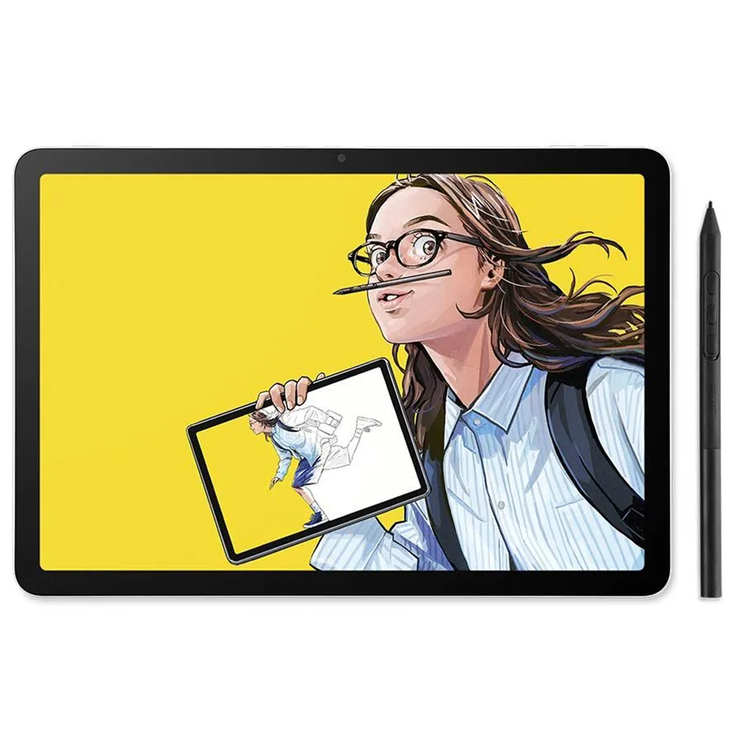
What if your best ideas didn't have to wait? You know that feeling when inspiration hits and you need to capture it right now? The Wacom MovinkPad 11 is for moments like that. Whether you're sketching between classes, storyboarding during your commute, or just need something that works when your brain decides to get creative at 2 AM, this all-in-one drawing tablet keeps up with your creativity. It's light and durable enough to take with you and ready the second you pick the pen up. ALL-IN-ONE DESIGN 11" Android 14 tablet, 8 GB memory/128 GB storage, battery-free, slim barrel Pro Pen 3, no computer needed; comes with Wacom Canvas sketching app and 2 years of Clip Studio Paint Debut QUICK DRAW READY Tap and hold the pen on screen to instantly launch Wacom Canvas and start sketching the moment inspiration strikes, just like opening a sketchbook - seamlessly transition to other apps to refine your drawing BEST-IN-CLASS PEN PERFORMANCE Designed for MovinkPad, this slim barrel version of Wacom Pro Pen 3, delivers 8,192 pressure levels, has three buttons, and comes with replacement nibs stored in the pen's back end PAPER-LIKE DRAWING EXPERIENCE bright, sharp display with matte etched glass surface that feels like paper with subtle texture - reduces glare and fingerprints so you can focus on creating without distractions THIN, LIGHT, PORTABLE Weighs just 1.3lbs, lighter than most laptops and easily fits in a bag or backpack, supports popular digital pens (Dr. Grip, LAMY, STAEDTLER); goes wherever a sketchbook can go Instantly capture the moment Start creating the moment inspiration strikes. Just tap and hold the pen on the screen to wake up the tablet and launch the Wacom Canvas sketching app - it's just like opening a sketchbook. And once you're ready to refine your creation, you can easily open it in Clip Studio Paint to refine and perfect it. Creativity, unplugged MovinkPad 11 can go anywhere - no computer required. Now the hallway between classes, your favorite café, or your local park is your new creative studio. Built-in front and rear cameras can capture quick snapshots to record all your inspiration. No charging, no interruptions The pen that comes with MovinkPad is a customized, slim version of Wacom's Pro Pen 3. It's the same tech that professional artists swear by, and it doesn't need charging. You get all the pressure sensitivity and tilt detection you'd expect from a pro-level Wacom product, plus replacement nibs are stored right in the back of the pen. Your digital sketchbook Creative freedom in an ultra-portable 1.3 lb design. With a sharp 2200 x 1440 screen, 7700 mAh battery, and front and back cameras, it's designed to follow your creativity anywhere with WiFi and Bluetooth connectivity. No glare getting in the way of your art This tablet is built for drawing and digital art. The 11" screen is bright and sharp, so it works well as a digital canvas. The matte finish etched glass feels like paper with a little bit of texture so it doesn't feel slick. The screen surface reduces glare and repels fingerprints, so you can focus on your art without constantly tilting or wiping the screen. Seamless software workflow Go from sketch to illustration without slowing down. The included Wacom Canvas app is perfect for sketching, and you can easily jump from there right into Clip Studio Paint to take your sketch to the next level - illustrations, manga, or anything else. Wacom MovinkPad 11 comes with 2 years of Clip Studio Paint Debut. Slim, light, portable At 1.3 pounds and just 0.3 inches thick, the MovinkPad slips easily into most bags or backpacks while staying durable enough for daily use. The 7,700 mAh battery keeps you drawing for hours, so whether you're on the sofa, in the backyard, or on the go, it's designed to follow your creativity wherever it leads. Included Software Wacom Canvas - Capture ideas the moment they strike.Wacom Canvas is the perfect digital sketchbook for doodles, sketches, and note-taking. It's as simple as possible, with just the essential tools - pencil, eraser, and ink - to limit distractions so you can stay focused on creativity. Quick Draw means it's ready to go as soon as inspiration strikes. Wacom Shelf saves everything for easy access. And once you're ready to take your work to the next level, Clip Studio Paint is only a single tap away. Clip Studio Paint - Bring your sketches to completion.Clip Studio Paint Debut is a drawing and illustration app designed to take your ideas from rough concept to polished artwork. With essential illustration tools and an intuitive interface optimized for tablets, you can add detailed line work, rich colors, and professional finishing touches to transform initial sketches into complete graphic art and illustrations. Simple enough for portable creativity, powerful enough for serious results. Wacom Shelf - View All Your Art in One PlaceScroll through your growing collection of sketches, artwork and reference images - all in one place. Wacom Shelf lets you view every image on your device, no matter the file type. Even if you've forgotten where you saved it, find everything you need at a glance. Supports bmp, clip, heic, jpg, webp, png and tiff formats.
- Product
- Wacom MovinkPad 11
- Cables
- USB-C to USB-C Cable (1m/Power)
- Pen Kit
- Wacom Pro Pen 3 with nib holder (Felt nib x3)
- Documents
- IPI Booklet, Regulation sheet
- Product color
- Light Gray
- Storage temperature and humidity
- Temperature: -10 to 60 degree C / Humidity: 30 to 90% RH (non-condensing)
- Operating temperature and humidity
- Temperature: 5 to 40 degree C / Humidity: 30 to 80% RH (non-condensing)
- Screen size (approx.)
- 11"
- Screen Resolution
- 2200 x 1440
- Color Depth
- 8bit x RGB (24bits)
- Screen size
- 11.45 in / 29 cm
- Display resolution
- 2200 x 1440 pixels
- Technology
- IPS
- Glass / surface
- AF + AG glass
- Direct Bonding
- Yes
- Active area (mm)
- 243 x 159 mm
- Active area (inch)
- 9.6 x 6.3 in
- Aspect ratio
- 3:2
- Supported resolution
- 2200 x 1440
- Viewing angle
- 170 deg. (85/85) H / 170 deg. (85/85) V (typ)
- Color depth
- 8bit x RGB = 24bit
- Color gamut coverage ratio
- sRGB 99% (CIE1931) (typ)
- Contrast ratio
- 1200:1 (typ)
- Brightness
- 400cd/m² (typ)
- Processor
- Mediatek Helio G99
- System memory
- 8G
- Expandable memory
- No
- Storage
- 128GB
- Wireless connectivity
- IEEE 802.11a/b/g/n/ac Bluetooth® 5.2
- Operating system
- Android™ 14
- Multi-Touch
- Yes
- Touch technology
- Projected capacitive technology
- Touch capacity
- Multi-touch 10 fingers
- I/O Ports
- 1x USB Type-C port (USB2.0)
- Front / rear camera
- 5M pixels (Front) / 4.7M pixels (Rear)
- Kenington Lock Slot
- No
- Sensors
- G-sensor / e-compass / Ambient light sensor
- Mic / Speakers
- Dual Microphones / Stereo Speaker
- Product dimensions (L x W x H) (mm)
- 266 x 182 x 7 mm
- Product dimensions (L x W x H) (inch)
- 10.5 x 7.2 x 0.3 in
- Product weight (kg)
- 588 g
- Product weight (lbs)
- 1.3 lb
- Pen name
- Wacom Pro Pen 3 with Nib holder
- Pen pressure levels
- 8192 levels
- Pen type
- Pressure-sensitive, cordless, battery-free
- Number of switches
- 3 side switches
- Pen tilt supported
- 60 degrees
- Pen resolution
- 5080 LPI
- Pen technology
- Electromagnetic resonance technology
As an international traveller you are entitled to bring a certain amount/value of goods that are free of Customs duty and exempt Goods and Services tax (GST) into New Zealand. This is called your duty free allowance and personal goods concession. It is important to review these for any purchases you make on The Mall.
Your duty free allowance entitles you to bring into New Zealand the following quantities of alcohol products free of customs duty and GST provided you are over 17 years of age. You do need to be 18 years or over to purchase.
- Up to six bottles (4.5 litres) of wine, champagne, port or sherry or
- Up to twelve cans (4.5 litres) of beer
- And three bottles (or other containers) each containing not more than 1125ml of spirits, liqueur, or other spirituous beverages
Goods other than alcohol and tobacco, whether purchased overseas or purchased duty free in New Zealand, that have a combined total value not exceeding NZ$700 may also be brought as part of your personal goods concession.
When travelling overseas there are legal limits on the amount of duty free alcohol and other goods you can take with you. These amounts will vary depending on the country you are flying into. We always recommend you check the latest limits and exemptions.
Your order can be picked up at an Auckland Airport Collection Point. There is one in departures and one at arrivals in the international terminal. Alternatively, if you are arriving between 11pm and 6am you will be able to collect your order from our lockers. See map
Please bring your order confirmation email and your passport. If you are collecting from lockers you will have been sent an email with your access code, be sure to have this on you in order to collect your order.
If you’re departing Auckland Airport, we recommend that you come to the Auckland Airport Collection Point at least 60 minutes before your flight. If you miss your pickup time or your flight details have changed please let us know as soon as possible.
When you collect your order you will have the opportunity to inspect the items and sign for them.
If you need to return an item, our Collection Point team are there to help you. If you are collecting after hours please return the item to your locker and our team will be in touch as soon as possible. You may also like to view our Returns & refunds which provides information on how this works and outlines the individual retailer's returns and refunds policies.
After Hours Collections
If your order needs to be collected after the Auckland Airport Collection Point desk is closed, your order will be placed in the lockers next to the desk. All the details you will need to collect your order will be provided in your Order Confirmation and Ready to Collect Email.