










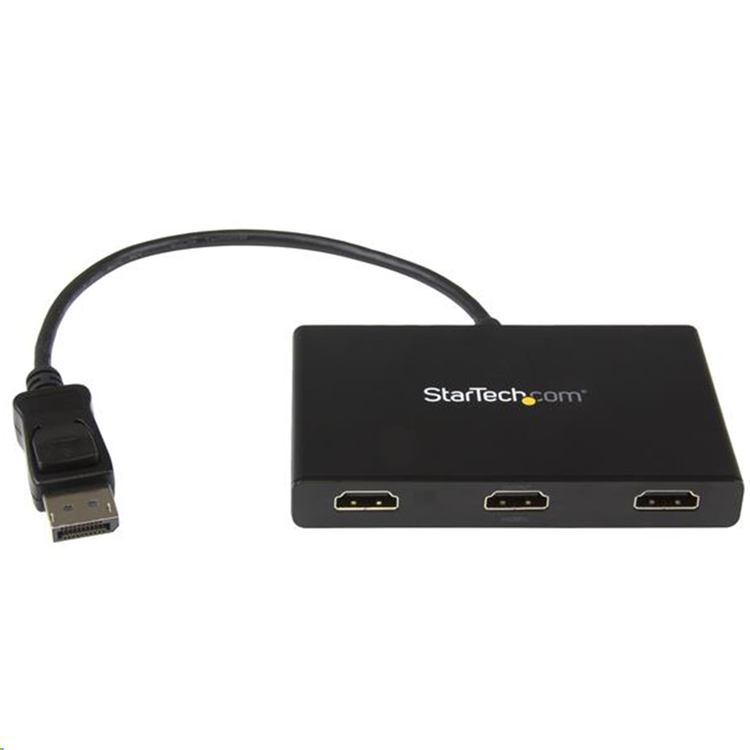
StarTech.com MSTDP123HD 3-Port Multi Monitor Adapter
This MST hub lets you connect three HDMI® monitors to your DisplayPort™ (DP) 1.2 equipped Windows® laptop or desktop. Increase productivity with multiple screensThe newest generations of computers are more portable than ever, which often means that you're left with fewer video outputs and smaller integrated screens. This MST hub solves both of these problems by letting you connect three additional displays to your computer, which makes multitasking much easier.Configure your displays for any environmentUsing the MST hub, you can extend your desktop onto additional monitors and stream independent content to each display. You can also mirror the same image onto multiple HDMI televisions or projectors for remote viewing applications such as digital signage.Enjoy amazing video quality without draining system resourcesMST technology uses your existing video card to minimize the use of system resources while delivering Ultra HD 4K resolutions. This unprecedented performance makes MST perfect for high-resolution applications such as graphic design, gaming and medical imaging. Note: When using a DisplayPort 1.1 video card the MSTDP123HD will act as splitter, automatically mirroring your video source across all displays. Resolution limitations apply. The MSTDP123HD supports plug-and-play installation for a hassle-free setup, and is backed by a StarTech.com 2-year warranty and free lifetime technical support.
- Audio
- Yes
- Chipset ID
- STDP4320
- Converter Type
- MST Hub
- Output Signal
- HDMI
- Ports
- 3
- Maximum Digital Resolutions
- 3840 x 2160 @30hz
- Supported Resolutions
- 1024x768
- 1280x720 (High-definition 720p)
- 1920x1080 (High-definition 1080p)
- 1920x1200
- 2560x1440
- 2560x1600
- 3840 x 2160 (Ultra HD 4K) @30hz
- Wide Screen Supported
- Yes
- Connector A
- 1 - DisplayPort (20 pin) Male Input
- Connector B
- 1 - HDMI (19 pin) Female Output
- OS Compatibility
- Windows 10 (32/64)
- Windows 8/8.1 (32/64)
- Windows 7(32/64)
- Center Tip Polarity
- Positive
- Input Current
- 0.5 A
- Input Voltage
- 110V-240V AC
- Output Current
- 3A
- Output Voltage
- 5 DC
- Plug Type
- N
- Power Consumption (In Watts)
- 15
- Power Source
- AC Adapter Included
- Humidity
- 50-90%
- Operating Temperature
- 0°C to 45°C (32°F to 113°F)
- Storage Temperature
- -20°C to 70°C (-4°F to 158°F)
- Color
- Black
- Enclosure Type
- Plastic
- Included in Package
- 1 - DisplayPort to 3x HDMI MST Hub
- 1 - Universal power adapter (NA/EU/UK/AU)
- 1 - Quick install guide
As an international traveller you are entitled to bring a certain amount/value of goods that are free of Customs duty and exempt Goods and Services tax (GST) into New Zealand. This is called your duty free allowance and personal goods concession. It is important to review these for any purchases you make on The Mall.
Your duty free allowance entitles you to bring into New Zealand the following quantities of alcohol products free of customs duty and GST provided you are over 17 years of age. You do need to be 18 years or over to purchase.
- Up to six bottles (4.5 litres) of wine, champagne, port or sherry or
- Up to twelve cans (4.5 litres) of beer
- And three bottles (or other containers) each containing not more than 1125ml of spirits, liqueur, or other spirituous beverages
Goods other than alcohol and tobacco, whether purchased overseas or purchased duty free in New Zealand, that have a combined total value not exceeding NZ$700 may also be brought as part of your personal goods concession.
When travelling overseas there are legal limits on the amount of duty free alcohol and other goods you can take with you. These amounts will vary depending on the country you are flying into. We always recommend you check the latest limits and exemptions.
Your order can be picked up at an Auckland Airport Collection Point. There is one in departures and one at arrivals in the international terminal. Alternatively, if you are arriving between 11pm and 6am you will be able to collect your order from our lockers. See map
Please bring your order confirmation email and your passport. If you are collecting from lockers you will have been sent an email with your access code, be sure to have this on you in order to collect your order.
If you’re departing Auckland Airport, we recommend that you come to the Auckland Airport Collection Point at least 60 minutes before your flight. If you miss your pickup time or your flight details have changed please let us know as soon as possible.
When you collect your order you will have the opportunity to inspect the items and sign for them.
If you need to return an item, our Collection Point team are there to help you. If you are collecting after hours please return the item to your locker and our team will be in touch as soon as possible. You may also like to view our Returns & refunds which provides information on how this works and outlines the individual retailer's returns and refunds policies.
After Hours Collections
If your order needs to be collected after the Auckland Airport Collection Point desk is closed, your order will be placed in the lockers next to the desk. All the details you will need to collect your order will be provided in your Order Confirmation and Ready to Collect Email.