










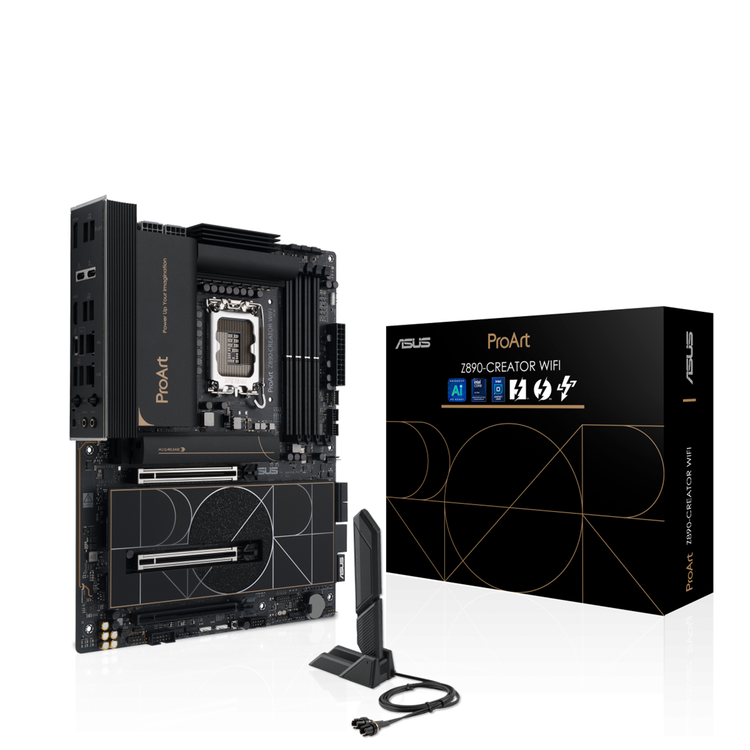


ASUS ProArt Z890-CREATOR WIFI Support Intel 15th Gen CPU, LGA 1851 ATX Motherboard
ProArt Z890-CREATOR WIFI The ProArt Z890-CREATOR WIFI empowers creators of all levels by maximizing the performance of the latest Intel® Core™ Ultra Processor (Series 2) processors with 16+1+2+2 team power stages, DDR5 slots, PCIe® 5.0 and lightning-fast connectivity including dual Thunderbolt™ 5 ports, 10G and 2.5G Ethernet, and WiFi 7. This motherboard manifests a professional, elegant and precise vision for content creators of all kinds, with a style elevated by tone-on-tone layers of black infused with metallic gold touches. A subtly designed I/O cover provides a sleek and sophisticated look while concealing the premium connectors within.
Connectivity
Performance
Cooling
DIY-Friendly
Thunderbolt™ Connectivity Get immersed in your creations with two Thunderbolt™ 5 and one USB4 / Thunderbolt™ ports for connecting to all your compatible content-creation gadgets, enjoying up to 80 Gbps of bi-directional bandwidth, and up to 120 Gbps with Bandwidth Boost. To further push your creative work with one 8K or two 4K color-accurate monitors, you can connect your discrete graphics card to the onboard DisplayPort™ In port on the rear I/O panel and direct the video output via the Thunderbolt™ 5 port*. *DP In cable not included. - Up to? 120Gbps Bandwidth- DisplayPort 2.1 Supports one 8K or dual 4K displays?- Daisy-Chaining For up to five devices?
Seamless Dual-PC Sharing with Thunderbolt™ Share Experience a revolutionary way to interact with two PCs using Thunderbolt™ Share-the ultrafast connectivity solution that transforms your dual-PC setup. Seamlessly share screens, keyboards, mice, storage and files between two computers, with the unparalleled speed of Thunderbolt™ technology. *A certified Thunderbolt™ or USB4® cable is required to meet minimum bandwidth requirements. Cable not included. - Control Other Computer- Sync Files- Drag and Drop- Transfer Data to a New Computer Robust Power Design Designed to meet the needs of high-core-count CPUs, the ProArt Z890-CREATOR WIFI features 16(90A)+1(90A)+2(90A)+2(80A) power stages that integrate high-side and low-side MOSFETs and drivers into packages rated for up to 90 amps each. This configuration ensures optimal power delivery, efficiency, stability and performance for new Intel® Core™ Ultra Processors (Series 2). - 16 Vcore Power (90A,DrMOS)- 2 VCCGT Power (90A,DrMOS)- 1 VCCSA Power (90A,DrMOS)- 2 VCNNAON Power (80A,DrMOS) Eight-Layer PCB DesignThis enhances quick heat dissipation around the voltage regulators for enhanced stability and overclocking. ProCool II ConnectorsThese are built to tight specifications to ensure flush contact with PSU power lines. The resulting lower impedance helps to prevent hotspots and connector failure. Superior Chokes &; CapacitorsThese are engineered to resist extreme temperatures, providing a higher level of performance than the industry standard. Digi+ VRM ControlThe ASUS Digi+ voltage-regulator module (VRM) is one of the finest in the industry and ensures ultra-smooth power delivery to the CPU.
AI Overclocking Maximized CPU performance and predictions for ideal CPU and cooling settings push your system to its limits.
AI Cooling II Balance the thermals and acoustics of any build with a single click.
AI Networking II Optimize network performance, helping to ensure seamless connectivity and maximized WiFi 7 speeds.
AI Advisor Using AI technology to understand natural-language questions or scenario descriptions, ASUS AI Advisor allows users to explore the functionality and advanced features of ASUS motherboards in a simple and straightforward way. * Availability of ASUS AI Advisor may vary by region.
NPU Boost The integrated Neural Processing Unit in Intel® Core™ Ultra Processors (Series 2) efficiently accelerates AI workflows - and NPU Boost lets you do more with it. This BIOS feature overclocks the NPU with just one click, increasing performance by up to 24%*. * Results were with an Intel® Core™ Ultra 9 285K processor, ROG Maximus Z890 Extreme motherboard, GeForce RTX™ 4090 24GB graphics card, and XPG Lancer DDR5 memory modules (model AX5U6000C4016G). Individual results may vary.
Memory The ProArt Z890-CREATOR WIFI enhances DDR5 performance by providing overclocking options that would otherwise be locked, whether you are dealing with high-speed or entry-level memory modules. DIMM Fit / DIMM Fit Pro DIMM Fit is an ASUS-exclusive BIOS feature that precisely analyzes individual memory modules to optimize performance and pinpoint potential issues. DIMM Fit Pro gives advanced PC builders more extensive customizability for memory tuning. It allows users to control up to twenty overclocking parameters, define testing ranges, and prioritize stability or performance, offering a more flexible and granular approach to memory optimization.
AEMP III ASUS Enhanced Memory Profile III (AEMP III) is an advanced firmware feature that empowers users to achieve unparalleled memory performance with cutting-edge CUDIMM memory. Through a two-phase comprehensive tuning process, AEMP III first optimizes the clock driver and then the memory frequency. This results in the best balance between performance and stability, even at cutting-edge speeds of DDR5-8000 or higher.* *Results may vary. Results are based on a test with an Intel Core Ultra 9 285K processor and 2x16GB SK Hynix DDR5-6400 Clocked Unbuffered DIMM RAM, model HMCG78AHBCA326N.
PCIe® Slot Q-Release Slim With PCIe Slot Q-Release Slim, simply tilt the card toward the latching mechanism to automatically unlock it from the PCIe slot. This makes upgrades and maintenance easier than ever before. Users no longer need to fiddle with a tricky latch or even press a button to release their graphics card from the slot.
M.2 Q-Release The new M.2 heatsink features a convenient switch to quickly remove it, eliminating the need for tiny screws during SSD installation. Its strong locking mechanism also provides a snug contact surface, helping to ensure reliable heat dissipation for your SSD.
M.2 Q-Slide A new sliding M.2 latch design supports sizes 2242, 2260 and 2280 for easy device installation.
New M.2 Q-Latch The innovative ASUS Q-Latch makes it easy to install or remove an M.2 SSD without the need for specific tools or screws. This design employs a simple locking mechanism to secure the drive and neatly detach it with one tap.
Q-Antenna With Q-Antenna, attaching a WiFi antenna to your PC is now easy and fast. Instead of slowly rotating two fasteners until they finally lock in, they just snap into place. Less hassle, and more consistent performance.
The Power of Minimalist Design A spark of inspiration can breathe life into a concept that leads to a masterpiece. ProArt is a comprehensive ecosystem providing professional creators with a stable foundation for your inspiration. These custom workstations feature award-winning ProArt motherboards, graphics cards, CPU coolers and chassis, pairing with ProArt displays to accelerate your creative workflow and bring the boldest visions and ideas to life.
Customize Your Personal Settings ProArt Creator Hub is your personal portal to monitor your PC status, personalize settings or optimize your workflow. It features an intuitive overview dashboard, with quickly switchable fan profiles and performance modes. Color Management? One of the most important things for creators is color. The top right corner allows easy access to the Color Management feature. This includes the Screen Color Picker and Image Color Extractor that make it simple to get a detailed color analysis and color information, and you can use the Color Palette to build your personal color preferences. You will also find color trends and color palettes created by the professionals at the ASUS Design Center.
WorkSmart To streamline your workflow, you can select up to 8 apps to be launched at the same time with a single desktop shortcut.?
Security Control and Remote Management Advanced security management functions from ASUS Control Center Express protect the PCs and confidential data in your creative studio. USB Port ManagementEnable or disable the USB port, or set it to Read Only to prevent data leaks. Software BlacklistFor added security, a software blacklist is available to help prevent the use of high-risk applications. Registry Editor On/OffRemotely disable the Registry Editor on client devices to prevent unauthorized changes to system configurations.? Upgraded User Experience BIOS Q-Dashboard and ASUS DriverHub make it easy to set up and maintain your PC, while ASUS GlideX delivers a variety of display and control options.
ASUS DriverHub ASUS DriverHub streamlines the installation and management of ASUS drivers and utilities to keep your hardware up-to-date and perform optimally. This standalone application automatically detects current driver versions and presents available updates in a list view. Users are invited to install ASUS DriverHub after OS installation.
ASUS GlidEx A cross-device, cross-platform screen-sharing, screen-control and operation solution for enhanced productivity across PCs, tablets and smartphones via USB or WiFi. It is compatible with Windows, macOS, Android and iOS. Trusted Stability ProArt Z890-CREATOR WIFI is engineered and rigorously tested to offer superior quality, stability and compatibility to ensure that it empowers creativity for years to come. - 24/7 Reliability- 168-hour Durability test- Up to 45°C Temperature- Up to 80%? Relative humidity
- CPU
- Support Intel® Core™ Ultra Processors (Series 2), LGA1851
- Supports Intel® Turbo Boost Technology 2.0 and Intel® Turbo Boost Max Technology 3.0**
- * Refer to https://www.asus.com/support/download-center/ for CPU support list.
- ** Intel® Turbo Boost Max Technology 3.0 support depends on the CPU types.
- Chipset
- Intel® Z890 Chipset
- Memory
- 4 x DIMM slots, max. 256GB, DDR5
- Support up to 9066+MT/s (OC), Non-ECC, Un-buffered and Clocked Unbuffered DIMM (CUDIMM)*
- Dual channel memory architecture
- Supports Intel® Extreme Memory Profile (XMP) memory module
- ASUS Enhanced Memory Profile III (AEMP III)
- Support DIMM Fit
- Support DIMM Flex
- * Supported memory types, data rate (speed), and number of DRAM modules vary depending on the CPU and memory configuration, for more information please refer to CPU/Memory Support list under the Support tab of product information site or visit https://www.asus.com/support/download-center/.
- ** Non-ECC, un-buffered DDR5 memory supports On-Die ECC function.
- Graphics
- 1 x HDMI™ port**
- 2 x Intel® Thunderbolt™ 5 ports (USB Type-C®) support DisplayPort and Thunderbolt™ video outputs***
- 1 x Intel® Thunderbolt™ 4 ports (USB Type-C®) support DisplayPort and Thunderbolt™ video outputs****
- * Graphics specifications may vary between CPU types. Please refer to www.intel.com for any updates.
- ** Supports 4K @ 60Hz as specified in HDMI 2.1
- *** Supports up to 2 x 8K @ 60HZ (DSC mode) + 1 x 4K @ 60HZ monitors with DP in.
- *** Supports up to 1 x 8K @ 60HZ (DSC mode) + 1 x 4K @ 60HZ monitors without DP in.
- *** For resolution support please check DisplayPort 2.1 specs. ThunderboltTM 5 bandwidth is limited by DisplayPort™ 2.1 with up to 77.4 Gbit/s. We recommend chain-connecting the monitors using verified Thunderbolt™ cables.
- **** In ThunderboltTM 4 mode, supports up to 8K @ 60Hz x1 with DSC, maximum total bandwidth up to 23.8Gbps, for resolution support please check DisplayPort 2.1 specs. In DP alt mode, supports up to UHBR20.When the ThunderboltTM 5 port is used to output two displays via integrated graphics, the Thunderbolt 4 port on the motherboard will not be able to output any display.
- ***** While installing the operating system, please ensure that your monitor is connected to the HDMI port on the back I/O panel or to a discrete graphics card.
- Expansion Slots
- Intel® Core™ Ultra Processors (Series 2) *
- 2 x PCIe 5.0 x16 slots (supports x16 or x8/x8 modes)
- Intel® Z890 Chipset
- *1 x PCIe 4.0 x16 slot (supports x4 mode)
- * Please check the PCIe bifurcation table on the support site (https://www.asus.com/support/FAQ/1037507/).
- - To ensure compatibility of the device installed, please refer to https://www.asus.com/support/download-center/ for the list of supported peripherals.
- Storage
- Total supports 5 x M.2 slots and 4 x SATA 6Gb/s ports*
- Intel® Core™ Ultra Processors (Series 2) *
- M.2_1 slot (Key M), type 2242/2260/2280/22110 (supports PCIe 5.0 x4 mode)
- M.2_2 slot (Key M), type 2242/2260/2280 (supports PCIe 4.0 x4 mode)
- Intel® Z890 Chipset
- M.2_3 slot (Key M), type 2242/2260/2280 (supports PCIe 4.0 x4 mode)
- M.2_4 slot (Key M), type 2242/2260/2280 (supports PCIe 4.0 x4 modes)
- M.2_5 slot (Key M), type 2242/2260/2280 (supports PCIe 4.0 x4 & SATA modes)**
- 4 x SATA 6Gb/s ports
- * Intel® Rapid Storage Technology supports PCIe RAID 0/1/5/10, SATA RAID 0/1/5/10, M.2 slot from CPU only supports RAID 0/1/5.
- ** M.2_5 slot shares bandwidth with PCIe 4.0 x16 slot. When M.2_5 slot is operating, PCIe 4.0 x16 slot will be disabled.
- Ethernet
- 1 x Marvell® AQtion 10Gb Ethernet
- 1 x Intel® 2.5Gb Ethernet
- ASUS LANGuard
- Wireless & Bluetooth
- Wi-Fi 7*
- 2x2 Wi-Fi 7 (802.11be)
- Supports 2.4/5/6GHz frequency band**
- Support Wi-Fi 7 320MHz bandwidth, up to 5.8Gbps transfer rate.
- Bluetooth® v5.4***
- *Wi-Fi features may vary depending on the operating system
- For Windows 11, Wi-Fi 7 will require 24H2 or later version for full functions, Windows 11 21H2/22H2/23H2 only supports Wi-Fi 6E.
- For Windows 10, only Wi-Fi 6 is supported.
- ** Wi-Fi 6GHz frequency band and bandwidth regulatory may vary between countries.
- *** The Bluetooth® version may vary, please refer to the Wi-Fi module manufacturer's website for the latest specifications.
- USB
- Rear USB (Total 10 ports)
- 2 x Thunderbolt™ 5 ports (2 x USB Type-C®)
- 1 x USB4 / Thunderbolt™ port (1 x USB Type-C®)
- 6 x USB 10Gbps ports (6 x Type-A )
- 1 x USB 2.0 port (1 x Type-A )
- Front USB (Total 5 ports)
- 1 x USB 20Gbps (supports USB Type-C®)
- 1 x USB 5Gbps header supports 2 additional USB 5Gbps ports
- 1 x USB 2.0 header supports 2 additional USB 2.0 ports
- USB Type-C® power delivery output: max. 5V/3A
- Audio
- Realtek ALC1220P 7.1 Surround Sound High Definition Audio CODEC*
- - Impedance sense for front and rear headphone outputs
- - Internal audio Amplifier to enhance the highest quality sound for headphone and speakers
- - Supports: Jack-detection, Multi-streaming, Front Panel Jack-retasking
- - High quality 120 dB SNR stereo playback output and 113 dB SNR recording input (Line-in)
- - Supports up to 32-Bit/192 kHz playback*Audio Features
- - Gold-plated audio jacks
- - Premium audio capacitors
- - Dedicated audio PCB layers
- * Due to limitations in HDA bandwidth, 32-Bit/192 kHz is not supported for 7.1 Surround Sound audio.
- ** A chassis with an HD audio module in the front panel is required to support 7.1 Surround Sound audio output.
- Back Panel I/O Ports
- 2 x Thunderbolt™ 5 USB Type-C® ports
- 1 x USB4 / Thunderbolt™ Type-C®port
- 6 x USB 10Gbps ports (6 x Type-A)
- 1 x USB 2.0 port (1 x Type-A)
- 1 x DisplayPort (Input only)
- 1 x HDMI™ port
- 1 x Wi-Fi module1 x Marvell® AQtion 10Gb Ethernet port
- 1 x Intel® 2.5Gb Ethernet port
- 2 x Gold-plated audio jacks
- 1 x BIOS FlashBack™ button
- 2 x Thunderbolt™ 5 USB Type-C® ports
- 1 x USB4 / Thunderbolt™ Type-C®port
- 6 x USB 10Gbps ports (6 x Type-A)
- 1 x USB 2.0 port (1 x Type-A)
- 1 x DisplayPort (Input only)
- 1 x HDMI™ port
- 1 x Wi-Fi module1 x Marvell® AQtion 10Gb Ethernet port
- 1 x Intel® 2.5Gb Ethernet port
- 2 x Gold-plated audio jacks
- 1 x BIOS FlashBack™ button
- Internal I/O Connectors
- Fan and Cooling Related
- 1 x 4-pin CPU Fan header
- 1 x 4-pin CPU OPT Fan header
- 1 x 4-pin AIO Pump header
- 5 x 4-pin Chassis Fan headers
- Power Related
- 1 x 24-pin Main Power connector
- 2 x 8-pin +12V CPU Power connector
- Storage Related
- 5 x M.2 slots (Key M)
- 4 x SATA 6Gb/s ports
- USB
- 1 x USB 20Gbps connector (supports USB Type-C® )
- 1 x USB 5Gbps header supports 2 additional USB 5Gbps ports
- 1 x USB 2.0 header supports 2 additional USB 2.0 ports
- Miscellaneous
- 3 x Addressable Gen2 headers
- 1 x Clear CMOS button
- 1 x COM Port header
- 1 x CPU Over voltage jumper
- 1 x Chassis Intrusion header
- 1 x Front Panel Audio header (F_AUDIO)
- 1 x SPI TPM header (14-1 pin)
- 1 x 10⁻¹ pin Front System Panel header
- 1 x Thermal Sensor header
- Special Features
- ASUS 5X PROTECTION III /
- - DIGI+ VRM (- Digital power design with DrMOS)
- - ESD Guards
- - LANGuard
- - Overvoltage protection
- - SafeSlot
- - Stainless-steel back I/O
- ASUS Q-Design
- - M.2 Q-Latch
- - M.2 Q-Release
- - M.2 Q-Slide
- - Q-Release Slim (with PCIe SafeSlot)
- - Q-Antenna
- - Q-Connector
- - Q-Dashboard
- - Q-DIMM
- - Q-LED (CPU [red], DRAM [yellow], VGA [white], Boot Device [yellow green])
- ASUS Thermal Solution
- - M.2 heatsink backplate
- - M.2 heatsink
- - VRM heatsink design
- ASUS EZ DIY
- - BIOS FlashBack™ button
- - BIOS FlashBack™ LED
- - Box headers
- - Clear CMOS button
- - CPU Socket lever protector
- - ProCool II
- - Pre-mounted I/O shield
- - SafeDIMM
- Aura Sync
- - Addressable Gen2 headers
- Bespoke Motherboard Design & Business Focused Features
- - 24/7 reliability- Overcurrent protection
- Software Features
- ASUS Exclusive Software
- Armoury Crate
- - Aura Creator
- - Aura Sync
- - Fan Xpert 4
- - Power Saving
- ASUS Driver Hub
- ASUS GlideX
- ASUS CPU-Z
- CreatonFirst
- ProArt Creator Hub
- TurboV Core
- Thunderbolt™ Share
- USB Wattage Watcher
- Adobe Creative Cloud (Free Trial)
- Norton 360 Deluxe (60 Days Free Trial)
- WinRAR (40 Days Free Trial)
- UEFI BIOS
- AI Overclocking Guide
- ASUS EZ DIY
- - ASUS CrashFree BIOS 3
- - ASUS EZ Flash
- - ASUS UEFI BIOS EZ Mode
- - ASUS MyHotkey
- NPU Boost
- Remote Management Features
- IT Management software supported
- - ASUS Control Center Express(ACCE)
- BIOS
- 256 Mb Flash ROM, UEFI AMI BIOS
- Manageability
- WOL by PME, PXE
- Accessories
- Cables
- 2 x SATA 6Gb/s cables
- Miscellaneous
- 1 x ASUS WiFi Q-Antenna
- 1 x Q-connector
- 2 x M.2 Q-Latch packages
- 2 x M.2 rubber packages
- 1 x ProArt accessory bag
- Documentation
- 1 x ACC Express activation key card
- 1 x Quick start guide
- Operating System
- Windows 11 (22H2 & later)
- Form Factor
- ATX Form Factor
- 12 inch x 9.6 inch ( 30.5 cm x 24.4 cm )
As an international traveller you are entitled to bring a certain amount/value of goods that are free of Customs duty and exempt Goods and Services tax (GST) into New Zealand. This is called your duty free allowance and personal goods concession. It is important to review these for any purchases you make on The Mall.
Your duty free allowance entitles you to bring into New Zealand the following quantities of alcohol products free of customs duty and GST provided you are over 17 years of age. You do need to be 18 years or over to purchase.
- Up to six bottles (4.5 litres) of wine, champagne, port or sherry or
- Up to twelve cans (4.5 litres) of beer
- And three bottles (or other containers) each containing not more than 1125ml of spirits, liqueur, or other spirituous beverages
Goods other than alcohol and tobacco, whether purchased overseas or purchased duty free in New Zealand, that have a combined total value not exceeding NZ$700 may also be brought as part of your personal goods concession.
When travelling overseas there are legal limits on the amount of duty free alcohol and other goods you can take with you. These amounts will vary depending on the country you are flying into. We always recommend you check the latest limits and exemptions.
Your order can be picked up at an Auckland Airport Collection Point. There is one in departures and one at arrivals in the international terminal. Alternatively, if you are arriving between 11pm and 6am you will be able to collect your order from our lockers. See map
Please bring your order confirmation email and your passport. If you are collecting from lockers you will have been sent an email with your access code, be sure to have this on you in order to collect your order.
If you’re departing Auckland Airport, we recommend that you come to the Auckland Airport Collection Point at least 60 minutes before your flight. If you miss your pickup time or your flight details have changed please let us know as soon as possible.
When you collect your order you will have the opportunity to inspect the items and sign for them.
If you need to return an item, our Collection Point team are there to help you. If you are collecting after hours please return the item to your locker and our team will be in touch as soon as possible. You may also like to view our Returns & refunds which provides information on how this works and outlines the individual retailer's returns and refunds policies.
After Hours Collections
If your order needs to be collected after the Auckland Airport Collection Point desk is closed, your order will be placed in the lockers next to the desk. All the details you will need to collect your order will be provided in your Order Confirmation and Ready to Collect Email.