










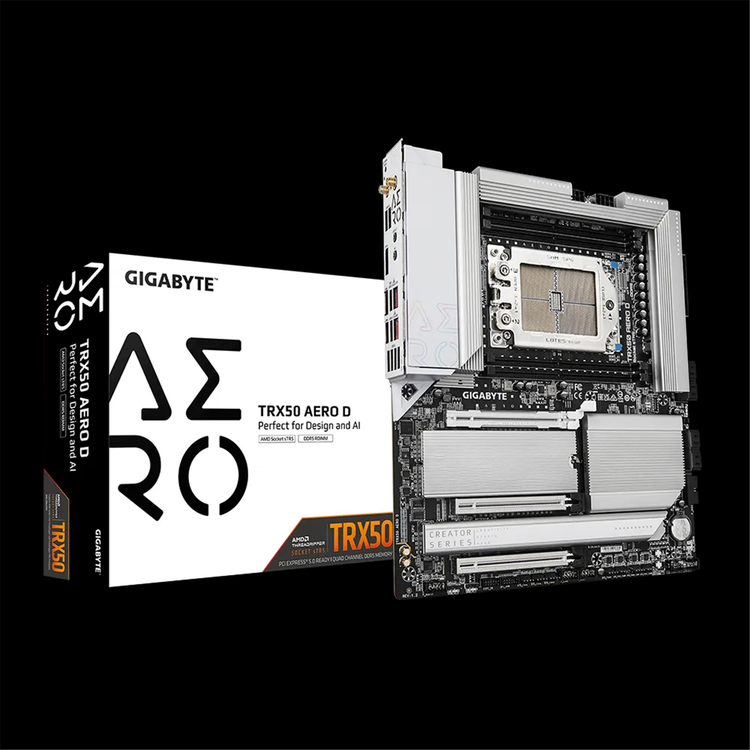
Gigabyte TRX50 AERO D For AMD Ryzen Threadripper Pro 9000 / 7000 WX Series ATX Motherboard
TRX50 AERO D (rev. 1.2) Supports AMD Ryzen™ Threadripper™ PRO 7000 series/ Ryzen™ Threadripper™ 7000 series Processors?Breakthrough Performance: 16+8+4 Phases Digital VRM SolutionQuad Channel DDR5: 4*SMD R-DIMMs with AMD EXPO™ &; Intel® XMP Memory Module SupportReinforced Overall Thermal: VRM Thermal Armor Advanced &; M.2 Thermal GuardUltimate Scalibility: 3*PCIe x16 slots for Multi-GPU and 4*PCIe x4 M.2 slotsNext-gen Connectivity: Dual USB4® Type-C portsBlazing Fast Networks: 10GbE + 2.5 GbE Dual LAN and Wi-Fi 7PCIe UD Slot X: PCIe 5.0 x16 slot with 10X strength for graphics cardEZ-Latch Click: M.2 heatsinks with screwless designEZ-Latch Plus: M.2 slots with quick release designHi-Fi Audio with DTS:X® Ultra: ALC4080+ALC897 CODECUC BIOS: User-Centred intuitive UX with Quick Access function
TRX50 AERO D - AI ERA MOTHERBOARD HEDT motherboard designed for AI, content creation scientific computing
Performance
Thermal
Connectivity
DIY Friendly
VRM - Breakthrough performance, more possibility - Revolutionary Power Design The TRX50 AERO D motherboard is designed for content creators, enthusiasts, and AI professionals. Equipped with the all-digital 16+8+4 phases power design of the Infineon multiphase PWM controller, the TRX50 AERO D unleashes exceptional performance of the new generation AMD Ryzen™ Threadripper™ CPU, while providing the best stability under heavy workloads and committing the most powerful HEDT platform to builders.
Digital VRM Design Ensures stable high-power delivery for exceptional performance. - 16 VCORE Phases 108A SPS to unleash the full potential of multi-core CPU performance.- 8 SOC Phase SPS + DrMOS for CPU integrated GPU performance and memory control.- 4 MISC Phases 108A SPS provide stable power for CPU-connected PCIe lanes. THERMAL - Advanced thermal With enlarged full metal thermal design, TRX50 AERO D motherboard birngs you exceptional performance while keep the system cool and solid.
VRM Thermal Armor Advanced High coverage MOSFETs and integrated molded heatsinks improve thermal efficiency by enhancing airflow and heat exchange. 4X Large SurfaceThe surface area has been increased up to 4X larger compared to traditional heatsinks, resulting in improved heat dissipation from the MOSFETs. Real One-piece BuildThe TRUE single-piece heatsink offers superior cooling performance compared to competitors' multi-piece designs, thanks to its one-piece construction and larger surface area. Multi-Cut DesignWith its Multi-Cut Design, this heatsink includes multiple channels and inlets to enhance airflow, resulting in improved heat transfer performance. 8mm Heatpipe8mm Mega-Heatpipe with refined manufacturing minimizes the gap between the heatpipe and heatsink, ensuring efficient MOSFET heat transfer and enhancing thermal performance. 7 W/mK Thermal PadOptimize hardware performance with our advanced 7 W/mK thermal pad for efficient heat dissipation.
M.2 Thermal Guard The M.2 Thermal Guard prevents throttling and bottlenecks from high speed M.2 SSDs as it helps to dissipate heat before it becomes an issue.
Smart Fan 6 ensures optimal cooling and quiet operation for your gaming PC, with support for PWM/DC fans and pumps, customizable settings, and intuitive temperature monitoring. High Current SupportEach fan header supports PWM and DC fans and Water Cooling Pump, and up to 24W (12V x 2A) with Over-Current Protection. Precision ControlMultiple temperature/fan speed control points for precise fan curve. Dual Curve ModeSlope/Stair dual mode for different user scenarios. Fan StopFan can stop completely below users' specified temperature point. Noise DetectionMonitor device noise levels in real time using our accurate sound pressure measurement and privacy-respecting Noise Detection cable, allowing you to adjust fan speeds accordingly for optimal noise control.
Smart Fan 6 BIOS UI Note: The image shown is for reference purposes and may vary depending on the specific model. Enhance Fan Curve UIEnhance fan curve control with an expanded number of control points, from 5 to 7, and a larger fan speed graph, enabling users to have more precise and effortless control over fan curve settings. Slope/Stair Dual Graph ModeSwitch between Slope and Stair modes to adapt to various user scenarios. Slope mode provides a linear fan speed curve, while Stair mode maintains a constant fan speed within specified temperature intervals. Manual InputFor advanced users, manual input of fan speeds is available for fine-tuning and precise control over the cooling system. EZ TuningSimplify the process with EZ Tuning by setting 4 points on a rough temperature/fan speed scale. Smart Fan 6 will quickly generate a fan curve based on these points. Fan Curve ProfileSave your customized fan curve profile in the BIOS ROM, ensuring it remains intact even after BIOS updates.
Memory - Leading DDR5 Performance Maximum CapacityTRX50 AERO D supports the max. memory capacity of DDR5 RDIMM up to 1TB, which brings crucial advantage when running high-demand computing like video editing, 3D rendering, high-resolution content creation, simulation, AI training, and etc.. - DDR5 Overclocking Up to 7800 MT/s
DDR5 - BIOS Engineering Feature-rich BIOS functions that enable easy access to the best-in-class DDR5 performance. DDR5 Auto Boosterone click to boost native DDR5-4800 to 5000 High Bandwidthone click to increase DDR5 bandwidth Low Latencyone click to shorten DDR5 latency AMD EXPO™/ Intel® XMP 3.0 User Profileoptimizes memory settings and achieve the best performance for the system Maximize DDR5 performance with your memory settings AMD EXPO™/ Intel® XMP 3.0 User Profile empowers you to optimize your memory settings and commit the leading DDR5 performance up to 7800MT/s. SPD Re-defined or retrieve from databaseUsers can define two empty SPD profiles and transfer them to another computer. Performance SimulationSimulate memory performance quickly by inputting clock and timing parameters. Save/Load ProfileSave and load memory profiles for online sharing. Boost non-overclockable DDR5 memory frequencyIncrease the frequency of non-overclockable DDR5 memory.
SCALABILITY - Ultimate scalability Brings you the future-proofing capatiblity Triple PCIe x 16 slots for Multi-GPUTRX50 AERO D features three PCIe 5.0/ 4.0 x16 slots to deliver premium graphics performance for superior rendering capabilities, more immersive gaming experience, and AI trainings. Triple slot width designThe Tripple slot width design of PCIex16 slot enables users to install huge high-end graphics cards on motherboards without any hassles.
4X M.2 slotsWith four onboard PCIe 5.0/ 4.0 M.2 slots, TRX50 AERO D is perfect for creators, enthusiasts, AI operation to RAID multiple NVMe devices for demanding workloads Back drilling for both PCIe and M.2 slotEnhances signal integrity in both PCIe and M.2 slot designs by reducing signal reflections and timing issues, thereby improving system performance and reliability.
Dual USB4 Type-C The latest USB4 Type-C dual ports provide significantly faster data transfer speeds up to 40 Gbps of each, which is particularly beneficial to video editing, large file transfers, and data-intensive tasks.
Wi-Fi 7 brings you the Ultimate VR experience Wi-Fi 7 provides significant benefits to the realm of virtual reality (VR). With its high bandwidth and low latency capabilities, Wi-Fi 7 ensures a smooth and immersive VR experience. 320/160 MHz channelsWi-Fi 7 supports up to 320 MHz channels, providing a significant increase in bandwidth for faster data rates. Multi-link OperationWith MLO(Multi-Link Operation) technology, you can allocate the 2.4GHz band for streaming and the 5/6GHz band for gaming, resulting in a higher quality network experience with fewer interruptions. 4K-QAMWith 4K-QAM technology, Wi-Fi 7 improves data throughput, resulting in faster file transfers and seamless streaming. Deterministic low latencyDeterministic low latency ensures minimal delays, making it ideal for real-time applications like video conferencing and online gaming.
GIGABYTE Ultra-high Gain Antenna Experience enhanced signal strength with the GIGABYTE Ultra-high gain Antenna, which incorporates a smart antenna function to optimize Wi-Fi signal transmission. - Direction signal Up to 5dBi- Omnidirectional signal Up to 4dBi- Magnetic Base
Dual LAN 10G+2.5G The Dual LAN design of 10GbE+2.5 GbE LAN is perfectly designed for content creation, media centers, workstations, and AI operation. Besides providing ultra-fast network speed, the dual LAN design can ensure constant network availability, load balancing, and smoother high-resolution video streaming.
True Hi-Fi Music Paired with Realtek's latest ALC4080 Codec, playback for surround sound audio and DSD enabled music are easier than ever.
DTS :X® Ultra Recreates an authentic, spatially accurate 3D audio experience for gaming over any headphones or speakers. Supports channel-based, scene based and object-based audio. Provides out-of-the-box calibration for a range of headphones and speakers. Provides post-processing enhancements and device level tuning for DTS® codecs. DTS Sound Unbound* leverage Microsoft Spatial, enabling the the most believable, 3D audio experience for games. Immersion through DTS Headphone:X means in the sonic landscape, stationary and moving sounds can be heard from above, below or around the listener. Sounds pass around the listener with amazing externalization and accurate localization. Learn more about the immersive gaming sound experience powered by DTS Sound Unbound at https://dts.com/sound-unbound *DTS Sound Unbound needs the latest Windows fixes in the Windows 10, please upgrade your Windows 10 OS to Win10 Build 18898 or later versions.
DIY-friendly - Build effortless Building your own PC is meant to be joyful and effortless. TRX50 AERO D, the most DIY-friendly ever.
EZ-Latch Designs Effortless mechanisms that enable easy installations of components. *For reference only; actual appearance may vary. M.2 EZ-Latch Clickscrewless installation for M.2 heatsink
M.2 EZ-Latch Plusscrewless installation for M.2 SSDs
PCIe EZ-Latcheasy detachment for graphics cards
Multi-key A multi-function reset button that can be reconfigured to other function in BIOS for different user scenarios. RGB SwitchTurn off all lighting effect on motherboard. Direct-To-BIOSBoot into BIOS menu directly without pressing any keyboard button. Safe ModeBoot into BIOS safe mode to change specific option without losing other BIOS settings.
Q-FLASH PLUS Update the BIOS easily without installing the CPU, memory and graphics card. STEP 1Plug 24pin &; 8pin power supply cable on motherboard.
STEP 2Download motherboard BIOS file and rename to "gigabyte.bin", save to USB flashdrive, and plug USB flashdrive into Q-FLASH PLUS USB port.
STEP 3Press Q-FLASH PLUS button, and motherboard will start updating BIOS automatically.
Ultra Durable™ - Get everythingUD GIGABYTE Ultra Durable™ Technology represents our highest standards to provide a platform for gamers that is not only powerful but also durable and reliable. TRX50 AERO D motherboard is built to last longer and stand stronger. PCIe UD Slot X The latest PCIe UD Slot X offers unprecedented strength, providing enhanced protection for your graphics card. 10X load-bearing capacityFeaturing a seamless, one-piece design that is screwed onto a dedicated backplate, the PCIe UD Slot X provides 10 times the load-bearing strength. Inner Lining Rubber StripThis rubber strip safeguards your graphics card's PCB from potential scratches. Zinc AlloyThe use of zinc alloy ensures effective electromagnetic shielding for high-speed signals.
M.2 UD Slot PG5 The one-piece, stainless-steel shielding design reinforces the M.2 Slots, and maximizes signal integrity. 1.3Xstronger in X-Axis Strength Test 1.5Xstronger in Y-Axis Strength Test Reduced Signal Degradation with SMD Technology
UD Power Connector The unique design provides better conductivity for power and better dissipation for the heat generated from it. Solid Pinsprovides superior conductivity &; signal transmission, reducing metal loss from repeated plugging.
Customization - Elevating Performance Together TRX50 AERO D signifies our dedication to BIOS optimization. Through our community partnership, we're making next-gen performance more user-friendly.
UC BIOS UC BIOSRedesigned as user-centered and provides intuitive performance tweakers. Redesigned UI and UXan intuitive operation interface with an aesthetically pleasing design. Quick Accesscustomizable option slots for effortless access in Easy Mode.
Enhanced Intuitive UX GIGABYTE User-Centred(UC) BIOS has enhanced the BIOS UX to provide users with an optimized experience featuring an intuitive operation interface and an aesthetically pleasing design.
Quick Access Function GIGABYTE UC BIOS' Quick Access function selects several? practical preset options from ADVANCE MODE and places them in EASY MODE for effortless access without switching or searching.
HWiNFO - Exclusive Partnership introduces innovative features for computer enthusiasts and professionals Default AORUS skin *AORUS skin auto-applies when detecting a GIGABYTE motherboard. When running HWiNFO on a GIGABYTE motherboard, a unique, AORUS-themed skin will be automatically applied as default that is available in bright or dark mode. This AORUS skin can also be manually applied on non-GIGABYTE motherboards.
Memory Timings Monitor As a result of the great efforts of expert developers from GIGABYTE and HWiNFO, this advanced readout application shows the most detailed memory timing settings ever, and help users monitor their memory performance and gain valuable insights.
Detailed BIOS information GIGABYTE motherboard users can now check out the detailed BIOS information in real time via HWiNFO, such as status of toggles or tweakers, and the BIOS versions. No more reboot for BIOS check!
GIGABYTE Control Center a unified software platform across a variety of GIGABYTE products. RGB Fusioncustomize the RGB lighting on the motherboard or devices that connect to it. Showcase your style Unleash your creativity with GCC's customizable lighting effects for your motherboard. Personalize your system with stunning visuals that reflect your individuality and style. Note: The depicted lighting effects are for demonstration purposes only, and the actual lighting effects may vary depending on the model.
Supercharge your lighting options Addressable RGB LED headers allow you to customize each LED individually (for ARGB GEN2 devices), and you can easily accomplish this using GCC. *The information provided is for reference; please prioritize your specific setup and specifications. - 1x RGB LED header- 3x ARGB LED headers
- CPU
- AMD Socket sTR5, support for:
- AMD Ryzen™ Threadripper™ PRO 9000-WX Series Processors/ AMD Ryzen™ Threadripper™ 9000 Series Processors/ AMD Ryzen™ Threadripper™ PRO 7000-WX Series Processors/ AMD Ryzen™ Threadripper™ 7000 Series Processors
- (Go to GIGABYTE's website for the latest CPU support list.)
- Chipset
- AMD TRX50
- Memory
- Support for DDR5 7800(O.C.)/7600(O.C.)/7200(O.C.)/7000(O.C)/6800(O.C.)/6400(O.C.)/6000(O.C.)/5600(O.C.)/5200/4800/4400 MT/s ECC Registered memory modules (RDIMM/RDIMM-3DS)
- 4 x DDR5 DIMM sockets supporting up to 1TB (256 GB single DIMM capacity) of system memory
- Quad channel memory architecture
- Support for AMD EXtended Profiles for Overclocking (AMD EXPO™) and Extreme Memory Profile (XMP) memory modules
- (The CPU and memory configuration may affect the supported memory types, data rate (speed), and number of DRAM modules, please refer to "Memory Support List" on GIGABYTE's website for more information.)
- Audio
- Realtek® ALC4080 CODEC (rear panel audio)
- - Support for DTS:X® Ultra
- - High Definition Audio
- - 2-channel
- Realtek® ALC897 CODEC (front panel audio)
- LAN
- Marvell® AQtion AQC113C 10GbE LAN chip (10 Gbps/5 Gbps/2.5 Gbps/1 Gbps/100 Mbps) (LAN1)w
- Realtek® 2.5GbE LAN chip (2.5 Gbps/1 Gbps/100 Mbps) (LAN)
- Wireless Communication module
- Qualcomm® Wi-Fi 7 QCNCM865
- - 802.11a, b, g, n, ac, ax, be, supporting 2.4/5/6 GHz carrier frequency bands
- - BLUETOOTH 5.3
- - Support for 11be 320MHz wireless standard
- (Actual data rate may vary depending on environment and equipment.)
- Note:
- Wi-Fi 7 features require Windows 11 SV3 to function properly. (There is no support driver for Windows 10)
- Wi-Fi 7 channels on 6GHz band availability depends on individual country's regulations.
- Expansion Slots
- CPU:
- - 2 x PCI Express x16 slots, supporting PCIe 5.0 and running at x16 (PCIEX16_1/PCIEX16_2)
- * For optimum performance, if only one PCI Express gra11111111111phics card is to be installed, be sure to install it in the PCIEX16_1 slot.
- - 1 x PCI Express x16 slot, supporting PCIe 4.0 and running at x16(PCIEX16_3)
- Storage Interface
- CPU:
- - 1 x M.2 connector (Socket 3, M key, type 25110/2280 PCIe 5.0 x4/x2 SSD support) (M2C_CPU)
- - 2 x M.2 connectors (Socket 3, M key, type 22110/2280 PCIe 5.0 x4/x2 SSD support) (M2A_CPU/M2B_CPU)
- - 1 x M.2 connector (Socket 3, M key, type 2280 PCIe 4.0 x4/x2 SSD support) (M2D_CPU)
- CPU+Chipset:
- - 8 x SATA 6Gb/s connectors
- RAID 0, RAID 1, and RAID 10 support for NVMe SSD storage devices
- RAID 0, RAID 1, and RAID 10 support for SATA storage devices
- USB
- CPU:
- - 3 x USB 3.2 Gen 2 Type-A ports (red) on the back panel
- Chipset+Intel® JHL8540 USB4® controller:
- - 2 x USB4® USB Type-C® ports on the back panel
- Chipset:
- - 1 x USB Type-C® port with USB 3.2 Gen 2x2 support, available through the internal USB header
- - 1 x USB 3.2 Gen 2 Type-A port (red) on the back panel
- - 2 x USB 3.2 Gen 1 ports available through the internal USB header
- CPU+USB 3.2 Gen 1 Hub:
- - 4 x USB 3.2 Gen 1 ports on the back panel
- Chipset+USB 2.0 Hub:
- - 4 x USB 2.0/1.1 ports available through the internal USB headers
- Internal I/O Connectors
- 1 x 24-pin ATX main power connector
- 2 x 8-pin ATX 12V power connectors
- 1 x CPU fan header
- 1 x CPU fan/water cooling pump header
- 4 x system fan headers
- 4 x system fan/water cooling pump headers
- 3 x addressable RGB Gen2 LED strip headers
- 1 x RGB LED strip header
- 4 x M.2 Socket 3 connectors
- 8 x SATA 6Gb/s connectors
- 1 x front panel header
- 1 x front panel audio header
- 1 x USB Type-C® header, with USB 3.2 Gen 2x2 support
- 1 x USB 3.2 Gen 1 header
- 2 x USB 2.0/1.1 headers
- 1 x noise detection header
- 1 x Trusted Platform Module header (For the GC-TPM2.0 SPI V2 module only)
- 1 x power button
- 1 x Clear CMOS button
- 1 x reset button
- 1 x reset jumper
- 2 x temperature sensor headers
- 1 x Clear CMOS jumper
- Back Panel Connectors
- 1 x Q-Flash Plus button
- 2 x SMA antenna connectors (2T2R)
- 1 x DisplayPort In port
- 1 x USB4® USB Type-C® port (DisplayPort)
- 1 x USB4® USB Type-C® port
- 4 x USB 3.2 Gen 2 Type-A ports (red)
- 4 x USB 3.2 Gen 1 ports
- 2 x RJ-45 ports
- 2 x audio jacks
- I/O Controller
- iTE® I/O Controller Chip
- H/W Monitoring
- Voltage detection
- Temperature detection
- Fan speed detection
- Water cooling flow rate detection
- Fan fail warning
- Fan speed control
- * Whether the fan (pump) speed control function is supported will depend on the fan (pump) you install.
- Noise detection
- BIOS
- 1 x 256 Mbit flash
- Use of licensed AMI UEFI BIOS
- PnP 1.0a, DMI 2.7, WfM 2.0, SM BIOS 2.7, ACPI 5.0
- Unique Features
- Support for GIGABYTE Control Center (GCC)
- * Available applications in GCC may vary by motherboard model. Supported functions of each application may also vary depending on motherboard specifications.
- Support for Q-Flash
- Support for Q-Flash Plus
- Bundled Software
- Norton® Internet Security (OEM version)
- LAN bandwidth management software
- Operating System
- Support for Windows 11 64-bit
- Form Factor
- E-ATX Form Factor; 30.5cm x 26.4cm
As an international traveller you are entitled to bring a certain amount/value of goods that are free of Customs duty and exempt Goods and Services tax (GST) into New Zealand. This is called your duty free allowance and personal goods concession. It is important to review these for any purchases you make on The Mall.
Your duty free allowance entitles you to bring into New Zealand the following quantities of alcohol products free of customs duty and GST provided you are over 17 years of age. You do need to be 18 years or over to purchase.
- Up to six bottles (4.5 litres) of wine, champagne, port or sherry or
- Up to twelve cans (4.5 litres) of beer
- And three bottles (or other containers) each containing not more than 1125ml of spirits, liqueur, or other spirituous beverages
Goods other than alcohol and tobacco, whether purchased overseas or purchased duty free in New Zealand, that have a combined total value not exceeding NZ$700 may also be brought as part of your personal goods concession.
When travelling overseas there are legal limits on the amount of duty free alcohol and other goods you can take with you. These amounts will vary depending on the country you are flying into. We always recommend you check the latest limits and exemptions.
Your order can be picked up at an Auckland Airport Collection Point. There is one in departures and one at arrivals in the international terminal. Alternatively, if you are arriving between 11pm and 6am you will be able to collect your order from our lockers. See map
Please bring your order confirmation email and your passport. If you are collecting from lockers you will have been sent an email with your access code, be sure to have this on you in order to collect your order.
If you’re departing Auckland Airport, we recommend that you come to the Auckland Airport Collection Point at least 60 minutes before your flight. If you miss your pickup time or your flight details have changed please let us know as soon as possible.
When you collect your order you will have the opportunity to inspect the items and sign for them.
If you need to return an item, our Collection Point team are there to help you. If you are collecting after hours please return the item to your locker and our team will be in touch as soon as possible. You may also like to view our Returns & refunds which provides information on how this works and outlines the individual retailer's returns and refunds policies.
After Hours Collections
If your order needs to be collected after the Auckland Airport Collection Point desk is closed, your order will be placed in the lockers next to the desk. All the details you will need to collect your order will be provided in your Order Confirmation and Ready to Collect Email.