










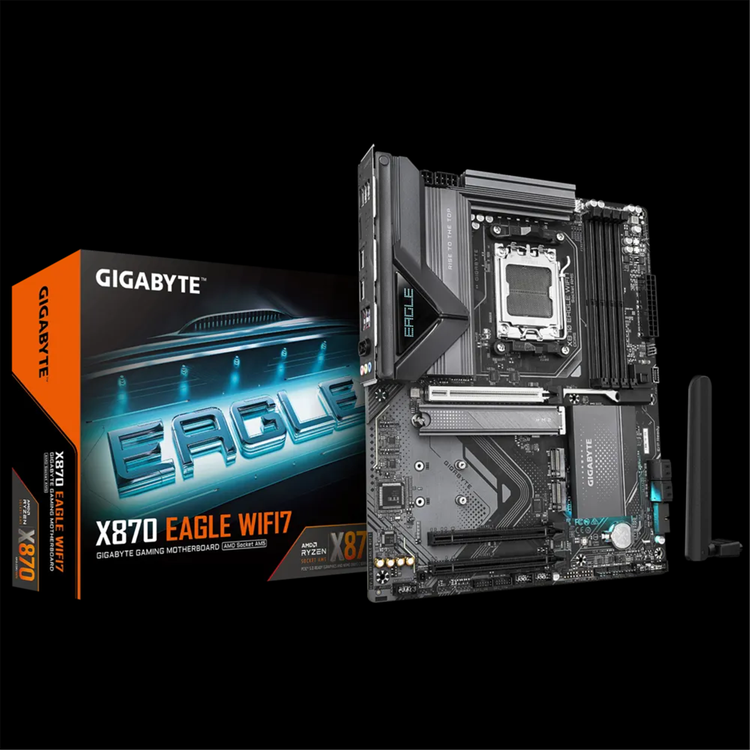
Gigabyte X870 EAGLE WIFI7 AMD Socket AM5 - X870 Chipset - ATX Motherboard
X870 EAGLE WIFI7 - AMD Socket AM5: Supports AMD Ryzen™ 9000 / 8000 / 7000 Series Processors- Digital twin 14+2+2 phases VRM solution- Dual Channel DDR5: 4*DIMMs with AMD EXPO™Memory Module Support- WIFI EZ-Plug: Quick and easy design for Wi-Fi antenna installation- EZ-Latch Plus: PCIe and M.2 slots with Quick Release &; Screwless Design- EZ-Latch Click: M.2 heatsinks with screwless design- Friendly UI: Multi-Theme, AIO Fan Control, and Q-Flash Auto Scan in BIOS and SW.- Ultra-Fast Storage: 3*M.2 slots, including 1* PCIe 5.0 x4- Efficient Thermal: VRM Thermal Armor Advanced
&; M.2 Thermal Guard- Fast Networking: 2.5GbE LAN &; Wi-Fi 7 with Ultra-high gain antenna- Extended Connectivity: Dual USB4 Type-C with DP-Alt, HDMI
Performance
Thermal
Connectivity
DIY Friendly
AORUS AI SNATCH Unleash Ultimate Performance with One-Click Activation. Auto DDR5 Memory BoostWith just a single click, unleash the full potential of DDR5 memory, instantly boosting your gaming and work efficiency. One-Click Acceleration:Enhance DDR5 speeds with a single click. - Enhanced Computing Power- Fast AI Performance- EZ to Peak- Safe OC- Less Power Usage
Fast AI Performance Accelerate AI processing for greater performance Up to 8% AI Performance* - Accelerated AI decision-making- Boosted reinforcement learning- Streamlined language processing * GeekBench AI PRO test conducted with High Bandwidth option manually enabled. Enhanced Computing Power Let your system faster, and performant. Up to 9% Memory Performance* - Computing Power Performance- Increased data transfer rates- Faster application loading times- Improved multitasking performance * AIDA64 Extreme 7 test conducted with High Bandwidth option manually enabled. Maximize performance in a snap Enable users to easily become overclocking experts through a simple interface. - EZ to Peak Smart &; Safe overclocking Protect your motherboard through multiple over-temperature and over-current safeguards. - OTP - Over Temperature Protection- OCP - Over Current Protection- OVP - Over Voltage Protection- OPP - Over Power Protection- UVP - Under Voltage Protection- SCP - Short Circuit Protection Less Power Usage - Optimal power-efficiency Enhance Up to 9% CP/Per Watt* With faster computations, it also means reduced power consumption, making it more environmentally friendly and energy-efficient, continuously contributing to the well-being of our planet. * AIDA64 Extreme 7 test conducted with High Bandwidth option manually enabled. Durable Performance GIGABYTE Ultra Durable™ motherboards built with optimal components inside out provide the prime performance and timeless platform. Digital Twin VRM Design Delivers consistent, high-powered performance to elevate your overclocking to the next level. - 14+2+2 Phases digital PWM + 60A DrMOS- Support the latest CPUs, and deliver enhanced system performance and ultimate hardware scalability. * 7+7 phases parallel power design** Photo for reference only
Zenith of the Memory GIGABYTE Gaming motherboards boost DDR5 memory performance and offer top-notch compatibility using various advanced methods. - DDR5 Overclocking Up to 8200 MT/s * Memory speeds vary. Check QVL for details. Features differ by model. Exclusive BIOS Design Advanced BIOS functionality provides seamless optimization of industry-leading DDR5 memory performance. AMD EXPO™ SettingsOptimize memory with AMD's user-friendly profiles. Boost PerformanceBoost Performance: Get the most out of your system's memory. Supercharge DDR5 Performance with Custom Settings AMD EXPO™ User ProfileHarness the power of AMD profiles to fine-tune your memory for outstanding system performance. Custom SPD ProfilesCreate and manage two unique SPD profiles, ready to transfer between machines. Fast Performance SimulationAutomatically adjusts clock and timing parameters, quickly simulating optimal memory performance. Profile ManagementSave and load your preferred memory settings, and share them with ease. Enhance non-overclockable DDR5 SpeedsPush the limits of your non-overclockable DDR5 memory with boosted frequencies. Instant ResetOne-click to clear and restore memory settings for quick adjustments.
Unmatched Hardware Excellence Elevate your gaming with our state-of-the-art technology for a superior experience. Shielded Memory RoutingAdvanced shielding inside the PCB keeps your memory signals clean and interference-free. Daisy-Chained RoutingInnovative design removes signal bottlenecks, allowing for blazing-fast memory speeds and a superior gaming setup. Comprehensive Thermal EAGLE motherboards come with advanced full-metal thermal design and durable heatsinks to keep your system cool and efficient. * Photo for reference only - 4X larger surface area for enhanced heat dissipation
Fully Covered MOSFET Heatsink True one-piece heatsink design- Outperforms competitors' multi-piece solutions- Integrated design and expanded surface area deliver exceptional cooling performance Multi-cut design with channels for improved airflow- More grooves, more airflow.- Better airflow, cooler system. M.2 Thermal Guard The M.2 Thermal Guard prevents throttling and bottlenecks from high speed M.2 SSDs as it helps to dissipate heat before it becomes an issue.
Smart Fan 6 Superior cooling performance and whisper-quiet operation for your gaming rig. High Current Support- Supports both PWM and DC fans, plus water cooling pumps- Up to 24W (12V x 2A) capacity per fan header- Built-in over-current protection Precision Control- Multiple temperature and fan speed points- Customizable fan curves for optimal performance Dual Curve Mode- Choose between slope and stair modes- Tailor cooling to your specific needs and preferences Fan Stop Technology- Fans can be completely turned off at low temperatures- Ensures silent operation during light loads Enhance Fan Curve UI- 7 adjustable control points- Expanded speed graph for precise adjustments Slope/Stair Dual Graph Mode- Slope mode: Smooth fan speed curve- Stair mode: Steady speeds within temperature ranges- Easy switching between modes Manual Input- Fine-tune fan speeds for optimal performance- Precise control for enthusiasts EZ Tuning- Quick setup with 4 temperature and fan speed points- Automatic optimization of fan curve Fan Curve Profile- Save personalized settings to BIOS ROM- Maintain custom settings through BIOS updates Note: Images are for illustrative purposes and may differ based on your model.
Future Connectivity The ultimate connectivity with blazing data-transfer speeds through the next generation network and storage. Dual 40Gbps USB4 with DP-Alt The dual latest USB4 Type-C ports provide blistering fast and reliable transfer speed up to 40 Gbps of each. Featuring extensive comparability, efficient charging, and ultra-HD displayport connectivity, USB4 is beneficial to video editing, large file transfers, and data-intensive tasks.
Wi-Fi 7 brings you the Ultimate VR experience Wi-Fi 7 transforms the VR landscape with its exceptional bandwidth and minimal latency, delivering an unparalleled, seamless immersive VR experience. 160 MHz channelsWi-Fi 7 introduces support for expansive 320/160 MHz channels, dramatically increasing bandwidth for unprecedented data transfer speeds. 4K-QAMLeveraging 4K-QAM technology, Wi-Fi 7 elevates data throughput, enabling lightning-fast file transfers and buffer-free streaming. Multi-link OperationWi-Fi 7's MLO (Multi-Link Operation) technology allows strategic bandwidth allocation - dedicating 2.4GHz for streaming and 5/6GHz for gaming, resulting in a superior and interruption-free network experience. Deterministic low latencyWith its deterministic low latency, Wi-Fi 7 minimizes delays, making it the best choice for time-sensitive applications such as video conferencing and competitive online gaming.
2.5GbE LAN Supercharge your gaming with 2.5GbE LAN Achieve lightning-fast speeds, minimal lag, and unbeatable performance to elevate your gaming setup and dominate the competition.
PCIe 5.0/4.0 Hardware Design Featuring PCIe 5.0 x16 slot and PCIe 5.0/4.0 M.2 slot support, GIGABYTE Motherboards are ready to work with the PCIe 5.0/ 4.0 devices to provide the superior performance. * Photo for reference only.
Hi-Fi Audio High-End Audio CapacitorsGIGABYTE motherboards use high-end audio capacitors. These high quality capacitors help deliver high resolution and high fidelity audio to provide the most realistic sound effects for gamers. Audio Noise GuardGIGABYTE motherboards feature an audio noise guard that essentially separates the board's sensitive analog audio components from potential noise pollution at the PCB level. * Photo for reference only.
Easy Friendly Innovative and intuitive hardware, software, and BIOS interface design to create your personal style. WIFI EZ-Plug The WIFI EZ-Plug design integrates Wi-Fi antenna plugs into one adapter, EZ to install. * Photo for reference only.
EZ Debug Zone Centralized debug LEDs and control buttons provide a handy and organized troubleshooting process when building a new computer. * Photo for reference only.
Multi-key A flexible control key for reset with BIOS-level reconfiguration options for diverse usage scenarios. RGB SwitchDisable all light displays on the motherboard. Direct-To-BIOSAccess the BIOS settings directly without keyboard inputs. Safe ModeAccess BIOS safe mode to modify select settings while preserving other configurations.
Optimal DRAM Installation Indicator? The DRAM Indicator LED will turn on when a module is installed into a non-recommended slot.
EZ-Latch Designs User-friendly designs simplifying the assembly process. PCIe EZ-Latch PlusEasy ejection with single click for graphics cards
M.2 EZ-Latch Clickscrewless installation for M.2 heatsink
M.2 EZ-Latch Plusscrewless installation for M.2 SSDs
UC BIOS Restructured with user-centered and intuitive performance adjustment mechanisms. Multi-ThemeThe newly exclusive grayscale mode provides a refreshing interface, ensuring a significantly more friendly and pleasant user experience.
AIO Fan ControlEnable non-windows users to adjust AIO fan speed in the BIOS before entering the OS. * Support for AORUS WATERFORCE X II series only.
Refined BIOS InterfaceGIGABYTE User-Centred (UC) BIOS elevates the interface, delivering an optimized experience through an easy-to-navigate layout and attractive design for optimal usability.
Quick Access FunctionGIGABYTE UC BIOS' Quick Access function selects brings 9 key options from Advanced Mode directly into Easy Mode, enabling swift adjustments without extensive navigation.
Q-FLASH Auto Scan The new Auto Scan function featues when using USB flashdrive during Q-Flash, the BIOS file will be auto scanned instead of searching manually.
Q-FLASH PLUS Effortlessly upgrade your BIOS without the need to install CPU, RAM, or GPU. STEP 1Connect the 24-pin and 8-pin power cables directly to the motherboard. STEP 2Download the motherboard's BIOS file, rename it to 'gigabyte.bin', and store it on a FAT32-formatted USB drive. Insert the drive into the Q-FLASH PLUS USB port. STEP 3Press the Q-FLASH PLUS button to trigger automatic BIOS updating.
AORUS &; HWiNFO Co-branded OSD AORUS and HWiNFO co-branded OSD(On-Screen Display) can display values as text or graphs in an overlay or independent window, also in full-screen applications and games, with no need for additional software installation.
Default AORUS skin When using HWiNFO on a GIGABYTE motherboard, a custom AORUS-themed interface automatically activates, offering light and dark options. This AORUS Skin can be manually applied to non-GIGABYTE boards as well. *AORUS skin auto-applies when detecting a GIGABYTE motherboard.
Memory Timings Monitor Thanks to the collaborative efforts of GIGABYTE and HWiNFO experts, this sophisticated monitoring tool now provides unprecedented detail in memory timing readouts. This empowers users to closely track memory performance and gather crucial insights.
Detailed BIOS information GIGABYTE motherboard users can now access comprehensive BIOS details in real-time through HWiNFO. This includes toggle and tweaker statuses, as well as BIOS versions. No need for system reboots to check BIOS info. anymore.
GIGABYTE Control Center A unified software platform encompassing multiple GIGABYTE product. RGB FusionPersonalize the RGB illumination on your motherboard and connected peripherals.
Spotlight your flairLiberate your imagination using GCC's versatile illumination options for your motherboard. Tailor your setup with eye-catching displays that mirror your unique personality and preferences. *Note: The depicted lighting effects are for demonstration purposes only, and the actual lighting effects may vary depending on the model.
Varnish your shineProgrammable RGB LED connectors enable precise control over individual LEDs (for ARGB GEN2 devices), seamlessly managed through the GCC. *The information provided is for reference; please prioritize your specific setup and specifications. - 1x RGB LED header- 3x ARGB LED headers
- CPU
- AMD Socket AM5, support for:
- AMD Ryzen™ 9000 Series Processors/ AMD Ryzen™ 8000 Series Processors/ AMD Ryzen™ 7000 Series Processors
- (Go to GIGABYTE's website for the latest CPU support list.)
- Chipset
- AMD X870
- Memory
- Support for DDR5 8200(OC) / 8000(OC) / 7800(OC) / 7600(OC) / 7200(OC) / 7000(OC) / 6800(OC) / 6666(OC) / 6600(OC) / 6400(OC) / 6200(OC) / 6000(OC) / 5600(OC) / 5200 / 4800 / 4400 MT/s memory modules
- 4 x DDR5 DIMM sockets supporting up to 256 GB (64 GB single DIMM capacity) of system memory
- Dual channel memory architecture
- Support for non-ECC Un-buffered DIMM 1Rx8/2Rx8/1Rx16 memory modules
- Support for AMD EXtended Profiles for Overclocking (AMD EXPO™) and Extreme Memory Profile (XMP) memory modules
- (The CPU and memory configuration may affect the supported memory types, data rate (speed), and number of DRAM modules, please refer to "Memory Support List" on GIGABYTE's website for more information.)
- Onboard Graphics
- Integrated Graphics Processor with AMD Radeon™ Graphics support+ASMedia USB4® Controller:
- - 2 x USB4® USB Type-C® ports, supporting USB4 and DisplayPort video outputs and a maximum resolution of 3840x2160 @ 240 Hz
- * Support for DisplayPort 1.4 version and HDR.
- Integrated Graphics Processor with AMD Radeon™ Graphics support:
- - 1 x HDMI port, supporting a maximum resolution of 4096x2160 @ 60 Hz
- * Support for HDMI 2.1 version, HDCP 2.3, and HDR.
- ** Support native HDMI 2.1 TMDS compatible ports.
- (Graphics specifications may vary depending on CPU support.)
- Audio
- Realtek® Audio CODEC
- High Definition Audio
- 2/4/5.1/7.1-channel
- * You can change the functionality of an audio jack using the audio software. To configure 7.1-channel audio, access the audio software for audio settings.
- LAN
- Realtek® 2.5GbE LAN chip (2.5 Gbps/1 Gbps/100 Mbps)
- Wireless Communication module
- MediaTek Wi-Fi 7 MT7925 (PCB rev. 1.0)
- - 802.11a, b, g, n, ac, ax, be, supporting 2.4/5/6 GHz carrier frequency bands
- - BLUETOOTH 5.4
- - Support for 11be 160MHz wireless standard
- Realtek® Wi-Fi 7 RTL8922AE (PCB rev. 1.1)
- - 802.11a, b, g, n, ac, ax, be, supporting 2.4/5/6 GHz carrier frequency bands
- - BLUETOOTH 5.4
- - Support for 11be 160MHz wireless standard
- (Actual data rate may vary depending on environment and equipment.)
- * Wi-Fi 7 features require Windows 11 SV3 to function properly. (There is no support driver for Windows 10.)
- ** Wi-Fi 7 channels on 6 GHz band availability depends on individual country's regulations.
- Expansion Slots
- 1 x PCI Express x16 slot (PCIEX16), integrated in the CPU:
- AMD Ryzen™ 9000/7000 Series Processors support PCIe 5.0 x16 mode
- AMD Ryzen™ 8000 Series-Phoenix 1 Processors support PCIe 4.0 x8 mode
- AMD Ryzen™ 8000 Series-Phoenix 2 Processors support PCIe 4.0 x4 mode
- * The PCIEX16 slot can only support a graphics card or an NVMe SSD. If only one graphics card is to be installed, be sure to install it in the PCIEX16 slot.
- Chipset:
- - 2 x PCI Express x16 slots, supporting PCIe 3.0 and running at x1 (PCIEX1_1/2)
- Storage Interface
- 1 x M.2 connector (M2A_CPU), integrated in the CPU, supporting Socket 3, M key, type 25110/22110/2580/2280 SSDs:
- AMD Ryzen™ 9000/7000 Series Processors support PCIe 5.0 x4/x2 SSDs
- AMD Ryzen™ 8000 Series- Phoenix 1 Processors support PCIe 4.0 x4/x2 SSDs
- AMD Ryzen™ 8000 Series- Phoenix 2 Processors support PCIe 4.0 x4/x2 SSDs
- 1 x M.2 connector (M2C_SB), integrated in the Chipset, supporting Socket 3, M key, type 25110/22110/2580/2280 PCIe 4.0 x2 SSDs
- 1 x M.2 connector (M2B_SB), integrated in the Chipset, supporting Socket 3, M key, type 25110/22110/2580/2280 PCIe 4.0 x4/x2 SSDs
- * The M2B_SB connector shares bandwidth with the M2C_SB connector. The M2B_SB connector operates at up to x2 mode when a PCIe SSD is installed in the M2C_SB connector.
- 4 x SATA 6Gb/s connectors
- RAID 0, RAID 1, RAID 5, and RAID 10 support for NVMe SSD storage devices
- * RAID 5 is only available on AMD Ryzen™ 9000 Series Processors.
- RAID 0, RAID 1, and RAID 10 support for SATA storage devices
- USB
- CPU+ASMedia USB4® controller:
- - 2 x USB4® USB Type-C® ports on the back panel
- CPU:
- - 1 x USB 3.2 Gen 2 Type-A port (red) on the back panel
- - 1 x USB 3.2 Gen 1 port on the back panel
- CPU+USB 2.0 Hub:
- - 4 x USB 2.0/1.1 ports on the back panel
- Chipset:
- - 1 x USB Type-C® port with USB 3.2 Gen 2x2 support, available through the internal USB header
- - 4 x USB 3.2 Gen 1 ports (2 ports on the back panel, 2 ports available through the internal USB header)
- - 4 x USB 2.0/1.1 ports available through the internal USB headers
- Internal I/O Connectors
- 1 x 24-pin ATX main power connector
- 1 x 8-pin ATX 12V power connector
- 1 x 4-pin ATX 12V power connector
- 1 x CPU fan header
- 1 x CPU fan/water cooling pump header
- 4 x system fan headers
- 3 x addressable RGB Gen2 LED strip headers
- 1 x RGB LED strip header
- 4 x SATA 6Gb/s connectors
- 3 x M.2 Socket 3 connectors
- 1 x front panel header
- 1 x front panel audio header
- 1 x USB Type-C® header, with USB 3.2 Gen 2x2 support
- 1 x USB 3.2 Gen 1 header
- 2 x USB 2.0/1.1 headers
- 1 x Trusted Platform Module header (For the GC-TPM2.0 SPI/GC-TPM2.0 SPI 2.0/GC-TPM2.0 SPI V2 module only)
- 1 x power button
- 1 x reset button
- 1 x reset jumper
- 1 x Clear CMOS jumper
- Back Panel Connectors
- 1 x Q-Flash Plus button
- 2 x antenna connectors (2T2R)
- 1 x HDMI port*
- 2 x USB4® USB Type-C® ports (DisplayPort*)
- 1 x USB 3.2 Gen 2 Type-A port (red)
- 3 x USB 3.2 Gen 1 ports
- 4 x USB 2.0/1.1 ports
- 1 x RJ-45 port
- 3 x audio jacks
- * Actual support may vary by CPU.
- I/O Controller
- iTE® I/O Controller Chip
- H/W Monitoring
- Voltage detection
- Temperature detection
- Fan speed detection
- Water cooling flow rate detection
- Fan fail warning
- Fan speed control
- * Whether the fan (pump) speed control function is supported will depend on the fan (pump) you install.
- BIOS
- 1 x 256 Mbit flash
- Use of licensed AMI UEFI BIOS
- PnP 1.0a, DMI 2.7, WfM 2.0, SM BIOS 2.7, ACPI 5.0
- Unique Features
- Support for GIGABYTE Control Center (GCC)
- * Available applications in GCC may vary by motherboard model. Supported functions of each application may also vary depending on motherboard specifications.
- Support for Q-Flash
- Support for Q-Flash Plus
- Support for Smart Backup
- Bundled Software
- Norton® Internet Security (OEM version)
- LAN bandwidth management software
- Operating System
- Support for Windows 11 64-bit
- Form Factor
- ATX Form Factor; 30.5cm x 24.4cm
As an international traveller you are entitled to bring a certain amount/value of goods that are free of Customs duty and exempt Goods and Services tax (GST) into New Zealand. This is called your duty free allowance and personal goods concession. It is important to review these for any purchases you make on The Mall.
Your duty free allowance entitles you to bring into New Zealand the following quantities of alcohol products free of customs duty and GST provided you are over 17 years of age. You do need to be 18 years or over to purchase.
- Up to six bottles (4.5 litres) of wine, champagne, port or sherry or
- Up to twelve cans (4.5 litres) of beer
- And three bottles (or other containers) each containing not more than 1125ml of spirits, liqueur, or other spirituous beverages
Goods other than alcohol and tobacco, whether purchased overseas or purchased duty free in New Zealand, that have a combined total value not exceeding NZ$700 may also be brought as part of your personal goods concession.
When travelling overseas there are legal limits on the amount of duty free alcohol and other goods you can take with you. These amounts will vary depending on the country you are flying into. We always recommend you check the latest limits and exemptions.
Your order can be picked up at an Auckland Airport Collection Point. There is one in departures and one at arrivals in the international terminal. Alternatively, if you are arriving between 11pm and 6am you will be able to collect your order from our lockers. See map
Please bring your order confirmation email and your passport. If you are collecting from lockers you will have been sent an email with your access code, be sure to have this on you in order to collect your order.
If you’re departing Auckland Airport, we recommend that you come to the Auckland Airport Collection Point at least 60 minutes before your flight. If you miss your pickup time or your flight details have changed please let us know as soon as possible.
When you collect your order you will have the opportunity to inspect the items and sign for them.
If you need to return an item, our Collection Point team are there to help you. If you are collecting after hours please return the item to your locker and our team will be in touch as soon as possible. You may also like to view our Returns & refunds which provides information on how this works and outlines the individual retailer's returns and refunds policies.
After Hours Collections
If your order needs to be collected after the Auckland Airport Collection Point desk is closed, your order will be placed in the lockers next to the desk. All the details you will need to collect your order will be provided in your Order Confirmation and Ready to Collect Email.