









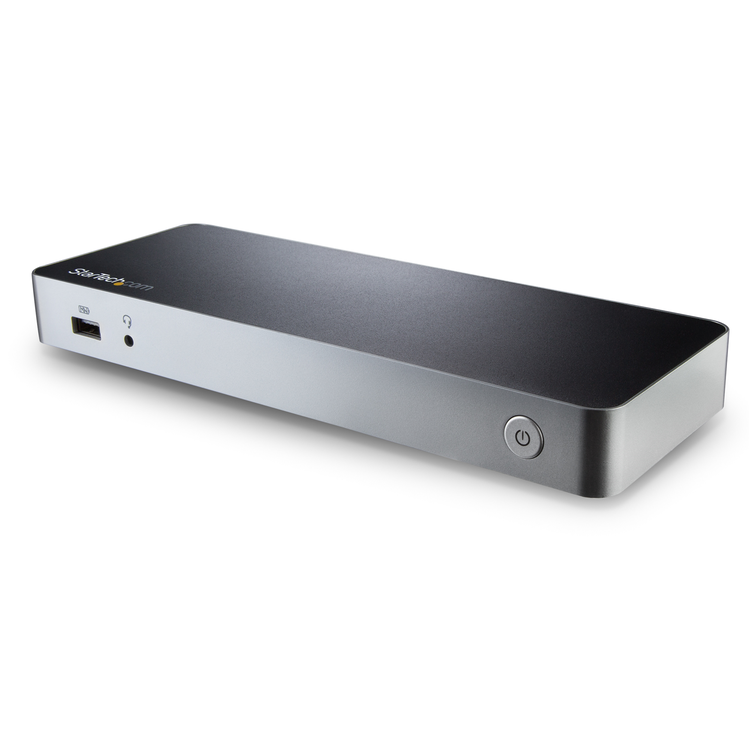


StarTech.com USB-C Dual FHD Docking Station with 60W Power Delivery
- 4K Support
- Yes
- Bus Type
- USB-C
- Chipset ID
- VIA/VLI - VL813
- MegaChips - STDP4320
- Realtek - RTL8153
- C-Media - CM6533
- Texas Instruments - TPS65983
- Displays Supported
- 2
- Fast-Charge Port(s)
- Yes
- Industry Standards
- USB Power Delivery Specification Rev. 2.0
- USB Battery Charging Specification Rev. 1.2
- DisplayPort 1.2 with MST
- IEEE 802.3, IEEE 802.3u, IEEE 802.3ab
- USB 3.0 - Backward compatible with USB 2.0 and 1.1
- Auto MDIX
- Yes
- Compatible Networks
- 10/100/1000 Mbps
- Full Duplex Support
- Yes
- Maximum Data Transfer Rate
- 5 Gbps (USB 3.0)
- 2 Gbps (Ethernet; Full-Duplex)
- Maximum Digital Resolutions
- 1920 x 1200p @ 60Hz (HDMI/DVI - Dual Monitors)
- 4096 x 2160p @ 24Hz (HDMI - Single Monitor)
- 3840 x 2160p @ 30Hz (HDMI - Single Monitor)
- 1920 x 1200p @ 60Hz (DVI - Single Monitor)
- PXE
- Yes
- Type and Rate
- USB 3.0 - 5 Gbit/s
- UASP Support
- Yes
- Connector Type(s)
- 2 - USB Type-C (24 pin) USB 3.0 (5Gbps) Female
- 2 - HDMI (19 pin) Female
- 1 - USB 3.0 A (Fast-Charge, 9 pin, SuperSpeed) Female
- 3 - USB Type-A (9 pin) USB 3.0 Female
- 1 - RJ-45 Female
- 1 - 3.5 mm Mini-Jack (4 Position) Female
- OS Compatibility
- Windows® 7, 8, 8.1, 10
- Note
- Ensure your laptop's drivers, firmware, and operating system are up to date prior to using the docking station.
- For a dual-monitor configuration, the Windows laptop must support MST.
- A 4K-capable HDMI display is required to achieve 4K resolution
- Video output capabilities are dependent on the video card and hardware specification of your connected laptop.
- Not all USB-C ports support the full functionality of the USB Type-C standard. Ensure that your laptop USB-C port supports DP Alt Mode, as well as USB Power Delivery.
- USB 3.0 is also known as USB 3.1 Gen 1; this connectivity standard offers speeds up to 5Gbps
- Not all Thunderbolt 3 USB-C ports support the full functionality of the Thunderbolt 3 standard. Ensure that your laptop Thunderbolt 3 port supports USB Power Delivery.
- This docking station provides up to 60W of Power Delivery to charge your laptop. Some laptops may have specific charging requirements such as the full 60W for charging. In the event that your laptop is not charging, simply unplug any peripheral accessories attached to the dock's USB-C port (on back of dock) and the USB 3.0 (Type-A) charging port (on front of dock) during charging. This will ensure the full 60 W of power is available for charging your laptop.
- System and Cable Requirements
- A Windows-based laptop with an available USB-C port (to ensure full adapter functionality, the host USB-C port must support USB Power Delivery 2.0 and DP Alt Mode)
- Center Tip Polarity
- Positive
- Input Current
- 2 A
- Input Voltage
- 100 ~ 240 AC
- Output Current
- 5 A
- Output Voltage
- 20V DC
- Plug Type
- N
- Power Consumption (In Watts)
- 100 W
- Power Delivery
- 60W
- Power Source
- AC Adapter Included
- Humidity
- 5%~95% RH (Non-condensing)
- Operating Temperature
- 0°C to 40°C (32°F to 104°F)
- Storage Temperature
- -20°C to 70°C (-4°F to 158°F)
- Color
- Black
- Enclosure Type
- Plastic
- Product Height
- 0.9 in [24 mm]
- Product Length
- 8.7 in [220 mm]
- Product Weight
- 9.1 oz [258 g]
- Product Width
- 3.1 in [80 mm]
- Shipping (Package) Weight
- 3.1 lb [1.4 kg]
As an international traveller you are entitled to bring a certain amount/value of goods that are free of Customs duty and exempt Goods and Services tax (GST) into New Zealand. This is called your duty free allowance and personal goods concession. It is important to review these for any purchases you make on The Mall.
Your duty free allowance entitles you to bring into New Zealand the following quantities of alcohol products free of customs duty and GST provided you are over 17 years of age. You do need to be 18 years or over to purchase.
- Up to six bottles (4.5 litres) of wine, champagne, port or sherry or
- Up to twelve cans (4.5 litres) of beer
- And three bottles (or other containers) each containing not more than 1125ml of spirits, liqueur, or other spirituous beverages
Goods other than alcohol and tobacco, whether purchased overseas or purchased duty free in New Zealand, that have a combined total value not exceeding NZ$700 may also be brought as part of your personal goods concession.
When travelling overseas there are legal limits on the amount of duty free alcohol and other goods you can take with you. These amounts will vary depending on the country you are flying into. We always recommend you check the latest limits and exemptions.
Your order can be picked up at an Auckland Airport Collection Point. There is one in departures and one at arrivals in the international terminal. Alternatively, if you are arriving between 11pm and 6am you will be able to collect your order from our lockers. See map
Please bring your order confirmation email and your passport. If you are collecting from lockers you will have been sent an email with your access code, be sure to have this on you in order to collect your order.
If you’re departing Auckland Airport, we recommend that you come to the Auckland Airport Collection Point at least 60 minutes before your flight. If you miss your pickup time or your flight details have changed please let us know as soon as possible.
When you collect your order you will have the opportunity to inspect the items and sign for them.
If you need to return an item, our Collection Point team are there to help you. If you are collecting after hours please return the item to your locker and our team will be in touch as soon as possible. You may also like to view our Returns & refunds which provides information on how this works and outlines the individual retailer's returns and refunds policies.
After Hours Collections
If your order needs to be collected after the Auckland Airport Collection Point desk is closed, your order will be placed in the lockers next to the desk. All the details you will need to collect your order will be provided in your Order Confirmation and Ready to Collect Email.