





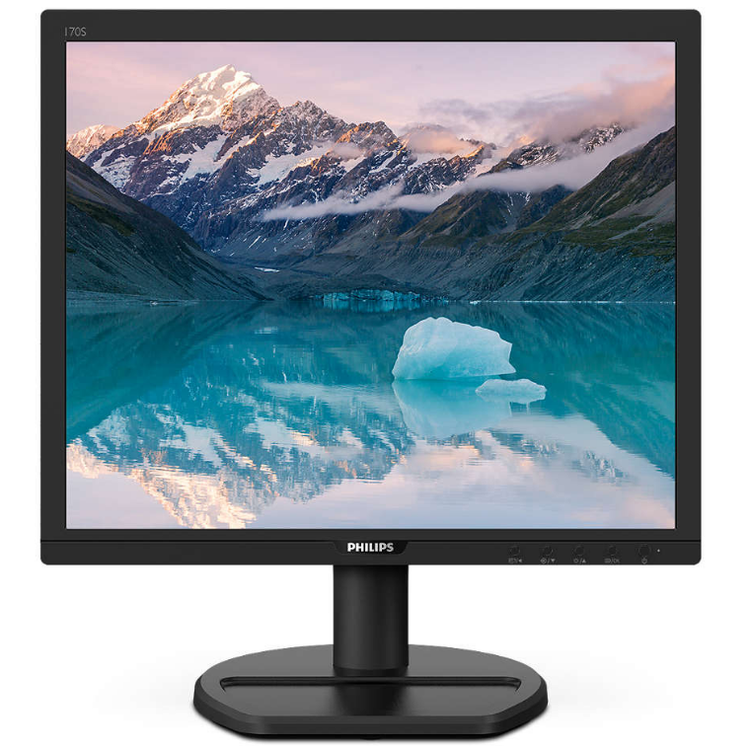
LowBlue Mode for easy on-the-eyes productivity Studies have shown that just as ultra-violet rays can cause eye damage, shortwave length blue light rays from LED displays can cause eye damage and affect vision over time. Developed for wellbeing, Philips LowBlue Mode setting uses a smart software technology to reduce harmful shortwave blue light. Less eye fatigue with Flicker-free technology Due to the way brightness is controlled on LED-backlit screens, some users experience flicker on their screen which causes eye fatigue. Philips Flicker-free Technology applies a new solution to regulate brightness and reduce flicker for more comfortable viewing. SmartImage presets for easy optimized image settings SmartImage is an exclusive leading edge Philips technology that analyzes the content displayed on your screen and gives you optimized display performance. This user friendly interface allows you to select various modes like Office, Photo, Movie, Game, Economy etc., to fit the application in use. Based on the selection, SmartImage dynamically optimizes the contrast, color saturation and sharpness of images and videos for ultimate display performance. The Economy mode option offers you major power savings. All in real time with the press of a single button! SmartContrast for rich black details SmartContrast is a Philips technology that analyzes the contents you are displaying, automatically adjusting colors and controlling backlight intensity to dynamically enhance contrast for the best digital images and videos or when playing games where dark hues are displayed. When Economy mode is selected, contrast is adjusted and backlighting fine-tuned for just-right display of everyday office applications and lower power consumption. 100% Recycled packing material 100% Recycled packing material for less environmental impact. Built-in speakers for audio without desktop clutter A pair of stereo speakers built into a display device. It can be visible front firing, or invisible down firing, top firing, rear firing, etc depending on model and design.
- LCD panel type
- TFT-LCD
- Backlight type
- W-LED system
- Panel Size
- 17 inch / 43.2 cm
- Display Screen Coating
- Anti-Glare, 3H, Haze 25%
- Effective viewing area
- 337.9 x 270.3 mm
- Aspect ratio
- 5:4
- Optimum resolution
- 1280 x 1024 @ 60Hz
- Pixel Density
- 96 PPI
- Response time (typical)
- 1 ms (GtG)*
- Brightness
- 250 cd/m²
- Contrast ratio (typical)
- 1,000:1
- SmartContrast
- 50,000,000:1
- Pixel pitch
- 0.264 x 0.264 mm
- Viewing angle
- 170º (H) / 160º (V)
- @ C/R > 10
- Flicker-free
- Yes
- Picture enhancement
- SmartImage
- Display colors
- 16.7 M
- Color gamut (typical)
- NTSC 87%*, sRGB 103%*
- Scanning Frequency
- 30 -83 kHz (H) / 50 -76 Hz (V)
- sRGB
- Yes
- EasyRead
- Yes
- LowBlue Mode
- Yes
- Signal Input
- DVI-D (digital, HDCP)
- VGA (Analog )
- HDCP
- HDCP 1.4 (DVI)
- Sync Input
- Separate Sync
- Sync on Green
- Audio (In/Out)
- PC audio-in
- Headphone out
- Built-in Speakers
- 2 W x 2
- User convenience
- SmartImage
- Input
- Brightness
- Menu
- Power On/Off
- Control software
- SmartControl
- Other convenience
- Kensington lock
- VESA mount (100x100mm)
- Plug & Play Compatibility
- DDC/CI
- Mac OS X
- sRGB
- Windows 10 / 8.1 / 8 / 7
- Stand
- Tilt
- -5 ~ 25 degree
- ECO mode
- 8.3 W (typ.)
- On mode
- 8.87 W (typ.) (EnergyStar test method)
- Standby mode
- 0.4 W (typ.)
- Off mode
- 0.3 W (typ.)
- Power LED indicator
- Operation - White
- Standby mode- White (blinking)
- Power supply
- Built-in
- 100-240VAC, 50-60Hz
- Product with stand (mm)
- 367 x 393 x 196 mm
- Product without stand (mm)
- 367 x 309 x 46 mm
- Product with stand (kg)
- 2.40 kg
- Product without stand (kg)
- 2.06 kg
- Environmental and energy
- EnergyStar 8.0
- EPEAT*
- RoHS
- Lead-free
- WEEE
- Recyclable packaging material
- 100 %
- Post consumer recycled plastic
- 25%
- Specific Substances
- PVC / BFR free housing
- Regulatory Approvals
- CE Mark
- FCC Class B
- SEMKO
- EPA
- ICES-003
- MEPS
- RCM
- Front bezel
- Black
- Rear cover
- Black
- Foot
- Black
- Finish
- Texture
As an international traveller you are entitled to bring a certain amount/value of goods that are free of Customs duty and exempt Goods and Services tax (GST) into New Zealand. This is called your duty free allowance and personal goods concession. It is important to review these for any purchases you make on The Mall.
Your duty free allowance entitles you to bring into New Zealand the following quantities of alcohol products free of customs duty and GST provided you are over 17 years of age. You do need to be 18 years or over to purchase.
- Up to six bottles (4.5 litres) of wine, champagne, port or sherry or
- Up to twelve cans (4.5 litres) of beer
- And three bottles (or other containers) each containing not more than 1125ml of spirits, liqueur, or other spirituous beverages
Goods other than alcohol and tobacco, whether purchased overseas or purchased duty free in New Zealand, that have a combined total value not exceeding NZ$700 may also be brought as part of your personal goods concession.
When travelling overseas there are legal limits on the amount of duty free alcohol and other goods you can take with you. These amounts will vary depending on the country you are flying into. We always recommend you check the latest limits and exemptions.
Your order can be picked up at an Auckland Airport Collection Point. There is one in departures and one at arrivals in the international terminal. Alternatively, if you are arriving between 11pm and 6am you will be able to collect your order from our lockers. See map
Please bring your order confirmation email and your passport. If you are collecting from lockers you will have been sent an email with your access code, be sure to have this on you in order to collect your order.
If you’re departing Auckland Airport, we recommend that you come to the Auckland Airport Collection Point at least 60 minutes before your flight. If you miss your pickup time or your flight details have changed please let us know as soon as possible.
When you collect your order you will have the opportunity to inspect the items and sign for them.
If you need to return an item, our Collection Point team are there to help you. If you are collecting after hours please return the item to your locker and our team will be in touch as soon as possible. You may also like to view our Returns & refunds which provides information on how this works and outlines the individual retailer's returns and refunds policies.
After Hours Collections
If your order needs to be collected after the Auckland Airport Collection Point desk is closed, your order will be placed in the lockers next to the desk. All the details you will need to collect your order will be provided in your Order Confirmation and Ready to Collect Email.