










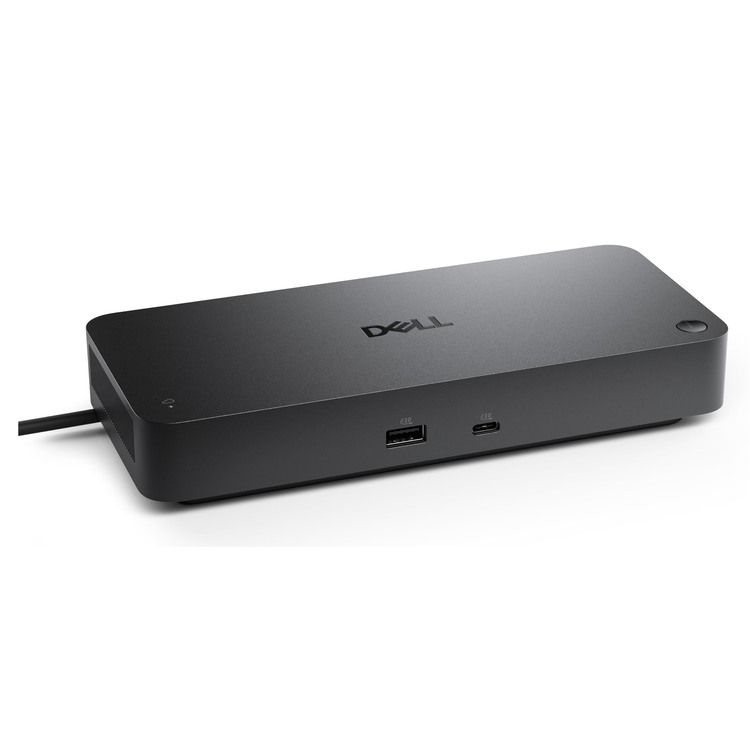
Dell Pro Thunderbolt 5 Smart Dock SD25TB5, Quad 4K 120Hz Docking Station with 300W Power Delivery
Future-proof your productivity Maximise your productivity on a Thunderbolt 5 smart dock, built for seamless multitasking using Gen AI tools across up to four 4K 120Hz displays. Featuring extended power range, this smart dock delivers up to 300W of power over a single USB-C cable to meet the demands of the highest performance AI PCs. Modern ports ensure a wide range of peripheral connectivity. More manageable and secure Elevate the IT management experience by directly managing your smart docks from the Dell Device Management Console - no PC connection or software required. More manageable commercial dockReduce IT efforts by scheduling updates during off-hours, while ensuring fleetwide firmware compliance and eliminating end user interruptions. More secure smart dockKeep users working confidently with enterprise-grade WPA-3 192-bit encryption for secure Wi-Fi communication. Safeguard your sensitive data with tamper-resistant, hardware-based encryption built into your Dell Pro Smart Dock. Effortless maintenanceRemotely configure, deploy and update Dell Pro Smart Docks over Wi-Fi* without the user connecting to a PC.Unlock out-of-band management on select Intel vPro® PCs with Intel® Active Management Technology (Intel® AMT) over Thunderbolt from the connected dock. Connect your way Configure your workspace to your liking with an ambidextrous USB-C cable** that can be routed left or right. Designed for sustainability The Dell Pro Thunderbolt 5 Smart Dock is built with post-consumer recycled materials and packaged with recycled or renewable packaging. Ports and slots Note * Via Dell Device Management Console.** The accurate length of this cable is 0.83 meters. The image provided is for illustrative purposes only.
- Connectivity Technology
- Wired
- Device Supported
- Notebook
- Cable Length
- 83 cm
- Features
- LED Power Indicator
- Power Delivery Pass-through
- Number of Displays Supported
- 4
- Maximum Data Transfer Rate
- 1.25 GB/s
- Network & Communication
- Ethernet Technology
- 2.5 Gigabit Ethernet
- Security Slot Type
- Noble Wedge Security Slot
- Kensington Security Slot
- Power Delivery
- 300W (Dell Systems)
- 240W (non-Dell Systems)
- Management Features
- MAC Address Pass-through
- PXE Boot
- Dock Power Button Sync
- Wake-on-LAN
- Kernel Direct Memory Access (DMA) Protection
- Intel AMT over Thunderbolt with select Intel vPro PCs
- Dell Command Update (DCU)
- Port Disablement
- WLAN to LAN Switch
- Screen Mode Supported
- 4K @ 120Hz
- 8K @ 60Hz
- 6K @ 60Hz
- 5K @ 60Hz
- 4K @ 60Hz
- WQHD @ 60Hz
- QHD @ 60Hz
- Supported Resolutions
- 7680 x 4320
- 6144 x 3456
- 5120 x 2160
- 3840 x 2160
- 3440 x 1440
- 2560 x 1440
- Power Delivery Details
- 4 x USB-A 3.2 Gen 2 (4.5W each)
- 1 x USB-C 3.2 Gen 2 (15W)
- 1 x USB-C Multi-function DisplayPort (7.5W)
- 2 x Thunderbolt 5 (15W each)
- All deliver power with or without PC
- Video Resolution Details
- 4K - 120 Hz (Triple Display)
- 4K - 120 Hz (Quad Display)
- 8K - 60 Hz (Single Display)
- 6K - 60 Hz (Dual Display)
- 4K - 60 Hz (Triple Display)
- 4K - 60 Hz (Quad Display)
- 5K - 60 Hz (Single Display)
- 4K - 60 Hz (Dual Display)
- WQHD - 60 Hz (Triple Display)
- QHD - 60 Hz (Quad Display)
- Host Interface
- Thunderbolt 5
- Total Number of USB Ports
- 6
- Number of USB 3.2 Gen 2 Type-A Ports
- 4
- Number of USB Type-A Ports
- 4
- Number of USB Type-C Ports
- 2
- USB Type-A
- Yes
- USB Type-C
- Yes
- USB Type-C Detail
- 1 x USB-C 3.2 Gen 2 Multi-function DisplayPort 2.1, 1 x USB-C 3.2 Gen 2 (10 Gbps)
- Network (RJ-45)
- Yes
- Number of DisplayPorts
- 2
- DisplayPort
- Yes
- DisplayPort Version
- 2.1
- Number of HDMI Ports
- 1
- HDMI
- Yes
- HDMI Version
- 2.1
- Thunderbolt
- Yes
- Thunderbolt Ports Quantity
- 2
- Operating System Supported
- Windows 10
- Windows 11
- Ubuntu 24.04
- macOS
- Red Hat Enterprise Linux 9.7
- ChromeOS 141
- Maximum Power Supply Wattage
- 330 W
- Power Source Type
- Power Adapter
- Height
- 205 mm
- Width
- 90 mm
- Depth
- 35.3 mm
- Weight (Approximate)
- 632 g
As an international traveller you are entitled to bring a certain amount/value of goods that are free of Customs duty and exempt Goods and Services tax (GST) into New Zealand. This is called your duty free allowance and personal goods concession. It is important to review these for any purchases you make on The Mall.
Your duty free allowance entitles you to bring into New Zealand the following quantities of alcohol products free of customs duty and GST provided you are over 17 years of age. You do need to be 18 years or over to purchase.
- Up to six bottles (4.5 litres) of wine, champagne, port or sherry or
- Up to twelve cans (4.5 litres) of beer
- And three bottles (or other containers) each containing not more than 1125ml of spirits, liqueur, or other spirituous beverages
Goods other than alcohol and tobacco, whether purchased overseas or purchased duty free in New Zealand, that have a combined total value not exceeding NZ$700 may also be brought as part of your personal goods concession.
When travelling overseas there are legal limits on the amount of duty free alcohol and other goods you can take with you. These amounts will vary depending on the country you are flying into. We always recommend you check the latest limits and exemptions.
Your order can be picked up at an Auckland Airport Collection Point. There is one in departures and one at arrivals in the international terminal. Alternatively, if you are arriving between 11pm and 6am you will be able to collect your order from our lockers. See map
Please bring your order confirmation email and your passport. If you are collecting from lockers you will have been sent an email with your access code, be sure to have this on you in order to collect your order.
If you’re departing Auckland Airport, we recommend that you come to the Auckland Airport Collection Point at least 60 minutes before your flight. If you miss your pickup time or your flight details have changed please let us know as soon as possible.
When you collect your order you will have the opportunity to inspect the items and sign for them.
If you need to return an item, our Collection Point team are there to help you. If you are collecting after hours please return the item to your locker and our team will be in touch as soon as possible. You may also like to view our Returns & refunds which provides information on how this works and outlines the individual retailer's returns and refunds policies.
After Hours Collections
If your order needs to be collected after the Auckland Airport Collection Point desk is closed, your order will be placed in the lockers next to the desk. All the details you will need to collect your order will be provided in your Order Confirmation and Ready to Collect Email.