










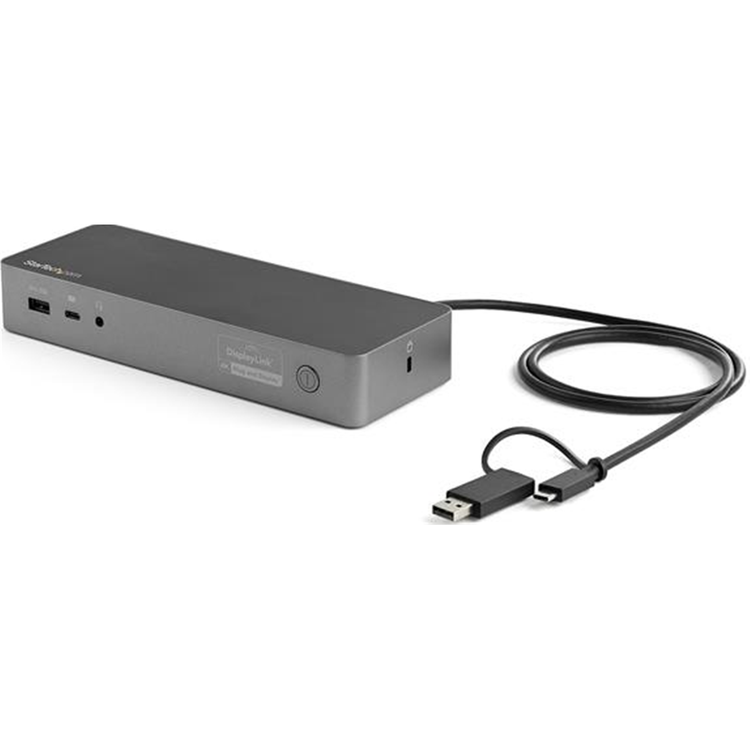


StarTech.com USB-C & USB 3.0 Dual 4K Docking Station with 100W Power Delivery
Transition from the legacy USB-A (USB 3.0) to the new USB-C with this certified universal laptop docking station for USB-C and USB-A laptops. The USB-C dock features 100W Power Delivery 3.0, dual HDMI and/or DisplayPort monitors, fast-charge, and both USB-C and USB-A peripheral ports. The Uniquely Universal Host Cable
The USB-C dock comes with a universal host cable that is designed with an attached USB-C to USB-A adapter to accommodate USB-A laptops. The cable also features an extended length of 1 meter (3.3 ft.) to support a wide variety of workstation setups. 100W Power Delivery For high performance laptops that require more charging power, the dock powers and charges your laptop as you work with 100W PD for faster charging, using the 170W power adapter - all through a single cable. Flexible Monitor Connections
This is a dual 4K60Hz video docking station with support for both Ultra HD DisplayPort and/or HDMI monitors that lets you configure your video connections to best suit your needs. Dual 4K DisplayPort | Up to 4096 x 2160p @ 60Hz Dual 4K HDMI | Up to 4096 x 2160p @ 60Hz Single 4K DisplayPort + Single 4K HDMI | Up to 4096 x 2160p @ 60Hz Single 5K DisplayPort* | Up to 5120 × 2880 *Requires monitor support for 5K using two DP ports Certified for Universal Compatibility &; Reliability This docking station is fully certified to meet top industry standards for USB-IF (USB 3.1 Gen 1, USB Type-C and Power Delivery), VESA DisplayPort and DisplayLink (video connections) certification to guarantee the highest quality, reliability, and compatibility.
Easy and Convenient Setup For fast setup right out of the box, the combo cable (USB-C with attached USB-A adapter) lets you connect any laptop. The dock has mounting holes for workstation mounting (bracket not included). The Connections You Need Connect your devices with four USB 3.1 ports: 1x USB-C and 3x USB-A. Fast-charge your USB-C or USB-A smartphone. The dock provides a GbE port (PXE Boot support &; Wake-on-LAN) and 3.5 mm 4-position headset audio jack. It also includes a security lock slot (K-slot) to protect against theft. For more installation flexibility, you can use StarTech.com mounting brackets (SSPMSUDWM &; SSPMSVESA) that are specifically designed for our docks and hubs, to mount your dock to a desk, wall, or other surfaces to give you the customized setup you need. Connected Device Transparency with the StarTech.com MAC Address Changer Utility the DK30C2DPEP, includes a free Windows® application that enables you to better manage your enterprise network security. When you connect to your network through the ethernet port of the DK30CHHPD, the computer's MAC address is typically not broadcast to the network, as your network only sees the MAC address of the docking station. However, the StarTech.com MAC Address Changer or Cloning software enables the USB-C dock to use MAC address spoofing of the connected Windows laptop rather than the MAC address of the dock itself. This ensures your network administrators have full visibility of each device on the network and can monitor and limit activity accordingly. To request access to our MAC Address Changer utility, please contact our Technical Support Department by phone, live chat, or e-mail. The IT Pro's Choice Since 1985 StarTech.com conducts thorough compatibility and performance testing on all our products to ensure we are meeting or exceeding industry standards and providing high-quality products to IT Professionals. Our local StarTech.com Technical Advisors have broad product expertise and work directly with our StarTech.com Engineers to provide support for our customers both pre and post-sales.
DK30C2DPEP is backed by a StarTech.com 3-year warranty and free lifetime technical support. Applications Create a dual-display workstation using either a USB-C laptop or USB 3.0 laptop Ideally suited for large enterprise, businesses and organizations using a mix of laptops Effective in work environments working with sensitive data and applications Ideal for hot-desking (hoteling or shared workstations), with universal compatibility
- 4K Support
- Yes
- Bus Type
- USB-C
- USB 3.0
- Chipset ID
- DisplayLink - DL6950`
- Genesys Logic - GL3523
- Fresco Logic - FL7102
- Fresco Logic - FL7201
- VIA Labs - VL160
- RealTek - RTL8153
- Texas Instruments - TS3A225E
- Displays Supported
- 2
- Fast-Charge Port(s)
- Yes
- Industry Standards
- USB Power Delivery Specification Rev. 3.0
- USB Battery Charging Specification Rev. 1.2
- DisplayPort 1.2
- IEEE 802.3, IEEE 802.3u, IEEE 802.3ab
- USB 3.0 - Backward compatible with USB 2.0 and 1.1
- Interface
- USB 3.0
- K-Lock Slot
- Kensington Standard Slot (K-Slot)
- Compatible Networks
- 10/100/1000 Mbps
- Full Duplex Support
- Yes
- Maximum Data Transfer Rate
- 5 Gbps (USB 3.0)
- 2 Gbps (Ethernet; Full-Duplex)
- Maximum Digital Resolutions
- 2x HDMI - 4096 x 2160p @60Hz
- 2x DisplayPort - 4096 x 2160p @60Hz
- 1x HDMI + 1x DisplayPort - 4096 x 2160p @60Hz
- 1x 5K DisplayPort using 2 DP video ports - 5120 x 2880 @60Hz
- Lower resolutions are also supported. For example, if the max is 4096 x 2160p (4K), it also supports 3840 x 2160p (4K), 2560 x 1600p and 2560 x 1440p.
- PXE
- Yes
- Type and Rate
- USB 3.0 - 5 Gbit/s
- UASP Support
- Yes
- Connector Type(s)
- 2 - DisplayPort (20 pin) Female
- 2 - HDMI (19 pin) Female
- 1 - USB Type-C (Fast-Charge, 24 pin) USB 3.0 Female
- 1 - USB 3.0 A (Fast-Charge, 9 pin) Female
- 2 - USB Type-A (9 pin) USB 3.0 Female
- 1 - Ethernet Gigabit Female
- 1 - 3.5 mm Mini-Jack (4 Position) Female
- OS Compatibility
- Windows® 7, 8, 8.1, 10
- macOS 10.11 - 10.12, 10.14
- Chrome OS™ v55+
- Note
- Not all USB-C ports support the full functionality of the USB Type-C standard. Ensure that your host USB-C port supports USB Power Delivery.
- 4K resolution is supported on all 4 video ports. A 4K-capable DisplayPort or HDMI display is required to achieve 4Kx2K resolutions
- If connected to a USB 2.0 host port, or if using a USB 2.0 host connection cable, performance may be limited (USB 3.0 host cable included)
- USB 3.0 is also known as USB 3.1 Gen 1; this connectivity standard offers speeds up to 5Gbps
- 5K resolution is supported by connecting the two DisplayPort video ports to a single 5K display. A 5K-capable display is required to achieve 5K (5120 x 2880 60Hz) resolutions
- The dock connects to the USB Type-C port or the USB Type-A port on your laptop.
- System and Cable Requirements
- USB-C enabled computer with an available USB Type-C port, or a USB-3.0 enabled computer with an available USB Type-A port
- Center Tip Polarity
- Positive
- Input Current
- 2.5 A
- Input Voltage
- 100 - 240 AC
- Output Current
- 8.5 A
- Output Voltage
- 20V DC
- Plug Type
- N
- Power Consumption (In Watts)
- 170 W
- Power Delivery
- 100W
- Power Source
- AC Adapter Included
- Humidity
- 0~95% RH
- Operating Temperature
- 0°C to 50°C (32°F to 122°F)
- Storage Temperature
- -20°C to 70°C (-4°F to 158°F)
- Colour
- Space Gray
- Material
- Plastic
- Product Height
- 1.2 in [3 cm]
- Product Length
- 8.7 in [22 cm]
- Product Width
- 3.1 in [80 mm]
- Weight of Product
- 9.9 oz [280 g]
- Package Height
- 3.5 in [90 mm]
- Package Length
- 10.6 in [27 cm]
- Package Width
- 6.1 in [15.5 cm]
- Included in Package
- 1 - Docking Station
- 1 - USB-C Cable (with Attached USB-C to USB-A Adapter)
- 1 - Universal Power Adapter (NA/JP, ANZ)
- 1 - Quick-Start Guide
As an international traveller you are entitled to bring a certain amount/value of goods that are free of Customs duty and exempt Goods and Services tax (GST) into New Zealand. This is called your duty free allowance and personal goods concession. It is important to review these for any purchases you make on The Mall.
Your duty free allowance entitles you to bring into New Zealand the following quantities of alcohol products free of customs duty and GST provided you are over 17 years of age. You do need to be 18 years or over to purchase.
- Up to six bottles (4.5 litres) of wine, champagne, port or sherry or
- Up to twelve cans (4.5 litres) of beer
- And three bottles (or other containers) each containing not more than 1125ml of spirits, liqueur, or other spirituous beverages
Goods other than alcohol and tobacco, whether purchased overseas or purchased duty free in New Zealand, that have a combined total value not exceeding NZ$700 may also be brought as part of your personal goods concession.
When travelling overseas there are legal limits on the amount of duty free alcohol and other goods you can take with you. These amounts will vary depending on the country you are flying into. We always recommend you check the latest limits and exemptions.
Your order can be picked up at an Auckland Airport Collection Point. There is one in departures and one at arrivals in the international terminal. Alternatively, if you are arriving between 11pm and 6am you will be able to collect your order from our lockers. See map
Please bring your order confirmation email and your passport. If you are collecting from lockers you will have been sent an email with your access code, be sure to have this on you in order to collect your order.
If you’re departing Auckland Airport, we recommend that you come to the Auckland Airport Collection Point at least 60 minutes before your flight. If you miss your pickup time or your flight details have changed please let us know as soon as possible.
When you collect your order you will have the opportunity to inspect the items and sign for them.
If you need to return an item, our Collection Point team are there to help you. If you are collecting after hours please return the item to your locker and our team will be in touch as soon as possible. You may also like to view our Returns & refunds which provides information on how this works and outlines the individual retailer's returns and refunds policies.
After Hours Collections
If your order needs to be collected after the Auckland Airport Collection Point desk is closed, your order will be placed in the lockers next to the desk. All the details you will need to collect your order will be provided in your Order Confirmation and Ready to Collect Email.