










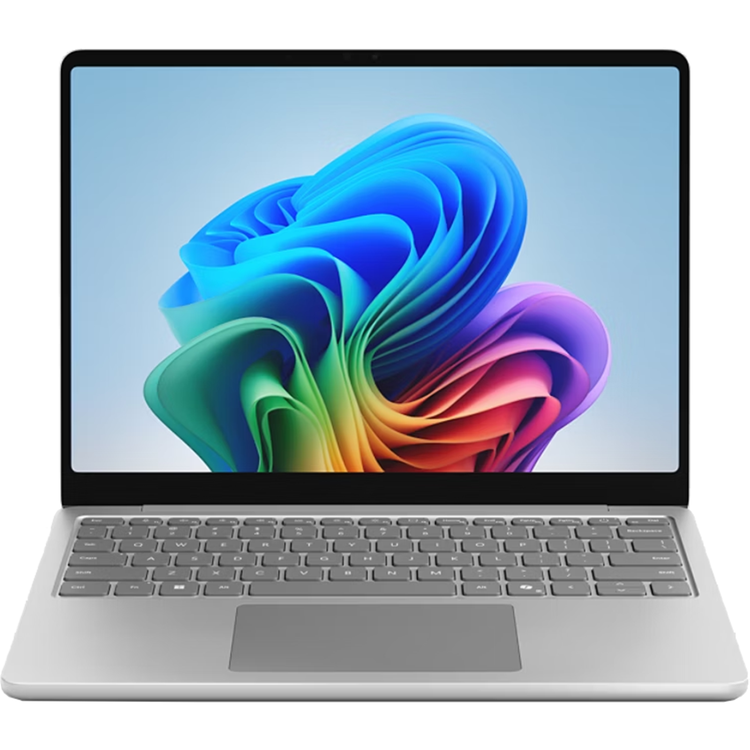


Microsoft Surface Laptop 13-Inch ( 1st Edition ) Copilot+ PC - 16GB RAM - 256GB SSD - Platinum
Ultralight, packed with performance Designed by Microsoft, Surface Laptop is an all-new Copilot+ PC, and the most portable Surface Laptop.
The most portable Copilot+ PC Surface Laptop Ultraportable and lightweight, Surface Laptop was crafted to move with you, no matter where the day takes you. Brilliant 13" PixelSense touchscreen Surface Laptop is built to be an incredible device for streaming your favourite movies, shows, and music. Ultraportable and lightweight Lightweight at 1.22 kg and compact, Surface Laptop is built to go anywhere. Type with perfection Accurate, fast and comfortable with large precision touchpad for better productivity. The ports you need Charge on-the-go, transfer data fast, or create the ultimate desktop set up with two USB-C® 3.2 ports.[3]
Productivity and efficiency, redefined Built with the latest Qualcomm Snapdragon® X Plus (8 Core) processors, Surface Pro delivers impressive performance and features a NPU with up to 45 TOPS designed to accelerate AI experiences.
Unlock your new superpower Elevate your productivity and creativity with exclusive Copilot+ PC experiences.[5]
Your AI Companion Bring more productivity and efficiency to your day, unleash your creativity, and communicate with maximum clarity with Copilot[6]. No matter what you set out to do, Copilot is always ready to help.
Fly back in time. Find it, instantly Fly back in time to get right back to where you were on your PC. Drop a hint, and Recall (preview) will track it down in seconds[7].
Describe it, find it Skip the scavenger hunt-just type what you remember. Describe what you're looking for in File Explorer, and Improved Windows Search will find it in a snap[8].
Remix. Reimagine. Restyle. Break through your creative block with Restyle Image in Photos to give your images a whole new artistic makeover[9].
Think it. Dream it. Make it. Try Image Creator to get your creative juices flowing by describing what image or art you want to create in Photos[10].
Rewrite with a click Make it make sense. Click to Do (preview) lets you act on text in an instant - just select and go.[11]
Find your perfect match Express your style in your choice of three colours - Violet, Platinum and Ocean.[2]
Build your perfect setup Pair your Surface Pro with a range of accessories[11] to create a personalised setup that meets your needs.
Power your day with Surface 45W USB-C Wall Charger Designed to charge your Surface Laptop with 45W of power via USB-C®. Your perfect travel companion Slim, light, and ready to travel, Surface Arc Mouse is designed to conform to your hand. Optimise your workspace with Surface USB4 Dock An affordable and efficient USB4®[3] docking solution for productivity and connectivity. Microsoft 365 for Surface Unlock new capabilities, build your skills, and uncover worlds of possibility with new AI-powered features with Microsoft 365.[12]
[1] Battery life varies significantly based on usage, network and feature configuration, signal strength, settings and other factors. See https://aka.ms/SurfaceBatteryPerformance for details.[2] Available colours may vary by market.[3] USB4® and USB-C® are registered trademarks of USB Implementers Forum.[4] On some devices, Copilot+ PC experiences require free updates available starting later this year and continuing into 2025. Timing varies by device and region -
aka.ms/copilotpluspcs[5] May require Windows Update or app download from the Microsoft Store.[6] Available on Copilot+ PCs with Snapdragon® X Series processors starting early 2025 and on other devices starting mid-2025. Text actions available across markets in select character sets. See https://aka.ms/copilotpluspcs. [7] Available starting early 2025 in most markets; rolling out to the European Economic Area later this year. Optimised for select languages (English, Chinese (Simplified), French, German, Japanese, and Spanish). Content-based and storage limitations apply. Requires Windows Hello Enhanced Sign-in Security. See aka.ms/copilotpluspcs.[7] Available starting early 2025 in most markets. Optimised for select languages (English, Chinese (Simplified), French, German, Japanese, and Spanish). Content-based and storage limitations apply. Requires Windows Hello Enhanced Sign-in Security. See aka.ms/copilotpluspcs.[8] Available on Copilot+ PCs with Snapdragon® X Series processors starting early 2025 and on other devices starting mid-2025. Works with specific text, image, and document formats only; optimised for select languages (English, Chinese (Simplified), French, German, Japanese, and Spanish). See aka.ms/copilotpluspcs.[9] Available now on Copilot+ PCs with Snapdragon® X Series processors and on other devices starting early 2025. Optimised for English text prompts and requires a Microsoft account and internet connection to access cloud services that help ensure the responsible use of AI. See aka.ms/copilotpluspcs.[10] Available now on Copilot+ PCs with Snapdragon® X Series processors and on other devices starting mid-2025. Optimised for English text prompts and requires a Microsoft account and internet connection to access cloud services that help ensure the responsible use of AI. See aka.ms/copilotpluspcs.[11] Accessories sold separately.[12] App availability varies by device/language. Features vary by platform. Minimum age limits may apply to use of AI features. Details here: https://go.microsoft.com/fwlink/?linkid=2280902. Microsoft 365 Personal or Family subscription required; AI features only available to subscription owner and cannot be shared; usage limits apply. Learn more here: https://go.microsoft.com/fwlink/?linkid=2280151.Questions and answers about Copilot and how it's used with a Microsoft 365 Personal and Family subscriptions. See: Frequently asked questions about Copilot in Microsoft 365 Family and Personal subscriptions - Microsoft Support Questions and answers about Copilot and how it's used with a Microsoft 365 Personal and Family subscriptions. go.microsoft.com for context menu.
- Processor
- Snapdragon® X Plus (8 Core)
- NPU
- Qualcomm® Hexagon™ with 45 TOPS
- Graphics
- Qualcomm® Adreno™ GPU
- Memory and storage
- 16 GB LPDDR5x RAM
- Storage: 256GB (UFS)
- Display
- Surface Laptop 13":
- Touchscreen: 13" PixelSense Display
- Resolution: 1920 x 1280 (178 PPI)
- Aspect ratio: 3:2
- Contrast ratio: 1000:1
- Refresh rate: up to 60Hz
- Colour profile: sRGB and Enhanced
- Individually colour-calibrated display
- Adaptive colour
- Adaptive contrast
- Touch: 10-point multi-touch
- Strengthened glass display
- Brightness: 400 nits maximum (typical)
- Battery life
- Up to 23 hours of local video playback
- Up to 16 hours of active web usage
- Size and weight
- Length: 285.65 mm (11.25 inch)
- Width: 214.14 mm (8.43 inch)
- Height: 15.6 mm (0.61 inch)
- Weight: 1.22 kg (2.7 lbs)
- Security
- Enhanced security with Microsoft Pluton TPM 2.0
- Windows 11 Secured-core PC
- Windows Hello Fingerprint Power Button with Enhanced Sign-in Security
- Microsoft Defender - for enhanced identity and privacy protection
- Cameras
- Full HD front-facing Surface Studio Camera
- 1080p Full HD camera
- Support for Windows Studio Effects with automatic framing, portrait blur, creative filters (illustrated, animated, watercolour), eye contact and portrait light
- Audio
- Omnisonic® speakers with Dolby Audio™
- Support for Bluetooth® LE Audio
- Mics
- Dual Studio Mics with enhanced voice focus
- Ports and charging
- 2 X USB-C® / USB 3.2 ports with support for:
- - Charging
- - Data transfer
- - DisplayPort 1.4a with support for up to two 4k monitors @60Hz
- - Surface Thunderbolt™ 4 Dock and other accessories
- Supports fast charging with minimum 60W charger via USB-C®
- USB-A 3.1
- 3.5 mm headphone jack
- Network and connectivity
- Wi-Fi 7
- Bluetooth® Core 5.4 technology
- Software
- Windows 11 Home
- Preloaded Microsoft 365 Apps
- Microsoft 365 Family 30-day trial
- Microsoft Defender App
- Preloaded Xbox app
- Xbox Game Pass Ultimate 30-day trial accessible through Xbox Cloud Gaming
- Accessibility
- Compatible with Surface Adaptive Kit
- Compatible with Microsoft adaptive accessories
- Sustainability
- Recycled materials:
- 100% rare earth metals contained in magnets
- 100% recycled cobalt contained in battery cell
- Thoughtful packaging:
- 73% recycled content in wood-based fibre consumer packaging
- Paper-based, minimising plastic use
- 100% of our virgin paper comes from responsibly managed forests
- Energy efficient:
- ENERGY STAR® certified
- Exterior
- Casing: Anodised aluminium
- Sensors
- Ambient color sensor
- What's in the box
- Surface Laptop
- USB-C® charging cable
- Surface 45W USB-C® Wall Charger
- Quick Start Guide
- Safety and warranty documents
- Keyboard layout
- Activation: Moving (mechanical) keys
- Layout: QWERTY, full row of function keys (F1 - F12)
- Windows key and dedicated buttons for media controls, screen brightness
- Keyboard backlight
- Copilot key
- Precision touchpad
- Battery capacities
- Battery Capacity Nominal (Wh) 50
- Battery Capacity Min (Wh) 48
As an international traveller you are entitled to bring a certain amount/value of goods that are free of Customs duty and exempt Goods and Services tax (GST) into New Zealand. This is called your duty free allowance and personal goods concession. It is important to review these for any purchases you make on The Mall.
Your duty free allowance entitles you to bring into New Zealand the following quantities of alcohol products free of customs duty and GST provided you are over 17 years of age. You do need to be 18 years or over to purchase.
- Up to six bottles (4.5 litres) of wine, champagne, port or sherry or
- Up to twelve cans (4.5 litres) of beer
- And three bottles (or other containers) each containing not more than 1125ml of spirits, liqueur, or other spirituous beverages
Goods other than alcohol and tobacco, whether purchased overseas or purchased duty free in New Zealand, that have a combined total value not exceeding NZ$700 may also be brought as part of your personal goods concession.
When travelling overseas there are legal limits on the amount of duty free alcohol and other goods you can take with you. These amounts will vary depending on the country you are flying into. We always recommend you check the latest limits and exemptions.
Your order can be picked up at an Auckland Airport Collection Point. There is one in departures and one at arrivals in the international terminal. Alternatively, if you are arriving between 11pm and 6am you will be able to collect your order from our lockers. See map
Please bring your order confirmation email and your passport. If you are collecting from lockers you will have been sent an email with your access code, be sure to have this on you in order to collect your order.
If you’re departing Auckland Airport, we recommend that you come to the Auckland Airport Collection Point at least 60 minutes before your flight. If you miss your pickup time or your flight details have changed please let us know as soon as possible.
When you collect your order you will have the opportunity to inspect the items and sign for them.
If you need to return an item, our Collection Point team are there to help you. If you are collecting after hours please return the item to your locker and our team will be in touch as soon as possible. You may also like to view our Returns & refunds which provides information on how this works and outlines the individual retailer's returns and refunds policies.
After Hours Collections
If your order needs to be collected after the Auckland Airport Collection Point desk is closed, your order will be placed in the lockers next to the desk. All the details you will need to collect your order will be provided in your Order Confirmation and Ready to Collect Email.