










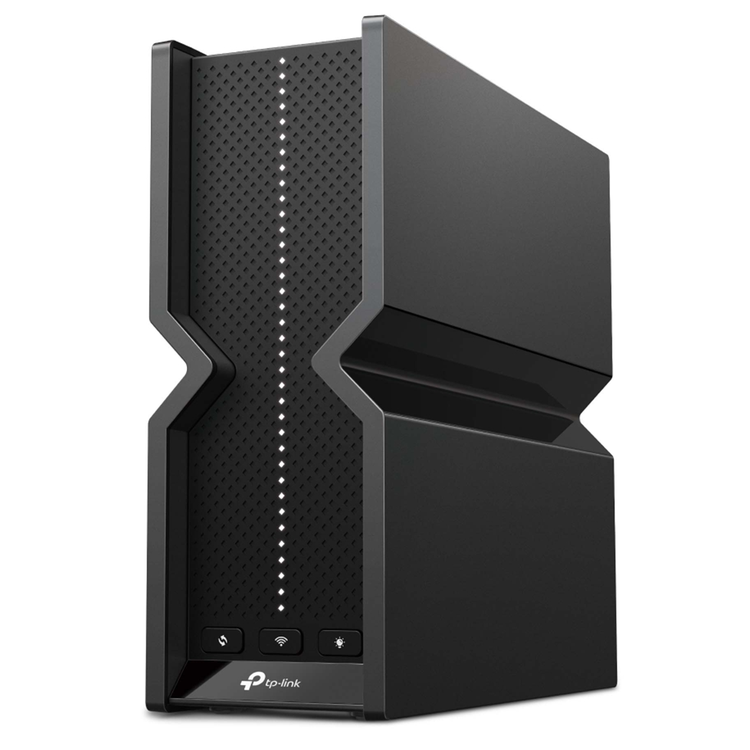
BE9300 Tri-Band Wi-Fi 7 Router Redefining WiFi Routers: With powerful WiFi 7 performance, lightning-fast wired connections, and brand-new design. Blazing-Fast 9214 Mbps Tri-Band WiFi 7: Enables your devices to run at full speed. Enjoy fluent 4K/8K streaming, immersive AR/VR gaming, and blazing-fast downloads.† Multi-Link Operation (MLO): Increases throughput, reduces latency, and improves reliability for emerging applications.‡ 5× 2.5G Ports: 1× 2.5 Gbps WAN port and 4× 2.5 Gbps LAN ports break through the 1G bottleneck, driving your devices to peak performance. Maximized Coverage: Proprietary WiFi optimization and optimally positioned antennas along with Beamforming deliver more capacity, stronger and more reliable connections, and less interference. EasyMesh-Compatible: Works with EasyMesh routers and range extenders to form seamless whole home Mesh WiFi, preventing drops and lag when moving between signals. Easy Setup and Use: Network management has never been easier with the Tether app. TP-Link HomeShield: Enhanced security defends against the latest cyber threats.* Great Compatibility: Supports all Wi-Fi generations and devices**and all internet providers*** WiFi 7 - WiFi Like Never Before WiFi 7 has arrived with jaw-dropping performance-offering accelerated throughput, lower latency, stronger anti-jamming, and higher efficiency. Join the pros and experience the sheer performance of the next generation of WiFi. Ultra-Fast 9214 Mbps 6-Stream Tri-Band WiFi Enjoy smooth 8K streaming, VR/AR, video conferencing, online gaming, and high-speed downloading. 5× 2.5 Gbps Ports for Full Multi-Gigabit Connectivity One 2.5 Gbps WAN port maximizes home internet speeds with up to 2.5× the wired speed of a typical Gigabit Ethernet port. The additional four 2.5 Gbps LAN ports make Archer BE550 an ideal solution for future-proofing your home network.? Let's begin the unprecedented smooth game! Flexibly Create Whole Home Mesh WiFi Archer BE550 is EasyMesh-compatible. If you have any dead zones at home, just add another EasyMesh router/range extender to further form your whole home multi-gigabit mesh WiFi. No more searching for a stable connection. Easy Setup and Use Whether you prefer the intuitive Tether app or TP-Link's powerful web interface, you can set up your Archer BE550 in minutes. The Tether app allows you to manage network settings from any Android or iOS device. Protect Your Children Block inappropriate content for your children and customize a time range for better online habits. New Connection Notifications You will be notified by your phone when new devices connect. Kick off any suspicious connections and block them. It's as simple as that. Easy Firmware Upgrades Tired of upgrading firmware manually? OTA updates simplify firmware upgrades with a click in the management panel. To keep your security and functions always up to date, just turn on the auto schedule. VPN Clients and Server Supported Allow devices in your home network to access remote VPN servers without needing to install VPN software on every device. Archer BE550 can run both the VPN and ordinary internet connections at the same time, delivering security and flexibility. Private IoT Network for More Security Set up a separate WiFi for IoT devices and overlay HomeShield and advanced WPA3 encryption** to better protect the security of your home network and IoT devices.
- WiFi Speeds
- BE9300
- - 6 GHz: 5760 Mbps (802.11be)
- - 5 GHz: 2880 Mbps (802.11be)
- - 2.4 GHz: 574 Mbps (802.11ax)
- WiFi Range
- 4 Bedroom Houses
- 6× Optimally Positioned Antennas
- Multiple antennas form a signal-boosting array to cover more directions and large areas
- Beamforming
- Concentrates wireless signal strength towards clients to expand WiFi range
- High-Power FEM
- Improves transmission power to strengthen signal coverage
- WiFi Capacity
- High
- Tri-Band
- Allocate devices to different bands for optimal performance
- 2×2 MU-MIMO
- Simultaneously communicates with multiple MU-MIMO clients
- OFDMA
- Simultaneously communicates with multiple clients
- Airtime Fairness
- Improves network efficiency by limiting excessive occupation
- DFS
- Access an extra band to reduce congestion
- 6 Streams
- Connect your devices to more bandwidth
- Working Modes
- - Router Mode
- - Access Point Mode
- Advanced Functions
- - Multi-Link Operation (MLO)
- - 320 MHz Channel
- - 4K-QAM
- - Multi-RUs
- - EasyMesh-Compatible
- - Works with Alexa and Google Assistant
- - IoT Network
- Network Security
- - SPI Firewall
- - Access Control
- - IP & MAC Binding
- - Application Layer Gateway
- - HomeShield Security
- Real-Time IoT Protection
- Malicious Site Blocker
- Intrusion Prevention System
- DDoS Attack Prevention
- Home Network Scanner
- Guest Network
- - 1× 6 GHz Guest Network
- - 1× 5 GHz Guest Network
- - 1× 2.4 GHz Guest Network
- VPN Server
- - OpenVPN Server
- - PPTP VPN Server
- - L2TP VPN Server
- - WireGuard VPN Server
- VPN Client
- - Open VPN Client
- - PPTP VPN Client
- - L2TP VPN Client
- - WireGuard VPN Client
- WiFi Encryption
- - WPA
- - WPA2
- - WPA3
- - WPA/WPA2-Enterprise (802.1x)
- Processor
- High-Performance CPU
- Ethernet Ports
- - 1× 2.5 Gbps WAN
- - 4× 2.5 Gbps LAN
- USB Support
- 1× USB 3.0
- - Supported Partition Formats:
- NTFS, exFAT, HFS+, FAT32
- - Supported Functions:
- FTP Server
- Media Server
- Samba Server
- Buttons
- - Power On/Off Button
- - Wi-Fi On/Off Button
- - LED Button
- - WPS Button
- - Reset Button
- Power
- 12 V ? 3.3 A
- Protocols
- - IPv4
- - IPv6
- Service Kit
- HomeShield
- EasyMesh
- Compatible with EasyMesh
- Parental Controls
- HomeShield Parental Controls
- Custom Profiles
- Professional Content Filter Library
- Family Time
- Bedtime
- Off Time
- Time Rewards
- Family Online Time Ranking
- Pause the Internet
- Weekly and Monthly Reports
- WAN Type
- - Dynamic IP
- - Static IP
- - PPPoE
- - PPTP
- - L2TP
- Quality of Service
- QoS by Device
- Cloud Service
- - Auto Firmware Upgrade
- - TP-Link ID
- - DDNS
- NAT Forwarding
- - Port Forwarding
- - Port Triggering
- - DMZ
- - UPnP
- IPTV
- - IGMP Proxy
- - IGMP Snooping
- - Bridge
- - Tag VLAN
- DHCP
- - Address Reservation
- - DHCP Client List
- - Server
- DDNS
- - TP-Link
- - NO-IP
- - DynDNS
- Management
- - Tether App
- - Webpage
- System Requirements
- Internet Explorer 11+, Firefox 12.0+, Chrome 20.0+, Safari 4.0+, or other JavaScript-enabled browser
- Cable or DSL Modem (if needed)
- Subscription with an internet service provider (for internet access)
- Certifications
- CE, FCC, RoHS
- Environment
- - Operating Temperature: 0?~40? (32? ~104?)
- - Operating Humidity: 10%~90% non-condensing
- Dimensions (W×D×H)
- 3.0 × 9.1 × 8.0 in (76 × 231.7 × 203 mm)
- Package Contents
- - Wi-Fi 7 Router Archer BE550
- - Power Adapter
- - RJ45 Ethernet Cable
- - Quick Installation Guide
As an international traveller you are entitled to bring a certain amount/value of goods that are free of Customs duty and exempt Goods and Services tax (GST) into New Zealand. This is called your duty free allowance and personal goods concession. It is important to review these for any purchases you make on The Mall.
Your duty free allowance entitles you to bring into New Zealand the following quantities of alcohol products free of customs duty and GST provided you are over 17 years of age. You do need to be 18 years or over to purchase.
- Up to six bottles (4.5 litres) of wine, champagne, port or sherry or
- Up to twelve cans (4.5 litres) of beer
- And three bottles (or other containers) each containing not more than 1125ml of spirits, liqueur, or other spirituous beverages
Goods other than alcohol and tobacco, whether purchased overseas or purchased duty free in New Zealand, that have a combined total value not exceeding NZ$700 may also be brought as part of your personal goods concession.
When travelling overseas there are legal limits on the amount of duty free alcohol and other goods you can take with you. These amounts will vary depending on the country you are flying into. We always recommend you check the latest limits and exemptions.
Your order can be picked up at an Auckland Airport Collection Point. There is one in departures and one at arrivals in the international terminal. Alternatively, if you are arriving between 11pm and 6am you will be able to collect your order from our lockers. See map
Please bring your order confirmation email and your passport. If you are collecting from lockers you will have been sent an email with your access code, be sure to have this on you in order to collect your order.
If you’re departing Auckland Airport, we recommend that you come to the Auckland Airport Collection Point at least 60 minutes before your flight. If you miss your pickup time or your flight details have changed please let us know as soon as possible.
When you collect your order you will have the opportunity to inspect the items and sign for them.
If you need to return an item, our Collection Point team are there to help you. If you are collecting after hours please return the item to your locker and our team will be in touch as soon as possible. You may also like to view our Returns & refunds which provides information on how this works and outlines the individual retailer's returns and refunds policies.
After Hours Collections
If your order needs to be collected after the Auckland Airport Collection Point desk is closed, your order will be placed in the lockers next to the desk. All the details you will need to collect your order will be provided in your Order Confirmation and Ready to Collect Email.