










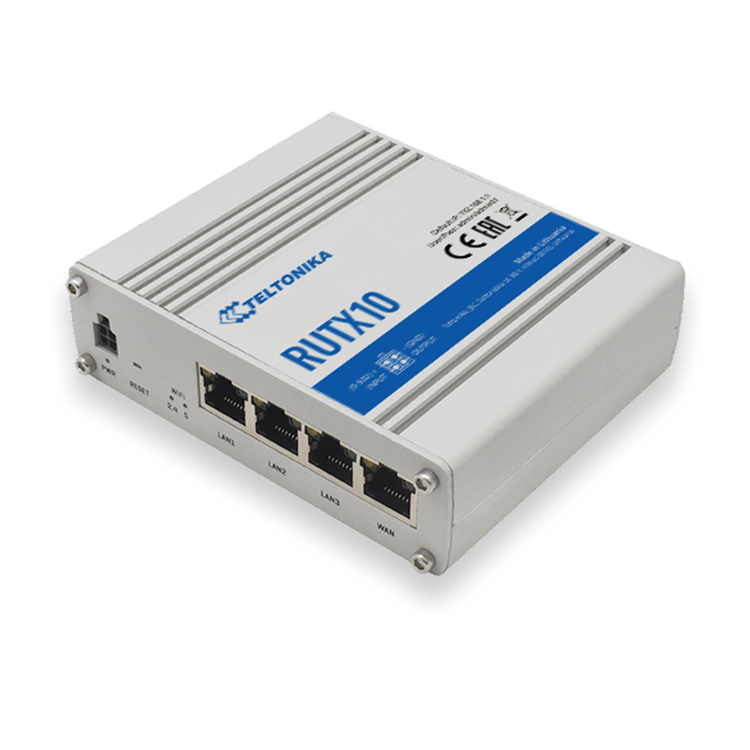
Teltonika RUTX10 AC867 Dual Band Wi-Fi 5 Industrial Router
RUTX10 Next-Generation Teltonika Enterprise router, equipped with the Dual Band WiFi 5 802.11ac and a Bluetooth LE module. Perfect for Small office or Public sector applications. High speed WiFi connectivity allows companies to transition into all-wireless office settings. We created RUTX10 Enterprise module specially for small to mid-size office application. It comes with Dual Band WiFi 5 802.11ac, that is extremely important for high data transmission and lag-free browsing experience. RUTX10 has all the latest security features and ability to monitor and control your office data usage remotely. Highly customizable RutOS is at the soul of RUTX10, but it's actually synergy between hardware and software that makes this device perfect performer in enterprise solutions. Quad Core ARM Cortex A7 717 MHz CPU is more than enough for VPN functionality and if what we offer is not enough there is 256 MBytes Flash memory to install additional protocols.
- WAN
- 1x WAN port (can be configured as LAN) 10/100/1000 Mbps, compliance with IEEE 802.3, IEEE 802.3u, 802.3az standards, supports auto MDI/MDIX crossover
- LAN
- 3x LAN ports, 10/100/1000 Mbps, compliance with IEEE 802.3, IEEE 802.3u, 802.3az standards, supports auto MDI/MDIX crossover
- Wireless mode
- 802.11ac (WiFi 5) with data transmission rates up to 867 Mbps (Dual Band, MU-MIMO), 802.11r fast transition, Access Point (AP), Station (STA)
- WiFi security
- WPA2-Enterprise-PEAP, WPA2-PSK, WPA-PSK, WEP; AES-CCMP, TKIP, Auto Cipher modes, client separation
- ESSID
- ESSID stealth mode
- Wireless Hotspot
- Captive portal (Hotspot), internal/external Radius server, built in customizable landing page
- Bluetooth LE
- Bluetooth low energy (LE) for short range communication
- Routing
- Static routing, Dynamic routing (BGP, OSPF v2, RIP v1/v2, EIGRP, NHRP)
- Network protocols
- TCP, UDP, IPv4, IPv6, ICMP, NTP, DNS, HTTP, HTTPS, FTP, SMTP, SSL v3, TLS, ARP, VRRP, PPP, PPPoE, UPNP, SSH, DHCP, Telnet client, SNMP, MQTT, Wake on LAN (WOL)
- VoIP passthrough support
- H.323 and SIP-alg protocol NAT helpers, allowing proper routing of VoIP packets
- Connection monitoring
- Ping Reboot, Wget reboot, Periodic Reboot, LCP and ICMP for link inspection
- Firewall
- Port forwards, traffic rules, custom rules
- DHCP
- Static and dynamic IP allocation, DHCP Relay, Relayd
- QoS
- Traffic priority queuing by source/destination (planned), service (planned), protocol or port (planned), WMM, 802.11e
- DDNS
- Supported >25 service providers, others can be configured manually
- Network backup
- VRRP, Wired and WiFi WAN options, each of which can be used as an automatic Failover
- SSHFS (optional)
- Possibility to mount remote file system via SSH protocol (not available in standard FW)
- Authetication
- Pre-shared key, digital certificates, X.509 certificates
- Firewall
- Pre-configured firewall rules can be enabled via WebUI, unlimited firewall configuration via CLI; DMZ; NAT; NAT-T
- Attack prevention
- DDOS prevention (SYN flood protection, SSH attack prevention, HTTP/HTTPS attack prevention), port scan prevention (SYN-FIN, SYN-RST, X-mas, NULL flags, FIN scan attacks)
- VLAN
- Port based and tag based VLAN separation
- WEB filter Blacklist for blocking out unwanted websites, whitelist for specifying allowed sites only
- Access control
- Flexible access control of TCP, UDP, ICMP packets, MAC address filter
- OpenVPN
- Multiple clients and a server can run simultaneously, 12 encryption methods
- OpenVPN Encryption
- DES-CBC, RC2-CBC, DES-EDE-CBC, DES-EDE3-CBC, DESX-CBC, BF-CBC, RC2-40-CBC, CAST5-CBC, RC2-64-CBC, AES-128-CBC, AES-192-CBC, AES-256-CBC
- IPsec
- IKEv1, IKEv2, with 5 encryption methods for IPsec (DES, 3DES, AES128, AES192, AES256)
- GRE
- GRE tunnel
- PPTP, L2TP
- Client/Server instances can run simultaneously
- Stunnel
- Proxy designed to add TLS encryption functionality to existing clients and servers without any changes in the program's code
- DMVPN
- Method of building scalable IPsec VPNs
- SSTP
- SSTP client instance support
- Modbus TCP slave
- ID range 1-255
- Modbus TCP master
- Supported functions 01, 02, 03, 04, 05, 06, 15, 16 Supported data formats 8 bit: INT, UINT; 16 bit: INT, UINT (MSB or LSB first); 32 bit float (Big endian, Big endian with byte-swapped, Little endian, Little endian with byte-swapped)
- WEB UI
- HTTP/HTTPS, status, configuration, FW update, CLI, troubleshoot, event log, system log, kernel log
- FOTA
- Firmware update from server, automatic notification
- SSH
- SSH (v1, v2)
- TR-069
- OpenACS, EasyCwmp, ACSLite, tGem, LibreACS, GenieACS, FreeACS, LibCWMP, Friendly tech, AVSystem
- SNMP
- SNMP (v1, v2, v3), SNMP trap
- MQTT
- MQTT Broker, MQTT publisher
- JSON-RPC (planned)
- Management API over HTTP/HTTPS
- RMS
- Teltonika Remote Management System (RMS)
- CPU
- Quad-core ARM Cortex A7, 717 MHz
- RAM
- 256 MB, DDR3
- FLASH memory
- 256 MB SPI Flash
- WEB UI
- Update FW from file, check FW on server, configuration profiles, configuration backup
- FOTA
- Update FW/configuration from server
- RMS
- Update FW/configuration for multiple devices at once
- Keep settings
- Update FW without losing current configuration
- Operating system
- RutOS (OpenWrt based Linux OS)
- Supported languages
- Busybox shell, Lua, C, C++
- Development tools SDK package with build environment provided
- Data rate
- USB 2.0
- Applications
- Samba share, custom scripts (planned)
- External devices
- Possibility to connect external HDD, flash drive, additional modem, printer (planned)
- Storage formats
- FAT, FAT32, NTFS
- Input
- 1x Digital Input
- Output
- 1x Digital Output
- Events
- SMS, Email, RMS
- Connector
- 4 pin industrial DC power socket
- Input voltage range
- 9 - 50 VDC, reverse polarity protection, voltage surge/transient protection
- PoE (passive)
- Passive PoE. Possibility to power up through LAN port, not compatible with IEEE802.3af and 802.3at standards
- Power consumption
- 11 W Max
- Ethernet
- 4x RJ45 ports, 10/100/1000 Mbps
- I/Os
- 1 Digital Input, 1 Digital Output on 4 pin power connector
- Status LEDs
- 8x LAN status LEDs, 1x Power LED, 2.4G and 5G WiFi LEDs
- Power
- 4 pin DC connector
- Antennas
- 2x RP-SMA for WiFi, 1x RP-SMA for Bluetooth
- USB
- USB A port for external devices
- Reset
- Factory reset button
- Casing material
- Full aluminium housing
- Dimensions
- 115 mm x 95 mm x 32 mm (H x W x D)
- Weight
- 355 g
- Mounting options
- DIN rail (can be mounted on two sides), flat surface placement
- Operating temperature
- -40 C to 75 C
- Operating humidity
- 10 % to 90 % non-condensing
- Ingress Protection Rating
- IP30
As an international traveller you are entitled to bring a certain amount/value of goods that are free of Customs duty and exempt Goods and Services tax (GST) into New Zealand. This is called your duty free allowance and personal goods concession. It is important to review these for any purchases you make on The Mall.
Your duty free allowance entitles you to bring into New Zealand the following quantities of alcohol products free of customs duty and GST provided you are over 17 years of age. You do need to be 18 years or over to purchase.
- Up to six bottles (4.5 litres) of wine, champagne, port or sherry or
- Up to twelve cans (4.5 litres) of beer
- And three bottles (or other containers) each containing not more than 1125ml of spirits, liqueur, or other spirituous beverages
Goods other than alcohol and tobacco, whether purchased overseas or purchased duty free in New Zealand, that have a combined total value not exceeding NZ$700 may also be brought as part of your personal goods concession.
When travelling overseas there are legal limits on the amount of duty free alcohol and other goods you can take with you. These amounts will vary depending on the country you are flying into. We always recommend you check the latest limits and exemptions.
Your order can be picked up at an Auckland Airport Collection Point. There is one in departures and one at arrivals in the international terminal. Alternatively, if you are arriving between 11pm and 6am you will be able to collect your order from our lockers. See map
Please bring your order confirmation email and your passport. If you are collecting from lockers you will have been sent an email with your access code, be sure to have this on you in order to collect your order.
If you’re departing Auckland Airport, we recommend that you come to the Auckland Airport Collection Point at least 60 minutes before your flight. If you miss your pickup time or your flight details have changed please let us know as soon as possible.
When you collect your order you will have the opportunity to inspect the items and sign for them.
If you need to return an item, our Collection Point team are there to help you. If you are collecting after hours please return the item to your locker and our team will be in touch as soon as possible. You may also like to view our Returns & refunds which provides information on how this works and outlines the individual retailer's returns and refunds policies.
After Hours Collections
If your order needs to be collected after the Auckland Airport Collection Point desk is closed, your order will be placed in the lockers next to the desk. All the details you will need to collect your order will be provided in your Order Confirmation and Ready to Collect Email.