










3x Brighter Colours with Epson*
Brilliant image quality requires high colour brightness (colour light output), and Epson® 3LCD projectors have 3 x Brighter Colours than leading competitive projectors*. One brightness measurement (lumens) is not enough. A projector's specification needs to show both high colour brightness and high white brightness. If colour brightness is lower than white brightness, images may be dark, dull and lose detail. If not provided, be sure to ask for a projector's colour brightness specification. *Compared to leading 1-chip DLP business and education projectors based on NPD data, July 2011 through June 2012. Colour brightness (colour light output) measured in accordance with IDMS 15.4. Colour brightness will vary depending on usage conditions. 3LCD technology
All Epson projectors are based on 3-chip LCD technology for amazing colour, incredible detail and solid reliability. 3LCD's 3-chip architecture dedicates an entire chip to process each primary colour - red, green and blue, continuously. Unlike single-chip technology that delivers colour sequentially, you get full-time colour. The result is vibrant, realistic images and video all delivered with 3LCD's true-to-life colour. Brilliant high definition image up to 300inch
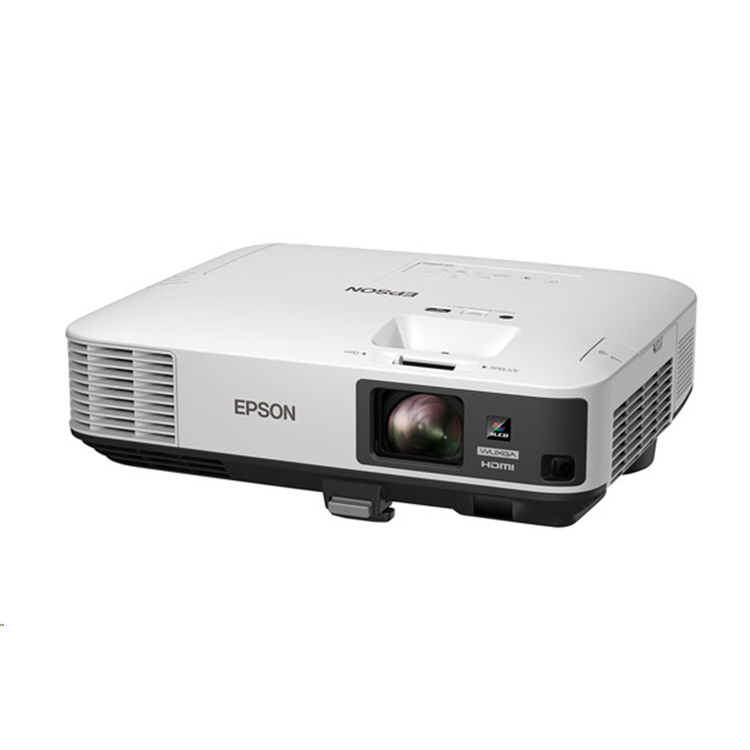
Featuring native resolution up to WUXGA (1920 x 1200), the Epson EB-2000 series delivers high quality images and crisp, sharp text without any distortion. Images can be projected on a large screen with no information left out. This applies to video output devices such as PCs and smart devices with their ever increasing image quality and higher definition and accommodates a variety of content including 3D CAD, digital broadcasts, Blu-ray, and internet movies. High brightness Even though its light weight and compact size enables it to be carried from room to room, the projector is capable of highly visible images thanks to its high brightness (up to 5,500lm) and superior 15,000:1 contrast ratio. Room lights don't have to be dimmed to see bright and clearly projected images, allowing meeting participants to concentrate better for improved meeting productivity. Epson iProjection App
Display and control content from your iPhone, iPad or iPod touch, Android and Chrome devices with the Epson iProjection App. This free application allows road warriors to travel light and present from their mobile devices. The app is easy to use and intuitive menu options bring your content to the bigger screen. Auto V/H keystone and screen fit
In cases where the image extends beyond the frame of the screen or whiteboard you just have to push the "Screen Fit" button and the image frame automatically matches up with the edges of the screen. Auto power on feature
The projector starts automatically upon connecting a VGA*, HDMI**, or USB cable to the device itself. This feature means you no longer have to use the power on button because startup is activated with cable insertion. *VGA auto power on is available with Computer 1 only**HDMI auto power on is available with HDMI1 only Gesture presentation
Present smarter with newly added 'gesture presentation' function. Simply move your hand in front of the arrows, and make your presentation more engaging and realistic with the audience. Split Screen
Split Screen allows you to display content from two inputs simultaneously, side by side, on a single screen. With three layout options you can display video and presentation materials, and run video on both screens New home screen
New home screen offers quick and easy access to a variety of useful functions. Also, all source information, no matter what the source input is, can be seen at a glance. Wireless connections can be made easily because all the information you need is right there on the screen. EasyMP Multi-PC projection
The EasyMP Multi PC Projection application makes it possible to connect with up to 50 computers and partition the screen for split screen projection. The moderator can select up to 4 of the connected devices and project their screens from the projector, maintaining control and preventing interference with the projected screen. EasyMP MonitorWith EasyMP Monitor, Epson's network monitoring and control software, a single PC can see which projectors are available and if they are running efficiently, even across the biggest of networks. This series can be configured remotely, with instant email alerts for pre-defined critical indicators such as non-functioning devices or overheating lamps. Each projector's serial number can also be accessed remotely via LAN/serial connection. Wireless LAN Enterprise securityThe EB-2000 series projectors now include 'WPA-Enterprise security' mode to connect in robust integrated network environment; compatible with WPA, WPA2-PSK and WPA2-EAP security protocols. Longer lamp lifeThe long 10,000H* lamp life saves time and money by reducing the frequency of costly lamp replacements.
- PRODUCT NAME
- Epson EB-2250U
- PRODUCT CODE
- V11H871053
- EAN
- 9314020623752
- Projection System
- Epson 3LCD, 3-chip technology
- LCD Panel
- 0.67-inch panel
- Zoom
- 1-1.6 (Optical Zoom)
- Screen Size
- 50" to 300" [1.46m to 8.95m] (Zoom: Wide)
- 50" to 300" [2.43m to 14.79m] (Zoom: Tele)
- Projection Distance
- 80" screen 2.36m - 3.92m
- Throw Ratio
- 1.38 (Zoom: Wide), 2.28 (Zoom: Tele)
- Projection Lens F Number
- 1.5 - 2.0
- Projection Lens Focal Length
- 23mm - 38.4mm
- Focus Method
- Manual Focus
- Offset
- 10:1
- Colour Light Output
- 5,000 Lumens
- White Light Output
- 5,000 Lumens
- Resolution
- WUXGA
- Native Aspect Ratio
- 16:10
- Contrast Ratio
- 15,000:1
- Lamp Hours
- Normal/Eco: 5,000/10,000 Hours
- Lamp Type
- 300W UHE
- Keystone Correction
- Vertical: -30 to +30 degrees
- Horizontal: -30 to +30 degrees
- Input: Video
- 1 x RCA (Yellow)
- Input: Computer
- 2 x D-sub 15-Pin (RGB), 1 x USB 2.0 type B
- Input: USB Memory Device
- 1 x USB Type A
- Input: Three-In-One USB Display
- 1 x USB 2.0 type B
- Input: Digital
- 2 x HDMI (1 x MHL)
- Input: Audio
- 1 x RCA (Red/White), 2 x Stereo mini jack
- Input: Control
- 1 x USB 2.0 type B, 1 x RS232C
- Input : HDBaseT
- N/A
- Input: Epson USB Document Camera
- 1 x USB 2.0 type A
- Network I/O:
- 1 x RJ45 (100Mbps)
- Wireless Connectivity
- Optional
- WiDI/Miracast
- N/A
- Output: Video
- 1 x D-sub 15 pin (black moulding)
- Output: Audio
- 1 x Stereo mini jack
- Speaker Output
- 16W
- EasyMP Network & Control
- Yes
- EasyMP Network Projection
- Yes
- PC Free Presentations
- Yes
- USB Plug 'n Play
- Yes
- AV Mute Slide
- Yes
- Instant Off
- Yes
- Auto Power On
- Yes
- Direct Power On/Off
- Yes
- Security
- Padlock & Security Cable Hole
- Kensington®-style lock provision
- Wireless LAN Unit Lock
- Password protect function
- Colour Modes
- Dynamic, Presentation, Cinema, sRGB, Blackboard, DICOM SIM
- Dimensions D x W x H (excluding feet)
- 291 x 377 x 110 mm
- Weight
- 4.8kg (approximate)
- Compatible lamp model
- ELPLP95 (New)
- Power Consumption: Lamp on
- Normal/Eco: 420/350W
- Power Consumption: Standby
- 0.5W (communication off)
- Noise Level
- Normal/Eco: 39/29dB
As an international traveller you are entitled to bring a certain amount/value of goods that are free of Customs duty and exempt Goods and Services tax (GST) into New Zealand. This is called your duty free allowance and personal goods concession. It is important to review these for any purchases you make on The Mall.
Your duty free allowance entitles you to bring into New Zealand the following quantities of alcohol products free of customs duty and GST provided you are over 17 years of age. You do need to be 18 years or over to purchase.
- Up to six bottles (4.5 litres) of wine, champagne, port or sherry or
- Up to twelve cans (4.5 litres) of beer
- And three bottles (or other containers) each containing not more than 1125ml of spirits, liqueur, or other spirituous beverages
Goods other than alcohol and tobacco, whether purchased overseas or purchased duty free in New Zealand, that have a combined total value not exceeding NZ$700 may also be brought as part of your personal goods concession.
When travelling overseas there are legal limits on the amount of duty free alcohol and other goods you can take with you. These amounts will vary depending on the country you are flying into. We always recommend you check the latest limits and exemptions.
Your order can be picked up at an Auckland Airport Collection Point. There is one in departures and one at arrivals in the international terminal. Alternatively, if you are arriving between 11pm and 6am you will be able to collect your order from our lockers. See map
Please bring your order confirmation email and your passport. If you are collecting from lockers you will have been sent an email with your access code, be sure to have this on you in order to collect your order.
If you’re departing Auckland Airport, we recommend that you come to the Auckland Airport Collection Point at least 60 minutes before your flight. If you miss your pickup time or your flight details have changed please let us know as soon as possible.
When you collect your order you will have the opportunity to inspect the items and sign for them.
If you need to return an item, our Collection Point team are there to help you. If you are collecting after hours please return the item to your locker and our team will be in touch as soon as possible. You may also like to view our Returns & refunds which provides information on how this works and outlines the individual retailer's returns and refunds policies.
After Hours Collections
If your order needs to be collected after the Auckland Airport Collection Point desk is closed, your order will be placed in the lockers next to the desk. All the details you will need to collect your order will be provided in your Order Confirmation and Ready to Collect Email.