










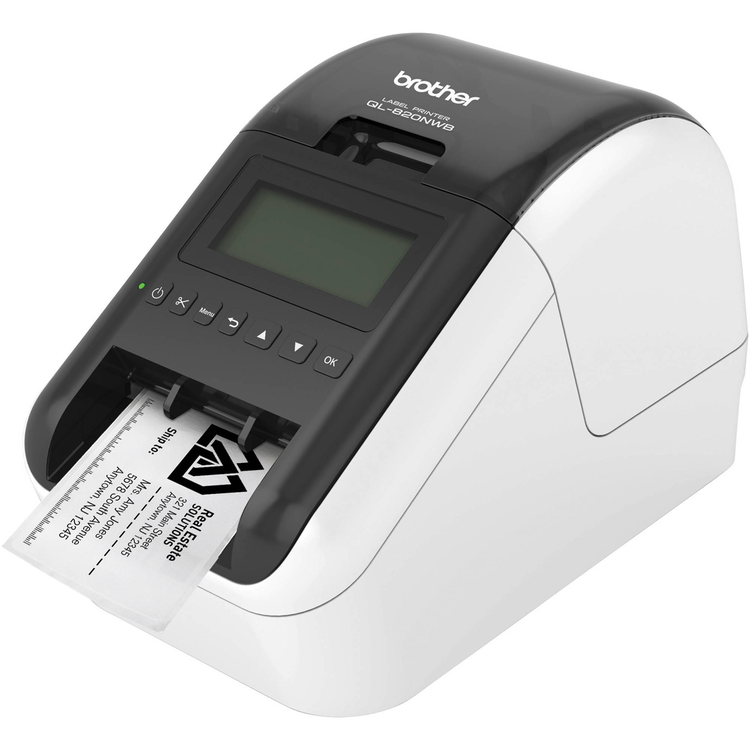
The QL820NWB offers two colour printing. Print in both black and red using DK22251 tapes - ideal for highlighting important information on a label. Create standout, cost-effective paper labels for packages, envelopes, file folders, name badges, food packaging and more.
This top end model features a large graphic LCD display, which makes it easy to operate the printer and design personal labels. It offers an extended range of connectivity options, including Bluetooth and wired network connectivity in addition to Wi-Fi, AirPrint and USB connections. Moreover, the Brother QL820NWB can work without being connected to a PC. This label printer can also run on an optional Li-ion battery, making it extremely mobile for printing labels in warehouses, shops or large offices, meeting the increasing demand for businesses to be mobile and flexible.- Flexible connectivity - The Brother QL820NWB network label printer features Bluetooth wireless technology, Ethernet, Wireless (802.11b/g/n) and Wireless Direct interfaces- Ultra-fast, printing up to 110 labels per minute- Print labels wirelessly using AirPrint, Brother iPrint&;Label app download- Easy to read Backlit Monochrome LCD screen allows for standalone use- Optional Li-ion battery for a complete mobile solution- High-resolution (up to 300 x 600 dpi) printing, for crisp text and graphics- Windows and Mac compatible
- Hardware Type
- Desktop
- Engine
- Direct thermal
- Functions
- Labeller that prints 62mm labels with auto cutter
- Keyboard
- N/A
- Display Type
- 62mm x 26mm LCD display with backlight
- Print Speed Max.
- 176 mm / sec. or 110 standard address labels / min.
- Print Resolution
- 300dpi
- Characters and Symbols
- PC Select
- Frames and Backgrounds
- PC Select
- Memory
- PC Memory
- Underline
- N/A
- Multi Line Print
- PC Select
- Repeat Print
- N/A
- Auto Number
- N/A
- Auto Format
- N/A
- Mirror Printing
- PC Select
- Vertical Printing
- PC Select
- Print Preview
- N/A
- Rotate Printing
- PC Select
- Tape Length Setting
- 12.7mm - 1000mm
- Max Print Height
- 58mm
- Max Print Length
- Up to 1000mm long (Windows)
- Fonts Labeller
- N/A
- Interface
- USB(Full Speed), RS-232C, 10/100 BASE-TX Wired Ethernet, IEEE 802.11b/g/n Wireless LAN, Bluetooth, USB Host
- Operating System
- Windows 10, Windows 8/8.1, Windows 7, Vista, Server 2008, Server 2008R2, Server 2012, Server 2012R2 Mac: OSX 10.9 or greater Linux deb, rpm (Only driver) Android / IOS
- Connect and Print
- Yes
- AC Adaptor
- External S/W Power Supply (PA-AD-001A)
- Size
- 125(w) x 234(h) x 145(d) mm
- Weights
- 1.13kg (without DK roll)
As an international traveller you are entitled to bring a certain amount/value of goods that are free of Customs duty and exempt Goods and Services tax (GST) into New Zealand. This is called your duty free allowance and personal goods concession. It is important to review these for any purchases you make on The Mall.
Your duty free allowance entitles you to bring into New Zealand the following quantities of alcohol products free of customs duty and GST provided you are over 17 years of age. You do need to be 18 years or over to purchase.
- Up to six bottles (4.5 litres) of wine, champagne, port or sherry or
- Up to twelve cans (4.5 litres) of beer
- And three bottles (or other containers) each containing not more than 1125ml of spirits, liqueur, or other spirituous beverages
Goods other than alcohol and tobacco, whether purchased overseas or purchased duty free in New Zealand, that have a combined total value not exceeding NZ$700 may also be brought as part of your personal goods concession.
When travelling overseas there are legal limits on the amount of duty free alcohol and other goods you can take with you. These amounts will vary depending on the country you are flying into. We always recommend you check the latest limits and exemptions.
Your order can be picked up at an Auckland Airport Collection Point. There is one in departures and one at arrivals in the international terminal. Alternatively, if you are arriving between 11pm and 6am you will be able to collect your order from our lockers. See map
Please bring your order confirmation email and your passport. If you are collecting from lockers you will have been sent an email with your access code, be sure to have this on you in order to collect your order.
If you’re departing Auckland Airport, we recommend that you come to the Auckland Airport Collection Point at least 60 minutes before your flight. If you miss your pickup time or your flight details have changed please let us know as soon as possible.
When you collect your order you will have the opportunity to inspect the items and sign for them.
If you need to return an item, our Collection Point team are there to help you. If you are collecting after hours please return the item to your locker and our team will be in touch as soon as possible. You may also like to view our Returns & refunds which provides information on how this works and outlines the individual retailer's returns and refunds policies.
After Hours Collections
If your order needs to be collected after the Auckland Airport Collection Point desk is closed, your order will be placed in the lockers next to the desk. All the details you will need to collect your order will be provided in your Order Confirmation and Ready to Collect Email.