










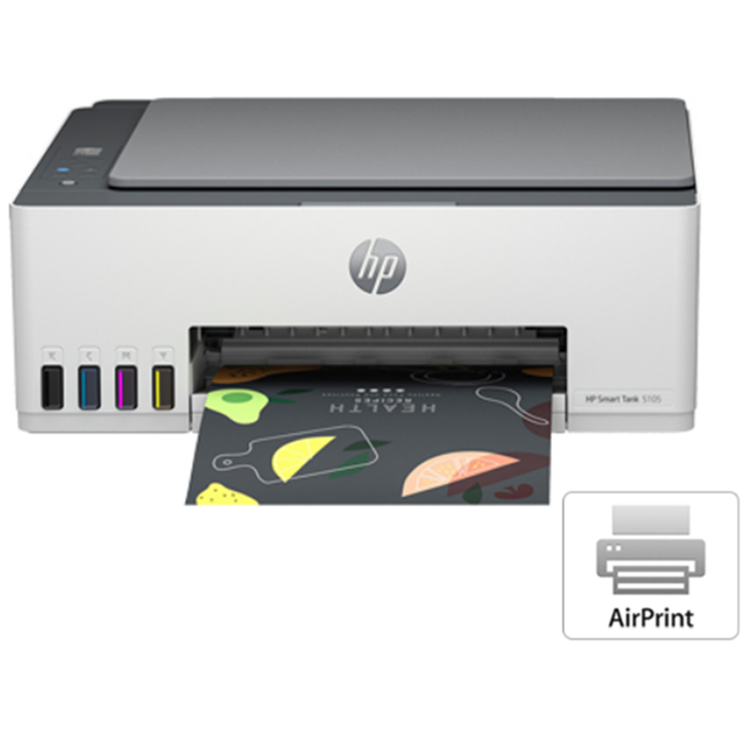
HP Smart Tank 5105 All-in-One Printer Enjoy everyday reliability with the HP Smart Tank 5105 All-in-One Printer that delivers the HP quality you expect and savings that are anything but expected 1 - Functions: Print, copy, scan- Print speed: Print speed up to 12 ppm (black) and 5 ppm (color) 2- Print quality black (best): Up to 1200 x 1200 rendered dpi Smart tank value HP delivers smart tank value Ready when you are Stay connected with a printer that is ready when you are Conveniently intuitive Get a conveniently intuitive tank printer designed for every day Enjoy everyday reliability with the HP quality you expect and savings that are anything but expected 1 - Mobile-guided, seamless setup: Use the guided, step-by-step animations to quickly set up your printer.- Smart buttons: Easily manage tasks with smart buttons that illuminate and guide you through the printing process.- Low-on-ink sensors: Easily monitor and maintain ink levels with integrated ink sensors- Self-healing Wi-Fi®: Get fast and reliable connections using self-healing Wi-Fi®.
- Functions
- Print, copy, scan
- Print speed black (ISO)
- Up to 12 ppm 1
- Print speed black (draft, A4)
- Up to 22 ppm 1
- Print speed black (ISO, A4)
- Up to 12 ppm 1
- Print speed color (ISO)
- Up to 5 ppm 1
- Print speed color (draft, A4)
- Up to 16 ppm 1
- Print Speed Color (ISO)
- Up to 5 ppm 1
- First page out black (letter, ready)
- (For details see: http://www.hp.com/go/printerclaims)
- First page out black (A4, ready)
- As fast as 14 sec (For details see: http://www.hp.com/go/printerclaims)
- First page out color (letter, ready)
- (For details see: http://www.hp.com/go/printerclaims)
- First page out color (A4, ready)
- As fast as 21 sec (For details see: http://www.hp.com/go/printerclaims)
- Duplex printing
- Manual (driver support provided)
- Duty cycle (monthly, letter)
- Up to 3,000 pagesUp to 3,000 pages
- Duty cycle (monthly, A4)
- Up to 3,000 pages
- Recommended monthly page volume
- 400 to 800
- Print quality black (best)
- Up to 1200 x 1200 rendered dpi
- Print quality color (best)
- Up to 4800 x 1200 optimized dpi color (when printing from a computer and 1200 input dpi)
- Print languages
- HP PCL 3 GUI; HP PCLm (HP Apps/UPD); URF (AirPrint)
- Print technology
- HP Thermal Inkjet
- Connectivity, standard
- 1 Bluetooth Low Energy; 1 Hi-Speed USB 2.0 (device); 1 Wi-Fi 802.11b/g/n; 1 Wi-Fi Direct
- Mobile printing capability
- HP Smart app; Apple AirPrint; Mopria Print Service; HP Print Service Plugin (Android printing); Wi-Fi Direct Printing 2
- Network capabilities
- Yes (via WiFi)
- Wireless capability
- Yes, built-in Wi-Fi 2.4G, Wi-Fi Direct, Bluetooth Low Energy
- Wireless technologies
- Bluetooth® 4.2; 802.11b/g/n
- Minimum System Requirements for Macintosh
- Apple® macOS v10.15 Catalina, macOS v11 Big Sur, macOS v12 Monterey; 2 GB HD; Internet required
- Minimum System Requirements
- Microsoft® Windows® 11, 10, 7 SP1: 32-bit or 64-bit, 2 GB available hard disk space, Internet connection, Microsoft® Internet Explorer or Edge.
- Digital sending standard features
- Scan to file (from software); HP Smart Tasks
- Display
- 33 segments + 1.2-inch iCON LCD Display
- Processor speed
- 980 MHz
- Maximum Memory
- 64MB
- Memory
- 64 MB Integrated DDR1 (No)
- Internal Storage
- No
- Compatible Operating Systems
- Windows 11; Windows 10; Windows 7; Android; iOS; macOS 10.15 Catalina; macOS 11 Big Sur; macOS 12 Monterey (Microsoft Windows 11, 10, 7 SP1: 32-bit or 64-bit; macOS v10.15 Catalina, macOS v11 Big Sur, macOS v12 Monterey; Android; iOS;)
- Paper handling input, standard
- 100-sheet input tray
- Paper handling output, standard
- 30-sheet output tray
- Finished output handling
- Sheetfed
- Media types
- Plain paper, Matte Brochure Papers, Glossy Brochure Papers, Photo papers, Envelopes, Other specialty inkjet papers
- Media sizes supported
- A4; B5; A6; DL envelope, legal
- Media sizes, custom
- 88.9 x 127 to 215.9 x 355.6 mm
- Borderless printing
- Yes (up to 8.5 x 11 in, 210 x 297 mm)
- Media weight, recommended
- 75 g/m²
- File Format Supported
- JPG; PDF
- Scanner type
- Flatbed only
- Scan file format
- JPEG; PDF
- Enhanced scanning resolution
- Up to 1200 dpi
- Scan resolution, optical
- Up to 1200 dpi
- Scan size, maximum
- 216 x 297 mm
- Scan technology
- Contact Image Sensor (CIS)
- Copy speed black (ISO)
- Up to 10 cpm 3
- Copy speed color (ISO)
- Up to 2 cpm 3
- Copy resolution (black text)
- Up to 600 dpi
- Copy resolution (color text and graphics)
- Up to 600 dpi
- Copy resolution (black graphics)
- Up to 600 dpi
- Copies, maximum
- Up to 99 copies
- Copy reduce / enlarge settings
- Via HP Smart app
- Copier settings
- Actual size; Binding Margin; Color; Black; ID Copy; Resize; Quality (Draft/Normal/Best); Enhancement; Lighter/Darker; Number of Copies
- Power consumption
- 0.109 watts (manual-Off), 3.023 watts (ready), 1.096 watt (sleep) 4
- Power
- Input voltage 100 to 240 VAC (+/- 10%), 50/60 Hz (+/- 3 Hz). High voltage: Input voltage 200 to 240 VAC (+/- 10%), 50/60 Hz (+/- 3Hz)
- Operating humidity range
- 15 to 80% RH (non-condensing)
- Recommended operating humidity range
- 20 to 80% RH
- Non-Operating Humidity Range
- 5 to 90% RH (non-condensing)
- Operating temperature range
- 5 to 40°C
- Operating temperature range
- 41 to 104°F
- Energy savings feature technology
- HP Auto-Off Technology
- Energy star certified
- No
- Safety
- IEC 62368-1 compliant; EU RED and EN 62368-1 compliant; NEMKO GS approved; CSA NRTL approved; Japan VCCI; Australia and New Zealand RCM.
- Security management
- No
- Minimum dimensions (W x D x H)
- 434.66 x 361.53 x 157.26 mm 5
- Maximum dimensions (W x D x H)
- 434.66 x 580.65 x 259.37 mm 5
- Weight
- 5.03 kg
- Product color
- Light basalt
- What's in the box
- HP Smart Tank 5105 All-in-One Printer; HP GT53XL 135-ml Black Original ink Bottle; HP GT52 50-ml Cyan Original Ink bottles; HP GT52 50-ml Magenta Original Ink bottles; HP GT52 50-ml Yellow Original Ink bottles; HP Black Printhead; HP Tri-color Printhead; Power cord; Ink caution flyer; Setup guide; Reference guide; Regulatory flyers; Warranty flyers
As an international traveller you are entitled to bring a certain amount/value of goods that are free of Customs duty and exempt Goods and Services tax (GST) into New Zealand. This is called your duty free allowance and personal goods concession. It is important to review these for any purchases you make on The Mall.
Your duty free allowance entitles you to bring into New Zealand the following quantities of alcohol products free of customs duty and GST provided you are over 17 years of age. You do need to be 18 years or over to purchase.
- Up to six bottles (4.5 litres) of wine, champagne, port or sherry or
- Up to twelve cans (4.5 litres) of beer
- And three bottles (or other containers) each containing not more than 1125ml of spirits, liqueur, or other spirituous beverages
Goods other than alcohol and tobacco, whether purchased overseas or purchased duty free in New Zealand, that have a combined total value not exceeding NZ$700 may also be brought as part of your personal goods concession.
When travelling overseas there are legal limits on the amount of duty free alcohol and other goods you can take with you. These amounts will vary depending on the country you are flying into. We always recommend you check the latest limits and exemptions.
Your order can be picked up at an Auckland Airport Collection Point. There is one in departures and one at arrivals in the international terminal. Alternatively, if you are arriving between 11pm and 6am you will be able to collect your order from our lockers. See map
Please bring your order confirmation email and your passport. If you are collecting from lockers you will have been sent an email with your access code, be sure to have this on you in order to collect your order.
If you’re departing Auckland Airport, we recommend that you come to the Auckland Airport Collection Point at least 60 minutes before your flight. If you miss your pickup time or your flight details have changed please let us know as soon as possible.
When you collect your order you will have the opportunity to inspect the items and sign for them.
If you need to return an item, our Collection Point team are there to help you. If you are collecting after hours please return the item to your locker and our team will be in touch as soon as possible. You may also like to view our Returns & refunds which provides information on how this works and outlines the individual retailer's returns and refunds policies.
After Hours Collections
If your order needs to be collected after the Auckland Airport Collection Point desk is closed, your order will be placed in the lockers next to the desk. All the details you will need to collect your order will be provided in your Order Confirmation and Ready to Collect Email.