










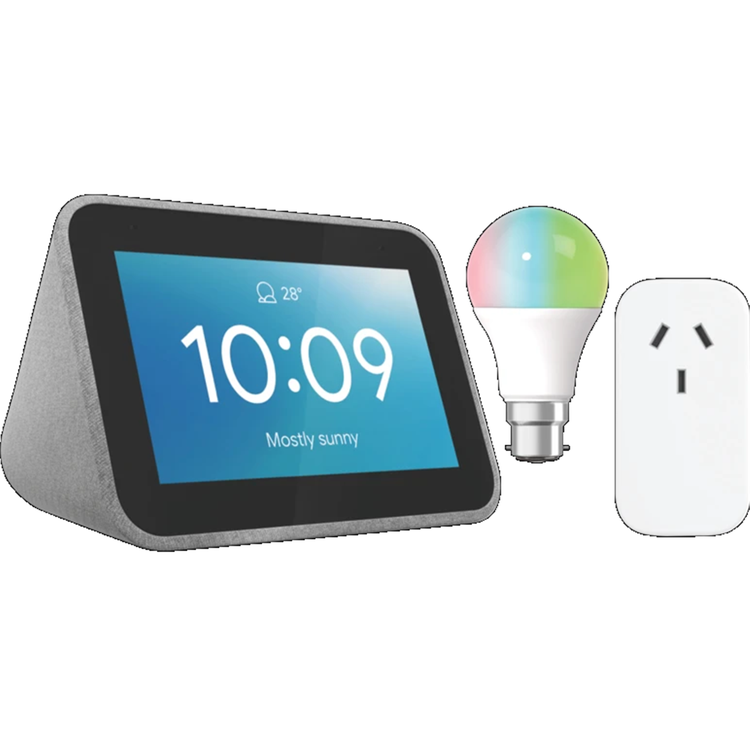
Kickstart your day Wake up with hundreds of sounds and media alarms to choose from. To snooze it, just tap on your Smart Clock. Check the display and see the weather, your calendar, commute info, news and more with the "Good morning" routine. Unwind in the evening Do more with a single command with the
"Good night" routine: turn off the lights, lock the doors, play some relaxing music, and more. You can also see alarm suggestions and set it up via voice or touch. Finally, charge your phone with the dedicated USB port that is conveniently located behind the device. Control your connected home Use your voice to control your smart home devices, and access them in a single dashboard. Turn on the lights, turn on the coffee maker - right when you wake up. Turn off lights, lock the front door, check your security camera before you go to sleep. Supporting 10,000+ products and 1000+ partners/brands. Enjoy your favourite tunes Play your favorite music, audiobooks, radio, podcasts, and more. With multi-room, you can add your Smart Clock to a speaker group and play media across multiple devices and rooms. Your Smart Clock also works with Chromecast, so you can stream your favorite shows, movies or music on your TV or speakers using only your voice. Ambient photo with time When you're not using your Lenovo Smart Clock, the screen can now turn into a digital photo album, displaying pictures from your Google Photos account or featured photos provided by Google. Continued Conversation Continued Conversation lets you have a natural back-and-forth conversation with the Assistant (starting in English). After you initially trigger the Assistant with a request, the Assistant will stay active for long enough to respond to follow up questions so you don't have to say "Hey Google" as often. The Lenovo Smart Clock also works with most cameras that work with the Assistant, so you can always see on the device who is outside your front door when your hands are full.
- Type:
- Smart Clock, Smart Plug, Smart B22 Colour Bulb
- Colour
- mart Clock: Grey, Smart Plug: White
- Wi-Fi
- Smart Clock: 2.4G/5G Dual Band, IEEE 802.11 a/b/g/n/ac, Smart Plug: 802.11 b/g/n, 2.4GHz only, Smart Bulb: 802.11 b/g/n
- Bluetooth
- Smart Clock: 5.0
- Audio
- 1x 1.5" 3W Speaker (Peak power of 6W)
- Display
- 4" 480 x 800
- Compatible Smart Home Systems
- Google Home and Alexa
- Voice Assistant
- Yes
- Weight (g)
- Smart Clock: 328
- Additional Features
- Colour Control: RGB White, Smart Bulb: Brightness: 810 Lumens
- What's In The Box
- Lenovo Smart Clock. Adapter, Quick Start Guide, Warranty Card, USB 2.0 Type-A Cable, Smart Plug, Smart B22 Colour Bulb
As an international traveller you are entitled to bring a certain amount/value of goods that are free of Customs duty and exempt Goods and Services tax (GST) into New Zealand. This is called your duty free allowance and personal goods concession. It is important to review these for any purchases you make on The Mall.
Your duty free allowance entitles you to bring into New Zealand the following quantities of alcohol products free of customs duty and GST provided you are over 17 years of age. You do need to be 18 years or over to purchase.
- Up to six bottles (4.5 litres) of wine, champagne, port or sherry or
- Up to twelve cans (4.5 litres) of beer
- And three bottles (or other containers) each containing not more than 1125ml of spirits, liqueur, or other spirituous beverages
Goods other than alcohol and tobacco, whether purchased overseas or purchased duty free in New Zealand, that have a combined total value not exceeding NZ$700 may also be brought as part of your personal goods concession.
When travelling overseas there are legal limits on the amount of duty free alcohol and other goods you can take with you. These amounts will vary depending on the country you are flying into. We always recommend you check the latest limits and exemptions.
Your order can be picked up at an Auckland Airport Collection Point. There is one in departures and one at arrivals in the international terminal. Alternatively, if you are arriving between 11pm and 6am you will be able to collect your order from our lockers. See map
Please bring your order confirmation email and your passport. If you are collecting from lockers you will have been sent an email with your access code, be sure to have this on you in order to collect your order.
If you’re departing Auckland Airport, we recommend that you come to the Auckland Airport Collection Point at least 60 minutes before your flight. If you miss your pickup time or your flight details have changed please let us know as soon as possible.
When you collect your order you will have the opportunity to inspect the items and sign for them.
If you need to return an item, our Collection Point team are there to help you. If you are collecting after hours please return the item to your locker and our team will be in touch as soon as possible. You may also like to view our Returns & refunds which provides information on how this works and outlines the individual retailer's returns and refunds policies.
After Hours Collections
If your order needs to be collected after the Auckland Airport Collection Point desk is closed, your order will be placed in the lockers next to the desk. All the details you will need to collect your order will be provided in your Order Confirmation and Ready to Collect Email.