










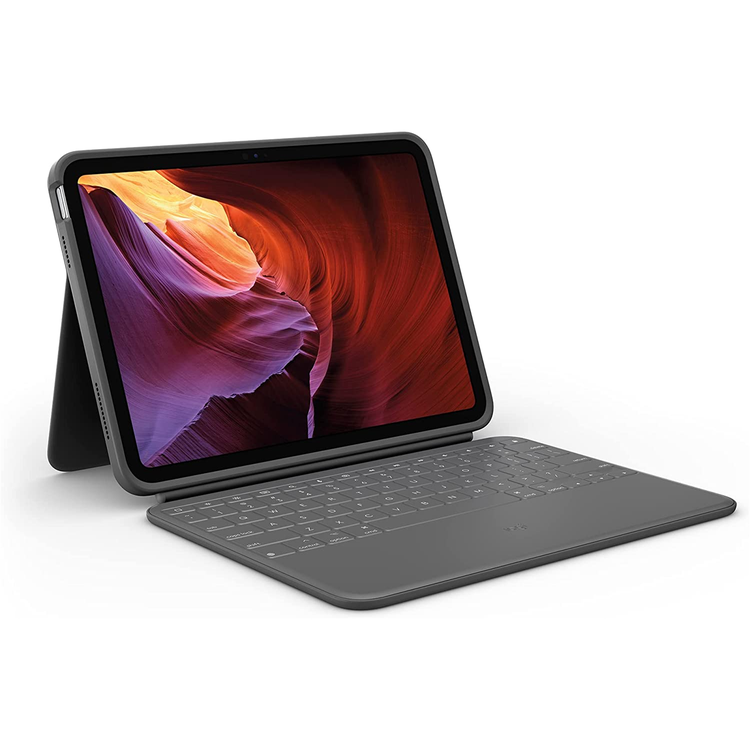
RUGGED FOLIO Ultra-protective keyboard case with Smart Connector for iPad (7th, 8th, 9th and 10th gen, A16) Rugged Folio is Logitech's most protective iPad® keyboard case with drop protection that exceeds military standard tests. Now available for the NEW iPad (10th generation).
DISCOVER WHAT'S POSSIBLE Military-grade drop protection for falls. Sealed keyboard for spills. Explore your world with Rugged Folio for iPad.
HEAVY-DUTY PROTECTION. SLIM DESIGN. Rugged Folio for iPad is a slim keyboard case with drop protection that exceeds military standard tests. Enjoy a full-size keyboard with convenient iPadOS® shortcut keys, secure form-fit protection for your iPad, and a handy spot to stow Logitech Crayon or Apple Pencil. Plus, high performance spill and dirt-resistant sealed keys make this the perfect tool for on-the-go work.
FOUR USE MODES Rugged Folio is flexible enough for any task (and tough enough for any environment). Type Mode: Dock the keyboard upright and pull out the kickstand to type out notes or emails.
Sketch Mode: Fully extend the kickstand back for the perfect angle to take notes or draw with Logitech Crayon.
Viewing Mode: Fold back the keyboard and pull out the kickstand to watch movies and TV shows.
Read Mode: Tuck the kickstand in and fold the keyboard back to read books, articles, and more.
MILITARY-GRADE PROTECTION Our proprietary shock-absorbent technology and materials help Rugged Folio exceed military standard drop tests (safe at 6.6 feet!) for new levels of protection. So whether you fumble it on your morning commute or accidentally knock it off your desk, your iPad is completely protected from drops, bobbles, bumps, and other mishaps.
SEALED SPILL-PROOF KEYBOARD A durable, high performance membrane seals in the keyboard, protecting it from spilled drinks, working-lunch crumbs, and other daily mishaps. When an accident does occur, the keyboard can be safely wiped clean.
ADJUSTABLE KICKSTAND Flexible kickstand offers 40° of tilt so you can always find the right angle for the task at hand. A sturdy mechanical hinge ensures the kickstand stays firmly in place and does not collapse, even with strong tapping.
POWER AND PAIR IN ONE CLICK Rugged Folio instantly pairs with your iPad via Smart Connector. And batteries aren't included, because you'll never need them-power is sourced directly from iPad.
TAKE A SEAT AT THE TABLE AI-powered meeting room camera that helps remote attendees feel like they're actually seated at the table.
SILENT TYPING Typing can get loud - and that can get distracting when you're working in public or back in the office. So we designed the keys to type silently. Your coworkers will thank us.
FULL ROW OF iPadOS SHORTCUT KEYS Forget hunting through on-screen menus. Rugged Folio gets it done with a full row of iPadOS® shortcut keys. Easily access media controls, brightness levels, Dictation, and more. 1 - Home: Go to home screen 2 - Screen brightness: Adjusts brightness up or down 3 - Virtual Keyboard: Shows/hides the virtual keyboard 4 - Search: Brings up iPadOS search field 5 - NEW Dictation: Access voice-to-text features or activate Siri® digital assistant 6 - Screenshot: Take photo of current screen 7 - Media controls: Back, Play/Pause, Forward 8 - Volume controls: Mute, Volume up, Volume down 9 - Screen on/off: Locks iPad screen
HOME FOR YOUR LOGITECH CRAYON A secure magnetic latch holds either Logitech Crayon or Apple Pencil. Now your digital pencil is always within reach so you can easily hand-write notes, sketch drawings, or markup documents directly on iPad.
- Height:
- 20 mm
- Width:
- 195 mm
- Length:
- 256 mm
- Weight:
- 570 g
- Power and Connectivity
- Upon placing iPad in holder, instantly pairs and powers via Smart Connector
- Case
- Space to charge and stow Apple Pencil
- Magnetic latch
- Front and back protection
- Access all ports: Camera / USB-C
- Keyboard
- Full-sized, well-spaced keys
- Full row of iPadOS shortcut keys
- (0.71 in) 18 mm key pitch
- (0.05 in) 1.2 mm key travel
- Modes
- Type, View, Sketch, Read
- Keyboard Type
- Integrated keyboard
- Backlit Keys
- No
- Home:
- Go to home screen
- Screen brightness:
- Adjusts brightness down and up
- Virtual Keyboard:
- Shows/hides the virtual keyboard
- Search:
- Brings up iPadOS search field
- Siri:
- Activate digital assistant
- Screenshot:
- Take photo of current screen
- Media controls:
- Back, Play/Pause, Forward
- Volume controls:
- Mute, Volume Down, Volume Up
- Screen on/off:
- Locks iPad screen
- Adjustable
- 40 degrees of adjustable angles
- Highest angle:
- 60 degrees
- Lowest angle:
- 20 degrees
- Compatible devices
- iPad 10th gen & A16
As an international traveller you are entitled to bring a certain amount/value of goods that are free of Customs duty and exempt Goods and Services tax (GST) into New Zealand. This is called your duty free allowance and personal goods concession. It is important to review these for any purchases you make on The Mall.
Your duty free allowance entitles you to bring into New Zealand the following quantities of alcohol products free of customs duty and GST provided you are over 17 years of age. You do need to be 18 years or over to purchase.
- Up to six bottles (4.5 litres) of wine, champagne, port or sherry or
- Up to twelve cans (4.5 litres) of beer
- And three bottles (or other containers) each containing not more than 1125ml of spirits, liqueur, or other spirituous beverages
Goods other than alcohol and tobacco, whether purchased overseas or purchased duty free in New Zealand, that have a combined total value not exceeding NZ$700 may also be brought as part of your personal goods concession.
When travelling overseas there are legal limits on the amount of duty free alcohol and other goods you can take with you. These amounts will vary depending on the country you are flying into. We always recommend you check the latest limits and exemptions.
Your order can be picked up at an Auckland Airport Collection Point. There is one in departures and one at arrivals in the international terminal. Alternatively, if you are arriving between 11pm and 6am you will be able to collect your order from our lockers. See map
Please bring your order confirmation email and your passport. If you are collecting from lockers you will have been sent an email with your access code, be sure to have this on you in order to collect your order.
If you’re departing Auckland Airport, we recommend that you come to the Auckland Airport Collection Point at least 60 minutes before your flight. If you miss your pickup time or your flight details have changed please let us know as soon as possible.
When you collect your order you will have the opportunity to inspect the items and sign for them.
If you need to return an item, our Collection Point team are there to help you. If you are collecting after hours please return the item to your locker and our team will be in touch as soon as possible. You may also like to view our Returns & refunds which provides information on how this works and outlines the individual retailer's returns and refunds policies.
After Hours Collections
If your order needs to be collected after the Auckland Airport Collection Point desk is closed, your order will be placed in the lockers next to the desk. All the details you will need to collect your order will be provided in your Order Confirmation and Ready to Collect Email.