










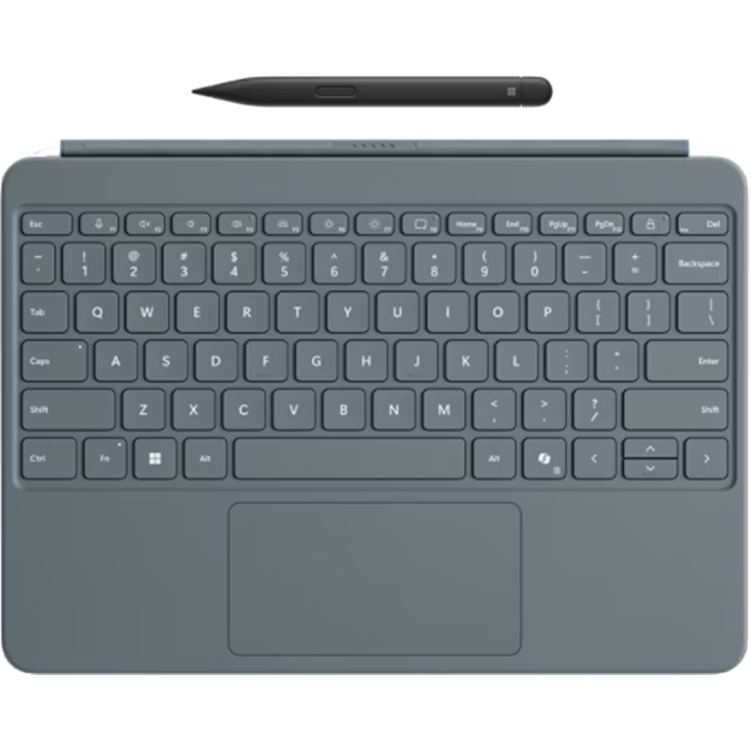
Microsoft Surface Pro 12-inch (1st Edition) - ( Ocean ) Keyboard with Slim Pen
Built for everyday work or play Surface Pro 12-inch Keyboard's smooth-matte palm rest is durable enough for everyday use, offers a sleek look and is easy to wipe clean.
Full-size, backlit keyboard The keyboard's size makes it comfortable for typing, and the built-in backlighting improves key visibility. Precision touchpad Enjoy precise clicking and scrolling with the spacious, responsive touchpad. Switch positions seamlessly Designed to easily snap into place, the dynamic hinge flexes 360 degrees so you can find the right posture that's comfortable for you.
Always handy and charged Surface Slim Pen magnetically attaches directly to the back of the 12-inch Surface Pro for storage and charging.
Feels natural Haptic feedback makes using Surface Slim Pen feel like writing on paper and its design fits comfortably in your hand.
Pinpoint accuracy You'll enjoy superior accuracy, shading and pressure sensitivity thanks to precise inking.
Quick access with a press of a button Instant CopilotOpen Copilot with a single key to help improve productivity and simplify daily tasks.Footnote3 Mute quicklySimply tap the key to quickly unmute or mute your microphone. Snip in a snapEffortlessly grab a screenshot with a key that gives you quick access to the snipping tool. Lock your device fastQuickly secure your 12-inch Surface Pro by locking your device with a single keystroke. Proximity snap Magnetically attach your keyboard without having to lift your 12-inch Surface Pro using proximity snap.
Sleek and sturdy Surface Pro 12-inch Keyboard's wedge design provides stability and allows you to type on your lap, tabletop or anywhere else.
Customise your keyboard Surface Pro 12-inch Keyboard works with Surface Adaptive Kit to make it easier to use, open and navigate your device.
Access Copilot instantly You can access the AI-powered assistant almost instantly, with fewer clicks, thanks to the dedicated Copilot key - a major benefit for those with limited mobility.
Adaptive touch mode The adaptive touch mode empowers those with limited mobility and a wide range of dexterity capabilities to adjust the touchpad. Use the touchpad with different parts of your limbs, such as your palm, foot, edges of the hand and residual limbs.
- Compatibility
- See Keyboard Compatibility Details
- See Pen Compatibility Details
- Size and weight
- Surface Pro 12-inch Keyboard dimensions
- Length: 276 mm (11 inches)
- Width: 192 mm (7.54 inches)
- Height: 6.80 mm (0.27 inches)
- Weight: 340 g (0.27 lbs)
- Surface Slim Pen (2nd Edition) dimensions
- Length: 136.8 mm (5.38 inches)
- Width: 11.3 mm (0.44 inches)
- Height: 6.3 mm (0.25 inches)
- Weight: 13 g (0.03 lbs)
- Accessibility
- Surface Pro 12-inch Keyboard
- - Precision touchpad with adaptive touch mode
- Sustainability
- Thoughtful packaging
- - 73% recycled content in wood-based fibre consumer packaging.
- - Our packaging is paper-based, minimising plastic use.
- - 100% of the virgin paper sourced for our packaging comes from responsibly managed forests.
- Keyboard layout
- Activation: Moving (mechanical) keys
- Layout: QWERTY (English), full row of function keys (F1 - F12)
- Dedicated keys for Copilot , microphone mute, snipping, Windows shortcuts, media controls, screen brightness and lock key
- Precision touchpad
- Backlight
- Interface
- Magnetic attach
- Hinge
- Dynamic hinge made of AlcantaraFootnote® fabric that flexes 360 degrees
- Sensors
- Accelerometer
- Exterior
- Surface Pro 12-inch Keyboard
- - Material: Smooth-matte palm rest, AlcantaraFootnote® back cover
- Surface Slim Pen (2nd Edition)
- - Material: Plastic enclosure
- - Colour: Matte Black
- Buttons
- Surface Slim Pen (2nd Edition)
- - Side button, top button, with eraser functionality
- Haptic feedback
- Surface Slim Pen (2nd Edition) buttons
- Haptic feedback functionality compatible only with Windows 11 on:
- See Compatibility Details
- Pressure and sensitivity
- Surface Slim Pen (2nd Edition)
- - 4,096 pressure levels
- - Zero force inking
- Battery and capacities
- Surface Slim Pen (2nd Edition)
- - Rechargeable Lithium Ion
- - Up to 15 hours of typical usage
- - Battery Capacity Nominal (Wh) 0.171
- - Battery Capacity Min (Wh) 0.164
- What's in the box
- Surface Pro 12-inch Keyboard
- Surface Slim Pen (2nd Edition)
- Quick Start Guide
As an international traveller you are entitled to bring a certain amount/value of goods that are free of Customs duty and exempt Goods and Services tax (GST) into New Zealand. This is called your duty free allowance and personal goods concession. It is important to review these for any purchases you make on The Mall.
Your duty free allowance entitles you to bring into New Zealand the following quantities of alcohol products free of customs duty and GST provided you are over 17 years of age. You do need to be 18 years or over to purchase.
- Up to six bottles (4.5 litres) of wine, champagne, port or sherry or
- Up to twelve cans (4.5 litres) of beer
- And three bottles (or other containers) each containing not more than 1125ml of spirits, liqueur, or other spirituous beverages
Goods other than alcohol and tobacco, whether purchased overseas or purchased duty free in New Zealand, that have a combined total value not exceeding NZ$700 may also be brought as part of your personal goods concession.
When travelling overseas there are legal limits on the amount of duty free alcohol and other goods you can take with you. These amounts will vary depending on the country you are flying into. We always recommend you check the latest limits and exemptions.
Your order can be picked up at an Auckland Airport Collection Point. There is one in departures and one at arrivals in the international terminal. Alternatively, if you are arriving between 11pm and 6am you will be able to collect your order from our lockers. See map
Please bring your order confirmation email and your passport. If you are collecting from lockers you will have been sent an email with your access code, be sure to have this on you in order to collect your order.
If you’re departing Auckland Airport, we recommend that you come to the Auckland Airport Collection Point at least 60 minutes before your flight. If you miss your pickup time or your flight details have changed please let us know as soon as possible.
When you collect your order you will have the opportunity to inspect the items and sign for them.
If you need to return an item, our Collection Point team are there to help you. If you are collecting after hours please return the item to your locker and our team will be in touch as soon as possible. You may also like to view our Returns & refunds which provides information on how this works and outlines the individual retailer's returns and refunds policies.
After Hours Collections
If your order needs to be collected after the Auckland Airport Collection Point desk is closed, your order will be placed in the lockers next to the desk. All the details you will need to collect your order will be provided in your Order Confirmation and Ready to Collect Email.