










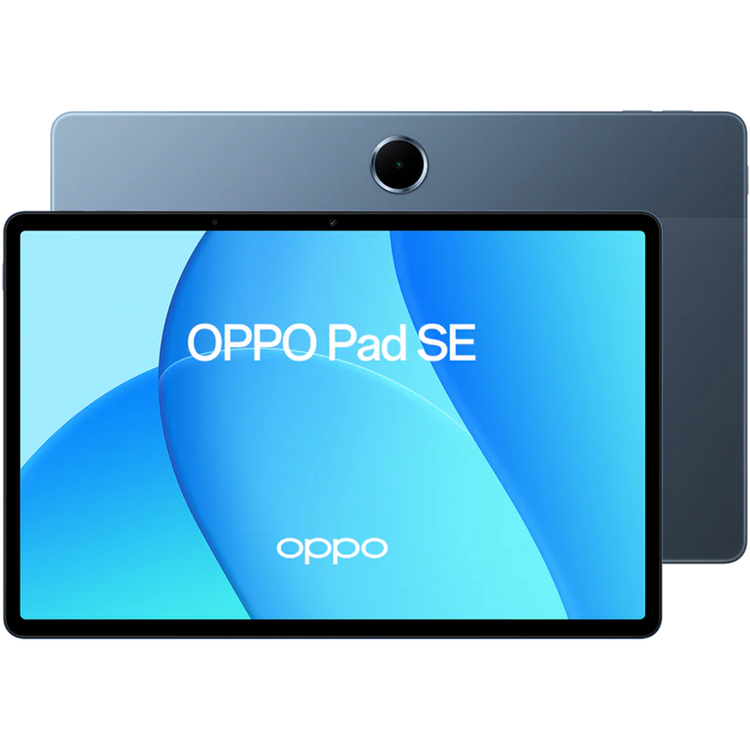
OPPO Pad SE 9340mAh Long-Lasting Battery | lmmersive Eye-Care Display | Personalized Kids Mode
Clear and Vivid Vision with Eye-Care Display Enjoy a comfortable and immersive experience whether you're watching movies or reading. The 11-inch[1] high-resolution display boasts 500nits[2] of brightness and a 90Hz refresh rate[3], delivering a smoother, clearer, and brighter viewing experience. - 11 Inches- 1920 * 1200 Resolution- 500nits Brightness- 90Hz Refresh Rate
Day and Night Scientific Protection OPPO Pad SE is packed with eye-care features. Its low-blue light and flicker free features are TUV Rheinland certified. Bedtime Mode automatically adjusts the brightness based on your environment, protecting your eyes, day and night4. - TUV Rheinland Low Blue Light Certification- TUV Rheinland Flicker Free Certification
Large Quad-Speaker Bigger, Better Sound Enjoy a more immersive experience with our large quad-speaker. Enhanced by Omnibearing Sound Field technology, the speakers intelligently adapt to surround sound stereo for richer, more intense and engaging audio.
Sleek Metal Design with Elegant Colours The sleek, lightweight metal body is built to last and easy to hold for kids and adults alike. Its shimmering design comes in elegant colour: Twilight Blue.
Long-Lasting Battery, Uninterrupted Fun Immersive entertainment is never interrupted with the upgraded 9340mAh high-capacity battery5 to keep you going and 33W fast charging5 to top you up. - 9340mAh Battery- 33W SUPERVOOCTM 800 Days Smart Power Saving, Always ReadyThe Smart Power Saving mode uses intelligent battery management to extend the tablet's standby time up to 800 days[6], so it's always powered up when you need it. - 800 Days Smart Power Saving*- 11 Hours Online video playback[7]- 80 Hours Online music playback[7] * The Smart Power Saving Mode needs to be turned on manually in "Settings".
36-Month Fluency Protection[8] - Smooth All Times Up to three years of smooth experience, making every tap smooth and easy, allowing you to enjoy entertainment at all times.
Personalized Kids Mode Exclusive Safety Shield Personalized Kids Mode is both a fun companion and a safe guardian for children. Customize app permissions, internet access, and screen time to craft a joyful and secure world for kids to explore.
iOS Compatible File Sharing With O+ Connect[9], you can share photos and videos with iOS devices effortlessly. Breaking down the OS barrier.
Tap into Your Phone's Data and GPS When the tablet is near your phone, it will piggyback on your phone's mobile data and GPS. Communication Sharing[10], letting you multitask with ease. * Only for OPPO Pad SE (Wi-Fi)
Seamless Cross-Device Connectivity With a simple connection, you can mirror your phone screen onto the tablet and instantly share photos, videos, and other files across devices. - Drag-and-drop files- Screen Mirroring[10]- Content Sync
Google Gemini: Smart AI Assistant Ask Google Gemini to set your alarms, organize your schedules, look things up, and help set you up for the day.
AI Photo Remaster[11] AI Reflection RemoverRemove glass glare and reveal the world's vibrant clarity.
AI UnblurNow, even the photo of that perfect moment can be perfect. Restore natural details, colours, and textures to blurry photos.
AI Clarity EnhancerLow resolution or cropped photo? No problem. Transform them into ultra-high-definition masterpieces.
AI EraserCircle or tap the area you want to remove, and AI Eraser will seamlessly edit unwanted elements out of your photos.
AI Intelligent Document[11] Document SummaryDocument Summary can accurately extract key information and identify it in the source when you need more detailed information.
AI RewriteWriter's block is a thing of the past! Polish or extend your drafts and tweak the tone for formality depending on the context.
Document TranslateTranslate documents with one tap, then view the source and output side by side so you can double-check the translation quality.
Disclaimer: The screen has rounded corners and a diagonal length of 11 inches (±0.05 inches) when measured as a standard rectangle. The data comes from OPPO Labs. 500nits brightness is the max brightness level achieved during testing. The maximum refresh rate is 90Hz, which only works for certain apps. This product is not a medical device and has no therapeutic effect. Eye protection means that OPPO Pad SE / OPPO Pad Matte Display Edition uses multi-dimensional technology to relieve eye fatigue and reduce eye discomfort. OPPO Pad SE / OPPO Pad Matte Display Edition's battery has an equivalent capacity of about 9340mAh (typical). This model supports 33W SUPERVOOCTM, and the battery has been especially encrypted for safety purposes. Please go to an official OPPO service center to repair your battery or get a genuine replacement battery. Due to country restrictions, some adapters cannot support 33W. Both 33W and 15W charging rates require official OPPO adapters. The data comes from OPPO Labs. When the tablet is fully charged and not used for 7 days, the smart power saving mode can ensure that the tablet will still have power after 800 days. The actual experience may vary due to different usage scenarios, personal usage habits and other factors. The data comes from OPPO Labs. The online video playback data and the online music playback data are tested from the tablet is fully charged. The actual battery life may vary slightly depending on the video resolution and environmental factors, which include network environment, features and applications used, usage habits, device age, software version, and other settings. "36-Month Fluency Protection" means that through the optimization of software, hardware and other comprehensive technologies, OPPO Pad SE has passed the 36-month fluency testing in OPPO laboratory. "Fluency Protection" does not mean that there is absolutely no lag. Due to factors such as ROM, network environment and personal usage, the actual experience may be different. Please refer to the actual experience. Transfer between OPPO devices and iPhone/iPad requires the "O+ Connect" app, with software compatibility for ColorOS version 15.0 or later and iOS/iPadOS version 15.0 or later. Communication Sharing, Content Sync, and Screen Mirroring are only supported by specific devices running ColorOS 13.1 or a later version. The specific supported models are subject to the version released by the actual mobile phone. The upgrade time is subject to the ColorOS upgrade announcement. The mobile phone and tablet must be logged in to the same OPPO account and Bluetooth and WLAN functions must be turned on before use. If the account is inconsistent or no account is logged in, only data sharing can be used. An internet connection may be required to use AI-related features (such as AI Photo Remaster, AI Intelligent Document). An account login may also be required to access certain AI features; these AI features will vary based on the specific regional laws and cloud-based capability of the user's location. AI features displayed on the product pages on this website (including but not limited to UI and background) are for illustrate purposes only to demonstrate the functions; these functions are dependent on the respective software version and may vary according to the time and place (region) of the launch of the respective software versions. Please refer to the functions and pages in the actual version. The product pictures are for reference only. Please refer to the actual product.
- Height
- about 254.91mm
- Width
- about 166.46mm
- Thickness
- about 7.39mm
- Weight
- Standard Screen: about 530g
- Note
- Tablet dimensions and weight may vary slightly depending on the product configuration, manufacturing process, and measurement method.
- RAM and ROM Capacities
- 4GB + 128GB
- RAM Type
- LPDDR4X
- ROM Specifications
- UFS 2.2
- USB OTG
- Supported
- Note
- The available internal storage may be smaller as part of the internal storage is occupied by software. Actual memory space may change due to application updates, user operations, and other related factors.
- Size
- 27.94cm (diagonal)
- Screen Ratio
- 85.3%
- Resolution
- 1920 x 1200
- Refresh Rate
- Max: 90Hz
- Adaptive: 60/90Hz
- Touch Sampling Rate
- Maximum: 180Hz
- Default: 180Hz
- Colour Gamut
- Vivid mode 98%
- Colour Depth
- Billion colour (8 + 2) bits
- Pixel Density
- 207 PPI
- Brightness
- Global Default Maximum Brightness: 500nits (typical value)
- Panel
- LCD
- Rear
- 5MP (f/2.2); FOV 76°; 3P lens; AF supported
- Front
- 5MP (f/2.2); FOV 77°; 3P lens; FF supported
- Shooting Mode
- Rear: Photo, Video, Time-Lapse, Sticker, Panorama
- Front: Photo, Video, Time-Lapse, Sticker, Retouch, Screen Fill Light
- Rear
- Supported: 1080P 30fps, 720P 30fps
- Front
- Supported: Default 1080P 30fps (with Retouch on), 720P 30fps
- CPU
- MediaTek Helio G100
- CPU Speed Cores
- 8 cores
- GPU
- Arm Mali-G57 MC2
- Battery
- 9098mAh/35.12Wh (Rated)
- 9340mAh/36.06Wh (Typical)
- Fast Charge
- SUPERVOOCTM 33W, PPS 33W, QC (9V, 2A), PD (9V, 2A)
- Facial Recognition
- Supported
- Sensors
- Ambient light sensor
- Accelerometer
- WLAN
- Supports Wi-Fi 5 (802.11ac)
- Supports 802.11 a/b/g/n
- Supports Wi-Fi Display
- Supports WLAN network sharing
- Bluetooth® Version
- Bluetooth® 5.4, Low Energy, BLE Audio
- Bluetooth® Audio Codec
- Supports SBC, AAC, aptX, aptX HD, LDAC
- USB Interface
- USB Type-C
- Earphone Jack
- Type-C headphones
- * Supported Type-C digital headphones & Type-C analog headphones
- Operating System
- ColorOS 15.0.1
- Note
- The operating system information is for reference only, subject to the actual product. If updated, no further notice will be given.
- Others
- WLAN positioning supported
- Maps
- Amap, Third-party map apps, and Baidu Map
- Included Items
- Tablet x 1
- USB data cable x 1
- Safety Guide x 1
- Quick Guide x 1
- Note
- May vary in different markets. Subject to the actual product.
As an international traveller you are entitled to bring a certain amount/value of goods that are free of Customs duty and exempt Goods and Services tax (GST) into New Zealand. This is called your duty free allowance and personal goods concession. It is important to review these for any purchases you make on The Mall.
Your duty free allowance entitles you to bring into New Zealand the following quantities of alcohol products free of customs duty and GST provided you are over 17 years of age. You do need to be 18 years or over to purchase.
- Up to six bottles (4.5 litres) of wine, champagne, port or sherry or
- Up to twelve cans (4.5 litres) of beer
- And three bottles (or other containers) each containing not more than 1125ml of spirits, liqueur, or other spirituous beverages
Goods other than alcohol and tobacco, whether purchased overseas or purchased duty free in New Zealand, that have a combined total value not exceeding NZ$700 may also be brought as part of your personal goods concession.
When travelling overseas there are legal limits on the amount of duty free alcohol and other goods you can take with you. These amounts will vary depending on the country you are flying into. We always recommend you check the latest limits and exemptions.
Your order can be picked up at an Auckland Airport Collection Point. There is one in departures and one at arrivals in the international terminal. Alternatively, if you are arriving between 11pm and 6am you will be able to collect your order from our lockers. See map
Please bring your order confirmation email and your passport. If you are collecting from lockers you will have been sent an email with your access code, be sure to have this on you in order to collect your order.
If you’re departing Auckland Airport, we recommend that you come to the Auckland Airport Collection Point at least 60 minutes before your flight. If you miss your pickup time or your flight details have changed please let us know as soon as possible.
When you collect your order you will have the opportunity to inspect the items and sign for them.
If you need to return an item, our Collection Point team are there to help you. If you are collecting after hours please return the item to your locker and our team will be in touch as soon as possible. You may also like to view our Returns & refunds which provides information on how this works and outlines the individual retailer's returns and refunds policies.
After Hours Collections
If your order needs to be collected after the Auckland Airport Collection Point desk is closed, your order will be placed in the lockers next to the desk. All the details you will need to collect your order will be provided in your Order Confirmation and Ready to Collect Email.